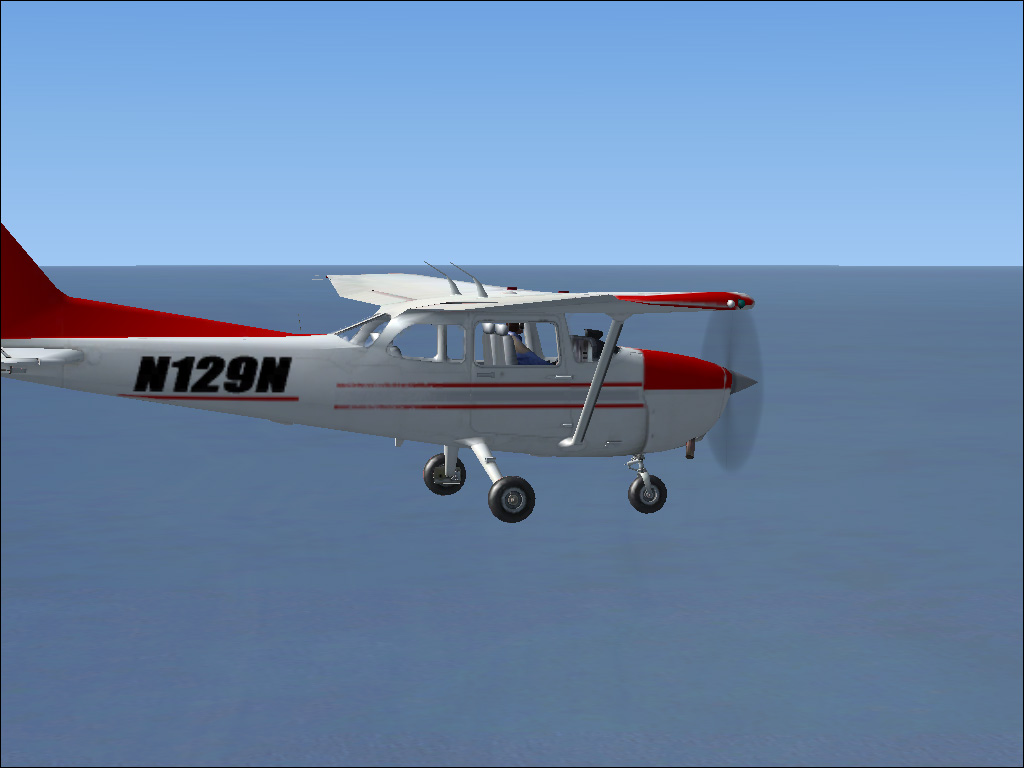
My newest repaint

Flight Simulation Screenshots displaying your Flight Simulation Experience. MSFS, FSX, Prepar3D, XPlane and other Flight Simulators. Focus is your Flight Simulator Experience. Please upload to Simviation (Button at top right)

My newest repaint

Postby Dr.bob7 » Sun Apr 27, 2008 9:27 pm

Image


she is on the current front page of the SimV Props

Dr.bob7
Major
Major
 
Posts: 1364
Joined: Sat Sep 15, 2007 11:03 pm
Location: Castle Rock Colorado

Re: My newest repaint

Postby haroldkip » Mon Apr 28, 2008 9:19 am

Really nice repaint. Very basic, I like it.

But to be brutally honest I don't think that your graphics quality does not do any justice to the advertisement of your work. The repaints are fuzzy and the shots lack anti aliasing. Apart from that I think that you should show the entire aircraft if you want to advertise your repaints ...

Try some of this ... you might find that helpfull ;)
Last edited by haroldkip on Mon Apr 28, 2008 9:20 am, edited 1 time in total.
User avatar
haroldkip
Lieutenant Colonel
Lieutenant Colonel
 
Posts: 5906
Joined: Wed Apr 12, 2006 5:13 am
Location: Amsterdam, The Netherlands

Re: My newest repaint

Postby Dr.bob7 » Mon Apr 28, 2008 4:59 pm

with the graphics well my card is horrible Im in desperate need of a update, with all my repaints well I can balme the fuzziness on myself and the version of PS im using (elements 4.0) im sure i could make it brighter and less blurry but its not exactly the ultimat editor
Dr.bob7
Major
Major
 
Posts: 1364
Joined: Sat Sep 15, 2007 11:03 pm
Location: Castle Rock Colorado

Re: My newest repaint

Postby haroldkip » Mon Apr 28, 2008 5:26 pm

I can balme the fuzziness on myself and the version of PS im using

I don't think the fuzzy repaint is your fault. Well, it is but you can fix that and it has nothing to do with Photoshop.

Did you read the post I suggested?
User avatar
haroldkip
Lieutenant Colonel
Lieutenant Colonel
 
Posts: 5906
Joined: Wed Apr 12, 2006 5:13 am
Location: Amsterdam, The Netherlands

Re: My newest repaint

Postby garryrussell » Mon Apr 28, 2008 8:01 pm

Photoshop Elements 4 is a good editor and is not the reason for the fuzziness

It looks like you are saving with mips selected

In DXT.BMP make sure the mip box is NOT checked.

Garry
garryrussell
Captain
Captain
 
Posts: 706
Joined: Sat Mar 22, 2008 10:58 am

Re: My newest repaint

Postby Dr.bob7 » Mon Apr 28, 2008 10:22 pm

It was checked ill have to experiment with it
Dr.bob7
Major
Major
 
Posts: 1364
Joined: Sat Sep 15, 2007 11:03 pm
Location: Castle Rock Colorado

Re: My newest repaint

Postby garryrussell » Tue Apr 29, 2008 4:50 am

No experimenting needed :-?

The box unchecked is standard setting and if left checked will cause blurries.  

Just resave and you will see a big difference :)

Garry
garryrussell
Captain
Captain
 
Posts: 706
Joined: Sat Mar 22, 2008 10:58 am


Return to Simulation Screenshots Showcase

Who is online

Users browsing this forum: No registered users and 488 guests
