Haha I'm winning!!

Flight Simulation Screenshots displaying your Flight Simulation Experience. MSFS, FSX, Prepar3D, XPlane and other Flight Simulators. Focus is your Flight Simulator Experience. Please upload to Simviation (Button at top right)

Haha I'm winning!!

Postby FS 2004 Captain Liam » Sun Apr 13, 2008 2:05 am

Image
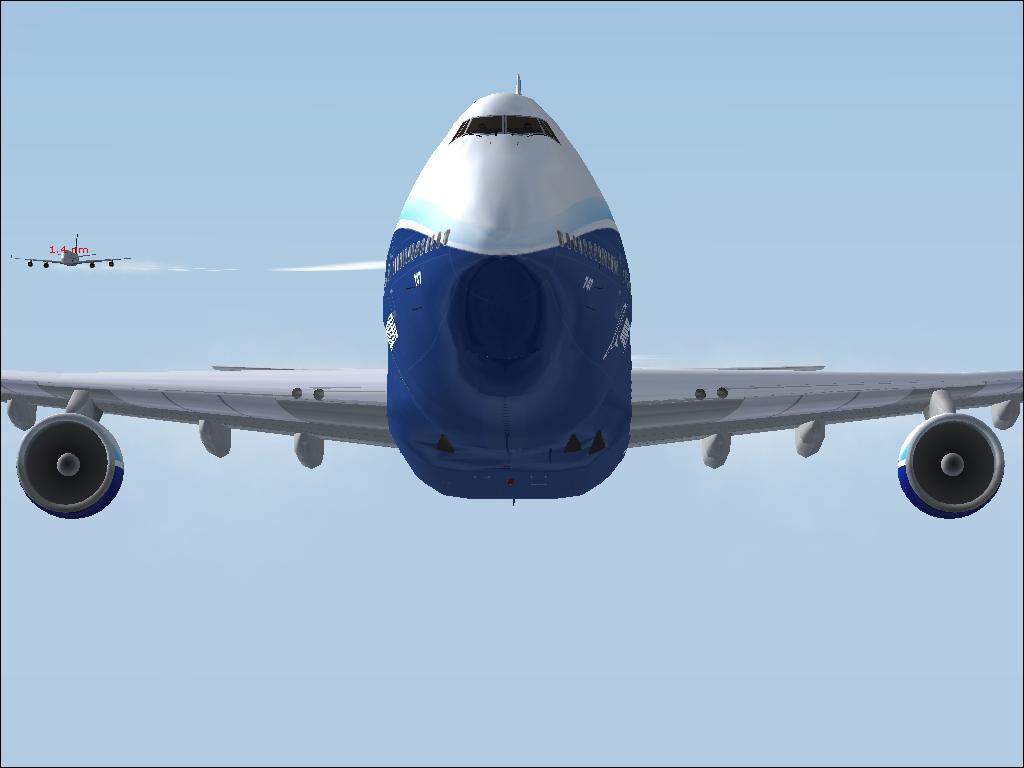
Just happened to shoot this picture of a Air New Zealand jumbo not far behind. And shame, Im winning the race!! ;D 8-) I was doing Mach 0.85
A snail walks into a bar and the barman tells him there's a strict policy about having snails in the bar and so kicks him out. A year later the same snail re-enters the bar and asks the barman "What did you do that for?" :-)
FS 2004 Captain Liam
Ground hog
Ground hog
 
Posts: 36
Joined: Wed Jan 23, 2008 5:41 am
Location: NZ

Re: Haha I'm winning!!

Postby Reno » Sun Apr 13, 2008 12:44 pm

It's a nice shot, good idea, but the thing that kills it for me is the labels.

Nice shot though.
Image
User avatar
Reno
1st Lieutenant
1st Lieutenant
 
Posts: 395
Joined: Thu Nov 30, 2006 3:07 pm
Location: Qualicum Beach, BC, Canada

Re: Haha I'm winning!!

Postby FS 2004 Captain Liam » Mon Apr 14, 2008 12:12 am

It's a nice shot, good idea, but the thing that kills it for me is the labels.

Nice shot though.


Yes it does look horrible. How do you disable them? I am so clueless :-[
A snail walks into a bar and the barman tells him there's a strict policy about having snails in the bar and so kicks him out. A year later the same snail re-enters the bar and asks the barman "What did you do that for?" :-)
FS 2004 Captain Liam
Ground hog
Ground hog
 
Posts: 36
Joined: Wed Jan 23, 2008 5:41 am
Location: NZ

Re: Haha I'm winning!!

Postby todayshorse » Mon Apr 14, 2008 12:27 am

Its pretty easy to disable the labels!

At sim startup, in the 'create a flight, select a flight, lessons, and all that stuff' screen, go to settings and then select 'traffic'

If your already in the sim, press 'alt' then 'settings' and finaly 'traffic'

Either way, a box will pop up with various options, one of which is 'show aircraft labels'

Uncheck the box, and bobs your uncle, fannys your aunt and daves your long lost cousin twice removed :)
Last edited by todayshorse on Mon Apr 14, 2008 12:28 am, edited 1 time in total.
Image
User avatar
todayshorse
Major
Major
 
Posts: 2808
Joined: Fri Mar 28, 2008 5:10 pm
Location: England

Re: Haha I'm winning!!

Postby FS 2004 Captain Liam » Mon Apr 14, 2008 12:30 am

Its pretty easy to disable the labels!

At sim startup, in the 'create a flight, select a flight, lessons, and all that stuff' screen, go to settings and then select 'traffic'

If your already in the sim, press 'alt' then 'settings' and finaly 'traffic'

Either way, a box will pop up with various options, one of which is 'show aircraft labels'

Uncheck the box, and bobs your uncle, fannys your aunt and daves your long lost cousin twice removed :)


OK thanks
A snail walks into a bar and the barman tells him there's a strict policy about having snails in the bar and so kicks him out. A year later the same snail re-enters the bar and asks the barman "What did you do that for?" :-)
FS 2004 Captain Liam
Ground hog
Ground hog
 
Posts: 36
Joined: Wed Jan 23, 2008 5:41 am
Location: NZ

Re: Haha I'm winning!!

Postby Brando14100 » Mon Apr 14, 2008 7:51 am

Like the angle of the shot.
Brando14100


Return to Simulation Screenshots Showcase

Who is online

Users browsing this forum: No registered users and 595 guests