A Monday Quickii

Flight Simulation Screenshots displaying your Flight Simulation Experience. MSFS, FSX, Prepar3D, XPlane and other Flight Simulators. Focus is your Flight Simulator Experience. Please upload to Simviation (Button at top right)

A Monday Quickii

Postby Wii » Mon Mar 17, 2008 12:21 pm

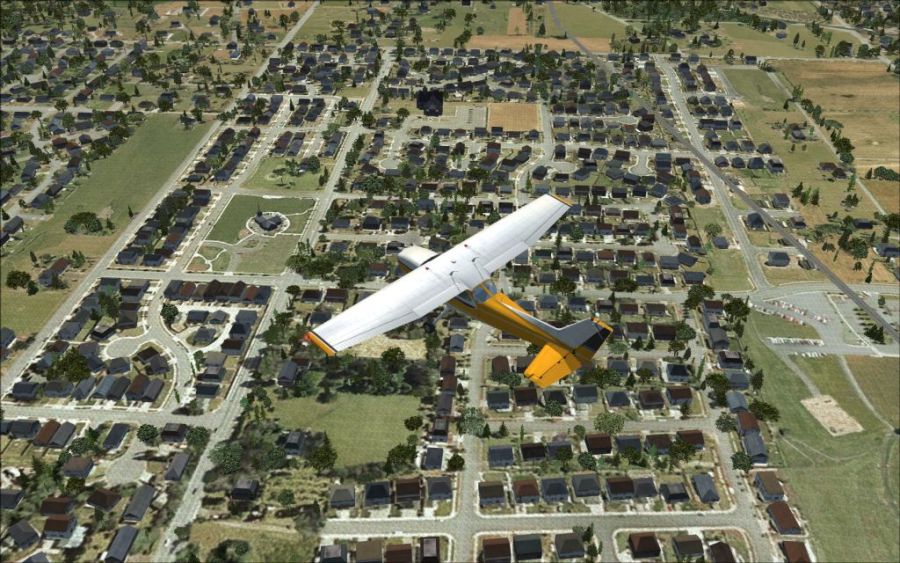
Got my tree per unit and house's per unit set at 6000. FSX Maxed with FPS not going a digit under 10. :)
Image
Though I think I will turn it back down because I like smoothness more than eye candy. :)

User avatar
Wii
Major
Major
 
Posts: 2727
Joined: Wed Jun 13, 2007 2:33 pm
Location: Space

Re: A Monday Quickii

Postby Daube » Mon Mar 17, 2008 12:23 pm

This doesn't look bad at all ;) but it would have been a bit more impressive if you would have shown more scenery, like, with a less up-to-down angle, to show the horizon, I mean :)

User avatar
Daube
Lieutenant Colonel
Lieutenant Colonel
 
Posts: 6611
Joined: Wed Oct 05, 2005 8:34 am
Location: Nice (FR)

Re: A Monday Quickii

Postby Wii » Mon Mar 17, 2008 12:25 pm

This doesn't look bad at all ;) but it would have been a bit more impressive if you would have shown more scenery, like, with a less up-to-down angle, to show the horizon, I mean :)

I'm still working out my "blurries" :-/
User avatar
Wii
Major
Major
 
Posts: 2727
Joined: Wed Jun 13, 2007 2:33 pm
Location: Space

Re: A Monday Quickii

Postby Brando14100 » Mon Mar 17, 2008 3:10 pm

How does one go about turning the trees and houses up and/or down?
Brando14100
 

Re: A Monday Quickii

Postby Wii » Mon Mar 17, 2008 5:00 pm

http://www.simviation.com/cgi-bin/yabb2/YaBB.pl?board=FSX;action=display;num=1160534656

Code: Select all
[TERRAIN]
LOD_RADIUS=x.x00000
MESH_COMPLEXITY=xxx
MESH_RESOLUTION=xx
TEXTURE_RESOLUTION=xx
AUTOGEN_DENSITY=x
DETAIL_TEXTURE=x
WATER_EFFECTS=x
TERRAIN_MAX_AUTOGEN_TREES_PER_CELL=xxxx
TERRAIN_MAX_AUTOGEN_BUILDINGS_PER_CELL=xxxx


Should look like this...insert your favorite number where the x's are. ;D Really... for a low end system - around 1000...gradually go higher. Max that FSX will recognize is 6000. All the other x's and automatically filled in when saving after messing with settings in FSX. :)
Last edited by Wii on Mon Mar 17, 2008 5:02 pm, edited 1 time in total.
User avatar
Wii
Major
Major
 
Posts: 2727
Joined: Wed Jun 13, 2007 2:33 pm
Location: Space

Re: A Monday Quickii

Postby a1 » Mon Mar 17, 2008 6:39 pm

Wow now that's maxed out. Nice looking suburbs there. ;)
Image
790i : QX9650 : 4Gb DDR3 : GeForce 8800 GTX : 1 WD Raptor : 1 WD VelociRaptor 150
User avatar
a1
Lieutenant Colonel
Lieutenant Colonel
 
Posts: 7608
Joined: Thu Jan 04, 2007 9:16 pm

Re: A Monday Quickii

Postby SubZer0 » Mon Mar 17, 2008 9:20 pm

Looks really good. I can't wait till the point where we can cheaply max FSX out!
[center][img]http://www.simviation.com/phpupload/uploads/1369006030.jpg[/img][/center]
User avatar
SubZer0
Major
Major
 
Posts: 3722
Joined: Fri May 04, 2007 9:29 pm
Location: KLNA

Re: A Monday Quickii

Postby pepper_airborne » Tue Mar 18, 2008 6:59 am

Actualy, that is very well possible, prices of all the equipment that, with tweaking will allow FSX to go max is getting lower everyday.
User avatar
pepper_airborne
Major
Major
 
Posts: 2268
Joined: Thu Mar 23, 2006 6:42 am

Re: A Monday Quickii

Postby Wii » Tue Mar 18, 2008 1:01 pm

Actualy, that is very well possible, prices of all the equipment that, with tweaking will allow FSX to go max is getting lower everyday.

Maxing FSX with the following
AMD Athlon x2 4800+ 2.5ghz (my weakest piece of hardware :()
3gbs RAM
320GB HD
eVGA 8800gt 512mb  :-*
Vista HP
22" monitor
User avatar
Wii
Major
Major
 
Posts: 2727
Joined: Wed Jun 13, 2007 2:33 pm
Location: Space


Return to Simulation Screenshots Showcase

Who is online

Users browsing this forum: No registered users and 570 guests