FSX GMAX Bell 430 Package

Flight Simulation Screenshots displaying your Flight Simulation Experience. MSFS, FSX, Prepar3D, XPlane and other Flight Simulators. Focus is your Flight Simulator Experience. Please upload to Simviation (Button at top right)

FSX GMAX Bell 430 Package

Postby theduke » Sat Dec 22, 2007 7:18 am

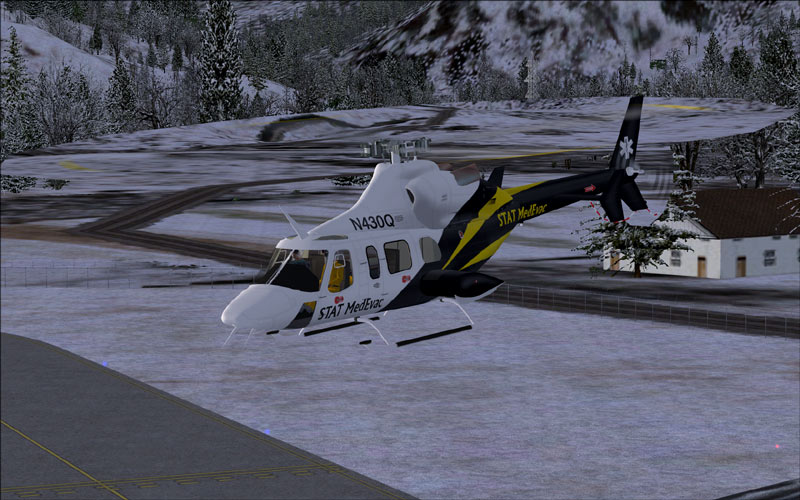
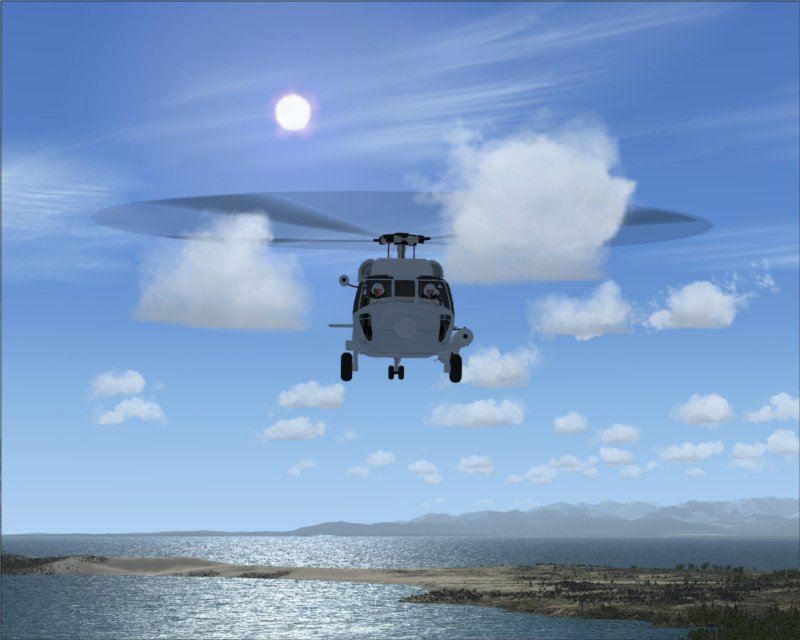
Before you spend time downloading the GMAX Bell 430 package for FSX at http://www.simviation.com/fsxhelicopters1.htm maybe you should take at look at the main rotor and tail rotor textures.

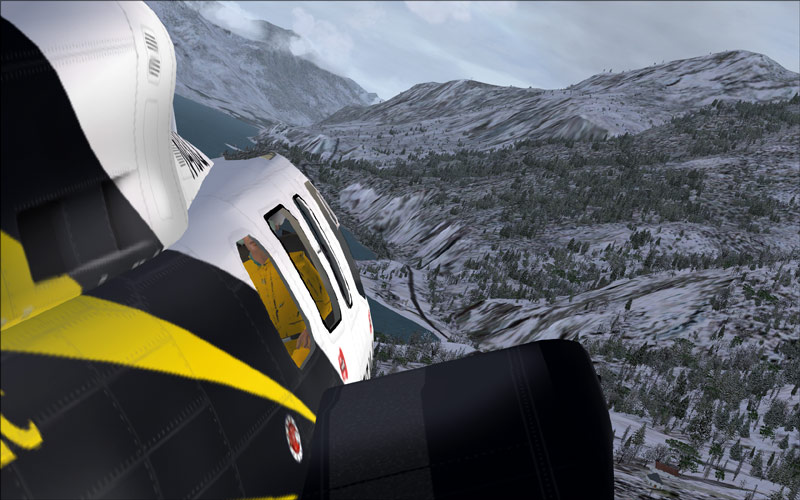
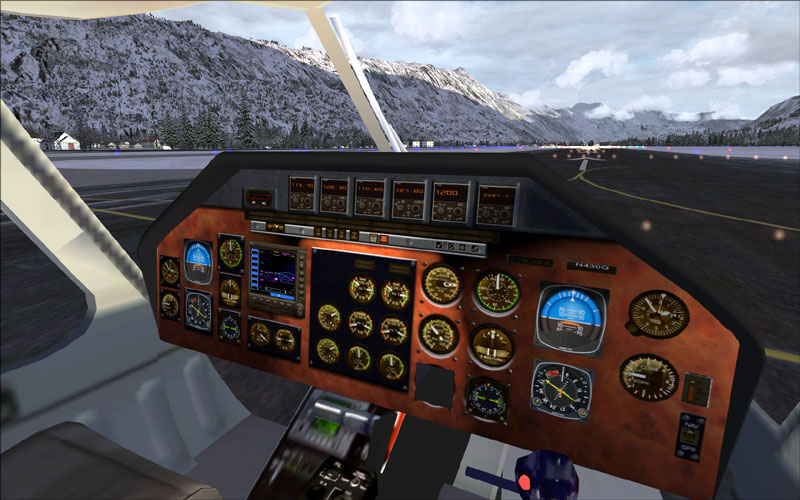
the 2D cockpit looks better than the VC
Image

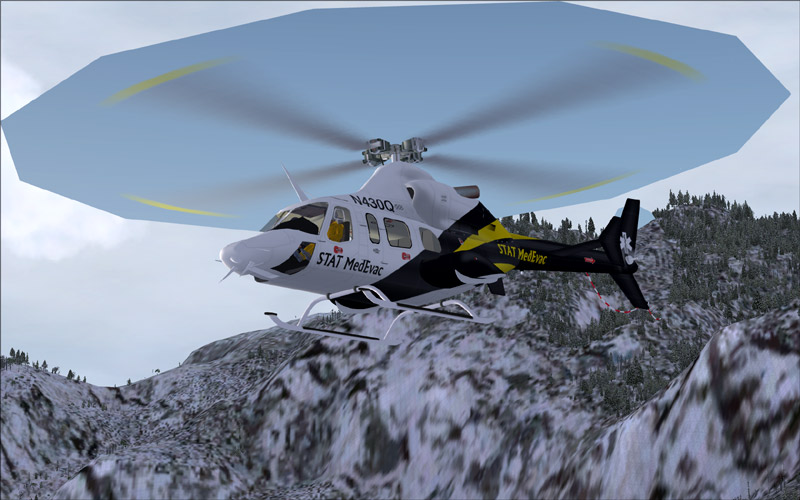
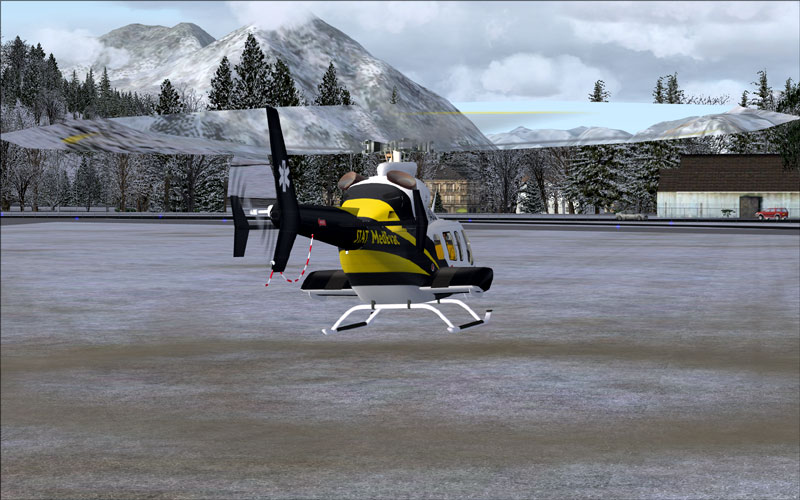
And here are the rotor textures.
Image
Image
Image
Image

The model fly very good in FSX and have some nice views. But the rotor textures in my opinion are horrible unless you like XRay vision.

AMD Athlon 64X2 dual core 6000+ processor,  Nvidia Geforce 8800 Ultra, 3 gig ram.
Image
User avatar
theduke
1st Lieutenant
1st Lieutenant
 
Posts: 348
Joined: Sun Dec 09, 2007 5:32 pm
Location: the world

Re:  FSX GMAX Bell 430 Package

Postby fabiane » Sat Dec 22, 2007 7:50 am

That's because it's basically a FS9 model. A lot of prop textures (Helos, Props,...) are having that problem in FSX. Sadly.... ::)

No. 1 und 4 look very nice though.

Cheers,
Fabian
fabiane
 

Re:

Postby Hagar » Sat Dec 22, 2007 8:32 am

Should be possible to fix those rotor textures with a quick tweak of the Alpha channel in DXTBmp. Display problems with FS9 aircraft will probably depend on which version of FSX you're using. SP1, SP2, Acceleration, Vista, DX10 etc. etc. There's so many variables now.
Last edited by Hagar on Sat Dec 22, 2007 8:35 am, edited 1 time in total.
Image

Founder & Sole Member - Grumpy's Over the Hill Club for Veteran Virtual Aviators
Member of the Fox Four Group
My Google Photos albums
My Flickr albums
User avatar
Hagar
Colonel
Colonel
 
Posts: 30869
Joined: Wed Jun 19, 2002 7:15 am
Location: Costa Geriatrica

Re:  FSX GMAX Bell 430 Package

Postby theduke » Sat Dec 22, 2007 2:32 pm

That's because it's basically a FS9 model. A lot of prop textures (Helos, Props,...) are having that problem in FSX. Sadly.... ::)

No. 1 und 4 look very nice though.

Cheers,
Fabian

Thanks.
My question is, if it is a FS9 model, why is it in the FSX download section? The description said it had been modified for FSX so I assumed that meant the textures etc. I expect problems if I download from the FS9 list and try it in FSX but not if I download from the FSX list. Live and learn I guess.

Should be possible to fix those rotor textures with a quick tweak of the Alpha channel in DXTBmp. Display problems with FS9 aircraft will probably depend on which version of FSX you're using. SP1, SP2, Acceleration, Vista, DX10 etc. etc. There's so many variables now.


I have fixed some of my prop texture problems like that but haven't had any luck with the rotor and tail rotor textures. My system is running XP with sp2 and I have acceleration installed so I guess FSX sp2 is running. Also with a NVidia card
AMD Athlon 64X2 dual core 6000+ processor,  Nvidia Geforce 8800 Ultra, 3 gig ram.
Image
User avatar
theduke
1st Lieutenant
1st Lieutenant
 
Posts: 348
Joined: Sun Dec 09, 2007 5:32 pm
Location: the world

Re:  FSX GMAX Bell 430 Package

Postby theduke » Sat Dec 22, 2007 2:40 pm

Ok here is the deal. I just tried replacing the alpha channel with the one which fixes my prop textures when they are Xray. It had absolutly no effect on the rotor or tail rotor.
AMD Athlon 64X2 dual core 6000+ processor,  Nvidia Geforce 8800 Ultra, 3 gig ram.
Image
User avatar
theduke
1st Lieutenant
1st Lieutenant
 
Posts: 348
Joined: Sun Dec 09, 2007 5:32 pm
Location: the world

Re:  FSX GMAX Bell 430 Package

Postby fabiane » Sun Dec 23, 2007 5:13 am

Should be possible to fix those rotor textures with a quick tweak of the Alpha channel in DXTBmp. Display problems with FS9 aircraft will probably depend on which version of FSX you're using. SP1, SP2, Acceleration, Vista, DX10 etc. etc. There's so many variables now.


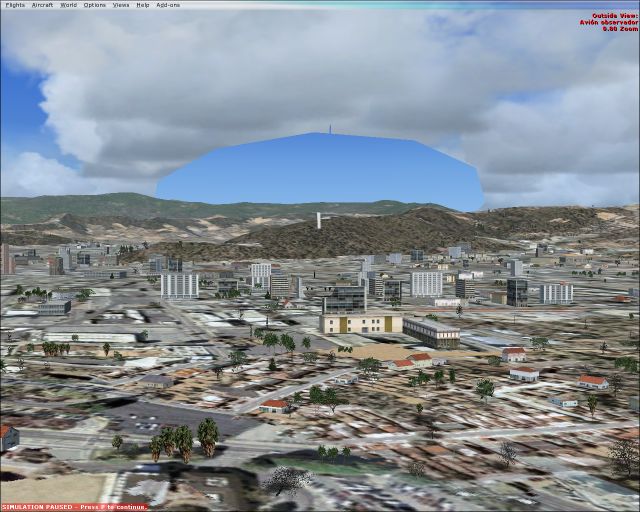
No, this can't be fixed. As you can see the blade textures are behind the trees / cut the trees away.

To get rid of that you'll have to rebuild the whole model. The gauges have been modified for FSX, you can't modify a model. It depend on the export tool the model has been created.

And it doesn't depend on the Alphas....,

Cheers,
Fabian
fabiane
 

Re:

Postby Hagar » Sun Dec 23, 2007 5:21 am

Should be possible to fix those rotor textures with a quick tweak of the Alpha channel in DXTBmp. Display problems with FS9 aircraft will probably depend on which version of FSX you're using. SP1, SP2, Acceleration, Vista, DX10 etc. etc. There's so many variables now.


No, this can't be fixed. As you can see the blade textures are behind the trees / cut the trees away.

To get rid of that you'll have to rebuild the whole model. The gauges have been modified for FSX, you can't modify a model. It depend on the export tool the model has been created.

And it doesn't depend on the Alphas....,

Cheers,
Fabian

I can't argue as I only have the FSX Demo. However, Alex (Alrot) has fixed the same problem with other FS9 aircraft by editing the Alpha channel of the transparent prop/rotor textures. Check this out. http://www.simviation.com/cgi-bin/yabb2/YaBB.pl?num=1197931214;start=all

Alternatively you could replace the rotor textures with some from another aircraft that display properly.
Last edited by Hagar on Sun Dec 23, 2007 5:25 am, edited 1 time in total.
Image

Founder & Sole Member - Grumpy's Over the Hill Club for Veteran Virtual Aviators
Member of the Fox Four Group
My Google Photos albums
My Flickr albums
User avatar
Hagar
Colonel
Colonel
 
Posts: 30869
Joined: Wed Jun 19, 2002 7:15 am
Location: Costa Geriatrica

Re:  FSX GMAX Bell 430 Package

Postby fabiane » Sun Dec 23, 2007 5:28 am

Ok, you never stop learning....,

I mailed the creator of the Nardi (little waterplane) about that issue, because his prop has the same problem. He told me this can't be fixed. I'll try to fix that with another heli. Maybe we should PM Alrot?

Intersting! Thanks for the hint Hagar!

Cheers,
Fabian
Last edited by fabiane on Sun Dec 23, 2007 5:29 am, edited 1 time in total.
fabiane
 

Re:

Postby Hagar » Sun Dec 23, 2007 5:31 am

I think it's worth a try. I would do it if I had FSX as it would only take a few moments to find out. Keep me informed of progress.

I'm sure Alrot will be glad to help.
Last edited by Hagar on Sun Dec 23, 2007 5:32 am, edited 1 time in total.
Image

Founder & Sole Member - Grumpy's Over the Hill Club for Veteran Virtual Aviators
Member of the Fox Four Group
My Google Photos albums
My Flickr albums
User avatar
Hagar
Colonel
Colonel
 
Posts: 30869
Joined: Wed Jun 19, 2002 7:15 am
Location: Costa Geriatrica

Re:  FSX GMAX Bell 430 Package

Postby fabiane » Sun Dec 23, 2007 5:49 am

So I've edited the Alphas to 40,40,40 but that didn't solve it. I PMed Alex... :)

Image
fabiane
 

Re:  FSX GMAX Bell 430 Package

Postby theduke » Sun Dec 23, 2007 5:50 am

Here is the problem I run into when trying to replace the rotor textures with ones from a helo that works okay. The default Helos in FSX have DDS texture files while the imported helos have BMP files. There are many different BMP formats and I have no idea which one to save the DDS file as. I do have DXTBmp to work with the files but have no idea where to start. I tried replacing a bell 407 Rotor textures with one that works from an imported AC and it had no effect. Also, most imported helos with textures that work have more than one main rotor texture file while the ones like the Bell 430 only have one BMP. Which one would I use? I think the chances of that working are probable nill.

I really like the 430 package but it is hard to live with those textures.
AMD Athlon 64X2 dual core 6000+ processor,  Nvidia Geforce 8800 Ultra, 3 gig ram.
Image
User avatar
theduke
1st Lieutenant
1st Lieutenant
 
Posts: 348
Joined: Sun Dec 09, 2007 5:32 pm
Location: the world

Re:

Postby Hagar » Sun Dec 23, 2007 6:02 am

OK. Let's see what he can do. It would be nice to fix this.

Did you try it with that Nardi? I downloaded it to check it out. It's a nice little plane & works fine in the FSX Demo. The problem appears to be with SP2.
Last edited by Hagar on Sun Dec 23, 2007 6:03 am, edited 1 time in total.
Image

Founder & Sole Member - Grumpy's Over the Hill Club for Veteran Virtual Aviators
Member of the Fox Four Group
My Google Photos albums
My Flickr albums
User avatar
Hagar
Colonel
Colonel
 
Posts: 30869
Joined: Wed Jun 19, 2002 7:15 am
Location: Costa Geriatrica

Re:

Postby Hagar » Sun Dec 23, 2007 6:05 am

Here is the problem I run into when trying to replace the rotor textures with ones from a helo that works okay. The default Helos in FSX have DDS texture files while the imported helos have BMP files. There are many different BMP formats and I have no idea which one to save the DDS file as. I do have DXTBmp to work with the files but have no idea where to start. I tried replacing a bell 407 Rotor textures with one that works from an imported AC and it had no effect. Also, most imported helos with textures that work have more than one main rotor texture file while the ones like the Bell 430 only have one BMP. Which one would I use? I think the chances of that working are probable nill.

I really like the 430 package but it is hard to live with those textures.

I don't think default textures will work. You would have to use the rotor textures from a 3rd party helicopter that displays properly in FSX. I don't know if there is such an animal.

PS. I see you've already done that. Let's see what Alrot comes up with.
Last edited by Hagar on Sun Dec 23, 2007 6:08 am, edited 1 time in total.
Image

Founder & Sole Member - Grumpy's Over the Hill Club for Veteran Virtual Aviators
Member of the Fox Four Group
My Google Photos albums
My Flickr albums
User avatar
Hagar
Colonel
Colonel
 
Posts: 30869
Joined: Wed Jun 19, 2002 7:15 am
Location: Costa Geriatrica

Re:

Postby alrot » Sun Dec 23, 2007 7:41 am

Hello Gentelmen ,Im downloading FSX GMAX Bell 430 (the linked one the one are causing the X vision issue) and I'll see if I can fix it
Last edited by alrot on Sun Dec 23, 2007 7:56 am, edited 1 time in total.
Image

Venezuela
User avatar
alrot
Lieutenant Colonel
Lieutenant Colonel
 
Posts: 8961
Joined: Wed Oct 08, 2003 10:47 am

Re:

Postby alrot » Sun Dec 23, 2007 9:17 am

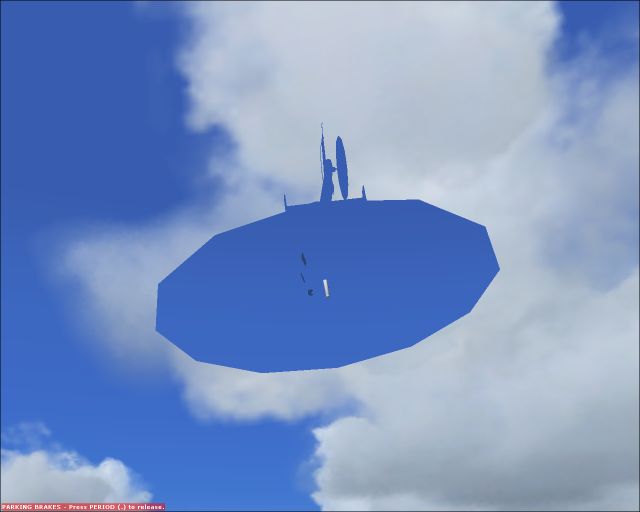
I don't know what kind of gMax the guy use it or how did he export this plane (heli) but something is wrong with the Nature itself of the *.Mdl, I wipe it Out all the textures Naturaly It shout becomes invisible ,But notice how this Mdl doesn't allow buildings tress and cloud shows up, Definaly is a rare issue in the mdl or Model it self maybe was exported with Makemdl (fs2002) and NOT with Makemdl9(fs9)

Image

Image
[smiley=smiley_up.gif]

I said upside down
Youre turning me
Youre giving love instinctively
Around and round youre turning me


;D
Last edited by alrot on Sun Dec 23, 2007 9:22 am, edited 1 time in total.
Image

Venezuela
User avatar
alrot
Lieutenant Colonel
Lieutenant Colonel
 
Posts: 8961
Joined: Wed Oct 08, 2003 10:47 am

Next

Return to Simulation Screenshots Showcase

Who is online

Users browsing this forum: No registered users and 806 guests