
Loomex for Nov

Flight Simulation Screenshots displaying your Flight Simulation Experience. MSFS, FSX, Prepar3D, XPlane and other Flight Simulators. Focus is your Flight Simulator Experience. Please upload to Simviation (Button at top right)

Loomex for Nov

Postby loomex » Wed Nov 14, 2007 10:39 am

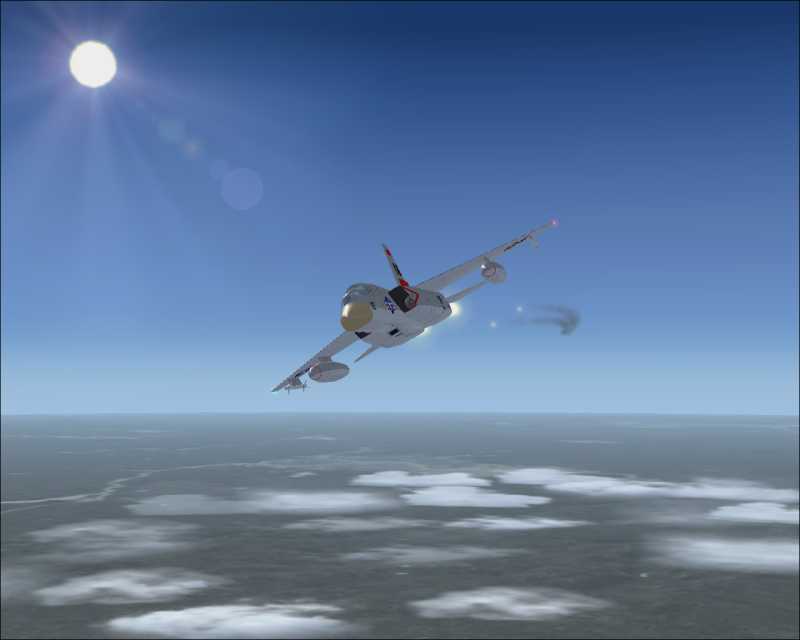
North American A-5/RA-5 "Vigilante".

Image
Windows 7 Home Premium (x64) ,2.70 gigahertz AMD Phenom II X6 1045T(6-core), two HD (1TB and 500GB), 8gb RAM, ATI Radeon HD 5570,
User avatar
loomex
Major
Major
 
Posts: 1525
Joined: Wed Feb 13, 2002 12:36 am
Location: Ithaca, NY

Re: Loomex for Nov

Postby machineman9 » Wed Nov 14, 2007 12:23 pm

victim of some compression or other nastiness- but a pretty great shot forgivving

love the lighting and the trails
Last edited by machineman9 on Wed Nov 14, 2007 12:23 pm, edited 1 time in total.
User avatar
machineman9
Major
Major
 
Posts: 4816
Joined: Fri Sep 17, 2004 9:05 am

Re: Loomex for Nov

Postby loomex » Wed Nov 14, 2007 6:00 pm

victim of some compression or other nastiness- but a pretty great shot forgivving

love the lighting and the trails

That seems to happen to quite a few people. I just wish I knew how to keep it from happening. Of Course it might have something to do with my card, Nvidia Gforce FX5200
Windows 7 Home Premium (x64) ,2.70 gigahertz AMD Phenom II X6 1045T(6-core), two HD (1TB and 500GB), 8gb RAM, ATI Radeon HD 5570,
User avatar
loomex
Major
Major
 
Posts: 1525
Joined: Wed Feb 13, 2002 12:36 am
Location: Ithaca, NY

Re: Loomex for Nov

Postby Dornep » Thu Nov 15, 2007 6:00 am

What program did you use to compress it, and what was the resolution before you resized it?

When I resize/resample a image and save it with compression... I save it as Wadevauwant.jpg, then check the file size to see if it's within forum rules. If it's not, I add another click of compression and save again. If it's well below the forum rules I reduce the compression until it's as close to 100KB as I can get without breaking the rule. Using Irfanview will let you get the maximum quality out of 800x600 and 100KB.

Hope that helps

Nice shot otherwise, I love the Vigilante and the exhaust trails.
My Gaming Rig.
CPU:PII 400MHz RAM:32MB SDRAM GFX:Quantum Raven 16MB PCI CDR:12X CD-Rom OS:Dos
User avatar
Dornep
2nd Lieutenant
2nd Lieutenant
 
Posts: 67
Joined: Tue Sep 21, 2004 11:03 pm
Location: Florida

Re: Loomex for Nov

Postby loomex » Fri Nov 16, 2007 9:10 am

Thanks for the comments guys.
I use Irfanview. I start with 1280x1024 and just reduce/resize to 800x whatever. I am not really sure how to work the compression (old fart here LOL)
Windows 7 Home Premium (x64) ,2.70 gigahertz AMD Phenom II X6 1045T(6-core), two HD (1TB and 500GB), 8gb RAM, ATI Radeon HD 5570,
User avatar
loomex
Major
Major
 
Posts: 1525
Joined: Wed Feb 13, 2002 12:36 am
Location: Ithaca, NY

Re: Loomex for Nov

Postby stuart1044 » Fri Nov 16, 2007 9:33 am

Thanks for the comments guys.
I use Irfanview. I start with 1280x1024 and just reduce/resize to 800x whatever. I am not really sure how to work the compression (old fart here LOL)



When you click on save as on the right hand side there is a bar which can can move up/down to change the quality, try around the 80ish mark ;)
[center][url=http://www.simviation.com/cgi-bin/yabb2/YaBB.pl?board=studiov]
Image[/url]
Intel Core 2 Duo E6750 @ 2.66ghz, 2gb DDR2 800mhz, Nvidia GeForce 6600GT 256mb, Western Digital
User avatar
stuart1044
Major
Major
 
Posts: 1497
Joined: Tue Mar 14, 2006 5:50 am
Location: Manchester, UK

Re: Loomex for Nov

Postby loomex » Fri Nov 16, 2007 10:32 pm

thanks. I'll give it a try :D
Windows 7 Home Premium (x64) ,2.70 gigahertz AMD Phenom II X6 1045T(6-core), two HD (1TB and 500GB), 8gb RAM, ATI Radeon HD 5570,
User avatar
loomex
Major
Major
 
Posts: 1525
Joined: Wed Feb 13, 2002 12:36 am
Location: Ithaca, NY


Return to Simulation Screenshots Showcase

Who is online

Users browsing this forum: No registered users and 327 guests