FSX Demo...

Flight Simulation Screenshots displaying your Flight Simulation Experience. MSFS, FSX, Prepar3D, XPlane and other Flight Simulators. Focus is your Flight Simulator Experience. Please upload to Simviation (Button at top right)

FSX Demo...

Postby Ashar » Mon Nov 12, 2007 3:11 am

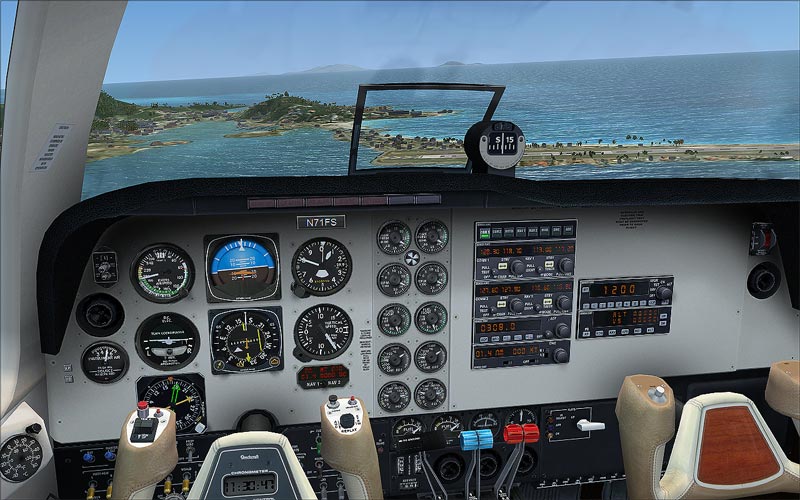
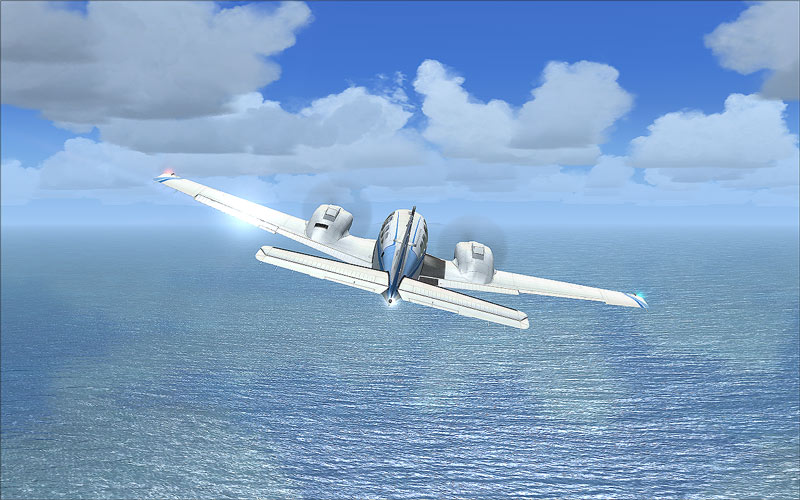
I decided to give the FSX Demo a whirl to see what FSX would look like on my laptop...Was rather decent...With everything on Ultra High, it was running at around 16FPS...Over open water, around 50-60FPS...I'll still be sticking with FS9 in the meantime...Unless the Final Release and the Service Packs fix the FPS issue...I'm really tempted to give the full version a whirl...But it's all the way in Rome... :'( :'(

Image

Image

Image

I love the Light Bloom though...It had no effect for me on FPS whatsoever which struck me as rather odd...The water looks beautiful too...Not too keen on the clouds though...Still have that flat look to them...Oh well... ;)

Have a great week all,
Ashar ;)

PS: Can someone tell me how to work the camera in FSX? I'm trying to use the FS9 combo's but they don't appear to work...The control settings page has tons of combos...I'd just like to know if there is anyway to make the camera pan around the entire aircraft...If you have FS9, give Shift+Enter and Ctrl+Shift+Enter a go and you'll see what I mean...Help appreciated... ;)
Last edited by Ashar on Mon Nov 12, 2007 3:15 am, edited 1 time in total.
Blabbing Away at SimV Since June 8, 2004
Ashar
Major
Major
 
Posts: 4041
Joined: Wed Mar 14, 2007 4:13 am
Location: Ottawa, Ontario

Re: FSX Demo...

Postby firemonte007 » Mon Nov 12, 2007 3:13 am

looking good ;)
Image
User avatar
firemonte007
Major
Major
 
Posts: 2288
Joined: Mon Aug 20, 2007 8:24 pm
Location: northern IL, USA

Re: FSX Demo...

Postby Ashar » Mon Nov 12, 2007 3:16 am

looking good ;)


Wow...Quick reply...LOL...Thanks ;)
Blabbing Away at SimV Since June 8, 2004
Ashar
Major
Major
 
Posts: 4041
Joined: Wed Mar 14, 2007 4:13 am
Location: Ottawa, Ontario

Re: FSX Demo...

Postby Layne. » Mon Nov 12, 2007 4:30 am

Wait till you get full version then you'll have 16 FPS max over open water ;D

The combo's are Ctrl Shift Enter, Ctrl Shift Backspace, Ctrl Backsapec, Shift Enter, Ctrl Enter, Shift Backspace.

You can only use them in the VC Views and the Extra Outside Views like: Tail View, Wing View Etc... :)
Windows 7 Ultimate x64 | 22" LED Monitor (1920x1080) | AMD Phenom II x4 970 Black Edition~3.5Ghz | 4gb RAM | ATI Radeon 6850 1gb | 1Tb HDD

[img]http://www.simviation.com/phpupload/uploads/1302666610.
User avatar
Layne.
Major
Major
 
Posts: 2646
Joined: Sun Jun 10, 2007 9:17 pm
Location: Australia, Victoria, Melbourne

Re: FSX Demo...

Postby evanatorx » Mon Nov 12, 2007 10:52 am

I tried it on my laptop, and it got over 101 degrees CELSIUS!
User avatar
evanatorx
Captain
Captain
 
Posts: 511
Joined: Wed Oct 03, 2007 7:44 pm

Re: FSX Demo...

Postby Rocket_Bird » Mon Nov 12, 2007 11:22 am

Everything on ultra high on a laptop?  You must have a good laptop  :)  Looking good
Cheers,
RB

Image
User avatar
Rocket_Bird
Major
Major
 
Posts: 1222
Joined: Fri Aug 06, 2004 12:00 pm
Location: Canada

Re: FSX Demo...

Postby Vuikag » Mon Nov 12, 2007 1:36 pm

Laptops  :P

FSX runs for me on minumum, with aircraft on maximum. The main reason I put up with it is for the little medal thingies and the fact that alot of fs2004 aircraft work.
But then theres that stupid guy who says 'don't sink'.........
Image
User avatar
Vuikag
Captain
Captain
 
Posts: 602
Joined: Wed Sep 05, 2007 8:37 pm
Location: Boonies ,Oregon

Re: FSX Demo...

Postby Ashar » Mon Nov 12, 2007 4:10 pm

Wait till you get full version then you'll have 16 FPS max over open water ;D

The combo's are Ctrl Shift Enter, Ctrl Shift Backspace, Ctrl Backsapec, Shift Enter, Ctrl Enter, Shift Backspace.

You can only use them in the VC Views and the Extra Outside Views like: Tail View, Wing View Etc... :)


Aha...Thanks!
Blabbing Away at SimV Since June 8, 2004
Ashar
Major
Major
 
Posts: 4041
Joined: Wed Mar 14, 2007 4:13 am
Location: Ottawa, Ontario

Re: FSX Demo...

Postby a1 » Mon Nov 12, 2007 4:14 pm

Well that looks good. ;)
Image
790i : QX9650 : 4Gb DDR3 : GeForce 8800 GTX : 1 WD Raptor : 1 WD VelociRaptor 150
User avatar
a1
Lieutenant Colonel
Lieutenant Colonel
 
Posts: 7608
Joined: Thu Jan 04, 2007 9:16 pm


Return to Simulation Screenshots Showcase

Who is online

Users browsing this forum: No registered users and 334 guests