My first screenshot

Flight Simulation Screenshots displaying your Flight Simulation Experience. MSFS, FSX, Prepar3D, XPlane and other Flight Simulators. Focus is your Flight Simulator Experience. Please upload to Simviation (Button at top right)

My first screenshot

Postby MCAntonio aka AN21 » Sun Nov 11, 2007 4:57 pm

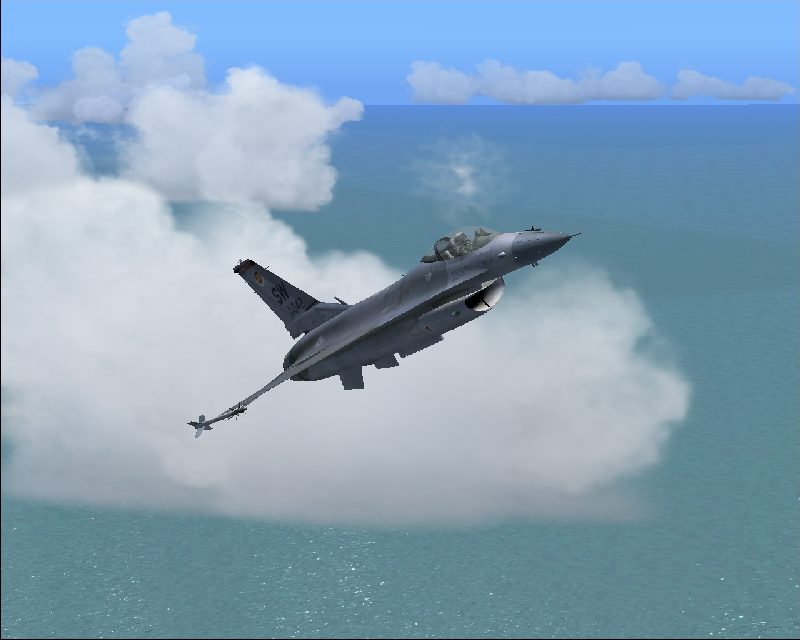
Hope you like it..I know that there aren't any sunsets etc. but I thought it was good
Image

And dont forget:Its my first shot so tell me some tricks how to get them better...

Amidst the blue skies, a link from the past to the future. The sheltering wings of the Protector..

Image
User avatar
MCAntonio aka AN21
2nd Lieutenant
2nd Lieutenant
 
Posts: 252
Joined: Wed Oct 31, 2007 4:01 pm
Location: Athens LGAV

Re: My first screenshot

Postby Souichiro » Sun Nov 11, 2007 5:01 pm

Overcompressed and needs Anti Aliasing

Anti Aliasing removes all the jaggies and turns everything smooth ( not an AA expert so others wioll have to help you there)

Also the file size is less than 50KB while the max is 100 KB a piece... What profram did you use to resize the pic? If not Irfanview... try irfanview


Visit StudioV! for help if you want :D
Image
User avatar
Souichiro
Ground hog
Ground hog
 
Posts: 0
Joined: Tue Aug 28, 2007 11:34 am

Re: My first screenshot

Postby MCAntonio aka AN21 » Sun Nov 11, 2007 5:10 pm

It's overcompressed huh?..And I thought it was tto big because when I saw the properties of the image it was showing 96kb's...I used Irfanview. Thanks :)
Amidst the blue skies, a link from the past to the future. The sheltering wings of the Protector..

Image
User avatar
MCAntonio aka AN21
2nd Lieutenant
2nd Lieutenant
 
Posts: 252
Joined: Wed Oct 31, 2007 4:01 pm
Location: Athens LGAV

Re: My first screenshot

Postby Souichiro » Sun Nov 11, 2007 5:16 pm

96? I have it showing as 43 kb...

The main issue is Anti Aliasing though... but I can't help you with that other than saying that you have to turn it on...

What are your system specs? Maybe someone can help :)
Image
User avatar
Souichiro
Ground hog
Ground hog
 
Posts: 0
Joined: Tue Aug 28, 2007 11:34 am

Re: My first screenshot

Postby firemonte007 » Sun Nov 11, 2007 5:21 pm

that a great shot for your first...like what has been already been said turn on your AA and one trick i use is i pause the sim then turn up all the sliders...you dont need to worry about frame rates while the program is pause. 8-) hope this helps and keep the shots coming 8-)

Jason
Image
User avatar
firemonte007
Major
Major
 
Posts: 2288
Joined: Mon Aug 20, 2007 8:24 pm
Location: northern IL, USA

Re: My first screenshot

Postby a1 » Sun Nov 11, 2007 5:21 pm

Go to your card's control panel and set AA to on. Go to Conrol Panel-Display-Settings Tab- Advanced. You should see stuff about your card and stuff about it from there. ;)
Image
790i : QX9650 : 4Gb DDR3 : GeForce 8800 GTX : 1 WD Raptor : 1 WD VelociRaptor 150
User avatar
a1
Lieutenant Colonel
Lieutenant Colonel
 
Posts: 7608
Joined: Thu Jan 04, 2007 9:16 pm

Re: My first screenshot

Postby MCAntonio aka AN21 » Sun Nov 11, 2007 5:23 pm

It was my fault..You re right its only 43..I didn't refresh it..thats why. Where do I turn anti-aliasing on??(I am such a noob) :-[
Amidst the blue skies, a link from the past to the future. The sheltering wings of the Protector..

Image
User avatar
MCAntonio aka AN21
2nd Lieutenant
2nd Lieutenant
 
Posts: 252
Joined: Wed Oct 31, 2007 4:01 pm
Location: Athens LGAV

Re: My first screenshot

Postby Wii » Sun Nov 11, 2007 5:45 pm

Take the advice of the people above. Also, the horizon looks bad. You should just chop that out of the picture. Or get a diferent view. Other than that I like the plane and water  8-)
User avatar
Wii
Major
Major
 
Posts: 2727
Joined: Wed Jun 13, 2007 2:33 pm
Location: Space

Re: My first screenshot

Postby Ashar » Sun Nov 11, 2007 10:17 pm

It was my fault..You re right its only 43..I didn't refresh it..thats why. Where do I turn anti-aliasing on??(I am such a noob) :-[


Read A1's response... ;) ;)
Blabbing Away at SimV Since June 8, 2004
Ashar
Major
Major
 
Posts: 4041
Joined: Wed Mar 14, 2007 4:13 am
Location: Ottawa, Ontario

Re: My first screenshot

Postby Vuikag » Mon Nov 12, 2007 1:15 am

ha ha, he said noob!
that aside, I'll just pretend that AA was turned on for my part of the critisiscm. To me the clouds further back look odd, but then again everything does from the air, and having the cloud behind the F-16 helps flesh it out a little (that's a good thing).
Image
User avatar
Vuikag
Captain
Captain
 
Posts: 602
Joined: Wed Sep 05, 2007 8:37 pm
Location: Boonies ,Oregon

Re: My first screenshot

Postby MCAntonio aka AN21 » Mon Nov 12, 2007 12:15 pm

Will it work if I turn it on from FS Display menu??(guess not) Because I can't find it from the display properties..
Amidst the blue skies, a link from the past to the future. The sheltering wings of the Protector..

Image
User avatar
MCAntonio aka AN21
2nd Lieutenant
2nd Lieutenant
 
Posts: 252
Joined: Wed Oct 31, 2007 4:01 pm
Location: Athens LGAV


Return to Simulation Screenshots Showcase

Who is online

Users browsing this forum: No registered users and 755 guests