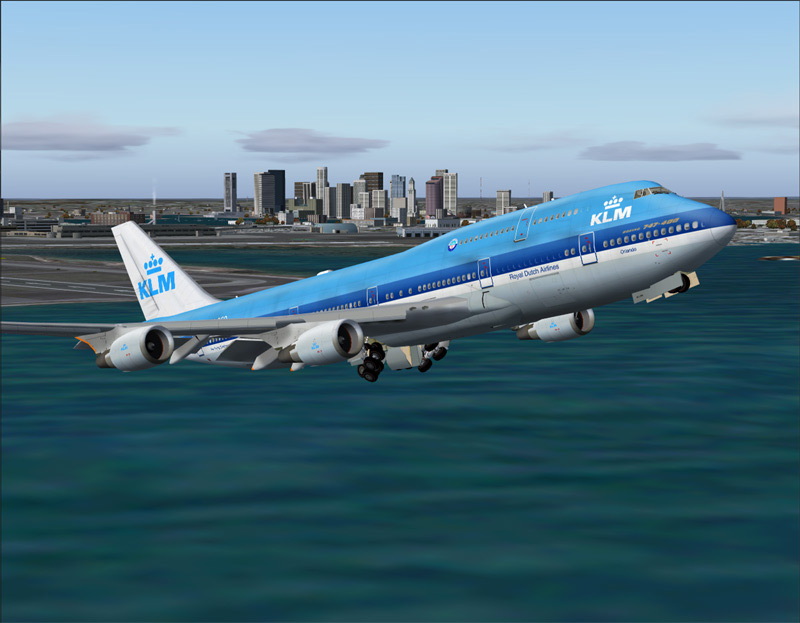
logan klm take off

Flight Simulation Screenshots displaying your Flight Simulation Experience. MSFS, FSX, Prepar3D, XPlane and other Flight Simulators. Focus is your Flight Simulator Experience. Please upload to Simviation (Button at top right)

logan klm take off

Postby Mavrick » Fri Sep 21, 2007 6:33 am

Image

come check out this forum  http://simviator.s10.forumsplace.com/index.php

Image


DIMM e521 AMD Athlon 64x2 Duel Core Processor 4000+
2.1 GHz 256 GB HD and a Nvidia Geforce 6150 le
User avatar
Mavrick
Ground hog
Ground hog
 
Posts: 25
Joined: Sun Sep 16, 2007 7:50 am
Location: Bremen Georgia

Re: logan klm take off

Postby John_MCknight » Fri Sep 21, 2007 6:45 am

Looks awesome!!

You truly have come a long way from your first post

I would still suggest some minor improvements, maybe some water textures would be nice

All in all nice shot
Image
User avatar
John_MCknight
2nd Lieutenant
2nd Lieutenant
 
Posts: 96
Joined: Sun Jun 03, 2007 12:10 pm
Location: Georgia, USA

Re: logan klm take off

Postby Layne. » Fri Sep 21, 2007 6:54 am

This shot is absolutely posotivly your best yet!  8-)

also to fix your water textures click on the settings bar on FSX and click on customize under the air traffic slider. Then click on the scenery tab and where it says water resolustion make the slider at either Medium x2 or High x2 and that will give you some good textures :)

I also would suggest putting up some graphics in the aircraft setting and some weather graphics ;)
Windows 7 Ultimate x64 | 22" LED Monitor (1920x1080) | AMD Phenom II x4 970 Black Edition~3.5Ghz | 4gb RAM | ATI Radeon 6850 1gb | 1Tb HDD

[img]http://www.simviation.com/phpupload/uploads/1302666610.
User avatar
Layne.
Major
Major
 
Posts: 2646
Joined: Sun Jun 10, 2007 9:17 pm
Location: Australia, Victoria, Melbourne

Re: logan klm take off

Postby PD87 » Fri Sep 21, 2007 7:00 am

click on the scenery tab and where it says water resolustion make the slider at either Medium x2 or High x2 and that will give you some good textures :)I also would suggest putting up some graphics in the aircraft setting and some weather graphics ;)


Yeah that^

Nice shot Nathan, keep em coming. btw, Try shooting/posting multiple shots on occasion. ;)
[center]Image
Jack's New Beast - GateWay GT5628 - Vista, Intel Core2 Quad 2.4GHZ, 3GB DDR2, 500GB HD, Nvidia GeForce 8600GTS-OC 256MB DDR3, Dell 22" WS LCD[/cente
User avatar
PD87
Captain
Captain
 
Posts: 618
Joined: Sun Jul 08, 2007 2:32 pm
Location: Riverside

Re: logan klm take off

Postby spitfire boy » Fri Sep 21, 2007 10:27 am

The main problem is the small quantity of cloud, plus, as mentioned before by other members, the water textures...

Other than that great shot!
Image


[center]
User avatar
spitfire boy
Major
Major
 
Posts: 2587
Joined: Mon May 21, 2007 4:46 pm
Location: Wherever you think I'm not

Re: logan klm take off

Postby Ashar » Fri Sep 21, 2007 10:38 am

Getting a 747 out of Logan is hard isn't it? Nice shot... ;) ;)

PS: I have my water effects set to none...Yet it doesn't seem to bother me...I learned a long time ago that the water in FS just looks very unrealistic...In the shots below, my water effects are set to none...Doesn't look bad to me... ::)

Image

Image
Last edited by Ashar on Fri Sep 21, 2007 10:41 am, edited 1 time in total.
Blabbing Away at SimV Since June 8, 2004
Ashar
Major
Major
 
Posts: 4041
Joined: Wed Mar 14, 2007 4:13 am
Location: Ottawa, Ontario

Re: logan klm take off

Postby Sovien » Fri Sep 21, 2007 11:21 am

In the shots below, my water effects are set to none...Doesn't look bad to me... ::)

Doesn't look that much different the my default water effects set to "on"
Last edited by Sovien on Fri Sep 21, 2007 11:21 am, edited 1 time in total.
Image
User avatar
Sovien
1st Lieutenant
1st Lieutenant
 
Posts: 311
Joined: Fri Mar 10, 2006 10:10 am


Return to Simulation Screenshots Showcase

Who is online

Users browsing this forum: No registered users and 188 guests