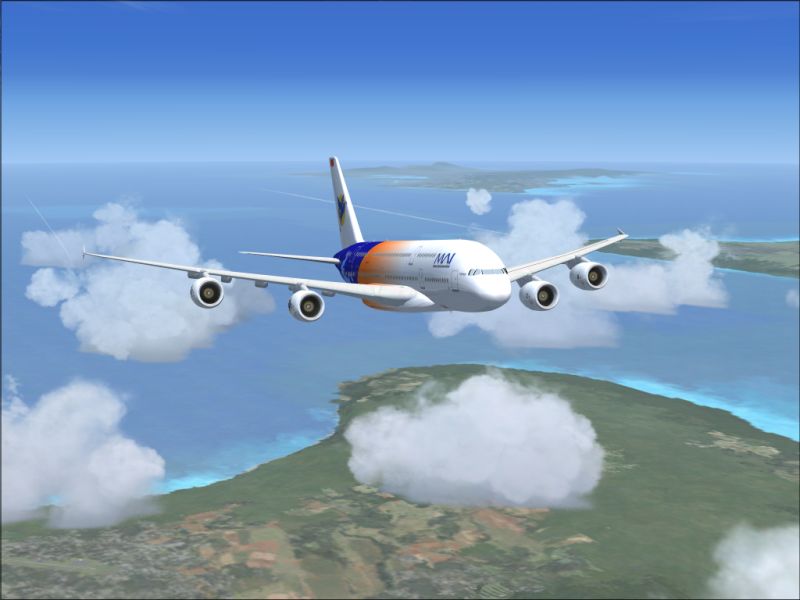

over maui

Flight Simulation Screenshots displaying your Flight Simulation Experience. MSFS, FSX, Prepar3D, XPlane and other Flight Simulators. Focus is your Flight Simulator Experience. Please upload to Simviation (Button at top right)

over maui

Postby firemonte007 » Sat Sep 08, 2007 8:53 pm

airbus 380-800 enjoying a peaceful flight over the islands of hawaii.
;)
Image
Image
User avatar
firemonte007
Major
Major
 
Posts: 2288
Joined: Mon Aug 20, 2007 8:24 pm
Location: northern IL, USA

Re: over maui

Postby PD87 » Sat Sep 08, 2007 9:39 pm

That is a nice shot you have there, Fire. I wouldnt mind seeing it alittle more crisp and clear though. You had over 50kb of available space you could have used. Which version of FS is this?

Read this entirely ;)

http://www.simviation.com/cgi-bin/yabb2 ... 1186723137
Last edited by PD87 on Sat Sep 08, 2007 9:46 pm, edited 1 time in total.
[center]Image
Jack's New Beast - GateWay GT5628 - Vista, Intel Core2 Quad 2.4GHZ, 3GB DDR2, 500GB HD, Nvidia GeForce 8600GTS-OC 256MB DDR3, Dell 22" WS LCD[/cente
User avatar
PD87
Captain
Captain
 
Posts: 618
Joined: Sun Jul 08, 2007 2:32 pm
Location: Riverside

Re: over maui

Postby firemonte007 » Sat Sep 08, 2007 9:58 pm

That is a nice shot you have there, Fire. I wouldnt mind seeing it alittle more crisp and clear though. You had over 50kb of available space you could have used. Which version of FS is this?

Read this entirely ;)

http://www.simviation.com/cgi-bin/yabb2 ... 1186723137


I have FSX on my comp and am new at taking screenshots.  To compress the screenshots i use irfanview.
i read through the link you sent and it seems greek to me lol.  we are suppose to have these shots 800x600 to post right?
Image
User avatar
firemonte007
Major
Major
 
Posts: 2288
Joined: Mon Aug 20, 2007 8:24 pm
Location: northern IL, USA

Re: over maui

Postby PD87 » Sat Sep 08, 2007 11:35 pm

Irfanview is fine, thats what I use.

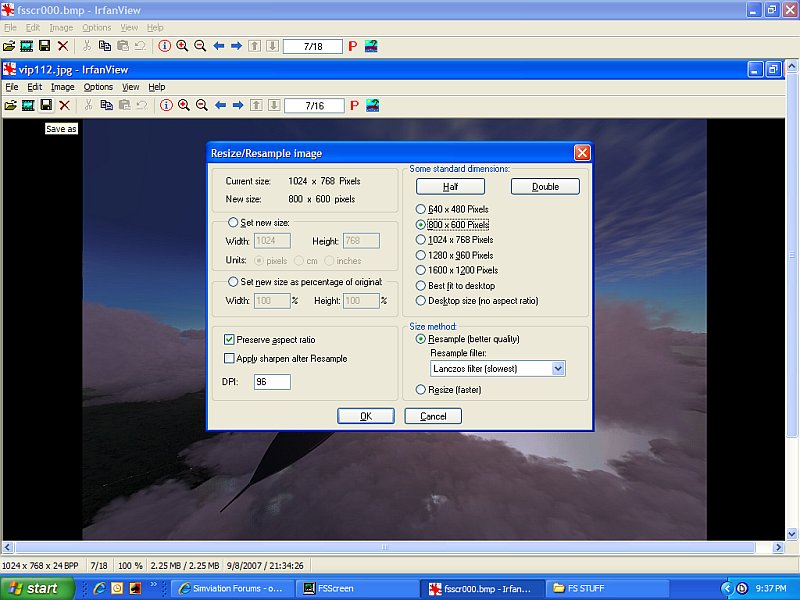
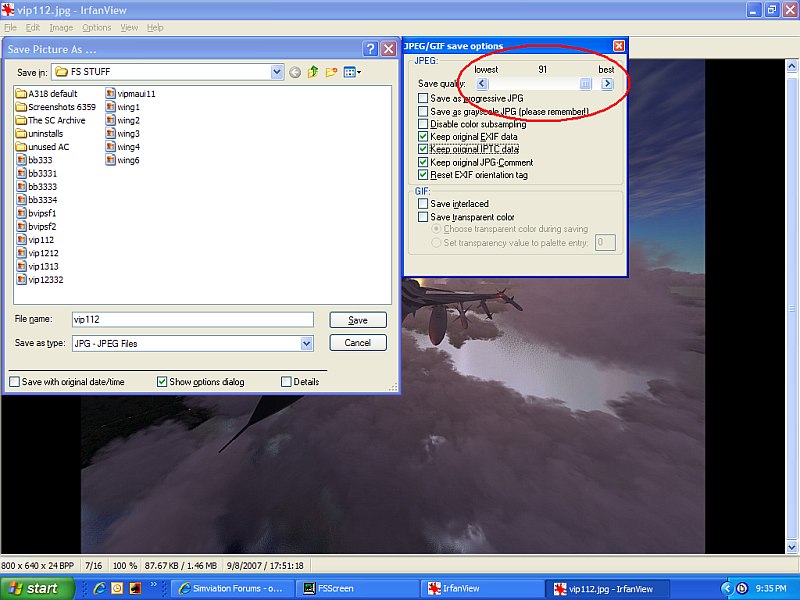
Yes, 800x600 with a max "weight" of 100kb, and you should utilize most or all of it to get the best quality shot you can. Using Irfanview, after youve finished resizing and you go to save the shot, there should be a quality percentage slider to the right. Begin at 100% and save the shot, then find the saved shot and see how big it is (usually at 100%, shots will be anywhere from 150kb's on up to 300kb's). If the shot is over 100kb, delete it and resave using a lower percentage setting until you get it right at, or around 100kb. It can get tedious, but it's worth it. ;)
[center]Image
Jack's New Beast - GateWay GT5628 - Vista, Intel Core2 Quad 2.4GHZ, 3GB DDR2, 500GB HD, Nvidia GeForce 8600GTS-OC 256MB DDR3, Dell 22" WS LCD[/cente
User avatar
PD87
Captain
Captain
 
Posts: 618
Joined: Sun Jul 08, 2007 2:32 pm
Location: Riverside

Re: over maui

Postby PD87 » Sat Sep 08, 2007 11:48 pm

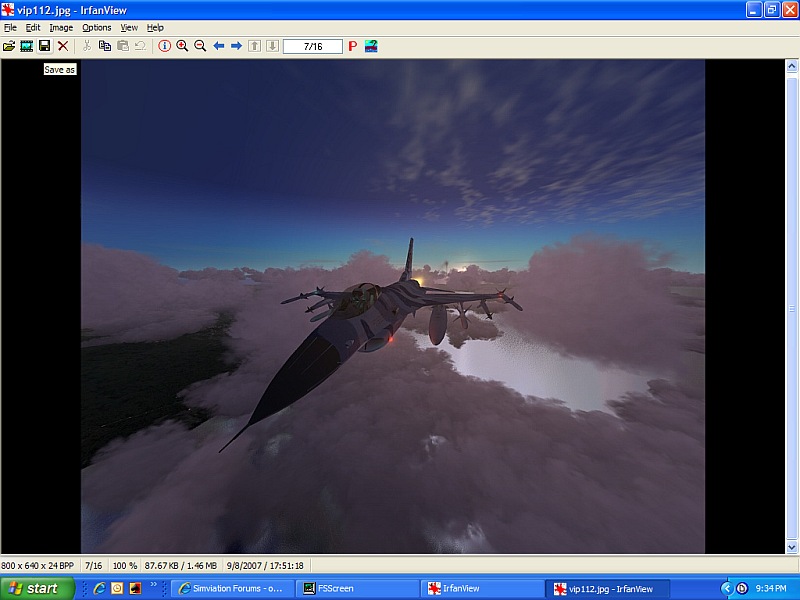
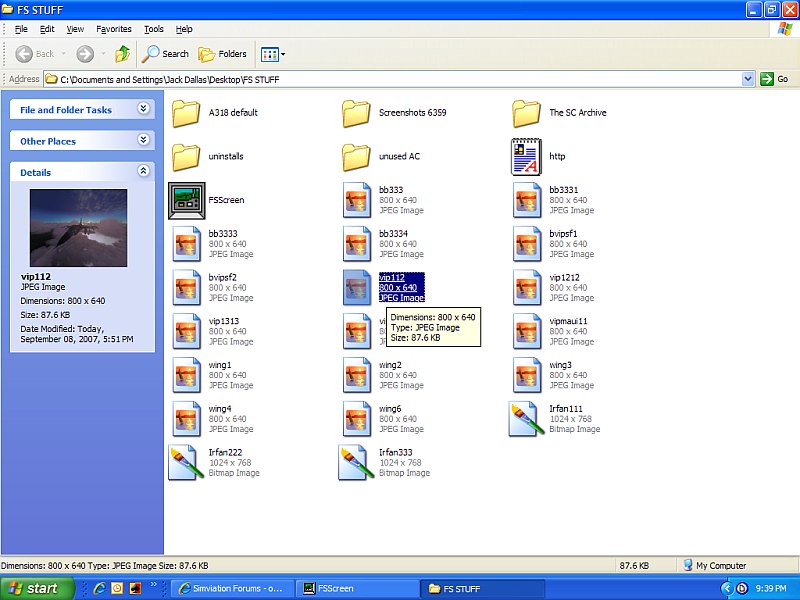
Here... ;)

Settings I use to save a shot
Image

The Resized shot
Image

Saving/selecting quality
Image

check the shot, and if its over 100kb, go back and do #3 over. A Final size of 85-99.9kb should be your target "weight".
Image
[center]Image
Jack's New Beast - GateWay GT5628 - Vista, Intel Core2 Quad 2.4GHZ, 3GB DDR2, 500GB HD, Nvidia GeForce 8600GTS-OC 256MB DDR3, Dell 22" WS LCD[/cente
User avatar
PD87
Captain
Captain
 
Posts: 618
Joined: Sun Jul 08, 2007 2:32 pm
Location: Riverside

Re: over maui

Postby firemonte007 » Sun Sep 09, 2007 2:00 am

thank you for the time you took to show and explain it....i just redid it and it looks a whole lot better...the largest i could get it is 94.5
Image
User avatar
firemonte007
Major
Major
 
Posts: 2288
Joined: Mon Aug 20, 2007 8:24 pm
Location: northern IL, USA

Re: over maui

Postby spitfire boy » Sun Sep 09, 2007 8:21 am

Good advice PD!!

BTW, the rules state 800 wide... the height can be anything you want it to be, within reason... ;)
Image


[center]
User avatar
spitfire boy
Major
Major
 
Posts: 2587
Joined: Mon May 21, 2007 4:46 pm
Location: Wherever you think I'm not

Re: over maui

Postby haroldkip » Sun Sep 09, 2007 2:12 pm

Not a bad shot for a 'beginner' but please listen to PD. He's been around ...

Good advice PD!!

Indeed it is ... we've taught you well my young apprentice ...

Image
Last edited by haroldkip on Sun Sep 09, 2007 2:13 pm, edited 1 time in total.
User avatar
haroldkip
Lieutenant Colonel
Lieutenant Colonel
 
Posts: 5906
Joined: Wed Apr 12, 2006 5:13 am
Location: Amsterdam, The Netherlands

Re: over maui

Postby PD87 » Sun Sep 09, 2007 3:09 pm

Yes! You taught me well, Master. ;D

Image
[center]Image
Jack's New Beast - GateWay GT5628 - Vista, Intel Core2 Quad 2.4GHZ, 3GB DDR2, 500GB HD, Nvidia GeForce 8600GTS-OC 256MB DDR3, Dell 22" WS LCD[/cente
User avatar
PD87
Captain
Captain
 
Posts: 618
Joined: Sun Jul 08, 2007 2:32 pm
Location: Riverside


Return to Simulation Screenshots Showcase

Who is online

Users browsing this forum: No registered users and 200 guests