Reinstalled FSX, new system...

Flight Simulation Screenshots displaying your Flight Simulation Experience. MSFS, FSX, Prepar3D, XPlane and other Flight Simulators. Focus is your Flight Simulator Experience. Please upload to Simviation (Button at top right)

Reinstalled FSX, new system...

Postby fabiane » Thu Aug 09, 2007 2:48 pm

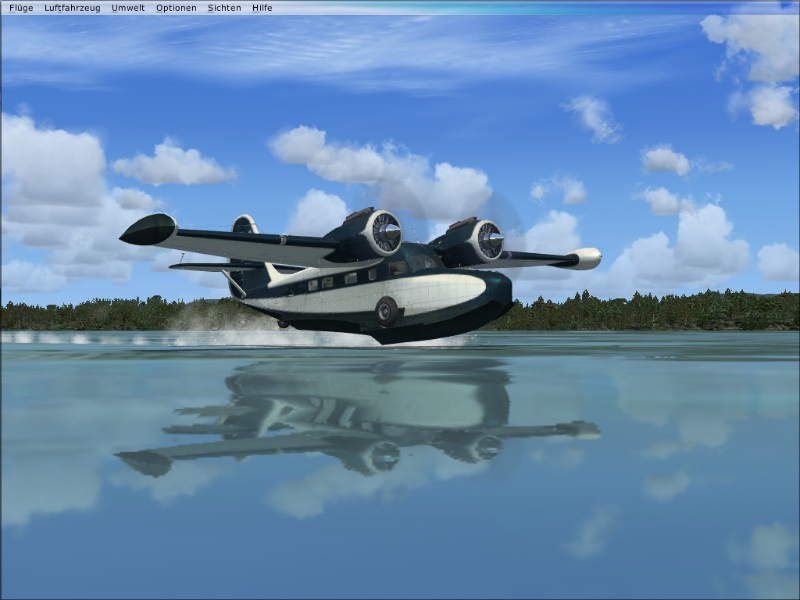
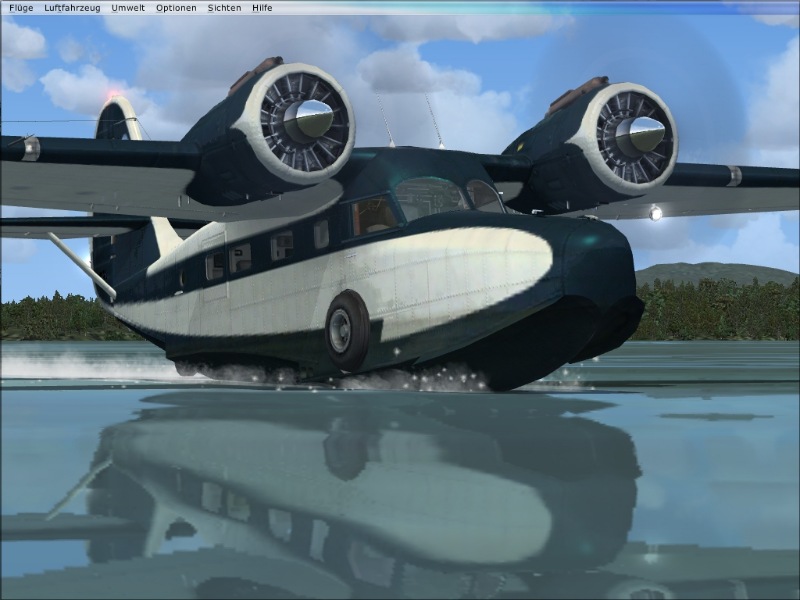
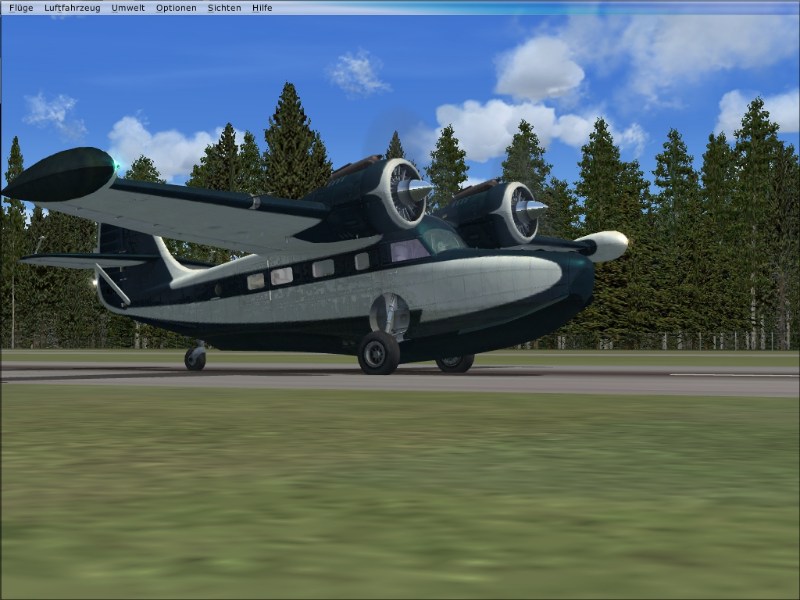
Ok, I've reinstalled my FSX (and FS9 and WinXP and Office and.... ::), took me a whole day to get everything working again.) and must say: Water looks awesome!
I'm now a proud owner of a dual-core system..., so my Geforce4 and Athlon1800 retired.
I still prefer to fly FS9 for my heavies, but for GA FSX rocks!

Any hints how to remove that d#mn bar on top of all images?

Cheers,
Fabian
---
Image

Image

Image
Last edited by fabiane on Thu Aug 09, 2007 2:58 pm, edited 1 time in total.
fabiane
 

Re: Reinstalled FSX, new system...

Postby francsal » Thu Aug 09, 2007 2:53 pm

Really nice, sharp, crystal clear shots there, Fabian! Congratulations!


Regarding the menu bar, keep the "Alt" key pressed for a couple of seconds, and it will be gone.


Cheers!


Frank
Last edited by francsal on Thu Aug 09, 2007 2:54 pm, edited 1 time in total.
****X-Plane 12 / MSFS2020/2024**** Ryzen 5 9600X, RX 9070, 32GB RAM ****
User avatar
francsal
Captain
Captain
 
Posts: 724
Joined: Thu Jan 15, 2004 3:58 pm
Location: Guatemala

Re: Reinstalled FSX, new system...

Postby fabiane » Thu Aug 09, 2007 2:55 pm

That was quick, thanks a lot! Didn't figure it out... ::)

Cheers,
Fabian
fabiane
 

Re: Reinstalled FSX, new system...

Postby BigTruck » Thu Aug 09, 2007 3:31 pm

nice shots, that close up is my favorite, love the detail
Alienware X51_R2 (thank you wife) Windows 8.1, 6GB Ram, Intel Core i3-4150 CPU @3.50GHz
FSX Acceleration settings on max, no twitches or glitches.
Saitek X52 Stick and Throttle
User avatar
BigTruck
Global Moderator
Global Moderator
 
Posts: 7048
Joined: Wed Jun 20, 2007 2:35 pm
Location: Tuscaloosa, AL

Re: Reinstalled FSX, new system...

Postby haroldkip » Thu Aug 09, 2007 6:32 pm

Ahh ... the Albatross' sister. Nice bird she is too 8-)

Cool shots Fab.
User avatar
haroldkip
Lieutenant Colonel
Lieutenant Colonel
 
Posts: 5906
Joined: Wed Apr 12, 2006 5:13 am
Location: Amsterdam, The Netherlands

Re: Reinstalled FSX, new system...

Postby mpicco » Thu Aug 09, 2007 9:59 pm

There's an option somewhere to auto hide the bar, or something like it, i know its in the options, i managed to remove it when i had FSx installed (that didnt last long btw :P)

Nice shots!
mpicco
2nd Lieutenant
2nd Lieutenant
 
Posts: 130
Joined: Thu Jul 05, 2007 2:40 pm

Re: Reinstalled FSX, new system...

Postby Alonso » Thu Aug 09, 2007 11:09 pm

Have fun 8-)
Image
Core i5 2500k @ 3.8 - 8GB DDR3 - GTX 560 OC
User avatar
Alonso
Major
Major
 
Posts: 2828
Joined: Fri Apr 21, 2006 7:13 pm
Location: Lima, Peru

Re: Reinstalled FSX, new system...

Postby machineman9 » Fri Aug 10, 2007 2:22 pm

very, very nice
User avatar
machineman9
Major
Major
 
Posts: 4816
Joined: Fri Sep 17, 2004 9:05 am

Re: Reinstalled FSX, new system...

Postby Stubbedtoe18 » Fri Aug 10, 2007 11:40 pm

Amazing water  ;D
User avatar
Stubbedtoe18
Captain
Captain
 
Posts: 875
Joined: Sun Jun 24, 2007 8:03 pm


Return to Simulation Screenshots Showcase

Who is online

Users browsing this forum: No registered users and 538 guests