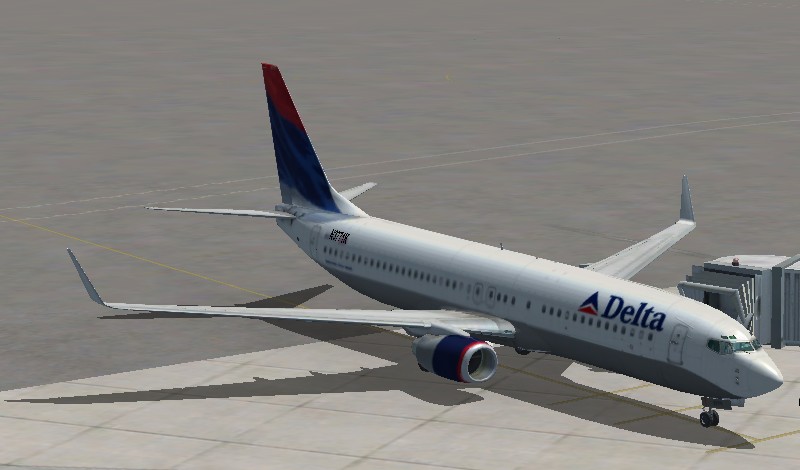
First Screenshots with new build and FS X

Flight Simulation Screenshots displaying your Flight Simulation Experience. MSFS, FSX, Prepar3D, XPlane and other Flight Simulators. Focus is your Flight Simulator Experience. Please upload to Simviation (Button at top right)

First Screenshots with new build and FS X

Postby KP05heavy » Mon Aug 06, 2007 10:52 pm

I just put together a new computer- Intel Core 2 Duo 2.6 Ghz - 2 gig Ram- 8800 GTS 320 MB - Gigabyte S-Series

These are my first screenshots with FS X- Used the built in screenshot function and edited with Microsoft digital image 2006

Any tips or tricks would be appreciated!
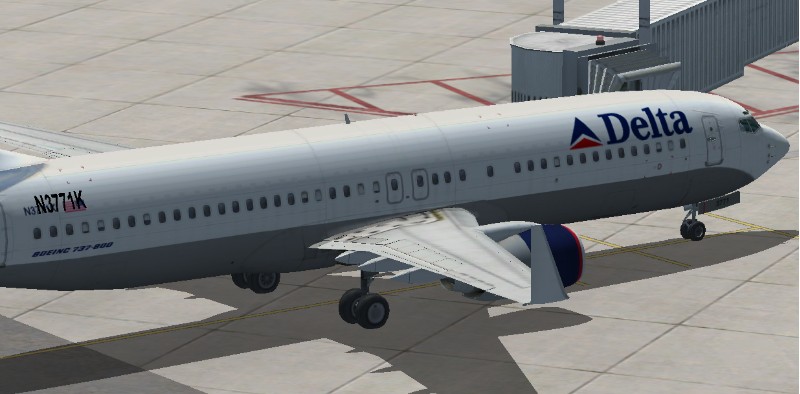
Image
Image
KP05heavy
Ground hog
Ground hog
 
Posts: 6
Joined: Mon Aug 06, 2007 9:28 pm

Re: First Screenshots with new build and FS X

Postby MOUSY » Mon Aug 06, 2007 11:17 pm

Pretty cool shots, but the first thing I noticed were the jaggies... and with an 8 series card, thats quite surprising.... I suggest turning up your resolution and adding some Anti-Aliaising... those shots should be as smooth as a baby's bum... 8-)

Congrats on your new build BTW.
[align=center][img]http://www.simviation.com/phpupload/uploads/1379790172.png[/img]
Current Work in Progress: CaribSky: GrenadaX
[url]www.facebook.com/richersimulations[/url][/align]
User avatar
MOUSY
Major
Major
 
Posts: 2110
Joined: Thu Jan 19, 2006 8:47 pm
Location: Commonwealth of Dominica

Re: First Screenshots with new build and FS X

Postby a1 » Mon Aug 06, 2007 11:55 pm

Cool. How many FPS you get?
Image
790i : QX9650 : 4Gb DDR3 : GeForce 8800 GTX : 1 WD Raptor : 1 WD VelociRaptor 150
User avatar
a1
Lieutenant Colonel
Lieutenant Colonel
 
Posts: 7608
Joined: Thu Jan 04, 2007 9:16 pm

Re: First Screenshots with new build and FS X

Postby haroldkip » Tue Aug 07, 2007 2:58 am

with an 8 series card, thats quite surprising

Too right! He probably didn't setup the card the way it should be set up ;)

Cool. How many FPS you get?

Still obsessed with FPS aren't you? Flight Simulator is not about a lot of FPS ... it is a simulator not a shooter.
Anything about 40 FPS is a waste of resources! Although I know you can be some good results in FSX by setting it to 'unlimited' with a correctly set up cfg file ::)

But why did you choose an 8800 GTS 320 in a ICD 2.6? I would've gone for its bigger brother but I also know that thing is more expensive. It might be premature judgment but I think the bottleneck in your rig is the card although that is a very card.

Having said that I think the shots are nice but your system can boast out far better shots if you put in a little effort.

And if you've edited your shots they should be in the edited forum, not here :-?
Last edited by haroldkip on Tue Aug 07, 2007 3:00 am, edited 1 time in total.
User avatar
haroldkip
Lieutenant Colonel
Lieutenant Colonel
 
Posts: 5906
Joined: Wed Apr 12, 2006 5:13 am
Location: Amsterdam, The Netherlands

Re: First Screenshots with new build and FS X

Postby KP05heavy » Tue Aug 07, 2007 7:49 am

When I said edit - I was only referring to resizing and cropping.
KP05heavy
Ground hog
Ground hog
 
Posts: 6
Joined: Mon Aug 06, 2007 9:28 pm

Re: First Screenshots with new build and FS X

Postby a1 » Tue Aug 07, 2007 1:00 pm

I am not obsessed about FPS much anymore. I am just curious about how FSX is running on different systems. It really interests me to see people run FSX.
Image
790i : QX9650 : 4Gb DDR3 : GeForce 8800 GTX : 1 WD Raptor : 1 WD VelociRaptor 150
User avatar
a1
Lieutenant Colonel
Lieutenant Colonel
 
Posts: 7608
Joined: Thu Jan 04, 2007 9:16 pm

Re: First Screenshots with new build and FS X

Postby haroldkip » Tue Aug 07, 2007 2:36 pm

I am not obsessed about FPS much anymore. I am just curious about how FSX is running on different systems. It really interests me to see people run FSX.

Good! Because there's more to running FSX than just a nice 8800 ;)
User avatar
haroldkip
Lieutenant Colonel
Lieutenant Colonel
 
Posts: 5906
Joined: Wed Apr 12, 2006 5:13 am
Location: Amsterdam, The Netherlands

Re: First Screenshots with new build and FS X

Postby francsal » Tue Aug 07, 2007 2:56 pm

Well, my first "trick" would be to have you ship the computer to my home...
Last edited by francsal on Tue Aug 07, 2007 2:58 pm, edited 1 time in total.
****X-Plane 12 / MSFS2020/2024**** Ryzen 5 9600X, RX 9070, 32GB RAM ****
User avatar
francsal
Captain
Captain
 
Posts: 724
Joined: Thu Jan 15, 2004 3:58 pm
Location: Guatemala

Re: First Screenshots with new build and FS X

Postby haroldkip » Tue Aug 07, 2007 3:16 pm

right, Alrot?

And Harold? ;D
User avatar
haroldkip
Lieutenant Colonel
Lieutenant Colonel
 
Posts: 5906
Joined: Wed Apr 12, 2006 5:13 am
Location: Amsterdam, The Netherlands

Re: First Screenshots with new build and FS X

Postby francsal » Wed Aug 08, 2007 12:14 pm

right, Alrot?

And Harold? ;D


Another irfanview hater? May I be the only one who likes it???
Last edited by francsal on Wed Aug 08, 2007 12:15 pm, edited 1 time in total.
****X-Plane 12 / MSFS2020/2024**** Ryzen 5 9600X, RX 9070, 32GB RAM ****
User avatar
francsal
Captain
Captain
 
Posts: 724
Joined: Thu Jan 15, 2004 3:58 pm
Location: Guatemala

Re: First Screenshots with new build and FS X

Postby mpicco » Wed Aug 08, 2007 8:02 pm

Cool. How many FPS you get?

Still obsessed with FPS aren't you? Flight Simulator is not about a lot of FPS ... it is a simulator not a shooter.
Anything about 40 FPS is a waste of resources!


Aw you wouldnt be saying that if you were trying to land a plane on 10 fps Harold! FPS is very important! besides the smoother it is the more real it feels... *sob* i want more fps!  :'(
mpicco
2nd Lieutenant
2nd Lieutenant
 
Posts: 130
Joined: Thu Jul 05, 2007 2:40 pm

Re: First Screenshots with new build and FS X

Postby haroldkip » Thu Aug 09, 2007 6:03 am

you wouldnt be saying that if you were trying to land a plane on 10 fps Harold! FPS is very important! besides the smoother it is the more real it feels... *sob* i want more fps!

FPS is not very important but indeed, 10 FPS is not a lot. But what I meant is that you'll need very good eyes to see the difference between 30 and 40 FPS ...

Typically, you'd want a nice and crisp looking sim and not a lot of FPS. I would not push FS9 to it's limits, but try and lock it at 20-25 FPS, and have a little reserve for what else the sim wants to do. I see a lot of nice shots in here but a lot also have blurried ground textures, which I don't think is necessary ...

If you're on 'unlimited' the sim will try to get as much FPS as possible. If you lock to a lower value then you will give the sim some breathing room to work on building (for example) ground textures or clouds.

I know my sim can do 40 FPS but I lock it at 30 which is 25% lower than what it can do. I have a very smooth sim when flying in Alaska, but when I get to a busy airport with a lot of traffic and animations (like PANC with Elmendorf just around the corner) my frames also drop to 'hardly acceptable'. I too get dips to 10 FPS but luckily not very often ::)

Look at my system specs in my sig and you'll see that I don't have a very modern, state of the art high performance machine, although it was when I bought it three and a half years ago. Sure, it has a lot of RAM and a fast hard disk drive but it doesn't have a fast dual core processor. And although I have a very nice graphics card in the 7800 series, my rig still has an AGP slot instead of PCIe ...

But I've invested a lot of time and effort (and some money) to tune my system and that pays off 8-)

If you're willing to invest time and effort in boosting your experience too, then read this tread and this one. It worked miracles for me! And if you have a dual core machine this is also very good reading material ;)

But of course, if you want the icing on the cake, go and talk to Michael Greenblatt of Flight Simulator Graphic Solutions. It is such an eyeopener ... and if you'd ask me that
Last edited by haroldkip on Thu Aug 09, 2007 6:20 am, edited 1 time in total.
User avatar
haroldkip
Lieutenant Colonel
Lieutenant Colonel
 
Posts: 5906
Joined: Wed Apr 12, 2006 5:13 am
Location: Amsterdam, The Netherlands

Re: First Screenshots with new build and FS X

Postby machineman9 » Thu Aug 09, 2007 6:22 am

When I said edit - I was only referring to resizing and cropping.

why did you do that?

when you get your image setup right, pause and go to the menus and change the output resolution to 800x600. it wight stretch depending on your resolution, but the image wont come out like that

print screen and paste. the image will come out at 800x600, and look clean. it might get rid of those jaggies as they do look slightly resize gotten
User avatar
machineman9
Major
Major
 
Posts: 4816
Joined: Fri Sep 17, 2004 9:05 am

Re: First Screenshots with new build and FS X

Postby Tweek » Thu Aug 09, 2007 9:42 am

When I said edit - I was only referring to resizing and cropping.

why did you do that?


Because he wanted to? :-?
Tweek
 

Re: First Screenshots with new build and FS X

Postby mpicco » Thu Aug 09, 2007 9:46 pm

Yeah i know, followed those threads, didnt have much gain since ive been around computers a lot and kinda had my sistem tuned anyhow... my specs are even lower than yours and here where i live, because of money devaluation facing dollars, technology is very expensive.

My rig right now runs an Athlon 3000+, 1gb DDR 400, 2 SATA and an IDE drive totaling bout 500GB... As youve seen on my screenshots pretty much everything is default cos im pretty sure if i install environments or ground textures its gonna plow my Fsim installation into Unplayable :S

I do have my FPS limited to 27 since i know the human eye basically doesnt detect anything above that number, but what we all know is that game have spikes, or hiccups, whatever you wanna call them, where the FPS go up or down a certain ammount (maybe due to disk activity, whatever reason) and if you run at 40, maybe you spike down to 25 and its not noticeable, but if you run at 25 and spike to 10, then it is very noticeable and not too enjoyable.

Heck i finished medal of honor on a pentium 2 with a geforce 2 card so i know what it means struggling :P
mpicco
2nd Lieutenant
2nd Lieutenant
 
Posts: 130
Joined: Thu Jul 05, 2007 2:40 pm


Return to Simulation Screenshots Showcase

Who is online

Users browsing this forum: No registered users and 561 guests