Re: Some of mine

Flight Simulation Screenshots displaying your Flight Simulation Experience. MSFS, FSX, Prepar3D, XPlane and other Flight Simulators. Focus is your Flight Simulator Experience. Please upload to Simviation (Button at top right)

Re: Some of mine

Postby Mictheslik » Wed Jul 25, 2007 9:41 am

Theres some promise here, but they have to be 800px wide....no more...

Also, you might want to turn Anti aliasing on on your video card...

.mic

[center]Image
User avatar
Mictheslik
Lieutenant Colonel
Lieutenant Colonel
 
Posts: 5517
Joined: Wed Mar 30, 2005 11:32 am
Location: Bristol, England

Re: Some of mine

Postby EGNX » Wed Jul 25, 2007 9:48 am

Very good. I think with some help from the guys at Studio V they will be able to bring your screenshots up to the next level. My main issue would be the Anti-Aliasing (The jaggy lines rather than smooth ones), but hopefully the guys will be able to sort you out and show you how to turn it on. And for next time you post some shots make sure they are 800px wide (Yours are currently 1024px) so that the mods don't get angry!
Image
User avatar
EGNX
Major
Major
 
Posts: 1431
Joined: Thu Jul 14, 2005 3:49 pm
Location: Leicester, England

Re: Some of mine

Postby Michael E. » Wed Jul 25, 2007 10:33 am

Image
Another one. With Anti aliasing ON.
Michael E.
2nd Lieutenant
2nd Lieutenant
 
Posts: 60
Joined: Sun Jul 22, 2007 3:09 pm
Location: Dublin, Ireland

Re: Some of mine

Postby spitfire boy » Wed Jul 25, 2007 10:37 am

Image
Another one. With Anti aliasing ON.


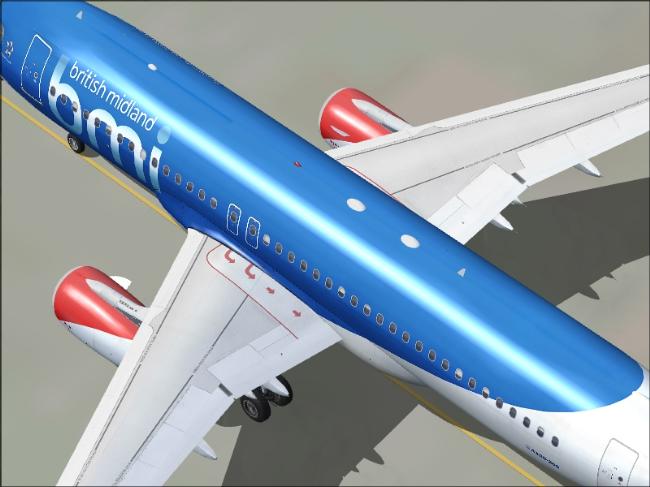
Better... although almost all 'screenshotters' around here agree that cutting bits off the plane when you aren't intending to do a 'close-up' kind of spoils the shot. Maybe you ought to have zoomed out a bit more.

Also, try to make the background more interesting for the viewer... the one you used in this shot looks kinda bland. Sorry.

There are positives - for example that light reflection on the fuselage is very nice.

Keep going!

P.S. Resize your original shots, otherwise a mod is going to get rid of them.
Last edited by spitfire boy on Wed Jul 25, 2007 10:38 am, edited 1 time in total.
Image


[center]
User avatar
spitfire boy
Major
Major
 
Posts: 2587
Joined: Mon May 21, 2007 4:46 pm
Location: Wherever you think I'm not

Re: Some of mine

Postby Michael E. » Wed Jul 25, 2007 10:41 am

Image
Another one. With Anti aliasing ON.


Better... although almost all 'screenshotters' around here agree that cutting bits off the plane when you aren't intending to do a 'close-up' kind of spoils the shot. Maybe you ought to have zoomed out a bit more.

Also, try to make the background more interesting for the viewer... the one you used in this shot looks kinda bland. Sorry.

There are positives - for example that light reflection on the fuselage is very nice.

Keep going!

P.S. Resize your original shots, otherwise a mod is going to get rid of them.


Thanks.
Michael E.
2nd Lieutenant
2nd Lieutenant
 
Posts: 60
Joined: Sun Jul 22, 2007 3:09 pm
Location: Dublin, Ireland

Re: Some of mine

Postby Mictheslik » Wed Jul 25, 2007 11:04 am

Image
Another one. With Anti aliasing ON.


I'm sure you'll agree that is 1000x better :)

As SB said, try not to cut bits of planes off....unless you're going for a nose or tail shot.

Also, try and master compression....your maximum picture properties for this site are 800px wide and 100Kbs....that pic is only about 40Kbs meaning you have 60 more to play with to make it better quality :)

Experiment with the saving quality on irfanview to change this ;)

.mic
[center]Image
User avatar
Mictheslik
Lieutenant Colonel
Lieutenant Colonel
 
Posts: 5517
Joined: Wed Mar 30, 2005 11:32 am
Location: Bristol, England

Re: Some of mine

Postby Michael E. » Wed Jul 25, 2007 11:11 am

Image
Another one. With Anti aliasing ON.


I'm sure you'll agree that is 1000x better :)

As SB said, try not to cut bits of planes off....unless you're going for a nose or tail shot.

Also, try and master compression....your maximum picture properties for this site are 800px wide and 100Kbs....that pic is only about 40Kbs meaning you have 60 more to play with to make it better quality :)

Experiment with the saving quality on irfanview to change this ;)

.mic


Thanks. The concept was that I could get the reflection and the titles. Although I realised that it looked extremely bland. It is Project Airbus a320 bmi at Dublin by the way. Im working on some 736 shots now which will be up in a few.
Michael E.
2nd Lieutenant
2nd Lieutenant
 
Posts: 60
Joined: Sun Jul 22, 2007 3:09 pm
Location: Dublin, Ireland


Return to Simulation Screenshots Showcase

Who is online

Users browsing this forum: No registered users and 240 guests