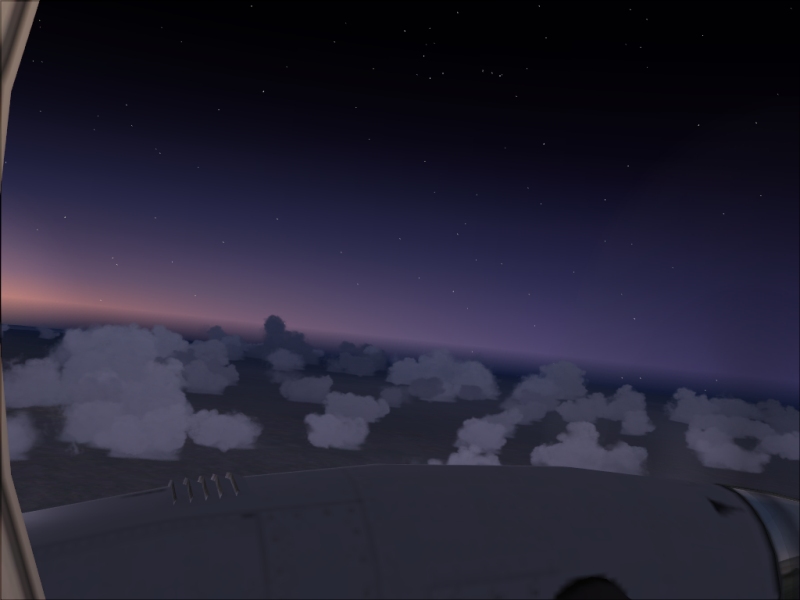

Daybreak

Flight Simulation Screenshots displaying your Flight Simulation Experience. MSFS, FSX, Prepar3D, XPlane and other Flight Simulators. Focus is your Flight Simulator Experience. Please upload to Simviation (Button at top right)

Daybreak

Postby aussiewannabe » Wed Jul 11, 2007 2:18 am

I'm still working on a screenshot for the July contest. Did this one two days ago. Almost identical to Stubbedtoe16's recent shot.

Image
Last edited by aussiewannabe on Wed Jul 11, 2007 2:19 am, edited 1 time in total.
HP Media Center Photosmart m7260n | 3.0GHz Intel Pentium D 830 | 2 GB RAM | 320 GB HD | Sapphire X1950 GT 512MB | Silencer 610 Watt PSU

[center][img]
http://www.simviation.com/yabbuploads/aussie_sig1.jpg
User avatar
aussiewannabe
Major
Major
 
Posts: 2530
Joined: Thu May 17, 2007 11:33 am

Re: Daybreak

Postby haroldkip » Wed Jul 11, 2007 5:20 am

Apart from the clouds (I'm a sucker for dramatic clouds), a very nice effort!
User avatar
haroldkip
Lieutenant Colonel
Lieutenant Colonel
 
Posts: 5906
Joined: Wed Apr 12, 2006 5:13 am
Location: Amsterdam, The Netherlands

Re: Daybreak

Postby aussiewannabe » Wed Jul 11, 2007 9:48 am

Apart from the clouds (I'm a sucker for dramatic clouds), a very nice effort!


I am too :-)

Thanks for the comment.
HP Media Center Photosmart m7260n | 3.0GHz Intel Pentium D 830 | 2 GB RAM | 320 GB HD | Sapphire X1950 GT 512MB | Silencer 610 Watt PSU

[center][img]
http://www.simviation.com/yabbuploads/aussie_sig1.jpg
User avatar
aussiewannabe
Major
Major
 
Posts: 2530
Joined: Thu May 17, 2007 11:33 am

Re: Daybreak

Postby haroldkip » Wed Jul 11, 2007 11:27 am

I am too

Well put some in then!!
User avatar
haroldkip
Lieutenant Colonel
Lieutenant Colonel
 
Posts: 5906
Joined: Wed Apr 12, 2006 5:13 am
Location: Amsterdam, The Netherlands

Re: Daybreak

Postby aussiewannabe » Wed Jul 11, 2007 11:39 am

I am too

Well put some in then!!


Roger that  8-)
HP Media Center Photosmart m7260n | 3.0GHz Intel Pentium D 830 | 2 GB RAM | 320 GB HD | Sapphire X1950 GT 512MB | Silencer 610 Watt PSU

[center][img]
http://www.simviation.com/yabbuploads/aussie_sig1.jpg
User avatar
aussiewannabe
Major
Major
 
Posts: 2530
Joined: Thu May 17, 2007 11:33 am

Re: Daybreak

Postby mpicco » Wed Jul 11, 2007 10:33 pm

How do you put dramatic clouds? :P
mpicco
2nd Lieutenant
2nd Lieutenant
 
Posts: 130
Joined: Thu Jul 05, 2007 2:40 pm

Re: Daybreak

Postby aussiewannabe » Wed Jul 11, 2007 11:35 pm

How do you put dramatic clouds? :P


A good add-on, I suppose. Can't find that recent entry of someone who registered late that had clouds that took my breath away as far as "dramatic" was concerned.
HP Media Center Photosmart m7260n | 3.0GHz Intel Pentium D 830 | 2 GB RAM | 320 GB HD | Sapphire X1950 GT 512MB | Silencer 610 Watt PSU

[center][img]
http://www.simviation.com/yabbuploads/aussie_sig1.jpg
User avatar
aussiewannabe
Major
Major
 
Posts: 2530
Joined: Thu May 17, 2007 11:33 am

Re: Daybreak

Postby coreservers » Thu Jul 12, 2007 3:26 am

Well I like it Aussie. With regard to the question of dramatic clouds. I always use real world weather (static) but that's in FSX never used fs9, went there from fs2002, so dunno how it works there.
RWW isn't soo good for clouds if the real weather is clear sun ;D ::)
Core 2 Duo E8500 3gb, Gigabyte S-Series mainboard, Sapphire HD5870 Vapor X
User avatar
coreservers
1st Lieutenant
1st Lieutenant
 
Posts: 334
Joined: Fri May 25, 2007 9:56 am
Location: Piddington

Re: Daybreak

Postby spitfire boy » Thu Jul 12, 2007 9:54 am

How do you put dramatic clouds? :P


It can depend on the type of clouds you use in which environment... for example, a low-level broken layer of tall thunderstorm clouds is gonna be more dramatic that a scattered array of cumulus, especially in a mountain scene, IMO.

All clouds have the potential to look dramatic... what you need is an eye that can see what lighting works with what clouds and environment.

To get the best out of your clouds, don't just settle with the first thing that the sim presents you with. Keep tweaking the weather and display settings until you get the effect you want.

Clouds can really set the mood of a shot... tranquil, dramatic, speedy, low-level, high-level, all sorts. It's crucial, therefore, to get the clouds right in a shot, as a number one priority, IMO.
Image


[center]
User avatar
spitfire boy
Major
Major
 
Posts: 2587
Joined: Mon May 21, 2007 4:46 pm
Location: Wherever you think I'm not

Re: Daybreak

Postby Pappy44 » Thu Jul 12, 2007 11:06 am

how high are you?  I tried to take a blackbird that high, but it kept stalling out, and it wouldn't get about 500 mph indicated in level flight...not sure what I was doing wrong, but then I changed the altitude on the map and it still didn't seem like I was going very high...I think the highest I set it was 300000 ft.
Pappy44
2nd Lieutenant
2nd Lieutenant
 
Posts: 253
Joined: Tue May 08, 2007 10:44 am
Location: Maryland Heights, MO

Re: Daybreak

Postby aussiewannabe » Thu Jul 12, 2007 11:31 am

[quote]how high are you?
HP Media Center Photosmart m7260n | 3.0GHz Intel Pentium D 830 | 2 GB RAM | 320 GB HD | Sapphire X1950 GT 512MB | Silencer 610 Watt PSU

[center][img]
http://www.simviation.com/yabbuploads/aussie_sig1.jpg
User avatar
aussiewannabe
Major
Major
 
Posts: 2530
Joined: Thu May 17, 2007 11:33 am

Re: Daybreak

Postby aussiewannabe » Thu Jul 12, 2007 11:40 am

Well I like it Aussie. With regard to the question of dramatic clouds. I always use real world weather (static) but that's in FSX never used fs9, went there from fs2002, so dunno how it works there.
RWW isn't soo good for clouds if the real weather is clear sun ;D ::)


Thank you, kind sir! I've only used real world weather just a few times. Might have made my around the world trip more entertaining in terms of weather. Like Harold, I'm a sucker for clouds, especially scattered clouds at altitude. I've made a mental note to use this feature on my Mexico, Central America, South America run. I want to see and feel realism in this trip.
Last edited by aussiewannabe on Thu Jul 12, 2007 11:41 am, edited 1 time in total.
HP Media Center Photosmart m7260n | 3.0GHz Intel Pentium D 830 | 2 GB RAM | 320 GB HD | Sapphire X1950 GT 512MB | Silencer 610 Watt PSU

[center][img]
http://www.simviation.com/yabbuploads/aussie_sig1.jpg
User avatar
aussiewannabe
Major
Major
 
Posts: 2530
Joined: Thu May 17, 2007 11:33 am


Return to Simulation Screenshots Showcase

Who is online

Users browsing this forum: No registered users and 196 guests