Stall

Flight Simulation Screenshots displaying your Flight Simulation Experience. MSFS, FSX, Prepar3D, XPlane and other Flight Simulators. Focus is your Flight Simulator Experience. Please upload to Simviation (Button at top right)

Stall

Postby AJMarch » Tue Jun 26, 2007 2:55 am

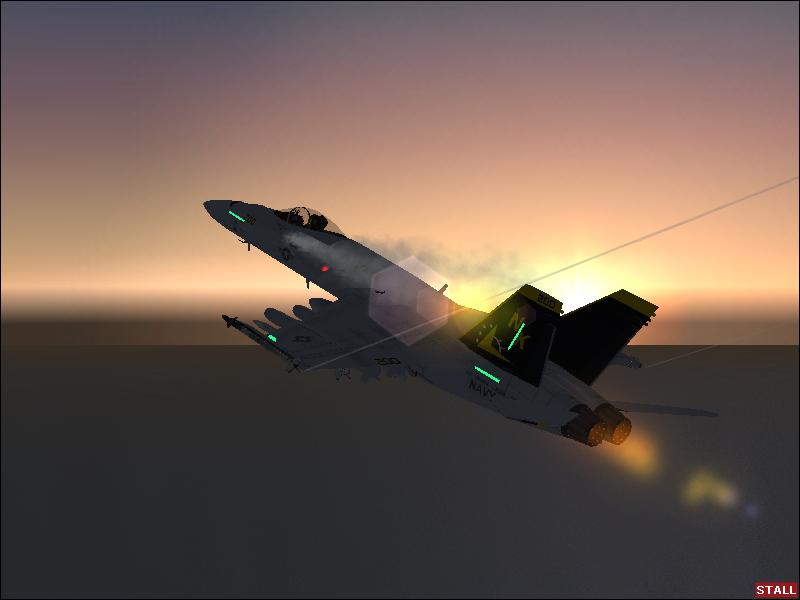
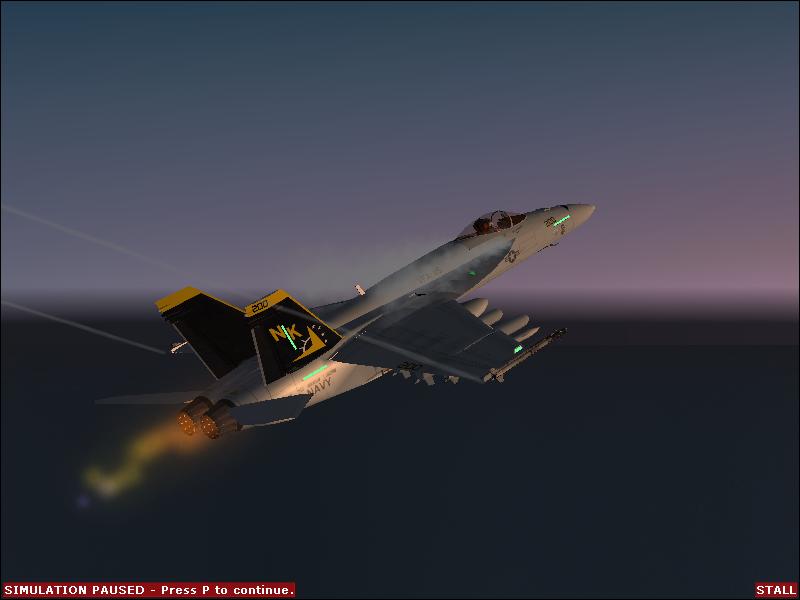
2 pics I made while messing around with the super hornet.

Image
Image
Image
User avatar
AJMarch
Ground hog
Ground hog
 
Posts: 8
Joined: Sun Jun 24, 2007 1:56 pm

Re: Stall

Postby spitfire boy » Tue Jun 26, 2007 11:23 am

Great idea. A few pieces of advice that would improve these shots;

Try to remove all the warning bars and pause menu indicators you get on the bottom of the screen - I'd go into settings in FS9 and see if its possible. As for the pause indicator, it just flashes on and off, so wait for it to not be there before taking your shot.

Try not to end up with jagged edges around the plane - ask around for a piece of software called Irfanview, or go into your graphics card settings and see if you can find a feature known as 'anti aliasing'.

Try to give the viewer more than just the plane to look at - maybe add in some clouds or scenery.

Avoid what is known as the 'laser edge horizon' - exactly what it says, it's a completely flat horizon. Eithe rmask it with clouds or take your shot in a mountainous area would be my advice.

I look forward to seeing more from you. ;D
Image


[center]
User avatar
spitfire boy
Major
Major
 
Posts: 2587
Joined: Mon May 21, 2007 4:46 pm
Location: Wherever you think I'm not

Re: Stall

Postby jankees » Wed Jun 27, 2007 10:51 am

I agree with spitfireboy, and would like to add that I am not mad about the lensflare either.
On the other hand, angle and lighting are very nice, as is the movement, so yes, I can't wait to see more
Image
jankees
Major
Major
 
Posts: 2799
Joined: Fri Aug 11, 2006 3:19 am
Location: Brussels, Belgium


Return to Simulation Screenshots Showcase

Who is online

Users browsing this forum: Flying Trucker and 417 guests