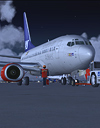
San Juan-Princess Juliana

Flight Simulation Screenshots displaying your Flight Simulation Experience. MSFS, FSX, Prepar3D, XPlane and other Flight Simulators. Focus is your Flight Simulator Experience. Please upload to Simviation (Button at top right)

San Juan-Princess Juliana

Postby Double_Farvel » Sat Apr 28, 2007 12:58 pm

Enjoy!
Image
User avatar
Double_Farvel
Major
Major
 
Posts: 1073
Joined: Fri Aug 11, 2006 5:06 am
Location: New Jersey, USA

Re: San Juan-Princess Juliana

Postby a1 » Sat Apr 28, 2007 1:08 pm

A tad bit more AA i'll say. Very good though. ;)

Image
790i : QX9650 : 4Gb DDR3 : GeForce 8800 GTX : 1 WD Raptor : 1 WD VelociRaptor 150
User avatar
a1
Lieutenant Colonel
Lieutenant Colonel
 
Posts: 7608
Joined: Thu Jan 04, 2007 9:16 pm

Re: San Juan-Princess Juliana

Postby Double_Farvel » Sat Apr 28, 2007 1:40 pm

A tad bit more AA i'll say. Very good though. ;)


I don't necessarily understand why I still have jaggies when the filter is at trilinear and I have the AA box checked.. :-/
Image
User avatar
Double_Farvel
Major
Major
 
Posts: 1073
Joined: Fri Aug 11, 2006 5:06 am
Location: New Jersey, USA

Re: San Juan-Princess Juliana

Postby ATI_7500 » Sat Apr 28, 2007 1:56 pm

Don't set it in FS, set it in your vid card drivers.

AA is fine, your blurry ground textures aren't 'though.
ATI_7500
 

Re: San Juan-Princess Juliana

Postby Double_Farvel » Sat Apr 28, 2007 3:04 pm

Don't set it in FS, set it in your vid card drivers.

AA is fine, your blurry ground textures aren't 'though.


What can I do about that? I have every  setting in the display section at maximum. :-? :-/
Image
User avatar
Double_Farvel
Major
Major
 
Posts: 1073
Joined: Fri Aug 11, 2006 5:06 am
Location: New Jersey, USA

Re: San Juan-Princess Juliana

Postby NDSP » Sat Apr 28, 2007 3:36 pm

A tad bit more AA i'll say. Very good though. ;)


I don't necessarily understand why I still have jaggies when the filter is at trilinear and I have the AA box checked.. :-/


I have the same problem... are you running a dell too?
NDSP
Major
Major
 
Posts: 1879
Joined: Tue Dec 12, 2006 4:20 pm
Location: Queens, New York City

Re: San Juan-Princess Juliana

Postby Alonso » Sat Apr 28, 2007 6:44 pm

There is nothing like building your own PC 8-)
Image
Core i5 2500k @ 3.8 - 8GB DDR3 - GTX 560 OC
User avatar
Alonso
Major
Major
 
Posts: 2828
Joined: Fri Apr 21, 2006 7:13 pm
Location: Lima, Peru

Re: San Juan-Princess Juliana

Postby haroldkip » Sun Apr 29, 2007 6:12 am

I don't necessarily understand why I still have jaggies when the filter is at trilinear and I have the AA box checked.. :-/

I have the same problem... are you running a dell too?

I have a 3 year old Dell (P4 3.2 Ghz - 2GB RAM - 150 GB WD Raptor - Gainward 7800 GS 512) and mine is running great!
But I must add to that I have been FS-GS'ed ... but still it ran pretty good before Michael's treatment ... but it just got better.

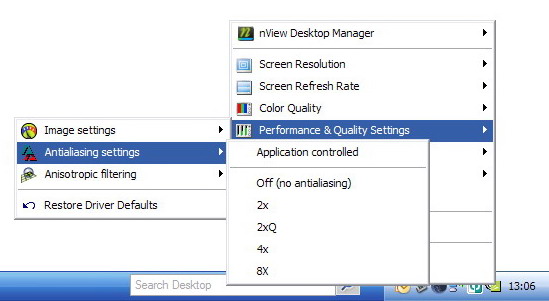
Uncheck AA in the Sim and set it on in your cards configuration panel.

Having the sim handling AA takes up unnecessary resources from CPU and RAM.
Have your GPU take care of the AA ... that is what it's there for ;)

Here's how to do it on an NVidia card ...

Image

PS ... set AA to 4x and see how it works out.
However, mine is set to 8; although some people say that FS9 does not handle 8x AA I can see the difference in graphics quality.

Just experiment with the settings. If you need any help just let me know.
Last edited by haroldkip on Sun Apr 29, 2007 6:13 am, edited 1 time in total.
User avatar
haroldkip
Lieutenant Colonel
Lieutenant Colonel
 
Posts: 5906
Joined: Wed Apr 12, 2006 5:13 am
Location: Amsterdam, The Netherlands

Re: San Juan-Princess Juliana

Postby PilotDude11 » Sun Apr 29, 2007 10:36 am

There is nothing like building your own PC 8-)

agreed
User avatar
PilotDude11
2nd Lieutenant
2nd Lieutenant
 
Posts: 135
Joined: Tue Apr 24, 2007 3:30 pm
Location: Newfoundland

Re: San Juan-Princess Juliana

Postby bok269 » Sun Apr 29, 2007 12:18 pm

very nice
Check out my around the world tour!
http://fsxaroundtheworld.blogspot.com/

Reality is wrong; Dreams are for real.  -Tupac

No bird soars too high, if he soars with
User avatar
bok269
Major
Major
 
Posts: 1458
Joined: Sat Dec 02, 2006 9:54 am
Location: HPN

Re: San Juan-Princess Juliana

Postby Double_Farvel » Mon Apr 30, 2007 1:55 pm

Thanks for the help and comments although Harold, my videocard came with the computer and I searched everywhere, but I still can't seem to find the AA settings.  :-/
Image
User avatar
Double_Farvel
Major
Major
 
Posts: 1073
Joined: Fri Aug 11, 2006 5:06 am
Location: New Jersey, USA

Re: San Juan-Princess Juliana

Postby NDSP » Mon Apr 30, 2007 1:58 pm

Thanks for the help and comments although Harold, my videocard came with the computer and I searched everywhere, but I still can't seem to find the AA settings.  :-/


This is the same problem I have :-/
NDSP
Major
Major
 
Posts: 1879
Joined: Tue Dec 12, 2006 4:20 pm
Location: Queens, New York City

Re: San Juan-Princess Juliana

Postby fighter25 » Mon Apr 30, 2007 3:08 pm

[quote][quote]Thanks for the help and comments although Harold, my videocard came with the computer and I searched everywhere, but I still can't seem to find the AA settings.
Image
fighter25
Major
Major
 
Posts: 1180
Joined: Fri Jan 19, 2007 10:50 pm
Location: Dayton, Ohio

Re: San Juan-Princess Juliana

Postby ATI_7500 » Tue May 01, 2007 8:55 am

Right click on desktop -> "Properties" -> "Settings" -> And the text above the screen resolution slider reads "[Your monitor] on [your graphics adapter]"
ATI_7500
 

Re: San Juan-Princess Juliana

Postby krigl » Tue May 01, 2007 5:58 pm

Nice!! Have you tried editing your FS9.cfg to help with the blurries? Back up first of course... this terrain setup works fairly well for me - got it from Clipper who got it from someone, who....  :)

[TERRAIN]
TERRAIN_ERROR_FACTOR=100.000000  
TERRAIN_MIN_DEM_AREA=10.000000  
TERRAIN_MAX_DEM_AREA=100.000000  
TERRAIN_MAX_VERTEX_LEVEL=21  
TERRAIN_TEXTURE_SIZE_EXP=8  
TERRAIN_AUTOGEN_DENSITY=3  
TERRAIN_USE_GRADIENT_MAP=1  
TERRAIN_EXTENDED_TEXTURES=1  
TERRAIN_DEFAULT_RADIUS=9.000000  
TERRAIN_EXTENDED_RADIUS=9.000000  
TERRAIN_EXTENDED_LEVELS=1  
If you're bored of an evening - and you'll have to be - you can check out my screenshot gallery: Kriglsflightsimscreens...HERE

[center][img]http://www.simviation.com/phpup
krigl
Lieutenant Colonel
Lieutenant Colonel
 
Posts: 8234
Joined: Fri Jun 10, 2005 3:47 am

Next

Return to Simulation Screenshots Showcase

Who is online

Users browsing this forum: No registered users and 419 guests