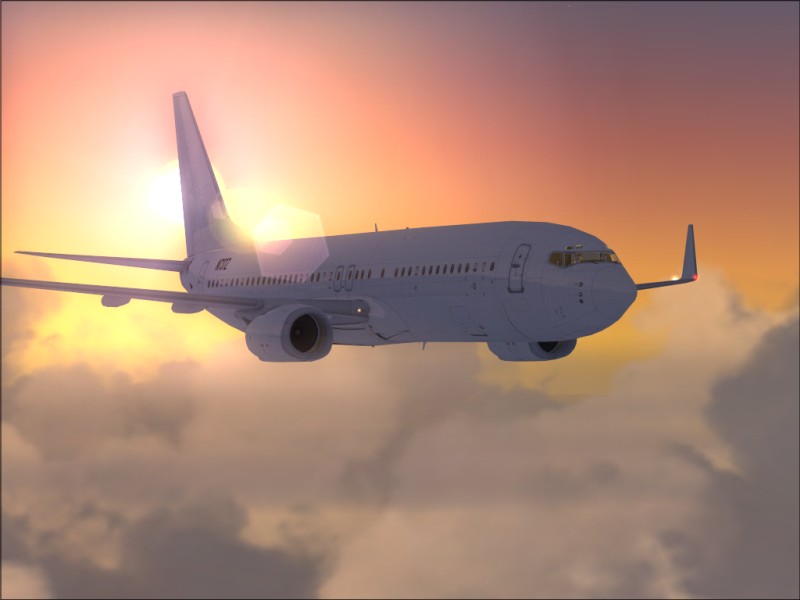
Nice

Flight Simulation Screenshots displaying your Flight Simulation Experience. MSFS, FSX, Prepar3D, XPlane and other Flight Simulators. Focus is your Flight Simulator Experience. Please upload to Simviation (Button at top right)

Nice

Postby EGNX » Thu Apr 12, 2007 7:13 am

No... not that place in France... just a nice day for some flying...

[center]
Click 'em for a slightly big'un...

Image
User avatar
EGNX
Major
Major
 
Posts: 1431
Joined: Thu Jul 14, 2005 3:49 pm
Location: Leicester, England

Re: Nice

Postby NDSP » Thu Apr 12, 2007 7:14 am

Great shots :) .. but how do you get the edges to be so smooth :o
NDSP
Major
Major
 
Posts: 1879
Joined: Tue Dec 12, 2006 4:20 pm
Location: Queens, New York City

Re: Nice

Postby EGNX » Thu Apr 12, 2007 7:21 am

AA (Anti-Aliasing)

I just tick the AA box in the FS display settings tab... and hey presto!
Image
User avatar
EGNX
Major
Major
 
Posts: 1431
Joined: Thu Jul 14, 2005 3:49 pm
Location: Leicester, England

Re: Nice

Postby NDSP » Thu Apr 12, 2007 8:02 am

AA (Anti-Aliasing)

I just tick the AA box in the FS display settings tab... and hey presto!


No really ::)

sorry for being sarcastic, but seriously even with my AA on I still get jaggies.... I posted about it in the Hardware section, and Nick N said I needed to turn on my AA on my videocard... I follow his instructions on how, and I couldnt get to the settings tab he told me about... so ive been really curious about how people get such smooth edges since

Nick ..

PS: Im not fully sure, If you can do me a favor, look at my screenshots... I need to know if Im overeacting or not ;D
NDSP
Major
Major
 
Posts: 1879
Joined: Tue Dec 12, 2006 4:20 pm
Location: Queens, New York City

Re: Nice

Postby EGNX » Thu Apr 12, 2007 8:09 am

AA (Anti-Aliasing)

I just tick the AA box in the FS display settings tab... and hey presto!


No really ::)

sorry for being sarcastic, but seriously even with my AA on I still get jaggies.... I posted about it in the Hardware section, and Nick N said I needed to turn on my AA on my videocard... I follow his instructions on how, and I couldnt get to the settings tab he told me about... so ive been really curious about how people get such smooth edges since

Nick ..

PS: Im not fully sure, If you can do me a favor, look at my screenshots... I need to know if Im overeacting or not ;D


Probably something wrong with your graphics card...., I'm not all that great with sorting out computer problems!  ::) ;D
Image
User avatar
EGNX
Major
Major
 
Posts: 1431
Joined: Thu Jul 14, 2005 3:49 pm
Location: Leicester, England

Re: Nice

Postby NDSP » Thu Apr 12, 2007 8:11 am

AA (Anti-Aliasing)

I just tick the AA box in the FS display settings tab... and hey presto!


No really ::)

sorry for being sarcastic, but seriously even with my AA on I still get jaggies.... I posted about it in the Hardware section, and Nick N said I needed to turn on my AA on my videocard... I follow his instructions on how, and I couldnt get to the settings tab he told me about... so ive been really curious about how people get such smooth edges since

Nick ..

PS: Im not fully sure, If you can do me a favor, look at my screenshots... I need to know if Im overeacting or not ;D

Probably something wrong with your graphics card...., I'm not all that great with sorting out computer problems!  ::) ;D


Neither am I..... thats the problem ;D
NDSP
Major
Major
 
Posts: 1879
Joined: Tue Dec 12, 2006 4:20 pm
Location: Queens, New York City

Re: Nice

Postby murjax » Thu Apr 12, 2007 3:11 pm

Those are some sweet shots.  [smiley=thumbsup.gif] Keep up the good work.
Image
I am just a train fan who happens to like flying and attempting to get the better of the mods especially those with 20/20 vision ;D ;D
User avatar
murjax
Major
Major
 
Posts: 1152
Joined: Sun Nov 26, 2006 12:18 am
Location: Jacksonville,FL

Re: Nice

Postby FSGT Gabe » Fri Apr 13, 2007 3:55 pm

#3 has BEAUTIFUL lighting :o.  Great job 8-).

- Kevin :D
Image
Studio V - Your destination for all your screenshot needs...
[move][color=#000066]Wi
User avatar
FSGT Gabe
Major
Major
 
Posts: 1576
Joined: Tue May 16, 2006 10:44 am
Location: Home airport: CYOO

Re: Nice

Postby Daube » Fri Apr 13, 2007 4:27 pm

AA (Anti-Aliasing)

I just tick the AA box in the FS display settings tab... and hey presto!


No really ::)

sorry for being sarcastic, but seriously even with my AA on I still get jaggies.... I posted about it in the Hardware section, and Nick N said I needed to turn on my AA on my videocard... I follow his instructions on how, and I couldnt get to the settings tab he told me about... so ive been really curious about how people get such smooth edges since

Nick ..

PS: Im not fully sure, If you can do me a favor, look at my screenshots... I need to know if Im overeacting or not ;D
Just in case you have a NVidia card, be sure not to choose the "Performance" or "Best Performance" mode. Choose either "Quality" or "Best Quality", else some of your video features will be drastically reduced by the drivers, to improve the performance instead of the video quality.

So first, set your drivers to "Best Quality", then crank up your AA slider to the max (and disable the AA checkbox in FSX setup), and see what happens.
Last edited by Daube on Fri Apr 13, 2007 4:28 pm, edited 1 time in total.
User avatar
Daube
Lieutenant Colonel
Lieutenant Colonel
 
Posts: 6611
Joined: Wed Oct 05, 2005 8:34 am
Location: Nice (FR)

Re: Nice

Postby Nick N » Fri Apr 13, 2007 4:33 pm

AA (Anti-Aliasing)

I just tick the AA box in the FS display settings tab... and hey presto!


No really ::)

sorry for being sarcastic, but seriously even with my AA on I still get jaggies.... I posted about it in the Hardware section, and Nick N said I needed to turn on my AA on my videocard... I follow his instructions on how, and I couldnt get to the settings tab he told me about... so ive been really curious about how people get such smooth edges since

Nick ..

PS: Im not fully sure, If you can do me a favor, look at my screenshots... I need to know if Im overeacting or not ;D

Just in case you have a NVidia card, be sure not to choose the "Performance" or "Best Performance" mode. Choose either "Quality" or "Best Quality", else some of your video features will be drastically reduced by the drivers, to improve the performance instead of the video quality.

So first, set your drivers to "Best Quality", then crank up your AA slider to the max (and disable the AA checkbox in FSX setup), and see what happens.


He's running a Dell on the original Dell ATi drivers.. he does not have control of AA without upgrading to the real ATi drivers and has litle experience with computer setup or driver upgrades http://www.simviation.com/cgi-bin/yabb2 ... 1176292624

EGNX
very nice images.. good lighting and balance
Last edited by Nick N on Fri Apr 13, 2007 4:34 pm, edited 1 time in total.
Nick N
Ground hog
Ground hog
 
Posts: 0
Joined: Thu Sep 20, 2007 2:12 pm

Re: Nice

Postby Daube » Fri Apr 13, 2007 4:47 pm

Ah OK, I understand.
For info, here is what I can get when I push everything to the max on my poor NVidia 6800 GT (yep, time to change...)

Image

No... not that place in France

Tss tss, respect, please  ;) 8-)
User avatar
Daube
Lieutenant Colonel
Lieutenant Colonel
 
Posts: 6611
Joined: Wed Oct 05, 2005 8:34 am
Location: Nice (FR)

Re: Nice

Postby ATI_7500 » Sat Apr 14, 2007 9:36 am

Turn light bloom off for some extra FPS.
ATI_7500
 

Re: Nice

Postby chiptas » Sat Apr 14, 2007 10:47 am

Beutiful set of shots could be photographs.
:)
Image
User avatar
chiptas
1st Lieutenant
1st Lieutenant
 
Posts: 403
Joined: Fri May 05, 2006 11:22 pm
Location: Brisbane Australia


Return to Simulation Screenshots Showcase

Who is online

Users browsing this forum: Canuck1955, pete and 509 guests