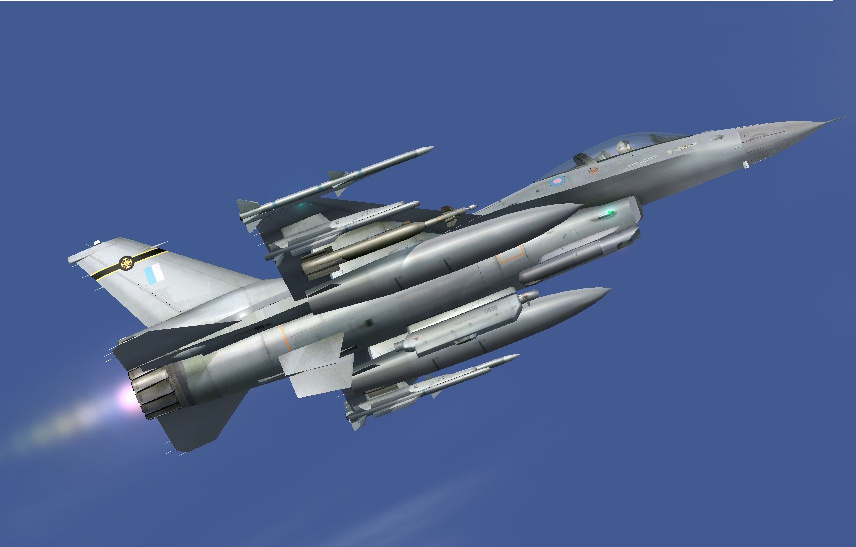

Coming Soon...

Flight Simulation Screenshots displaying your Flight Simulation Experience. MSFS, FSX, Prepar3D, XPlane and other Flight Simulators. Focus is your Flight Simulator Experience. Please upload to Simviation (Button at top right)

Coming Soon...

Postby Sakura » Fri Dec 08, 2006 2:50 pm

Image
Image
User avatar
Sakura
Captain
Captain
 
Posts: 559
Joined: Sat Jul 15, 2006 5:25 am
Location: UK

Re: Coming Soon...

Postby ThatOnePerson » Fri Dec 08, 2006 3:55 pm

Nice, but it needs some AA desperately :o ;)
Image

"Float like Pissed-Off Butterfly, Sting like Bad-Ass Bee."
ThatOnePerson
Major
Major
 
Posts: 1854
Joined: Sun Jun 05, 2005 11:42 pm
Location: The Blue Planet

Re: Coming Soon...

Postby Sakura » Fri Dec 08, 2006 3:58 pm

Dispite AMRAMMs on the Tip Rails and ASRAMMs under the Wings?
Image
User avatar
Sakura
Captain
Captain
 
Posts: 559
Joined: Sat Jul 15, 2006 5:25 am
Location: UK

Re: Coming Soon...

Postby jlvandem » Fri Dec 08, 2006 4:09 pm

He's referring to anti-aliasing... it makes the edges look much much smoother.

Best way is to enable it in your graphic card's settings.

Looks awesome!
Image
User avatar
jlvandem
1st Lieutenant
1st Lieutenant
 
Posts: 410
Joined: Wed Feb 06, 2002 9:50 pm

Re: Coming Soon...

Postby Sakura » Fri Dec 08, 2006 4:17 pm

Resizing down to 800 Pixels wide from 1154 Does that. Like My Shot in the Contest.
Last edited by Sakura on Fri Dec 08, 2006 4:17 pm, edited 1 time in total.
Image
User avatar
Sakura
Captain
Captain
 
Posts: 559
Joined: Sat Jul 15, 2006 5:25 am
Location: UK

Re: Coming Soon...

Postby ThatOnePerson » Fri Dec 08, 2006 4:58 pm

Resizing shouldnt do that, mind pming me the original? BTW what resizeing program are you using?
Image

"Float like Pissed-Off Butterfly, Sting like Bad-Ass Bee."
ThatOnePerson
Major
Major
 
Posts: 1854
Joined: Sun Jun 05, 2005 11:42 pm
Location: The Blue Planet

Re: Coming Soon...

Postby Sakura » Fri Dec 08, 2006 5:00 pm

I do Resizing In Paint Shop Pro 9.Image On it's Way.

Edit:I had To Resize to Fit The Limits.

EDIT 2:Sorry,But Original Won't Upload to the Image Server...
Last edited by Sakura on Fri Dec 08, 2006 5:03 pm, edited 1 time in total.
Image
User avatar
Sakura
Captain
Captain
 
Posts: 559
Joined: Sat Jul 15, 2006 5:25 am
Location: UK

Re: Coming Soon...

Postby Hagar » Fri Dec 08, 2006 5:02 pm

Edit:I had To Resize to Fit The Limits.

You're not alone. It's the same for everyone.
Image

Founder & Sole Member - Grumpy's Over the Hill Club for Veteran Virtual Aviators
Member of the Fox Four Group
My Google Photos albums
My Flickr albums
User avatar
Hagar
Colonel
Colonel
 
Posts: 30869
Joined: Wed Jun 19, 2002 7:15 am
Location: Costa Geriatrica

Re: Coming Soon...

Postby Hagar » Fri Dec 08, 2006 5:31 pm

I do Resizing In Paint Shop Pro 9.

Your shot is compressed too much at under 38 Kb. You're allowed 100 Kb so use it. PSP9 should have a Wizard to optimize compression when saving in JPEG format. (Click the Options button from File/Save As)

EDIT 2:Sorry,But Original Won't Upload to the Image Server...

The Upload limit is 100 Kb the same as the forum. If you wish to send someone the original image you will have to send it by E-mail.
Last edited by Hagar on Fri Dec 08, 2006 5:32 pm, edited 1 time in total.
Image

Founder & Sole Member - Grumpy's Over the Hill Club for Veteran Virtual Aviators
Member of the Fox Four Group
My Google Photos albums
My Flickr albums
User avatar
Hagar
Colonel
Colonel
 
Posts: 30869
Joined: Wed Jun 19, 2002 7:15 am
Location: Costa Geriatrica

Re: Coming Soon...

Postby Sakura » Fri Dec 08, 2006 5:46 pm

I See...

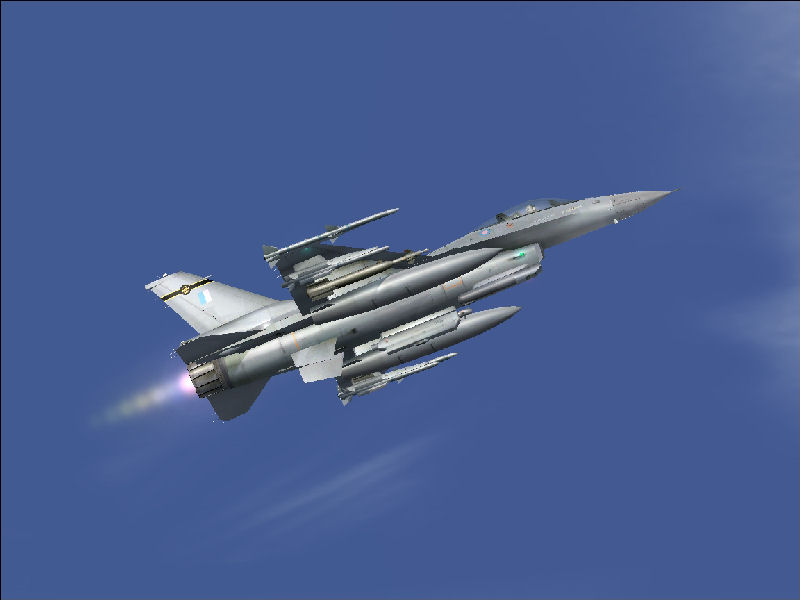
Here's A Retry,Where I cut the F-16 Out and Discarded Most of the Sky.Same size as Orginal.

Image
Image
User avatar
Sakura
Captain
Captain
 
Posts: 559
Joined: Sat Jul 15, 2006 5:25 am
Location: UK


Return to Simulation Screenshots Showcase

Who is online

Users browsing this forum: No registered users and 601 guests