My first FSX Screens

Flight Simulation Screenshots displaying your Flight Simulation Experience. MSFS, FSX, Prepar3D, XPlane and other Flight Simulators. Focus is your Flight Simulator Experience. Please upload to Simviation (Button at top right)

Re: My first FSX Screens

Postby haroldkip » Sat Dec 02, 2006 4:00 pm

Here's a little piece of advise I got recently that might help you with shutting down services:

Go to: CONTROL PANEL - ADMINISTRATIVE TOOLS

Last edited by haroldkip on Sat Dec 02, 2006 4:39 pm, edited 1 time in total.
User avatar
haroldkip
Lieutenant Colonel
Lieutenant Colonel
 
Posts: 5906
Joined: Wed Apr 12, 2006 5:13 am
Location: Amsterdam, The Netherlands

Re: My first FSX Screens

Postby MOUSY » Sat Dec 02, 2006 8:30 pm

FSAutostart is nice but any system with 2 GB or RAM or more does not really need it.

And when was your last GOOD defrag? ;)

I beg to politely differ:

FSAutostart easily allows you to shut off many unneccesary services and themes and start them back again after simming. It sometimes doubles my free memory after a memory defrag and although I only have have 128MB in total, which is not alot, imagine what it can do with 2GB to work with.
2GB is more than sufficient but there is no such thing as too much free memory or CPU cycles ehn? ;)

And I did a GOOD defrag about a month and a half ago. I normally do one every month and more frequently if I have been doing alot of simultaneous downloading, moving and deleting of large files. Coincidently, I was half way into one when I began reading your post.
;)
[align=center][img]http://www.simviation.com/phpupload/uploads/1379790172.png[/img]
Current Work in Progress: CaribSky: GrenadaX
[url]www.facebook.com/richersimulations[/url][/align]
User avatar
MOUSY
Major
Major
 
Posts: 2110
Joined: Thu Jan 19, 2006 8:47 pm
Location: Commonwealth of Dominica

Re: My first FSX Screens

Postby haroldkip » Sun Dec 03, 2006 2:59 am

Hi Mouse, I understand.

If you have only 128 Megs of RAM it makes sense to use FSAutostart, because each of the services recuires a bit your memory and all added up they use a lot. But if you have 2 gigs of RAM you have so much free memory left that it makes little sense to use the, otherwise very good, tool.

And the question about the defrag was actually addressed to Mozilla ;)
User avatar
haroldkip
Lieutenant Colonel
Lieutenant Colonel
 
Posts: 5906
Joined: Wed Apr 12, 2006 5:13 am
Location: Amsterdam, The Netherlands

Re: My first FSX Screens

Postby Scudrunner » Sun Dec 03, 2006 1:34 pm

Here's a little piece of advise I got recently that might help you with shutting down services:


CFTMON can be removed as a service but it can be a little tricky. Assuming you do not use alternate user input services for MS Office such as speech recognition, CFTMON can be shut down permanently but it must be done using this method:

1. Click Start, point to Settings, and then click Control Panel.

2. In the Control Panel, double-click Text Services. NOTE: In Windows XP, click Date, Time, Language, and Regional Options, and then click Regional and Language Options. On the Languages tab, click Details.

3. Under Installed Services, select each input item that is listed, and then click Remove to remove the item. All items must be removed, one by one, except the following input service: English (United States) - default Keyboard United States 101

4. Click Start and then click Run.

5. In the Run dialog box, copy/past the following command into the box: Regsvr32.exe /u msimtf.dll

6. Click OK.

7.  In the Run dialog box, copy/paste the following command into the box: Regsvr32.exe /u msctf.dll

8. Click OK.

9. Reboot.

CTFMON should now be properly uninstalled and gone.

AFter you're done please post a shot of your running processes and see if we can do anything more with your Windows processes. If you feel unsure about this please feel free to 'call' me ;)

FSAutostart is nice but any system with 2 GB or RAM or more does not really need it.

And when was your last GOOD defrag? ;)

As far as removing CTFMON, The only thing I could find was control panel. Could not find anything in control panel about "text services", "time, date, language and regional options". No language tab to click on options.

I am leary of messing around with my computer in this fashion. I use this computer for a lot more important things than flight simulator and can't afford to mess things up.

Did my last defrag last Monday. I usually do a defrag about every 2 to 3 weeks.
Scudrunner
2nd Lieutenant
2nd Lieutenant
 
Posts: 130
Joined: Thu Nov 30, 2006 5:09 pm
Location: USA

Re: My first FSX Screens

Postby Scudrunner » Sun Dec 03, 2006 2:10 pm

Well, I also tried FSAutostart. in about 10 different trys with different configurations, it locked up my computer each time I tried it so I uninstalled it.

I guess I will just stick with FS 9. I didn't realize when I got FSX that you had to have an MCSE+ or be a computer programming  engineer to be able to get results close to those shown on the package.

Thanks to all who tryed to help.
Scudrunner
2nd Lieutenant
2nd Lieutenant
 
Posts: 130
Joined: Thu Nov 30, 2006 5:09 pm
Location: USA

Re: My first FSX Screens

Postby haroldkip » Sun Dec 03, 2006 2:30 pm

I am leary of messing around with my computer in this fashion. I use this computer for a lot more important things than flight simulator and can't afford to mess things up.

Did my last defrag last Monday. I usually do a defrag about every 2 to 3 weeks.

Defragging every 2 weeks is EXCELLENT! I normally go into maintenance mode once a month, doing a couple of O&O Defrag runs, clean the registry and check for spy- & malware and install the latest driver- & software updates.

I can imagine that you're reluctant about messing with your machine. You're not really messing with your system ... you're just telling it that if it looses the backpack it can run a little faster and easier.

But believe me, I've done all things I'm telling you to my own machine and machines of a couple of friends. The machines are not only performing better on Flight Simulator but also on a range of other software, including resource suckers like Adobe Premiere ;)

I'm sorry about the mistake I made in my previous post.
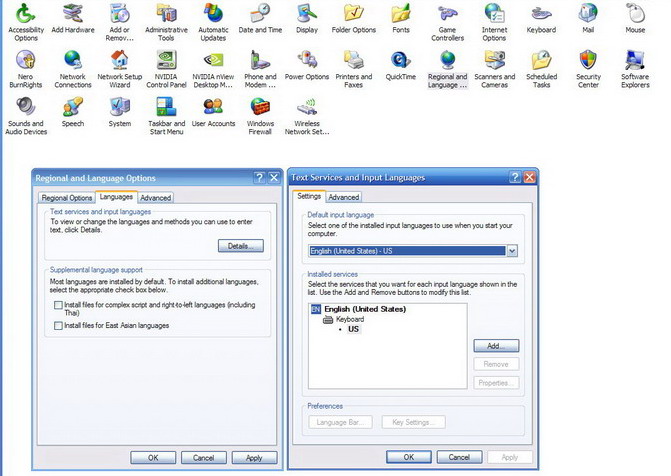
1. Go to CONTROL PANEL - REGIONAL & LANGUAGE OPTIONS.

2. Click the LANGUAGES tab.

3. Click on DETAILS

Please take a screenshot of the Textservices and Input Languages box. It should list only one language + keyboard layout. See below.

Image

Let's see what you've got there and if you don't use it you can turn it off. You have a killer machine now let's see if we can get it to run at it's potential :D And it definately will run FSX.
Last edited by haroldkip on Sun Dec 03, 2006 2:35 pm, edited 1 time in total.
User avatar
haroldkip
Lieutenant Colonel
Lieutenant Colonel
 
Posts: 5906
Joined: Wed Apr 12, 2006 5:13 am
Location: Amsterdam, The Netherlands

Re: My first FSX Screens

Postby Scudrunner » Sun Dec 03, 2006 3:09 pm

It only has english there.

I don't have Adobe Premier. I use Cyberlink PowerDirector. It does a great job for me. My son in law uses it (Adobe). He is editing a video now and hoping for Discovery Channel approval.
Scudrunner
2nd Lieutenant
2nd Lieutenant
 
Posts: 130
Joined: Thu Nov 30, 2006 5:09 pm
Location: USA

Re: My first FSX Screens

Postby MOUSY » Sun Dec 03, 2006 4:12 pm

Hi Mouse, I understand.

If you have only 128 Megs of RAM it makes sense to use FSAutostart, because each of the services recuires a bit your memory and all added up they use a lot. But if you have 2 gigs of RAM you have so much free memory left that it makes little sense to use the, otherwise very good, tool.

And the question about the defrag was actually addressed to Mozilla ;)

Ooooppps, my bad. After looking at yours and Nick's post I believe that I stand largely corrected. :-X

And about that question to Mozilla too...
:P
[align=center][img]http://www.simviation.com/phpupload/uploads/1379790172.png[/img]
Current Work in Progress: CaribSky: GrenadaX
[url]www.facebook.com/richersimulations[/url][/align]
User avatar
MOUSY
Major
Major
 
Posts: 2110
Joined: Thu Jan 19, 2006 8:47 pm
Location: Commonwealth of Dominica

Re: My first FSX Screens

Postby haroldkip » Sun Dec 03, 2006 6:48 pm

It only has english there.

Very good! That is all you need! If you're up to it I can show you a few other tune-ups that will make your system run a little smoother ... and have it run at least a smooth FS9 and most likely a smooth FSX.

Ooooppps, my bad. After looking at yours and Nick's post I believe that I stand largely corrected. :-X

You're OK there Mouse! Help and tips are always welcome, because two know more than one :)
Last edited by haroldkip on Sun Dec 03, 2006 6:49 pm, edited 1 time in total.
User avatar
haroldkip
Lieutenant Colonel
Lieutenant Colonel
 
Posts: 5906
Joined: Wed Apr 12, 2006 5:13 am
Location: Amsterdam, The Netherlands

Re: My first FSX Screens

Postby Scudrunner » Sun Dec 03, 2006 7:26 pm
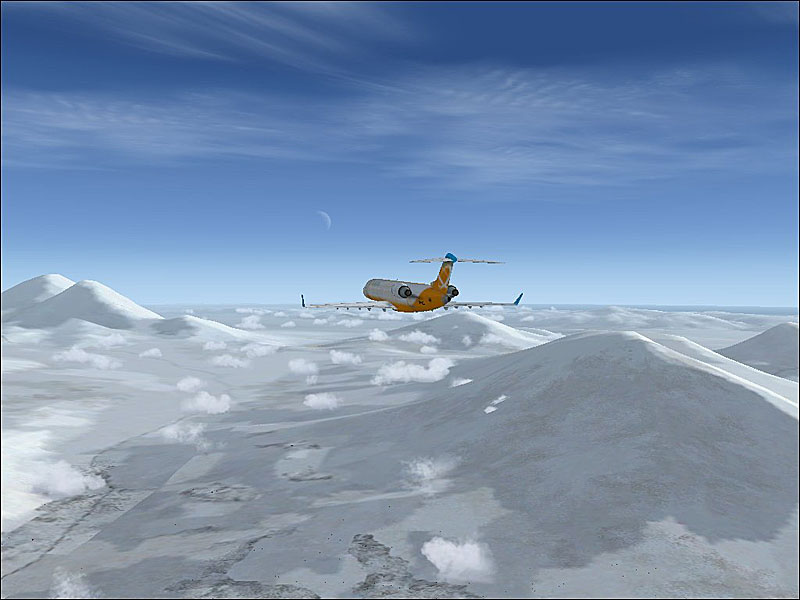
Go ahead with the tune ups when you are ready. I will try to keep up.

Ever flown Kamchatka (hope the spelling is right)?
Image
Scudrunner
2nd Lieutenant
2nd Lieutenant
 
Posts: 130
Joined: Thu Nov 30, 2006 5:09 pm
Location: USA

Re: My first FSX Screens

Postby Fly2e » Tue Dec 05, 2006 10:24 am

COMING SOON!
User avatar
Fly2e
Colonel
Colonel
 
Posts: 198020
Joined: Thu Jan 17, 2002 5:29 pm
Location: KFRG

Re: My first FSX Screens

Postby haroldkip » Tue Dec 05, 2006 4:06 pm

Please see this post!

Very good initiative Dave! I agree 100% with what you and Nick are saying.

@ Scudrunner: The info I am giving to you comes from Nick, who replied to Dave's post!
And as I've said ... I've tried them all and they're really worth while :)
So, can you please tell me which services are running and which are not?

And no, I haven't flown there yet but I did fly up north a while ago ...

Image
Last edited by haroldkip on Tue Dec 05, 2006 4:19 pm, edited 1 time in total.
User avatar
haroldkip
Lieutenant Colonel
Lieutenant Colonel
 
Posts: 5906
Joined: Wed Apr 12, 2006 5:13 am
Location: Amsterdam, The Netherlands

Re: My first FSX Screens

Postby Scudrunner » Tue Dec 05, 2006 4:27 pm

So what about the tune ups for FSX?

I also have another question. I have FS9 and FSX. If I turn the setting up on FSX, I get crappy results frame wise but I can see the sun reflecting in the water. I can turn all the setting to max in FS9 and still get about 15 to 20 FPS but no reflection. I saw a post with pix supposedly from FS9 that had the sun reflecting in the water. Is there an add on or something that I need to install to get that?

Thanks.

PS: I went to my profile and changed my name to Scud Runner (just in case you was looking for Mozilla44)
Scudrunner
2nd Lieutenant
2nd Lieutenant
 
Posts: 130
Joined: Thu Nov 30, 2006 5:09 pm
Location: USA

Re: My first FSX Screens

Postby haroldkip » Tue Dec 05, 2006 5:45 pm
Please read the e-mail I sent you @earthnet.

The best way to find out what was in the shot you saw, is to look for it again and ask the person that posted it.
I can't tell what it was or help you out if I don't know which post it was ...

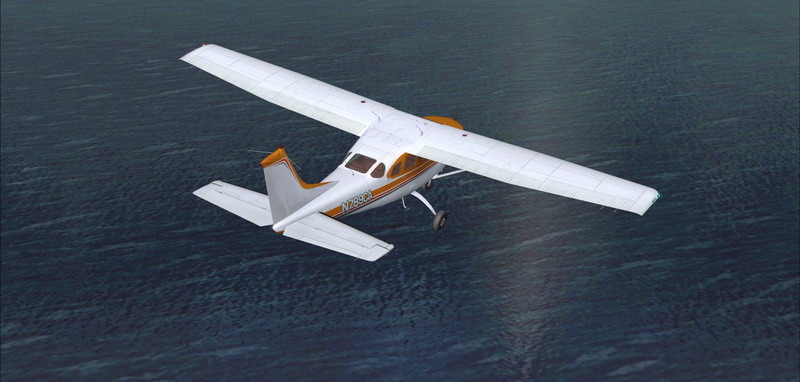
But in FS9 the sun reflects in my water ... (see this post)

Image
User avatar
haroldkip
Lieutenant Colonel
Lieutenant Colonel
 
Posts: 5906
Joined: Wed Apr 12, 2006 5:13 am
Location: Amsterdam, The Netherlands

Re: My first FSX Screens

Postby DizZa » Wed Dec 06, 2006 4:11 am

Beleive it or not, I have 17 processes when I start my PC up. I can get it down to around 12 if I wanted to, but I like tray drivers and such....
DizZa
 

PreviousNext

Return to Simulation Screenshots Showcase

Who is online

Users browsing this forum: No registered users and 603 guests

