
Semi-transparent textures in FSX ?

Flight Simulation Screenshots displaying your Flight Simulation Experience. MSFS, FSX, Prepar3D, XPlane and other Flight Simulators. Focus is your Flight Simulator Experience. Please upload to Simviation (Button at top right)

Semi-transparent textures in FSX ?

Postby congo » Fri Aug 11, 2006 2:04 pm

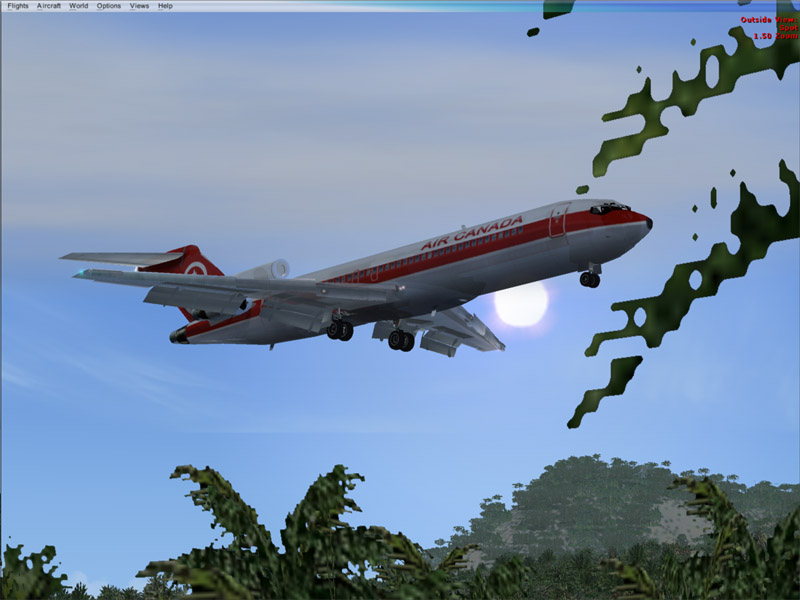
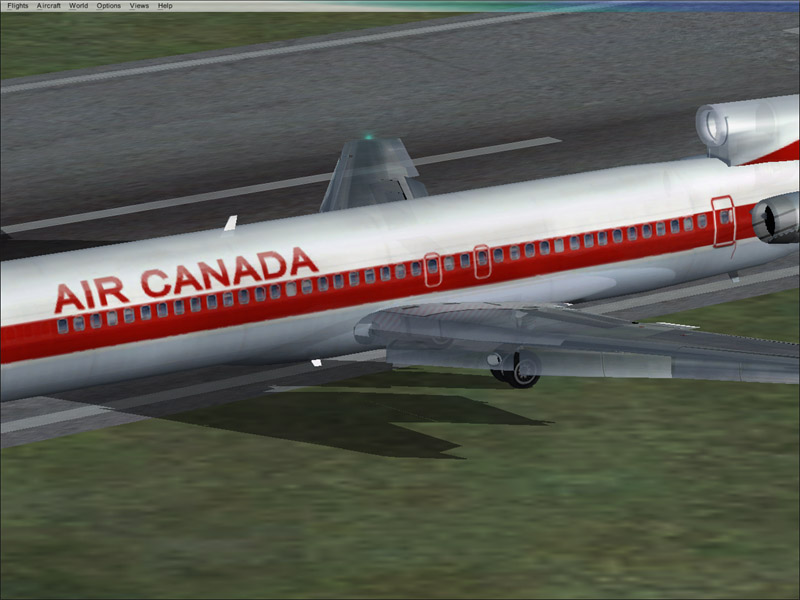
I threw this B727 into FSX and some of the textures are semi-transparent, you can see thru the engine cowling here.

Image

Wings
Image
Last edited by congo on Fri Aug 11, 2006 2:13 pm, edited 1 time in total.
ImageMainboard: Asus P5K-Premium, CPU=Intel E6850 @ x8x450fsb 3.6ghz, RAM: 4gb PC8500 Team Dark, Video: NV8800GT, HDD: 2x1Tb Samsung F3 RAID-0 + 1Tb F3, PSU: Antec 550 Basiq, OS: Win7x64, Display: 24&

User avatar
congo
Major
Major
 
Posts: 3655
Joined: Fri Aug 16, 2002 12:13 am
Location: Australia

Re: Semi-transparent textures in FSX ?

Postby Jakemaster » Fri Aug 11, 2006 2:07 pm

Seems like any alpha channel shows up transparent in FSX
Jakemaster
 

Re: Semi-transparent textures in FSX ?

Postby AuMaV » Fri Aug 11, 2006 2:17 pm

Hi
Copy the envmap.bmp from the fs9/texture folder to the fsx\texture folder and all will be as it was ;)
Wozza
User avatar
AuMaV
2nd Lieutenant
2nd Lieutenant
 
Posts: 293
Joined: Mon Jul 07, 2003 7:44 am
Location: The Great Southern Land

Re: Semi-transparent textures in FSX ?

Postby congo » Fri Aug 11, 2006 2:18 pm

Thanks Wozza!

Now, it's off to bed, been up all night playing with the new toy   :D
ImageMainboard: Asus P5K-Premium, CPU=Intel E6850 @ x8x450fsb 3.6ghz, RAM: 4gb PC8500 Team Dark, Video: NV8800GT, HDD: 2x1Tb Samsung F3 RAID-0 + 1Tb F3, PSU: Antec 550 Basiq, OS: Win7x64, Display: 24&
User avatar
congo
Major
Major
 
Posts: 3655
Joined: Fri Aug 16, 2002 12:13 am
Location: Australia

Re: Semi-transparent textures in FSX ?

Postby Ecko » Fri Aug 11, 2006 2:34 pm

Happened to me too, with the MD500E Package, not with the DodoSim Bell 206 and DSB Tornado package though.
Image
User avatar
Ecko
Major
Major
 
Posts: 3684
Joined: Fri May 13, 2005 4:47 pm
Location: Denmark

Re: Semi-transparent textures in FSX ?

Postby Jakemaster » Fri Aug 11, 2006 3:55 pm

Hi
Copy the envmap.bmp from the fs9/texture folder to the fsx\texture folder and all will be as it was ;)
Wozza


GENIOUS!
Jakemaster
 

Re: Semi-transparent textures in FSX ?

Postby Airshow_lover » Fri Aug 11, 2006 4:00 pm

yeah i loaded a pitts and the intire thing was semi-transparent except the cockpit :P
C/SMSgt - Civil Air Patrol
User avatar
Airshow_lover
Major
Major
 
Posts: 1615
Joined: Mon Jan 09, 2006 3:18 pm
Location: LaVergne, TN

Re: Semi-transparent textures in FSX ?

Postby GA_Pilot » Fri Aug 11, 2006 4:20 pm

Thanks......that solved that problem.. ;D
GA_Pilot


Return to Simulation Screenshots Showcase

Who is online

Users browsing this forum: No registered users and 703 guests