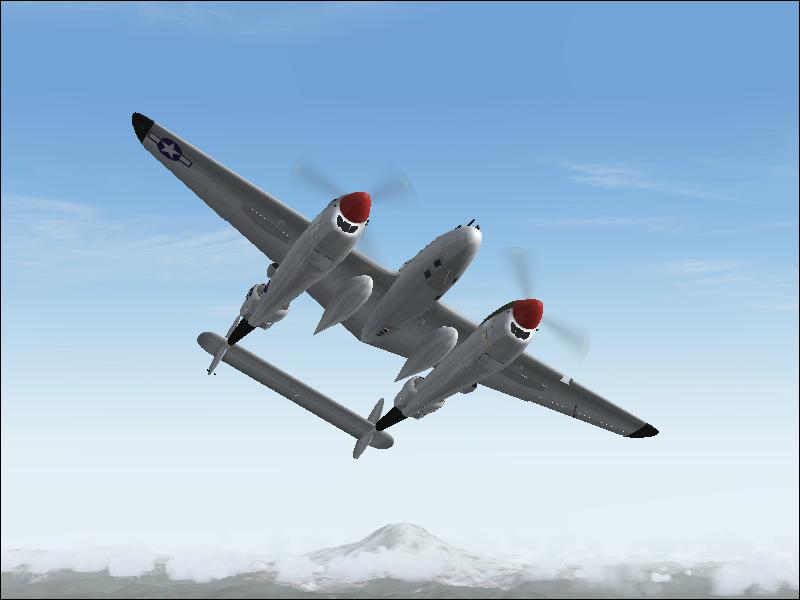
P-38

Flight Simulation Screenshots displaying your Flight Simulation Experience. MSFS, FSX, Prepar3D, XPlane and other Flight Simulators. Focus is your Flight Simulator Experience. Please upload to Simviation (Button at top right)

P-38

Postby Immelman » Mon Jul 31, 2006 5:17 pm

Image

Comments and suggestions apreciated.

User avatar
Immelman
1st Lieutenant
1st Lieutenant
 
Posts: 409
Joined: Sat Jun 03, 2006 7:37 pm

Re: P-38

Postby krigl » Mon Jul 31, 2006 5:30 pm

Fine shot. Turn up the anti aliasing on your video card and then turn it off in the game...Either make the backdrop more interesting with clouds or scenery, or make the plane bigger. Check out other posts in here for ideas....cheers, Krigl
If you're bored of an evening - and you'll have to be - you can check out my screenshot gallery: Kriglsflightsimscreens...HERE

[center][img]http://www.simviation.com/phpup
krigl
Lieutenant Colonel
Lieutenant Colonel
 
Posts: 8234
Joined: Fri Jun 10, 2005 3:47 am

Re: P-38

Postby Immelman » Thu Aug 03, 2006 11:08 am

how do i turn on anti alias on my video card?
User avatar
Immelman
1st Lieutenant
1st Lieutenant
 
Posts: 409
Joined: Sat Jun 03, 2006 7:37 pm

Re: P-38

Postby Foxtrot Sport » Thu Aug 03, 2006 11:27 am

Depending on the card you have, usually you can access it by right click anywhere on the desktop, then clicking properties.  From there, click the Settings tab, and then click "Advanced" in the lower right.  From there it all changes depending on the card, but you're looking for a slider for Antriscopic Filtering and Anti-Aliasing and such, which should be under "Options" or in my case "SMARTGART".  Just look around until you find it.
Image
Formerly HighFlyer24
User avatar
Foxtrot Sport
Major
Major
 
Posts: 1027
Joined: Wed Jun 30, 2004 12:33 pm
Location: Sacramento, California

Re: P-38

Postby Immelman » Fri Aug 04, 2006 1:00 pm

I found the "advanced" button but in that menu i dont see anything for anti aliasing.  does anyone know how to do this on a Radeon X300 SE 128MB HyperMemory card?
User avatar
Immelman
1st Lieutenant
1st Lieutenant
 
Posts: 409
Joined: Sat Jun 03, 2006 7:37 pm

Re: P-38

Postby masmith » Fri Aug 04, 2006 1:52 pm

Nice setting but you could of done with some AA
User avatar
masmith
Major
Major
 
Posts: 1176
Joined: Sat Nov 19, 2005 3:14 pm
Location: Bristol UK

Re: P-38

Postby haroldkip » Sat Aug 05, 2006 6:26 am

I found the "advanced" button but in that menu i dont see anything for anti aliasing.
does anyone know how to do this on a Radeon X300 SE 128MB HyperMemory card?

You might want to check with the team in the "Hardware & Software" section of the forum.
They generally have pretty good advise and already helped me out a couple of times.
User avatar
haroldkip
Lieutenant Colonel
Lieutenant Colonel
 
Posts: 5906
Joined: Wed Apr 12, 2006 5:13 am
Location: Amsterdam, The Netherlands


Return to Simulation Screenshots Showcase

Who is online

Users browsing this forum: No registered users and 792 guests