Yak-18 Panel manual (layout mess warning)

Flight Simulation Screenshots displaying your Flight Simulation Experience. MSFS, FSX, Prepar3D, XPlane and other Flight Simulators. Focus is your Flight Simulator Experience. Please upload to Simviation (Button at top right)

Yak-18 Panel manual (layout mess warning)

Postby Ivan » Sun Jul 30, 2006 4:47 am

OK Layout for this post is a mess but i couldnt resize the switch bank picture whitout losing valueable space to put the text in...

So here's a short manual with pictures to prevent you flying around whitout brakes and working gear...

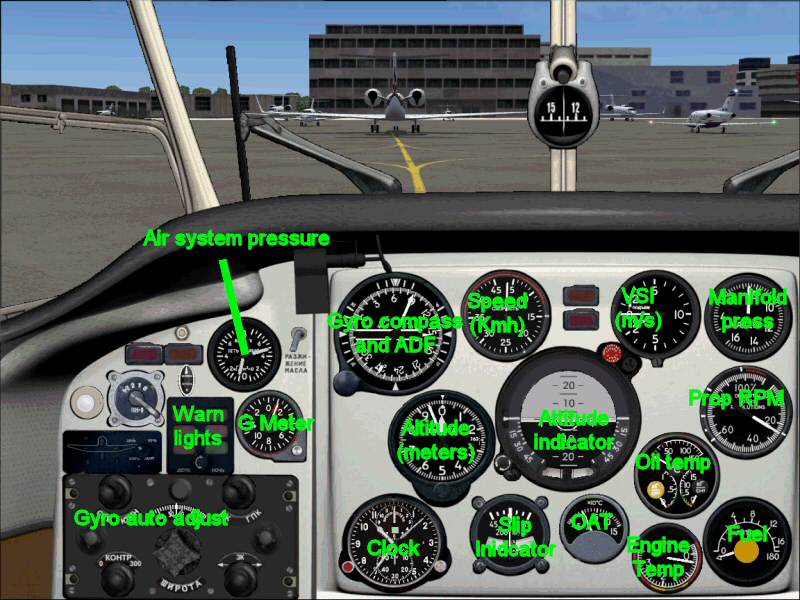
Main view
Image
Before you take off, the engine temperature should be in or past the first yellow section. Not doing so will result in less available power.
Engine cuts and starts to smoke if you run it too long at 100% prop rpm.

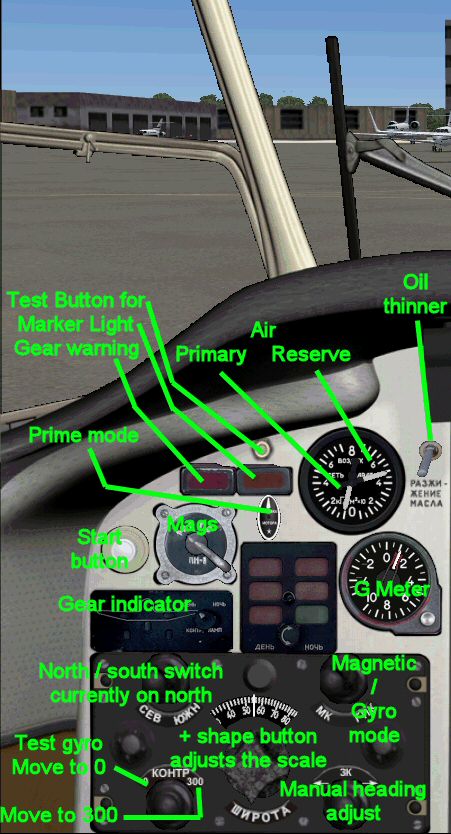
Left side (on the main panel)
Image
Main things to notice here:
1: before takeoff, both indicators on the air system gauge should be at the same level.
2: Gyro adjuster takes a minute or so to get to the right position, so take your time when you are taxiing to the runway.
3: Oil thinner is only needed in the winter. Read the manual for instructions about the primer button

Instructions for the gyro adjuster
The big '+' shaped button adjusts the latitude scale on the gyro adjuster. Having this one in the wrong position will cause the gyro to drift. Put that one in the right position for your location (shift z), and don't forget the 'north / south' switch.
If the gyro is correcly powered up, you can check the function by using the '0 / 300' test switch. Hold that one until the gauge indicates the desired heading (0 or 300)

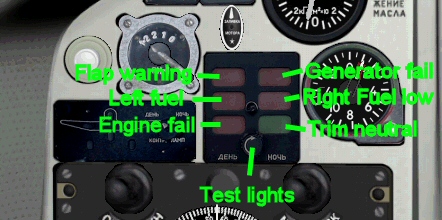
Warning lights
Image
After startup the following lights should be on: 'Trim neutral' and 'Generator fail'. The generator light goes out when prop RPM is over 40%.

Clickspots are on the far left side of the main view...
- Upper one is the full view (also available by the 'down' key)
- Middle one gives the Right panel
- Lower one gives the throttle levers and the alternate A/B switch for the ADF radio
Image
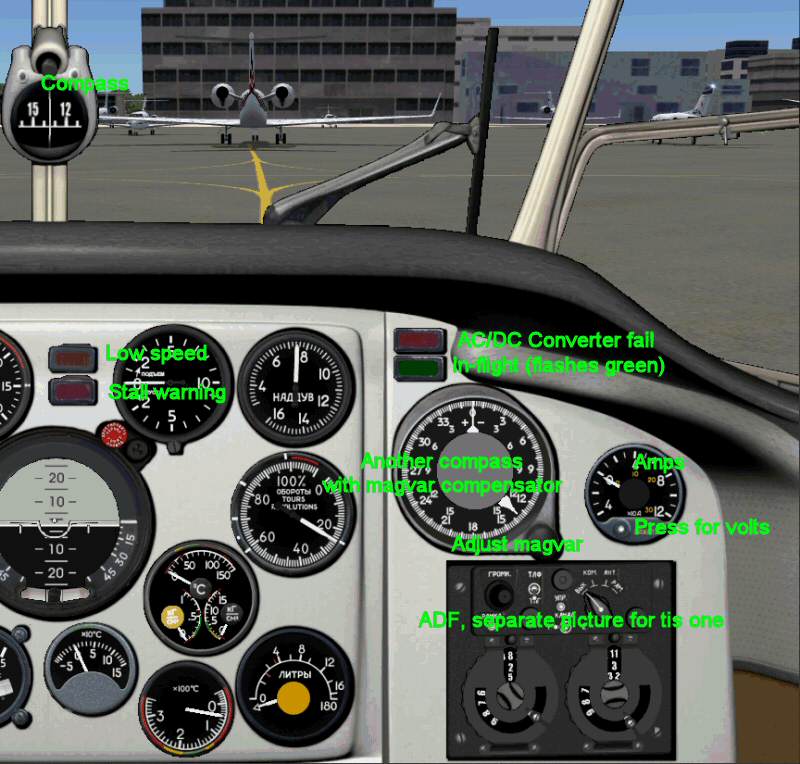
Main features on this one are the compensated heading indicator and the ADF Radio.
Stall / low speed lights should go on when taking off (first both, then low speed only)
Image
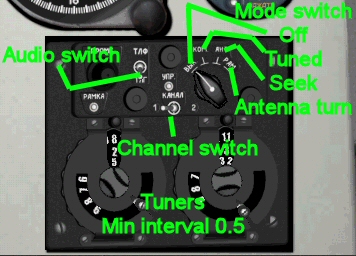
ADF Radio... two channels on this one, tooltips for frequency.
Audio switch doesnt work...
Mode switch should be in the 2nd position for navigation

Lower switchbank

Image
For flying: All switches except landing / taxi in the up position.
Landing / Taxi: up is taxilight, down is landing light and middle is off
Main Air should be clicked once, so that the needles on the air gauge are at the same position on both sides. Not doing this results in:
No gear movements
No flap movement
and most important: NO BRAKES!
Russian planes: IL-76 (all standard length ones),  Tu-154 and Il-62, Tu-134 and [url=http://an24.uw.hu/]An-24RV[/ur
Ivan
Lieutenant Colonel
Lieutenant Colonel
 
Posts: 5805
Joined: Sun Apr 13, 2003 8:18 am
Location: The netherlands

Re: Yak-18 Panel manual (layout mess warning)

Postby Serpent_6 » Sun Jul 30, 2006 5:41 am

Ill try it again, last evening i couldnt even get the damn thing started ;D I like realism but this is too much  ;D
Serpent_6
Captain
Captain
 
Posts: 570
Joined: Mon Mar 13, 2006 6:43 am
Location: Holland

Re: Yak-18 Panel manual (layout mess warning)

Postby C » Sun Jul 30, 2006 6:20 am

Thanks Ivan. Makes the panel a whole lot clearer. :)
User avatar
C
Colonel
Colonel
 
Posts: 11977
Joined: Mon May 19, 2003 1:04 pm
Location: Earth

Re: Yak-18 Panel manual (layout mess warning)

Postby DC-3 » Sun Jul 30, 2006 11:03 am

Sorry if this has been answered already, but I've looked..
where can I d/l this plane? Looks like it's fun to fly! ;D
Cody
N406C

Gateway GT5674, AMD Phenom 9500 Quad-Core 2.20 GHz, 3 GB RAM, GeForce 6150 SE, Vista SP1. All stock, addons to come.
User avatar
DC-3
2nd Lieutenant
2nd Lieutenant
 
Posts: 105
Joined: Sun Jul 17, 2005 1:42 pm
Location: KPIA

Re: Yak-18 Panel manual (layout mess warning)

Postby krigl » Sun Jul 30, 2006 1:18 pm

Aha. It's one of 'those' planes  :D

Thanks for taking the time, I've saved the page and will use it in future when I'm feeling up for some aviation S+M... :)
If you're bored of an evening - and you'll have to be - you can check out my screenshot gallery: Kriglsflightsimscreens...HERE

[center][img]http://www.simviation.com/phpup
krigl
Lieutenant Colonel
Lieutenant Colonel
 
Posts: 8234
Joined: Fri Jun 10, 2005 3:47 am

Re: Yak-18 Panel manual (layout mess warning)

Postby Ivan » Sun Jul 30, 2006 3:26 pm

Sorry if this has been answered already, but I've looked..
where can I d/l this plane? Looks like it's fun to fly! ;D

Plane
yakovlev_yak-18t.zip

Update
yak-18t_addpack21.zip

Both on avsim.com

searching avsim.com for 'yak-18t'... first page has basepack and repaints for the fs2004 version
Russian planes: IL-76 (all standard length ones),  Tu-154 and Il-62, Tu-134 and [url=http://an24.uw.hu/]An-24RV[/ur
Ivan
Lieutenant Colonel
Lieutenant Colonel
 
Posts: 5805
Joined: Sun Apr 13, 2003 8:18 am
Location: The netherlands

Re: Yak-18 Panel manual (layout mess warning)

Postby DC-3 » Sun Jul 30, 2006 3:45 pm

Plane
yakovlev_yak-18t.zip

Update
yak-18t_addpack21.zip

Both on avsim.com

searching avsim.com for 'yak-18t'... first page has basepack and repaints for the fs2004 version


Thank you sir, I tried searching "Yak-18" at avsim earlier and nothing came up! Now its guaranteed to come up.. ;)
Cody
N406C

Gateway GT5674, AMD Phenom 9500 Quad-Core 2.20 GHz, 3 GB RAM, GeForce 6150 SE, Vista SP1. All stock, addons to come.
User avatar
DC-3
2nd Lieutenant
2nd Lieutenant
 
Posts: 105
Joined: Sun Jul 17, 2005 1:42 pm
Location: KPIA


Return to Simulation Screenshots Showcase

Who is online

Users browsing this forum: No registered users and 462 guests