Frnchy444's Rejects

Flight Simulation Screenshots displaying your Flight Simulation Experience. MSFS, FSX, Prepar3D, XPlane and other Flight Simulators. Focus is your Flight Simulator Experience. Please upload to Simviation (Button at top right)

Frnchy444's Rejects

Postby frnchy444 » Tue May 16, 2006 2:02 pm

The title says it all really...
Image

Image

Image

Image

Image
It was really between my entry and this one:
Image
Comments and critisism welcome  :D
Last edited by frnchy444 on Tue May 16, 2006 8:06 pm, edited 1 time in total.
Image
User avatar
frnchy444
2nd Lieutenant
2nd Lieutenant
 
Posts: 273
Joined: Sun Mar 19, 2006 9:51 pm

Re: Frnchy444's Rejects

Postby MOUSY » Tue May 16, 2006 10:47 pm

Like #3 except for the fact that the parachutist is above the craft...
and the last looks real cool... where did that blue light come from?  
[align=center][img]http://www.simviation.com/phpupload/uploads/1379790172.png[/img]
Current Work in Progress: CaribSky: GrenadaX
[url]www.facebook.com/richersimulations[/url][/align]
User avatar
MOUSY
Major
Major
 
Posts: 2110
Joined: Thu Jan 19, 2006 8:47 pm
Location: Commonwealth of Dominica

Re: Frnchy444's Rejects

Postby Sir_Jon » Wed May 17, 2006 11:40 am

Number 3  :o
Image
AMD Athlon
Sir_Jon
Major
Major
 
Posts: 1593
Joined: Mon Oct 03, 2005 4:37 pm
Location: Cambs, England

Re: Frnchy444's Rejects

Postby Mirage 2000 » Wed May 17, 2006 11:41 am

:) Hey, if you allow me to critisism (in order to pefect your screenshot!  ;) ) that we don't see very well your plane and the action you want to shot. for example we don't see very well the soldier jumping out off the plane in the 3rd. That in general the pb with screenshot taken in the night. You can trying to take your shot with the moon in the back. Like this your action will be more contarst, and more luminous.

The 4,5,6 are well, just try to ajuste the aliasing, not in FS but in the graphic card's driver. They will be very nice since the aliasing. To make screenshot it's not necessary to have a lot of fps, so you can sacrified then, to have good screen.

good luck for the others ;)

PS:My english is not perfect so if you don't understand a thing don't hesitate to say me. ;)
User avatar
Mirage 2000
Ground hog
Ground hog
 
Posts: 18
Joined: Mon Mar 20, 2006 4:18 am

Re: Frnchy444's Rejects

Postby cspyro21 » Wed May 17, 2006 11:42 am

#3 and 5......  :o
User avatar
cspyro21
Major
Major
 
Posts: 4987
Joined: Sun Aug 28, 2005 6:11 am

Re: Frnchy444's Rejects

Postby frnchy444 » Wed May 17, 2006 1:21 pm

Thanks cspyro and everone else... Sorry about the anti-aliasing, i had to compress them to 65kb so the thread wouldn't get too big... My screen at home is pretty light, sorry about the light. I wish i put in anotherone though, anyone know if you can modify your entry?
Last edited by frnchy444 on Wed May 17, 2006 1:21 pm, edited 1 time in total.
Image
User avatar
frnchy444
2nd Lieutenant
2nd Lieutenant
 
Posts: 273
Joined: Sun Mar 19, 2006 9:51 pm

Re: Frnchy444's Rejects

Postby frnchy444 » Wed May 17, 2006 5:54 pm

Like #3 except for the fact that the parachutist is above the craft...
and the last looks real cool... where did that blue light come from?  


It's part of the A/C lighting system... From the cockpit i think  ???
Image
User avatar
frnchy444
2nd Lieutenant
2nd Lieutenant
 
Posts: 273
Joined: Sun Mar 19, 2006 9:51 pm

Re: Frnchy444's Rejects

Postby Mirage 2000 » Thu May 18, 2006 1:31 am

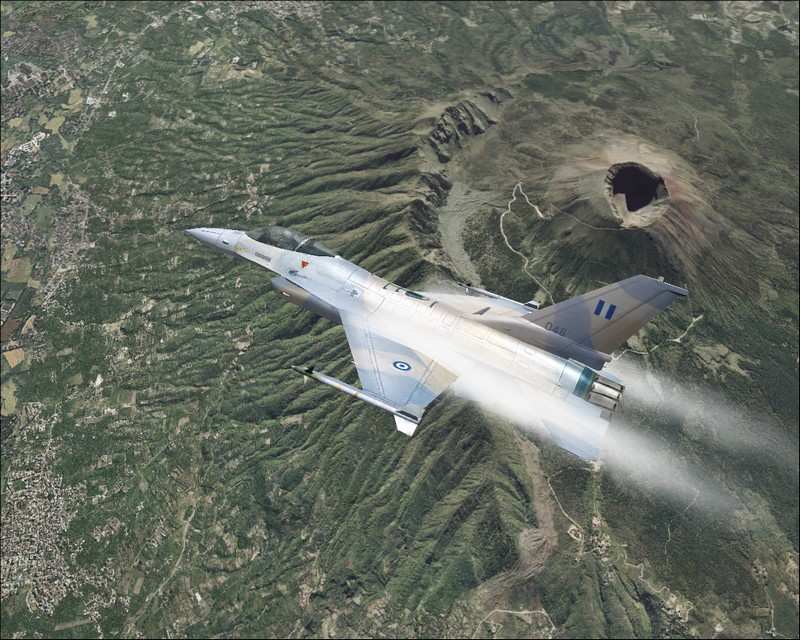
:) I don't think that the compression don't make aliasing on screeshot. For example look this screen taken by a friend (arrow), there is no aliasing and the weight of the screen is like yours +/- 75ko.
Image

but it's possible that the compression accentuate the aliasing effect  ;) on my old computer that whats happens the aliasing were discrete butwhen i reduce it it's were horrible >:(

So try to change parametrers or change of picture's software. In my opinion you will get better result with the anti aliasing in your graphic card. ;)
Last edited by Mirage 2000 on Thu May 18, 2006 1:59 am, edited 1 time in total.
User avatar
Mirage 2000
Ground hog
Ground hog
 
Posts: 18
Joined: Mon Mar 20, 2006 4:18 am

Re: Frnchy444's Rejects

Postby frnchy444 » Thu May 18, 2006 5:54 am

AA is on, but whenever the shot is into the light it makes it worse. How do i change the parameters on the card?
Image
User avatar
frnchy444
2nd Lieutenant
2nd Lieutenant
 
Posts: 273
Joined: Sun Mar 19, 2006 9:51 pm

Re: Frnchy444's Rejects

Postby haroldkip » Thu May 18, 2006 6:37 am

Nice shots there Frenchy! I especially like the last one with the blue light effects! Well done and I think you made a good choice. Good luck in the comp!
User avatar
haroldkip
Lieutenant Colonel
Lieutenant Colonel
 
Posts: 5906
Joined: Wed Apr 12, 2006 5:13 am
Location: Amsterdam, The Netherlands

Re: Frnchy444's Rejects

Postby Mirage 2000 » Thu May 18, 2006 7:07 am

:) the AA in fs is not very good. So you must unactive it, in fs9. then you go in ypur office, and in the right down corner you will have ati/nvidia symbol. It here that you select AA the anisotropic filter. That like this for an ati X300, and an 6800.

If you have an old graphic card you go in the office, properties, parameters, advance, and you must find them.

PS:the screen have been taken with a 9600pro ;)

;) good luck
Last edited by Mirage 2000 on Thu May 18, 2006 7:09 am, edited 1 time in total.
User avatar
Mirage 2000
Ground hog
Ground hog
 
Posts: 18
Joined: Mon Mar 20, 2006 4:18 am


Return to Simulation Screenshots Showcase

Who is online

Users browsing this forum: No registered users and 630 guests