Nuke Capture (Fixed)

Flight Simulation Screenshots displaying your Flight Simulation Experience. MSFS, FSX, Prepar3D, XPlane and other Flight Simulators. Focus is your Flight Simulator Experience. Please upload to Simviation (Button at top right)

Re: Nuke Capture

Postby francsal » Wed Mar 08, 2006 1:38 pm

Well, setting the file size apart, how about resizing, compressing and posting the pics? The title looks interesting enough...
****X-Plane 12 / MSFS2020/2024**** Ryzen 5 9600X, RX 9070, 32GB RAM ****
User avatar
francsal
Captain
Captain
 
Posts: 724
Joined: Thu Jan 15, 2004 3:58 pm
Location: Guatemala

Re: Nuke Capture

Postby Radopilot » Wed Mar 08, 2006 2:00 pm

Well i need some help on compressing in IrfanView....*hint hint*
Proud iPod Touch Owner, 1.5 Hours Real World Piloting Time
User avatar
Radopilot
1st Lieutenant
1st Lieutenant
 
Posts: 391
Joined: Mon Jan 09, 2006 7:33 pm
Location: The US of A.

Re: Nuke Capture

Postby TSC. » Wed Mar 08, 2006 2:04 pm

Well i need some help on compressing in IrfanView....*hint hint*

Go to 'Image' -> 'Re-size/Resample' -> change width to 800 pixels -> 'Save As'

Or just press Ctrl + R as a shortcut to the re-size window.

Cheers,

TSC.
Image

'Only two things are infinite.......The Universe and Human stupidity........and I'm not too sure about the Universe' - Einstein
User avatar
TSC.
Major
Major
 
Posts: 4273
Joined: Wed Nov 03, 2004 11:11 am
Location: Torquay, Devon, England.

Re: Nuke Capture

Postby Radopilot » Wed Mar 08, 2006 2:08 pm

Ive known how to resize pictures but i need help on making the pictures filesize smaller so i can save myself before i get banned for being portrayed as a rulebreaker. :P

Proud iPod Touch Owner, 1.5 Hours Real World Piloting Time
User avatar
Radopilot
1st Lieutenant
1st Lieutenant
 
Posts: 391
Joined: Mon Jan 09, 2006 7:33 pm
Location: The US of A.

Re: Nuke Capture

Postby TSC. » Wed Mar 08, 2006 2:24 pm

Sorry Radopilot,

I see your problem now - that'll be me not reading things properly. I'm stumped as anything I save in Irfanview & re-size to 800 is fine in KB size - your pictures are even saved as jpg's - hopefully somebody more helpful will be along with a proper answer real soon.

Cheers,

TSC.
Image

'Only two things are infinite.......The Universe and Human stupidity........and I'm not too sure about the Universe' - Einstein
User avatar
TSC.
Major
Major
 
Posts: 4273
Joined: Wed Nov 03, 2004 11:11 am
Location: Torquay, Devon, England.

Re: Nuke Capture

Postby Souichiro » Wed Mar 08, 2006 2:28 pm

Ive known how to resize pictures but i need help on making the pictures filesize smaller so i can save myself before i get banned for being portrayed as a rulebreaker. :P



Sounds weird but it does help..

I once cropped out a piece of bmp wallpaper and resized it.... Enough I thought but nope.. I could have gotten it inside the limits but.... would have been small... The wallpaper was a bmp... I took a screenshot of the wallpaper and saved it as a jpg.. I then cropped out the piece again and was perfect!

So maybe take a screenshot of your pic and crop it out again...

Just an idea
Image
User avatar
Souichiro
Ground hog
Ground hog
 
Posts: 0
Joined: Tue Aug 28, 2007 11:34 am

Re: Nuke Capture

Postby Omag 2.0 » Wed Mar 08, 2006 3:12 pm

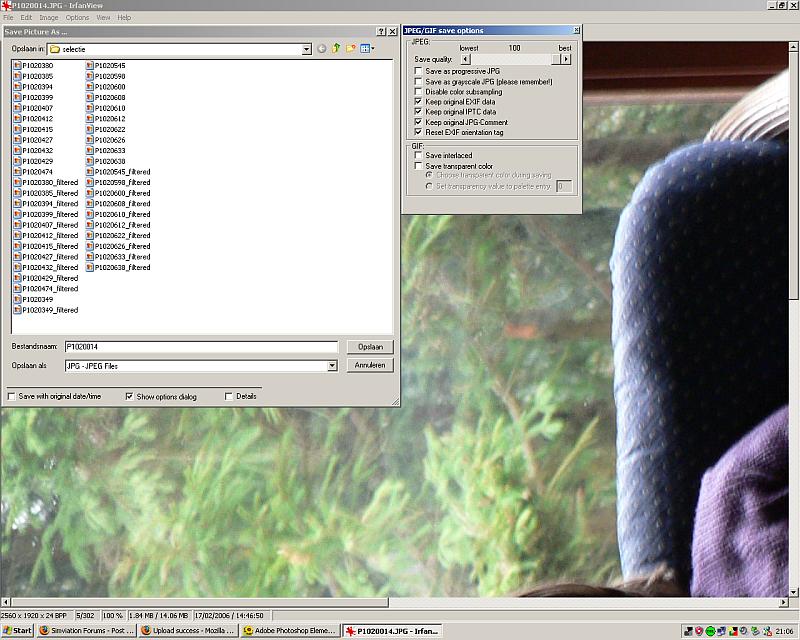
Ok, time to learn you guys some basics about the size! Open irfanview and a picture and resize it to 800 x 600

Now, go to file ( left hand upper corner) and choose safe as from the list...

You get this:

Image

Notice the little menu on the right hand side? It has a slider, allowing you to control the compression when saving. 100% means max. quality = large size.

Try setting it at 75% and save the shot. Now check the size of the saved picture... see anything different? The size is smaller now...

And that, my friends, is how we keep shots under 100 kb ...  ;D

Now, lowering the slider will lower the quality too. Just check if it's still ok, before you post it and go all - compression ruined it. And offcourse, 75% will not always be sufficient to go under 100 kb. Just lower it some more if it's still to big!

Have fun complying with the rules...  ;)

Omag
[center]
Image

Check my aviation-photo's at www.airliners.be

Or go straight to Omag's Album[/cent
User avatar
Omag 2.0
Lieutenant Colonel
Lieutenant Colonel
 
Posts: 9490
Joined: Tue Aug 05, 2003 6:43 am
Location: Somewhere, Belgium

Re: Nuke Capture (Fixed)

Postby Radopilot » Wed Mar 08, 2006 8:21 pm

alright, finally got the pictures fixed, how do they look?
Proud iPod Touch Owner, 1.5 Hours Real World Piloting Time
User avatar
Radopilot
1st Lieutenant
1st Lieutenant
 
Posts: 391
Joined: Mon Jan 09, 2006 7:33 pm
Location: The US of A.

Re: Nuke Capture (Fixed)

Postby A/SGT.Mav316 » Thu Mar 09, 2006 1:18 am

.................... ??? Where's the nuke? From the looks of things you should have been crying "Super 61 one is going down......Super 61 is going down"  ;D
Its only in your mind, strong mind, strong soul and nobody can take that from you!
User avatar
A/SGT.Mav316
Major
Major
 
Posts: 1325
Joined: Sun Feb 02, 2003 12:31 am
Location: New York City

Re: Nuke Capture (Fixed)

Postby glennlcasey » Thu Mar 09, 2006 5:05 am
for some reason, i was expecting to see a B-29 silhouetted against a mushroom cloud,

nonetheless, good shots
Go Do that VooDOo that You Do So Well!

Image
glennlcasey
Captain
Captain
 
Posts: 887
Joined: Sat Jul 16, 2005 3:29 pm
Location: Perth Western Australia

Re: Nuke Capture (Fixed)

Postby Wingo » Thu Mar 09, 2006 5:08 am

Nice shots, I love the storyline. The craft isn't too bad either, but I'm not a fan of rotors.
Image
User avatar
Wingo
Major
Major
 
Posts: 1174
Joined: Thu Jun 23, 2005 2:12 am
Location: YSBK. Back where I belong.

Re: Nuke Capture (Fixed)

Postby krigl » Thu Mar 09, 2006 6:06 am

Finally it's here - interesting set, is the second to last one from FS? Are the men walking out of the chopper (and towards) an animation?
If you're bored of an evening - and you'll have to be - you can check out my screenshot gallery: Kriglsflightsimscreens...HERE

[center][img]http://www.simviation.com/phpup
krigl
Lieutenant Colonel
Lieutenant Colonel
 
Posts: 8234
Joined: Fri Jun 10, 2005 3:47 am

Re: Nuke Capture (Fixed)

Postby Mike.. » Thu Mar 09, 2006 9:25 am

The first shot reminded me of the carrier ops map from BF2. ( *thinks to himself* about BF2....hmm. wonder if that Euro booster pak is out yet that was supposed to be released in feburary). Great shots. ;D
Image
User avatar
Mike..
Major
Major
 
Posts: 1687
Joined: Wed Feb 01, 2006 1:29 pm
Location: Fayetteville NC

Re: Nuke Capture (Fixed)

Postby flyboy 28 » Thu Mar 09, 2006 3:05 pm

Hmm. I saw a package like this, but it was payware.. ?
User avatar
flyboy 28
Colonel
Colonel
 
Posts: 10266
Joined: Thu Jun 12, 2003 4:01 pm
Location: Jacksonville, FL

Re: Nuke Capture (Fixed)

Postby Radopilot » Thu Mar 09, 2006 10:53 pm

The scenery is from Planesimulation, its membershipware. Also the soldiers are in the scenery, just put the heli behind them ;)

Also, anyone round here seen a A380 with a VC? Thanks
Cheers
John
Proud iPod Touch Owner, 1.5 Hours Real World Piloting Time
User avatar
Radopilot
1st Lieutenant
1st Lieutenant
 
Posts: 391
Joined: Mon Jan 09, 2006 7:33 pm
Location: The US of A.

Previous

Return to Simulation Screenshots Showcase

Who is online

Users browsing this forum: No registered users and 615 guests