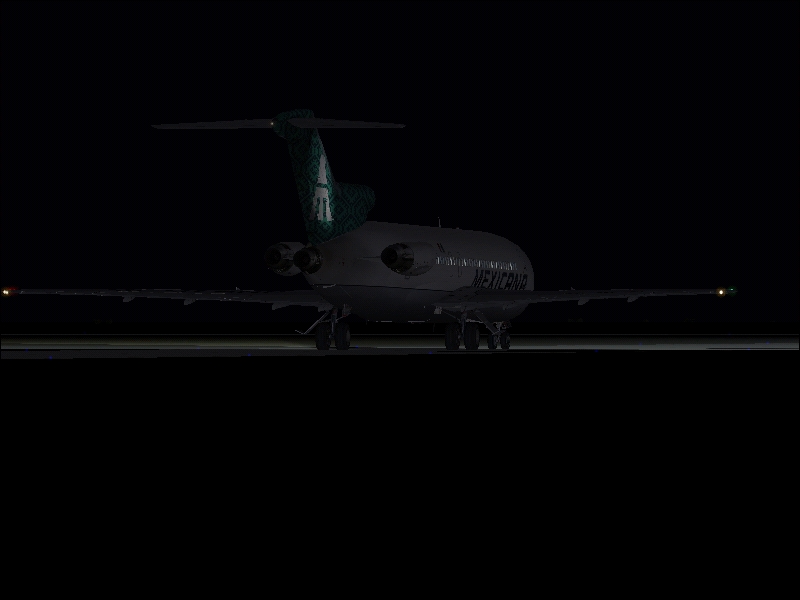
Mexicana

Flight Simulation Screenshots displaying your Flight Simulation Experience. MSFS, FSX, Prepar3D, XPlane and other Flight Simulators. Focus is your Flight Simulator Experience. Please upload to Simviation (Button at top right)

Mexicana

Postby Radopilot » Tue Mar 07, 2006 9:22 pm

Image
Image
*prays for the wrath of ozzy not to fall on him*
P.S. Yes I know they are all too dark

Last edited by Radopilot on Tue Mar 07, 2006 9:22 pm, edited 1 time in total.
Proud iPod Touch Owner, 1.5 Hours Real World Piloting Time
User avatar
Radopilot
1st Lieutenant
1st Lieutenant
 
Posts: 391
Joined: Mon Jan 09, 2006 7:33 pm
Location: The US of A.

Re: Mexicana

Postby BFMF » Tue Mar 07, 2006 11:46 pm

The first screenshot is 217KB :o
BFMF
Colonel
Colonel
 
Posts: 16266
Joined: Mon Feb 25, 2002 6:06 pm
Location: Pacific Northwest

Re: Mexicana

Postby krigl » Wed Mar 08, 2006 5:02 am

It must take real skill and effort to make an almost completely black shot come out at 217kb, I'd imagine 40kb max on 100% quality.

(Don't usually bother about such things but read Esselbach's post)

I congratulate you Radopilot on this difficult-to-pull-off achievement, and no doubt Ozzy will be along shortly to do the same  :)
If you're bored of an evening - and you'll have to be - you can check out my screenshot gallery: Kriglsflightsimscreens...HERE

[center][img]http://www.simviation.com/phpup
krigl
Lieutenant Colonel
Lieutenant Colonel
 
Posts: 8234
Joined: Fri Jun 10, 2005 3:47 am

Re: Mexicana

Postby Falcon500 » Wed Mar 08, 2006 8:58 am

[img]
P.S. Yes I know they are all too dark


BUT!!!!!!!!!!! did you know that your shots are quite dark, i demand thee make thee nighttime a bit brighter.

:P

Cool plane, and country ;)
What do I do you ask? I struggle! Then destroy! Then try to put back together what I just broke on accident.....


                       The GMax effect[img]http://ww
User avatar
Falcon500
Major
Major
 
Posts: 1021
Joined: Tue Mar 22, 2005 11:00 pm
Location: Northern Michigan, USA

Re: Mexicana

Postby BFMF » Wed Mar 08, 2006 1:52 pm

It must take real skill and effort to make an almost completely black shot come out at 217kb, I'd imagine 40kb max on 100% quality.


And what I don't get is that he was just lectured the other day for posting screenshots that were well over the limit in his 'Nuke Capture' thread, and yet he still continues to break the rules ::)
BFMF
Colonel
Colonel
 
Posts: 16266
Joined: Mon Feb 25, 2002 6:06 pm
Location: Pacific Northwest

Re: Mexicana

Postby Cobra » Wed Mar 08, 2006 2:02 pm

To be fair, some editing programs dont tell you what size the images have been saved as when u JPEG em' , so it could be something like that!

Or just uploading the wrong image, i've done it many a time!
JAA/FAA PPL + Night Rating!


Quad Core 6600 2.4GHz ~ nVidia 8800GTX ~ 4GB DDR2 RAM 800MHz ~ Sound Blaster X-Fi 7.1 ~ Samsung Pebble 20" ~ Logitech 5.1 Surround Sound


[center][img]http://www.simvi
User avatar
Cobra
Major
Major
 
Posts: 1751
Joined: Sun Jan 01, 2006 5:16 pm
Location: Bournemouth, England

Re: Mexicana

Postby Radopilot » Wed Mar 08, 2006 2:05 pm

To be fair, some editing programs dont tell you what size the images have been saved as when u JPEG em' , so it could be something like that!

Or just uploading the wrong image, i've done it many a time!

Thank you Cobra, someone now understands whats going on. IrfanView doesnt give me the features to save my sorry arse from the admins  :P ::)
Proud iPod Touch Owner, 1.5 Hours Real World Piloting Time
User avatar
Radopilot
1st Lieutenant
1st Lieutenant
 
Posts: 391
Joined: Mon Jan 09, 2006 7:33 pm
Location: The US of A.

Re: Mexicana

Postby cspyro21 » Wed Mar 08, 2006 2:10 pm

To be fair, some editing programs dont tell you what size the images have been saved as when u JPEG em' , so it could be something like that!


Thank you Cobra, someone now understands whats going on. IrfanView doesnt give me the features to save my sorry arse from the admins :P ::)


Cobra, Radopilot, Irfanview does say what size the images have been saved at when saved as a JPEG:

Image

All you gotta do is save your pic at 100% JPEG quality, take note of the size, and reduce the JPEG quality and save to get the image under 100kb. ;)
User avatar
cspyro21
Major
Major
 
Posts: 4987
Joined: Sun Aug 28, 2005 6:11 am

Re: Mexicana

Postby Radopilot » Wed Mar 08, 2006 2:21 pm

Ah thanks my head no longer has a bounty on it ;) Thanks a bunch!

Cheers
John
Proud iPod Touch Owner, 1.5 Hours Real World Piloting Time
User avatar
Radopilot
1st Lieutenant
1st Lieutenant
 
Posts: 391
Joined: Mon Jan 09, 2006 7:33 pm
Location: The US of A.


Return to Simulation Screenshots Showcase

Who is online

Users browsing this forum: No registered users and 562 guests