whats with these textures

Flight Simulation Screenshots displaying your Flight Simulation Experience. MSFS, FSX, Prepar3D, XPlane and other Flight Simulators. Focus is your Flight Simulator Experience. Please upload to Simviation (Button at top right)

whats with these textures

Postby A/SGT.Mav316 » Fri Jan 27, 2006 12:23 am

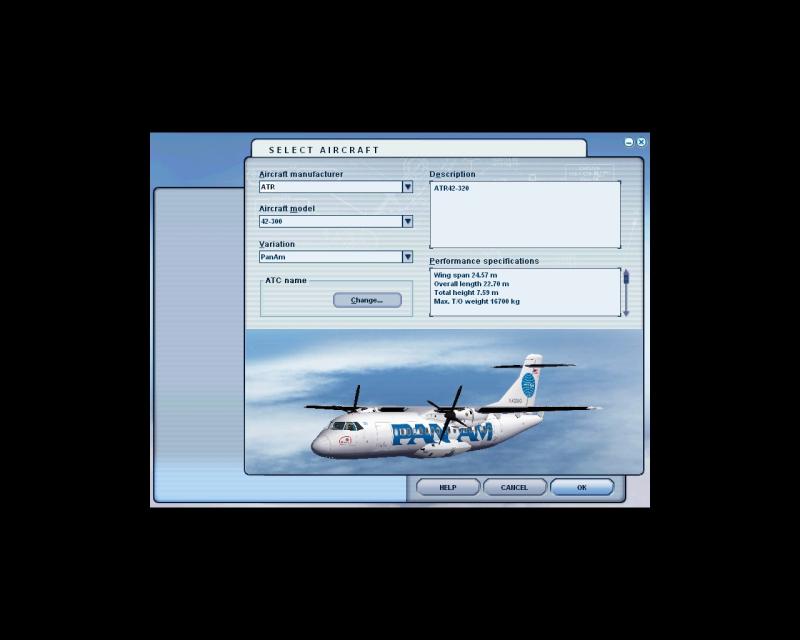
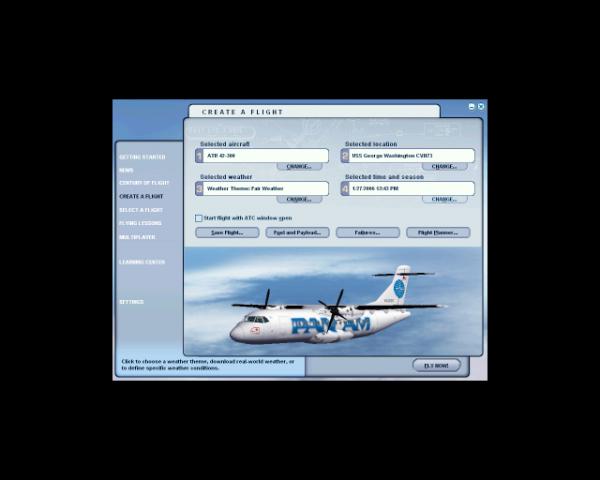
this ATR 42-700 in PAN AM skin looked so sharp and then I notice the textures got blurry. Why does this occur, is my graphics card becoming defective?


Image
                               before
Image
                                after

when I look at the aircraft in the directory its pic looks sharp, but after I select it I get these blurry textures. Don't know if you notice the difference.

is there a way to refresh the textures on an aircraft.

Its only in your mind, strong mind, strong soul and nobody can take that from you!
User avatar
A/SGT.Mav316
Major
Major
 
Posts: 1325
Joined: Sun Feb 02, 2003 12:31 am
Location: New York City

Re: whats with these textures

Postby Lazerbeak » Fri Jan 27, 2006 12:29 am

I think it's probably due to mip-maps on the textures. The same thing happened with my 737 Janet repaint. Once you get it in-game, it should be fine, though it may get blurry from time to time (after pausing, changing views, etc.). I've found that if it gets blurry in-game, zooming in real close and then zooming back out fixes it.

A better, more permanent fix can be done by modifying the textures. If you have DTXBmp, you can open the texture files and un-check the "Inlcude mipmaps when saving" option, then just re-save the textures. It worked on my repaint, which now has prefectly crisp textures.

Note that I could be entirely wrong on this, so take what I say with a grain of salt.
Image

The proletarians of the world have nothing to lose but their chains. They have a world to win. WORKERS OF THE WORLD, UNITE!
User avatar
Lazerbeak
Captain
Captain
 
Posts: 703
Joined: Tue Dec 20, 2005 10:21 pm
Location: A house.

Re: whats with these textures

Postby A/SGT.Mav316 » Fri Jan 27, 2006 12:45 am

thanks for the suggestion lazerbeak. I just discovered that changing views part you mentioned did remedy the situation. When I load the plane the textures went blurry, then when I cycled the views it got sharp again.

But whenever I press the alt key to do anything in game play the textures go blurry again. So I cycled the views again and again the textures got sharp again. I don't have that program you mentioned. But I rather keep it as is as to not disturb something I haven't a single clue about.

again thanks lazerbeak.  ;)
Its only in your mind, strong mind, strong soul and nobody can take that from you!
User avatar
A/SGT.Mav316
Major
Major
 
Posts: 1325
Joined: Sun Feb 02, 2003 12:31 am
Location: New York City

Re: whats with these textures

Postby Hai Perso Coyone? » Fri Jan 27, 2006 2:34 pm

No need to cycle the views...sometimes you can just zoom fully in...and then back out...usually works out... ;)
User avatar
Hai Perso Coyone?
Ground hog
Ground hog
 
Posts: 0
Joined: Fri Jan 12, 2007 7:31 pm
Location: Rome, Italy

Re: whats with these textures

Postby chomp_rock » Fri Jan 27, 2006 5:33 pm

Just remove the mipmaps, they're quite useless in FS as they degrade the image quality beyond any marginal FPS gain they can help deliver.
AMD Athlon 64 3700+
GeForce FX5200 256Mb
1GB DDR400 DC
Seagate 500Gb SATA-300 HDD
Windows XP Professional X64 Edition


That's right, I'm now using an AMD! I decided to give them another try and they
User avatar
chomp_rock
Major
Major
 
Posts: 2411
Joined: Wed Jul 10, 2002 2:23 pm

Re: whats with these textures

Postby A/SGT.Mav316 » Fri Jan 27, 2006 6:48 pm

Just remove the mipmaps, they're quite useless in FS as they degrade the image quality beyond any marginal FPS gain they can help deliver.


I would if I knew how to? But as complicated as Lazerbeak makes it sound. It sounds like something I don't want to mess with.
Its only in your mind, strong mind, strong soul and nobody can take that from you!
User avatar
A/SGT.Mav316
Major
Major
 
Posts: 1325
Joined: Sun Feb 02, 2003 12:31 am
Location: New York City

Re: whats with these textures

Postby chomp_rock » Fri Jan 27, 2006 6:55 pm

Well... all you have to do is open the .bmp files with DXTbmp and untick the 'include mipmaps when saving' box then save them (I always use DXT3, you can use 32bit too but it makes the files about 4 times as large with very little quality gain, bloody pointless IMO).  It's just as lazerbeak says, and it isn't complicated, less you be a simpleton ;D.
Last edited by chomp_rock on Fri Jan 27, 2006 6:59 pm, edited 1 time in total.
AMD Athlon 64 3700+
GeForce FX5200 256Mb
1GB DDR400 DC
Seagate 500Gb SATA-300 HDD
Windows XP Professional X64 Edition


That's right, I'm now using an AMD! I decided to give them another try and they
User avatar
chomp_rock
Major
Major
 
Posts: 2411
Joined: Wed Jul 10, 2002 2:23 pm

Re: whats with these textures

Postby Lazerbeak » Fri Jan 27, 2006 7:28 pm

Indeed, it's not complicated at all. It's as simple as unchecking a box and resaving. I like to be thorough, so I have a tendency to make things sound more complex than they are. In reality, it's the easiest thing in the world. :)
Image

The proletarians of the world have nothing to lose but their chains. They have a world to win. WORKERS OF THE WORLD, UNITE!
User avatar
Lazerbeak
Captain
Captain
 
Posts: 703
Joined: Tue Dec 20, 2005 10:21 pm
Location: A house.

Re: whats with these textures

Postby A/SGT.Mav316 » Fri Jan 27, 2006 10:04 pm

where do iget dxtbmp?
Its only in your mind, strong mind, strong soul and nobody can take that from you!
User avatar
A/SGT.Mav316
Major
Major
 
Posts: 1325
Joined: Sun Feb 02, 2003 12:31 am
Location: New York City


Return to Simulation Screenshots Showcase

Who is online

Users browsing this forum: No registered users and 502 guests