
SPOT THE FLAW :|

Flight Simulation Screenshots displaying your Flight Simulation Experience. MSFS, FSX, Prepar3D, XPlane and other Flight Simulators. Focus is your Flight Simulator Experience. Please upload to Simviation (Button at top right)

SPOT THE FLAW :|

Postby SkyNoz » Mon Jan 23, 2006 8:20 pm

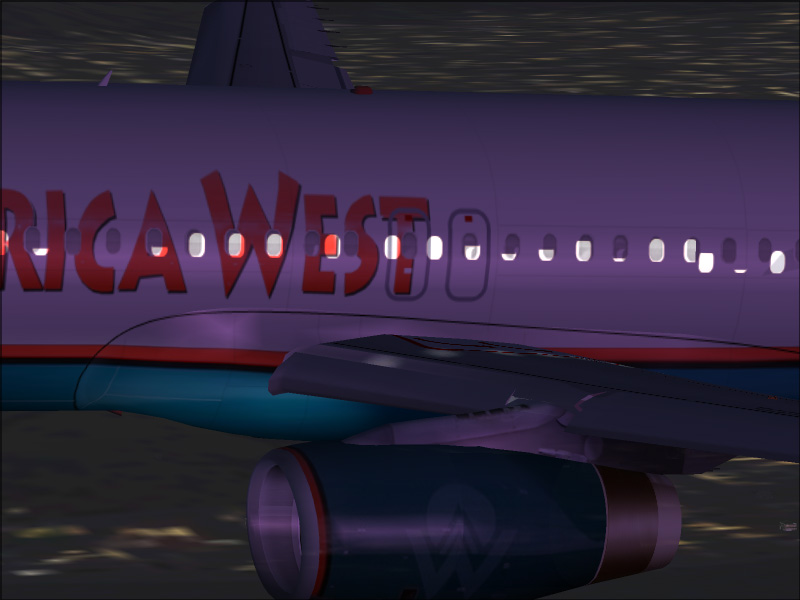
Can you spot the flaw with this aircraft?

Image

;D
Project Kfir!
Image
My Gmax page
Aircraft modeler/Aircarft painter

Aye the key!
[GeneralEngineData]
//0=Piston, 1=Jet, 2=N
SkyNoz
Major
Major
 
Posts: 1703
Joined: Sat Aug 06, 2005 11:02 am

Re: SPOT THE FLAW :|

Postby Woodlouse2002 » Mon Jan 23, 2006 8:30 pm

It would seem the light textures are out of sync with the aircraft textures. :P
Woodlouse2002 PITA and BAR!!!!!!!!

Our Sovereign Lord the King chargeth and commandeth all persons, being assembled, immediately to disperse themselves, and peaceably to depart to their habitations, or to their lawful business, upon the pains c
User avatar
Woodlouse2002
Colonel
Colonel
 
Posts: 10369
Joined: Wed Feb 06, 2002 3:51 pm
Location: Cornwall, England

Re: SPOT THE FLAW :|

Postby tennm1980 » Mon Jan 23, 2006 9:00 pm

The passenger windows on the rear of the wing look a bit "off".
tennm1980
2nd Lieutenant
2nd Lieutenant
 
Posts: 100
Joined: Sun Jun 05, 2005 2:58 pm
Location: Bristol TN (KTRI)

Re: SPOT THE FLAW :|

Postby Katahu » Mon Jan 23, 2006 9:19 pm

I agree, the first thing I noticed were the light textures. They are either not properly sized or they are not properly aligned.
User avatar
Katahu
Lieutenant Colonel
Lieutenant Colonel
 
Posts: 5993
Joined: Mon Jul 22, 2002 10:29 pm

Re: SPOT THE FLAW :|

Postby SkyNoz » Mon Jan 23, 2006 9:32 pm

Close but not it.....This is something you really need to think on, It does have to do with the repaint though.  ;)
Project Kfir!
Image
My Gmax page
Aircraft modeler/Aircarft painter

Aye the key!
[GeneralEngineData]
//0=Piston, 1=Jet, 2=N
SkyNoz
Major
Major
 
Posts: 1703
Joined: Sat Aug 06, 2005 11:02 am

Re: SPOT THE FLAW :|

Postby GA_Pilot » Mon Jan 23, 2006 9:37 pm

The front half of the repaint doesnt line up with the back half....... ???
GA_Pilot
 

Re: SPOT THE FLAW :|

Postby SkyNoz » Mon Jan 23, 2006 9:38 pm

Okay, the clue is the engine check it out. ;)
Project Kfir!
Image
My Gmax page
Aircraft modeler/Aircarft painter

Aye the key!
[GeneralEngineData]
//0=Piston, 1=Jet, 2=N
SkyNoz
Major
Major
 
Posts: 1703
Joined: Sat Aug 06, 2005 11:02 am

Re: SPOT THE FLAW :|

Postby Jared » Mon Jan 23, 2006 9:38 pm

double doors eh?
User avatar
Jared
Lieutenant Colonel
Lieutenant Colonel
 
Posts: 9976
Joined: Sun Jul 13, 2003 11:18 am
Location: Uniontown, Ohio

Re: SPOT THE FLAW :|

Postby Katahu » Mon Jan 23, 2006 10:11 pm

The engine is partially transparent. It took a while for me to notice. Take a look at the blue paint near the exhaust. Notice an oval shape there? ::)
User avatar
Katahu
Lieutenant Colonel
Lieutenant Colonel
 
Posts: 5993
Joined: Mon Jul 22, 2002 10:29 pm

Re: SPOT THE FLAW :|

Postby Wind-Farmer » Mon Jan 23, 2006 10:18 pm

Yep the windows are messed, the engine is transparent, and the ground textures arent loaded, and no passengers in the plane, wing casts a shadown on the engine even though its nearly dark
Wind-Farmer
2nd Lieutenant
2nd Lieutenant
 
Posts: 128
Joined: Wed Dec 21, 2005 11:26 am
Location: Minnesota, USA

Re: SPOT THE FLAW :|

Postby Falcon500 » Mon Jan 23, 2006 10:27 pm
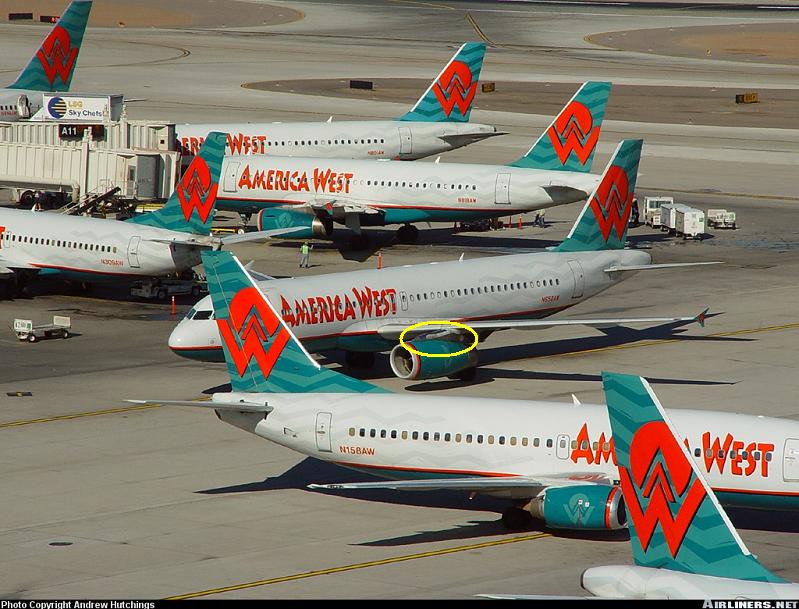
Good work Katahu! I was going to say the top of the engine mount wasnt painted right, before that i was going to say the engine meets the wing with a bunch 'o' holes  ;D.....

Looks like the Engine and the mounts their on are partially transparent.

and there is no squiggles <<<(technical term)  ::)

lol i had to google america west....
Image
What do I do you ask? I struggle! Then destroy! Then try to put back together what I just broke on accident.....


                       The GMax effect[img]http://ww
User avatar
Falcon500
Major
Major
 
Posts: 1021
Joined: Tue Mar 22, 2005 11:00 pm
Location: Northern Michigan, USA

Re: SPOT THE FLAW :|

Postby SkyNoz » Tue Jan 24, 2006 12:01 am

The engine is partially transparent. It took a while for me to notice. Take a look at the blue paint near the exhaust. Notice an oval shape there? ::)


Yessss winner Katahu, I should have noted that their was a flaw with Repaint. The repaint is the flaw, I don't  remember what's the cause of getting transperent textures on models, If I remeber off hand it was Alpha channel etc. ;D
Project Kfir!
Image
My Gmax page
Aircraft modeler/Aircarft painter

Aye the key!
[GeneralEngineData]
//0=Piston, 1=Jet, 2=N
SkyNoz
Major
Major
 
Posts: 1703
Joined: Sat Aug 06, 2005 11:02 am

Re: SPOT THE FLAW :|

Postby Katahu » Tue Jan 24, 2006 12:44 am

If the model doesn't have a light map, and the main texture has an alpha applied, then transparencies at night are innevitable.
User avatar
Katahu
Lieutenant Colonel
Lieutenant Colonel
 
Posts: 5993
Joined: Mon Jul 22, 2002 10:29 pm


Return to Simulation Screenshots Showcase

Who is online

Users browsing this forum: No registered users and 649 guests