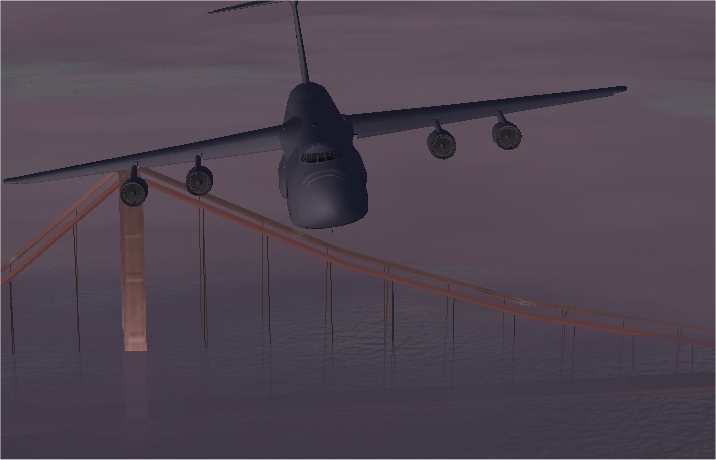
A bit of "Simulator Magic"..

Flight Simulation Screenshots displaying your Flight Simulation Experience. MSFS, FSX, Prepar3D, XPlane and other Flight Simulators. Focus is your Flight Simulator Experience. Please upload to Simviation (Button at top right)

A bit of "Simulator Magic"..

Postby flyboy 28 » Fri Jan 06, 2006 8:46 pm

It's nice to change time of day and weather. :)

That San Fran evening fog..
Image

This pic is based off of these two images;

http://archive.cs.uu.nl/pub/AIRCRAFT-IM ... Galaxy.jpg

http://www.clancyfaq.com/images/C-5%20In%20Flight.jpg

Enjoy. :)


James

-edit- Whoops! I just remembered I turned off AA to improve frames.. :P Never mind the jaggies. :)
Last edited by flyboy 28 on Fri Jan 06, 2006 8:49 pm, edited 1 time in total.
User avatar
flyboy 28
Colonel
Colonel
 
Posts: 10266
Joined: Thu Jun 12, 2003 4:01 pm
Location: Jacksonville, FL

Re: A bit of "Simulator Magic"..

Postby KDSM » Fri Jan 06, 2006 8:50 pm

Bridge looks like its engulfed by water
Image
User avatar
KDSM
Major
Major
 
Posts: 1326
Joined: Mon Jul 07, 2003 8:29 pm

Re: A bit of "Simulator Magic"..

Postby bbstackerf » Fri Jan 06, 2006 9:22 pm

Wow, can you say I. F. R.? ;D Nice adaptation of the pics,  Rim.
Keni ;)
The only thing you never want to hear a Navy ordnanceman say.
bbstackerf
1st Lieutenant
1st Lieutenant
 
Posts: 495
Joined: Wed Nov 16, 2005 6:57 pm
Location: Phoenix, AZ

Re: A bit of "Simulator Magic"..

Postby gijake » Fri Jan 06, 2006 9:23 pm

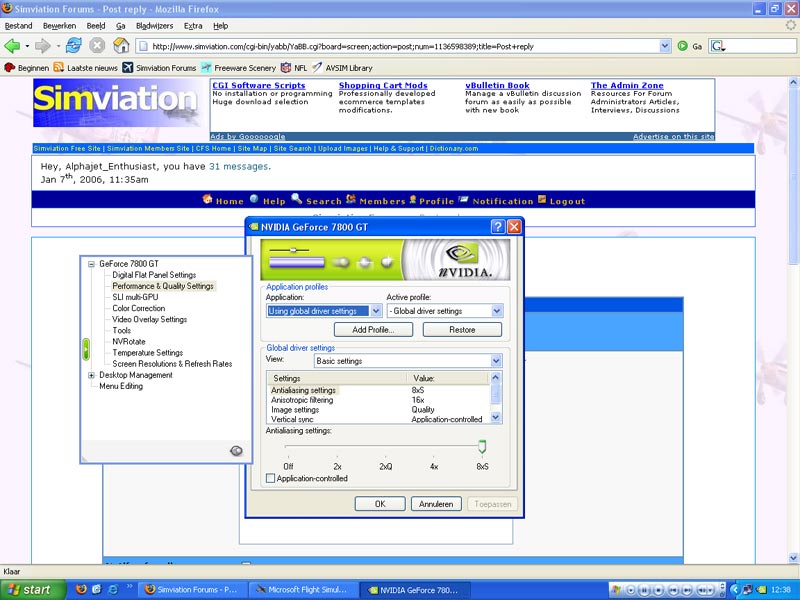
What is AA?
gijake
Major
Major
 
Posts: 1027
Joined: Sun Dec 18, 2005 12:04 pm

Re: A bit of "Simulator Magic"..

Postby BFMF » Fri Jan 06, 2006 9:29 pm

Anti-Aliasing ;)
BFMF
Colonel
Colonel
 
Posts: 16266
Joined: Mon Feb 25, 2002 6:06 pm
Location: Pacific Northwest

Re: A bit of "Simulator Magic"..

Postby gijake » Fri Jan 06, 2006 9:43 pm

And where can I turn that on?
gijake
Major
Major
 
Posts: 1027
Joined: Sun Dec 18, 2005 12:04 pm

Re: A bit of "Simulator Magic"..

Postby Alphajet_Enthusiast » Sat Jan 07, 2006 4:39 am

On your videocard (if it supports it):

Image

Also ingame you get that option but that really sucks it hardly makes a difference. Best to turn it on on your hardware.  ;)
Image
Macbook Pro | Nvidia Geforce 8600M GT | 2GB Ram | 2.6GHz Intel Core 2 Duo | Mac OSX 10.5 Leopard
User avatar
Alphajet_Enthusiast
Major
Major
 
Posts: 2858
Joined: Mon Jan 03, 2005 12:49 pm

Re: A bit of "Simulator Magic"..

Postby The_Joker_Flyer » Sat Jan 07, 2006 7:08 am

Cool shot.. has a sense of mystery!!!!  ;D ;D ;D ;)
Image

^Bigbunny^


The_Joker_Flyer
User avatar
The_Joker_Flyer
Major
Major
 
Posts: 1972
Joined: Sun Oct 16, 2005 5:24 am
Location: Europe

Re: A bit of "Simulator Magic"..

Postby simonmd » Sat Jan 07, 2006 2:47 pm

Does look like the bridge is under water, global warming eh?!
Image
This months's screenshot contest entry> http://www.simviation.com/cgi-bin/yabb2 ... 1197692798
User avatar
simonmd
Major
Major
 
Posts: 1847
Joined: Sun Nov 06, 2005 4:47 pm
Location: s wales, UK

Re: A bit of "Simulator Magic"..

Postby Marlin » Sat Jan 07, 2006 10:15 pm

??? ??? Global warming  ??? ???

Oh no lol
Marlin
1st Lieutenant
1st Lieutenant
 
Posts: 486
Joined: Thu Dec 30, 2004 1:14 am
Location: NEW Mexico


Return to Simulation Screenshots Showcase

Who is online

Users browsing this forum: No registered users and 612 guests