Quality shot?

Flight Simulation Screenshots displaying your Flight Simulation Experience. MSFS, FSX, Prepar3D, XPlane and other Flight Simulators. Focus is your Flight Simulator Experience. Please upload to Simviation (Button at top right)

Quality shot?

Postby Jimbo » Sun Sep 25, 2005 8:24 am

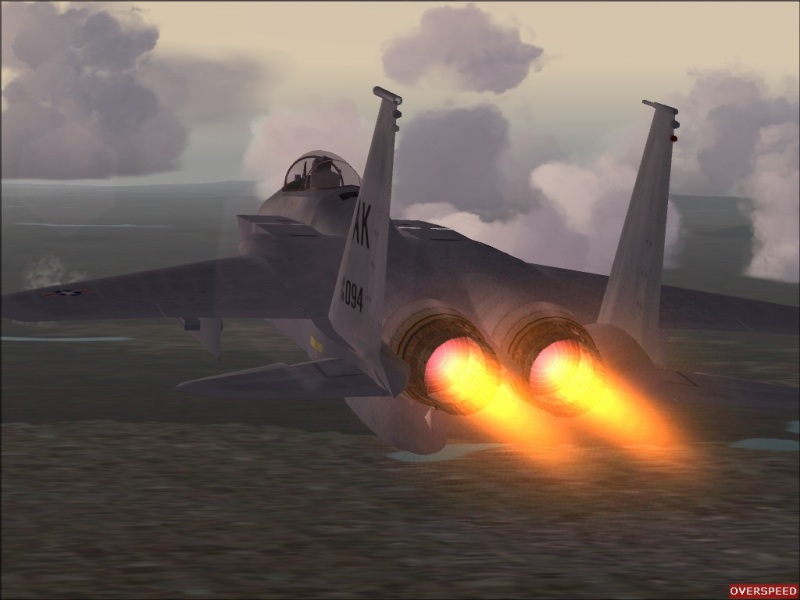
Just getting My Pc back to normal after a re-format so im testing out the quality to see if ive got my FS9 settings back to how i like em'.

Tell me what you think? Quality wise?

And a special thanks for Clipper for getting me this far, im sure he knows it but ive been real busy lately and hardly had any time for the actual sim.
So this one goes for you Clip! :)

Cheers for looking and COMMENTS very Welcome,

Image

(P.s overspeed warning on, forgot to edit)

Also there are no ground textures, i tried to make it so that the jet was travelling real fast, did i suceed?

Cheers

James 8)
Last edited by Jimbo on Sun Sep 25, 2005 8:25 am, edited 1 time in total.
..Jimbo's Tours, MORE info in the MULTIPLAYER SECTION
User avatar
Jimbo
Major
Major
 
Posts: 2387
Joined: Sun Jan 23, 2005 8:09 am
Location: HOMETOWN: Sheffield UK, Living: Perth, AU

Re: Quality shot?

Postby Hai Perso Coyone? » Sun Sep 25, 2005 8:31 am

Looks good ;) 8)
User avatar
Hai Perso Coyone?
Ground hog
Ground hog
 
Posts: 0
Joined: Fri Jan 12, 2007 7:31 pm
Location: Rome, Italy

Re: Quality shot?

Postby Tweek » Sun Sep 25, 2005 8:36 am

Jets always look like they are travelling fast when they have their afterburners lit :P
Tweek
 

Re: Quality shot?

Postby Sytse » Sun Sep 25, 2005 8:41 am

Looks fine to me... ;)
User avatar
Sytse
Major
Major
 
Posts: 3397
Joined: Fri Jun 24, 2005 5:26 am
Location: The Netherlands

Re: Quality shot?

Postby Jimbo » Sun Sep 25, 2005 8:46 am

Jets always look like they are travelling fast when they have their afterburners lit :P


I was talking about the ground textures.
..Jimbo's Tours, MORE info in the MULTIPLAYER SECTION
User avatar
Jimbo
Major
Major
 
Posts: 2387
Joined: Sun Jan 23, 2005 8:09 am
Location: HOMETOWN: Sheffield UK, Living: Perth, AU

Re: Quality shot?

Postby Tweek » Sun Sep 25, 2005 8:53 am

Well, the ground textures ideally have to be blurred (in a certain direction) when signifying movement, which is an almost impossible task without the screenshot being edited. I think what the lower texture size helps to do, is focus the attention on the a/c instead of the ground rather than show speed. Nice shot anyway :)
Tweek
 

Re: Quality shot?

Postby Clipper » Sun Sep 25, 2005 2:00 pm

Yo Jimbo! The shot looks great. Jaggies are non existant,
plane looks smooth, afterburner color is great. I've never been a big fan of "lens flare" though. As you can see, it creates a shadowy or blotchy look to the image where it hits. My recommendation would be to turn it off permanantly. Ground textures are always a bitch to get realistic, although not impossible. (See Lemoncats' comp shot this month). Other comment would be to crop out any red messages (overspeed) etc..Otherwise looking good Jimbo.
Last edited by Clipper on Sun Sep 25, 2005 2:01 pm, edited 1 time in total.
Image
User avatar
Clipper
Global Moderator
Global Moderator
 
Posts: 8420
Joined: Tue Aug 23, 2005 5:40 am

Re: Quality shot?

Postby beaky » Sun Sep 25, 2005 5:15 pm

Looking good, jim, but ditto about the lens flare... I think it usually looks silly. Maybe if it's off-centr against the sky, it'll give you that "real-life photo" look, but most of the time... eh.
Image
User avatar
beaky
Global Moderator
Global Moderator
 
Posts: 12877
Joined: Thu Dec 16, 2004 8:00 am
Location: Shenandoah, PA USA

Re: Quality shot?

Postby Souichiro » Sun Sep 25, 2005 5:18 pm

Imho the ground textures like that do not add anything to the sense of speed. They just look well not loaded. If you want a sensation of speed Incorporate rain or snow in your shot that really helps.
Image
User avatar
Souichiro
Ground hog
Ground hog
 
Posts: 0
Joined: Tue Aug 28, 2007 11:34 am


Return to Simulation Screenshots Showcase

Who is online

Users browsing this forum: No registered users and 668 guests