Where has my beautiful FS9 gone?

Flight Simulation Screenshots displaying your Flight Simulation Experience. MSFS, FSX, Prepar3D, XPlane and other Flight Simulators. Focus is your Flight Simulator Experience. Please upload to Simviation (Button at top right)

Where has my beautiful FS9 gone?

Postby Steve_Butka » Wed Sep 07, 2005 6:26 pm

Ok all,

I've narrowed things down.  It seems I can fly aicraft with lower quaslity textures but once I try and use anythin else (namely on anyhtin larger than an A318) it looks like this:
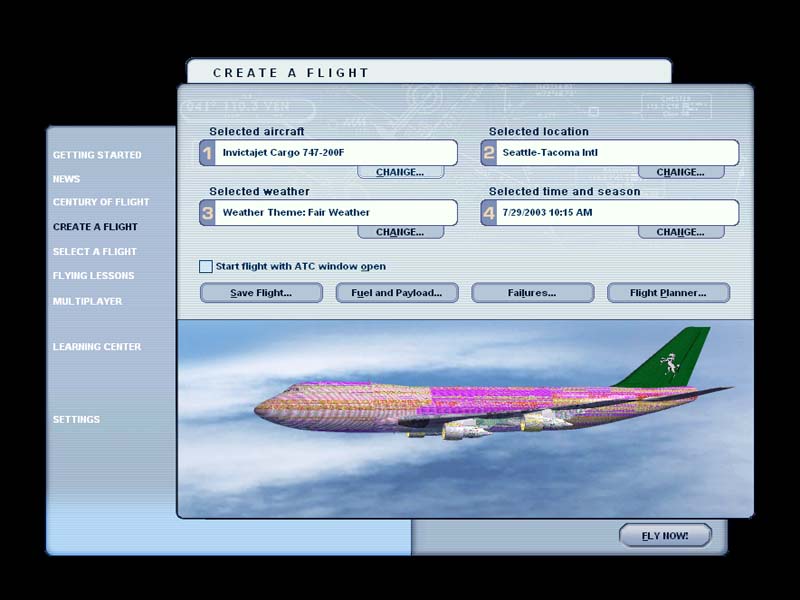
Image

And here are my settings.  frankly, I'm lost.  i uninstalled thje game and reinstalled it and for some reason it wound up coming back exactly how I left it-- all of my dl'ed aircraft, utilities, and all.... :-/
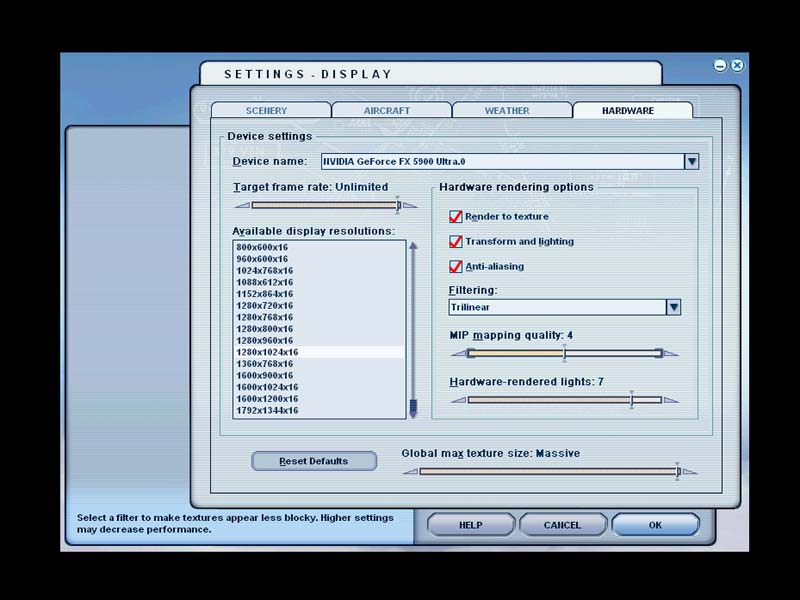
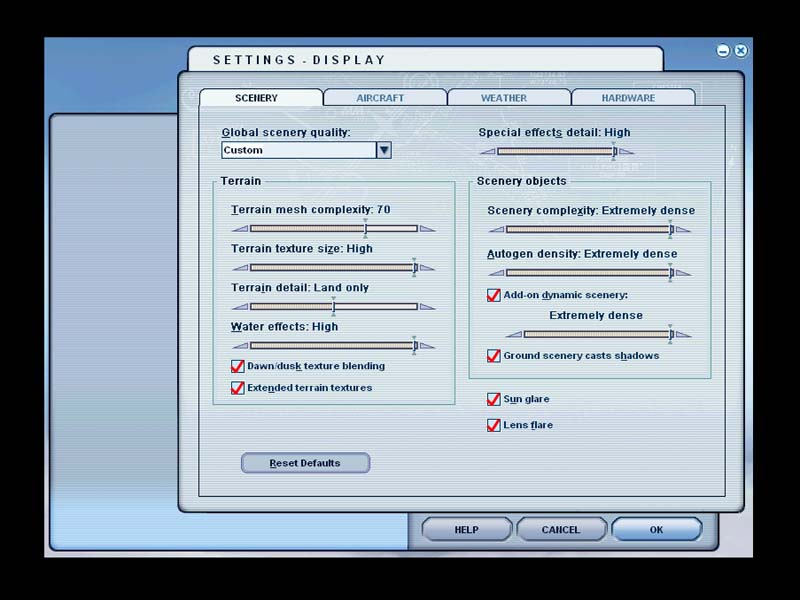
Image

Image

The card is a Nvidia 5900 Ultra and i've tried basically every performance setting.  Just can't figure out why these textures are completely freezing my game up just about every time I load it up.
User avatar
Steve_Butka
1st Lieutenant
1st Lieutenant
 
Posts: 370
Joined: Tue May 11, 2004 12:16 am
Location: Poughkeepsie, NY

Re: Where has my beautiful FS9 gone?

Postby jordonj » Wed Sep 07, 2005 7:00 pm

I hate to say this, but it looks like something in your computer hardware is dying...

Maybe your graphics card...
My first flight in a 172 on August 20, 2004
Image

Doing the right thing is more important than doing the thing right. (P. Drucker)

When all think alike, then no one i
User avatar
jordonj
Lieutenant Colonel
Lieutenant Colonel
 
Posts: 5314
Joined: Mon Jun 14, 2004 11:40 pm
Location: Michigan

Re: Where has my beautiful FS9 gone?

Postby Triple_7 » Wed Sep 07, 2005 8:32 pm

Could very well be the graphics card going bad...But have you tried uninstalling the card and just running it on the normal system settings???  It it runs fine then (texture wise not speed wise) but not when you put the card back in...then hope you have a warenty :-X
Triple_7
 

Re: Where has my beautiful FS9 gone?

Postby Steve_Butka » Wed Sep 07, 2005 10:05 pm

I hate to say this, but it looks like something in your computer hardware is dying...

Maybe your graphics card...


Here are my facts:

1-  The card is used, thus no warranty.  But it was not used very much.

2-  This only happens in FS9-- all other games run fine.

3-  This texture stuff only happens with some airplanes.  For example, Bill Lyons' Luscombe 8A runs fine.

4- I just had a new power supply put it and the card should be functioning normally.  The other games I play (Call of Duty, Battlefield 2, etc.) also pack a mean punch graphics wise-- if they work, why shouldn't this?

5-  I have not run the FS9 patch released by Microsoft awhile ago-- would that do anything?  I heard people had problems with the patch so I never downloaded-- what is yoour opinion of it?
User avatar
Steve_Butka
1st Lieutenant
1st Lieutenant
 
Posts: 370
Joined: Tue May 11, 2004 12:16 am
Location: Poughkeepsie, NY

Re: Where has my beautiful FS9 gone?

Postby jordonj » Wed Sep 07, 2005 10:12 pm

Well, if the patch doesn't work, you're not much worse off than you are now...

What card is this again (give brand name as well).

Maybe it doesn't like 32-bit or DXT3 textures...
My first flight in a 172 on August 20, 2004
Image

Doing the right thing is more important than doing the thing right. (P. Drucker)

When all think alike, then no one i
User avatar
jordonj
Lieutenant Colonel
Lieutenant Colonel
 
Posts: 5314
Joined: Mon Jun 14, 2004 11:40 pm
Location: Michigan

Re: Where has my beautiful FS9 gone?

Postby Steve_Butka » Wed Sep 07, 2005 11:39 pm

Well, if the patch doesn't work, you're not much worse off than you are now...

What card is this again (give brand name as well).

Maybe it doesn't like 32-bit or DXT3 textures...


Nvidia 5900 Ultra
User avatar
Steve_Butka
1st Lieutenant
1st Lieutenant
 
Posts: 370
Joined: Tue May 11, 2004 12:16 am
Location: Poughkeepsie, NY

Re: Where has my beautiful FS9 gone?

Postby Carlo » Thu Sep 08, 2005 12:46 am

I hate to say this, but it looks like something in your computer hardware is dying...

Maybe your graphics card...


If your graphics card was dying, the rest of the screen would be messed up too, not only the aircraft. Is this problem only in FS or does it happen in other programs too?

Crash ;)
Carlo
 

Re: Where has my beautiful FS9 gone?

Postby Steve_Butka » Thu Sep 08, 2005 12:50 am


If your graphics card was dying, the rest of the screen would be messed up too, not only the aircraft. Is this problem only in FS or does it happen in other programs too?

Crash ;)


Just in Fs, and its not really a crash.  it's just....the screen freezes and goes ahead a single frame once every 20 second or so....at it's fastest.
User avatar
Steve_Butka
1st Lieutenant
1st Lieutenant
 
Posts: 370
Joined: Tue May 11, 2004 12:16 am
Location: Poughkeepsie, NY

Re: Where has my beautiful FS9 gone?

Postby Carlo » Thu Sep 08, 2005 1:49 am

If it freezes and you have a framerate of 1 per 20 seconds, it looks like there is something wrong with your memory. I assume you have enough memory on your motherboard and that it is ok. (It runs FS, right?). However there might be a problem with the memory on your graphics card. The card uses only little of it for simple things, like backgrounds or windows, but has to use a lot of it for complicated textures, like big aircraft with a lot of colours. So might that be the problem?

Since you say, you buy the card second hand did you see it work before you buy it and was this the reason it was sold? Other games work fine, but do they demand so much graphics power as FS does?

Crash ;)
Last edited by Carlo on Thu Sep 08, 2005 1:49 am, edited 1 time in total.
Carlo
 

Re: Where has my beautiful FS9 gone?

Postby Medevac71 » Thu Sep 08, 2005 9:22 am

are these textures on every aircraft ??  i have one on a BO-105 (i call it Aurora *g*), it was a mistake in the Imagetool
User avatar
Medevac71
1st Lieutenant
1st Lieutenant
 
Posts: 320
Joined: Mon Jul 25, 2005 7:58 am
Location: Schwelm, NRW, Germany

Re: Where has my beautiful FS9 gone?

Postby Clipper » Thu Sep 08, 2005 12:06 pm

This is a shot in the dark, but try re-installing FS9, then turn off anti-aliasing in the games settings, use your vid card settings for aa. No guarantees, but a fresh install may help. :)
Image
User avatar
Clipper
Global Moderator
Global Moderator
 
Posts: 8420
Joined: Tue Aug 23, 2005 5:40 am

Re: Where has my beautiful FS9 gone?

Postby CODY614 » Thu Sep 08, 2005 12:20 pm

Does it really say "16 bit" next to the 1280x1024 in the Display settings???????
I thought it had to be 32 bit??????
Commodore 64
210 kb Hard Drive
Image
CODY614
Captain
Captain
 
Posts: 579
Joined: Mon Aug 26, 2002 5:55 am

Re: Where has my beautiful FS9 gone?

Postby Hagar » Thu Sep 08, 2005 12:23 pm

Steve. I haven't been following this problem so don't know the full details. Just one point that nobody seems to have picked up on.

[quote]frankly, I'm lost.
Last edited by Hagar on Thu Sep 08, 2005 12:35 pm, edited 1 time in total.
Image

Founder & Sole Member - Grumpy's Over the Hill Club for Veteran Virtual Aviators
Member of the Fox Four Group
My Google Photos albums
My Flickr albums
User avatar
Hagar
Colonel
Colonel
 
Posts: 30869
Joined: Wed Jun 19, 2002 7:15 am
Location: Costa Geriatrica

Re: Where has my beautiful FS9 gone?

Postby ThatOnePerson » Thu Sep 08, 2005 12:51 pm

Try uninstalling and reinstalling the drivers,when my old card screwed up i did that and everything went bsck to normal
Image

"Float like Pissed-Off Butterfly, Sting like Bad-Ass Bee."
ThatOnePerson
Major
Major
 
Posts: 1854
Joined: Sun Jun 05, 2005 11:42 pm
Location: The Blue Planet

Re: Where has my beautiful FS9 gone?

Postby lemoncat » Thu Sep 08, 2005 2:03 pm

sorry to hear about your problems steve...
i was going to suggest some of the points hagar as just posted..about deleting fs9 cfg ect...
i was also going to suggest what monkeys just posted....
rather than u/i the drivers and re/i them try some different ones...
make sure you have the latest directx driver installed too...
check to make sure your textures or texture on the offending aircraft aren't 24bit instead of 32 or dxt...
try changing from x16 to x32 in your display setting,,, also uncheck aa and run from your card settings instead like clipper mentioned..
i had something Similar awhile back when setting up duel monitors...it corrupted my drivers once that was fixed everything ran fine again..
other than all that's been suggested you could just go for the complete re install...at least by doing that your sure to find out one way or the other...
hope you get sorted real quick :) :)
User avatar
lemoncat
Major
Major
 
Posts: 4286
Joined: Fri Jan 02, 2004 6:41 pm
Location: earth


Return to Simulation Screenshots Showcase

Who is online

Users browsing this forum: No registered users and 468 guests