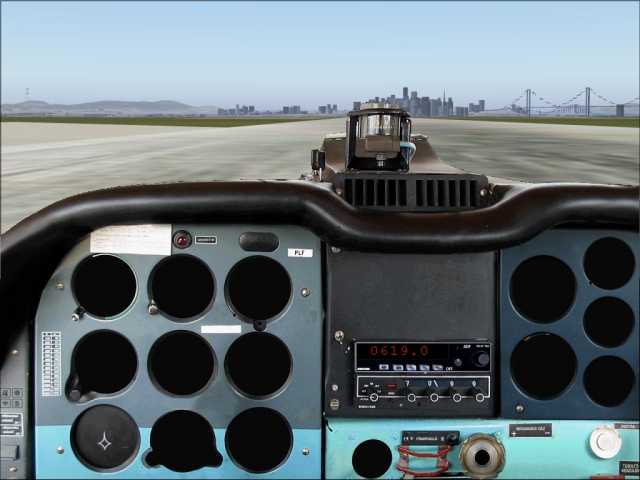
zlinz43choteborpraha1

Flight Simulation Screenshots displaying your Flight Simulation Experience. MSFS, FSX, Prepar3D, XPlane and other Flight Simulators. Focus is your Flight Simulator Experience. Please upload to Simviation (Button at top right)

Re: zlinz43choteborpraha1

Postby Ecko » Fri Aug 26, 2005 1:06 pm


I give up on this model.... :'(...!

I have downloaded the model from both SimV and Avsim and neither of them seem to contain any of the gauges which are listed in the Panel.cfg .... ::)...!

I have auto-installed them, and also extracted them to a seperate folder, and an examinination of the folders show no gauges... :o....!
The gauges listed in the Panel.cfg are special to this aircraft, and do not refer to the standard gauges in the main Gauges Folder...!

In most downloads the gauges appear in a seperate Gauge Folder, the contents of which are copied into the Main Gauge Folder.

There appears to be something different with this particular aircraft download.....?

This is all I get with the 2D panel, and the 3D panel only shows photographic, non-working gauges...>>>

Image

Very un-usual...!

Cheers...!

Paul.


Just download a file called FSsound.dll :) It comes with a lot of planes!
Last edited by Ecko on Fri Aug 26, 2005 1:07 pm, edited 1 time in total.
Image
User avatar
Ecko
Major
Major
 
Posts: 3684
Joined: Fri May 13, 2005 4:47 pm
Location: Denmark

Re: zlinz43choteborpraha1

Postby Fozzer » Fri Aug 26, 2005 1:38 pm


Just download a file called FSsound.dll :) It comes with a lot of planes!


Hi Ecko...!

FS 2004.
I removed that file from my Modules Folder ages ago...kept coming up with the report..."Incompatible Software...FSsound.dll"

All my other zillions of planes, (FS 2002/FS2004), work without it....
Adding it does nothing for the Zlin...still no gauges showing...!!

...bleedin' Zlins... :'(...!
LOL...!

Paul.

P.S. If you want a similar aircraft that really works...including all it's gauges....try this...>>>
"Luscombe Model 8A Package"...

http://www.simviation.com/fs2004props79.htm
Last edited by Fozzer on Fri Aug 26, 2005 1:48 pm, edited 1 time in total.
Win 8.1 64-bit. DX11. Advent Tower. Intel i7-3770 3.9 GHz 8-core. 8 GB System RAM. AMD Radeon HD 7700 1GB RAM. DVD ROM. 2 Terra Byte SATA Hard Drive. Philips 17" LCD Monitor. Saitek Cyborg X Fly-5 Joystick. ...and a Briggs and Stratton Petrol Lawn Mower.
User avatar
Fozzer
Colonel
Colonel
 
Posts: 27370
Joined: Thu Jan 31, 2002 3:11 pm
Location: Hereford. England. EGBS.

Re: zlinz43choteborpraha1

Postby Ecko » Fri Aug 26, 2005 2:30 pm

Thats pretty weird.. ???

I had the same problem as you, but I just downloaded the module, and everything worked.

BTW, what did you press, yes or no, when it said 'ERROR, potentially incompatible aircraft or software do you want to load it?'?

I assume thats the message you get..
Image
User avatar
Ecko
Major
Major
 
Posts: 3684
Joined: Fri May 13, 2005 4:47 pm
Location: Denmark

Re: zlinz43choteborpraha1

Postby JBr » Fri Aug 26, 2005 3:17 pm

kept coming up with the report..."Incompatible Software...FSsound.dll"


You can get rid of that message easily - just by adding two lines of text into your fs9.cfg.

P.S. If you want a similar aircraft that really works...including all it's gauges....try this...>>>
"Luscombe Model 8A Package"...


Well, this package works. XML gauges are present in your picture, that means the installer worked and installed the gauges. My guess is that the problem really is in the cva_z43_v1_0.gau - or in the fact that it needs FSSound.dll which you don't have installed, to be more specific.

Well... First, check if you have cva_z43_v1_0.gau in your FS gauge folder (eg. c:\Program Files\Microsoft Games\Flight Simulator 9\Gauges).  If it's there, then try to do what we suggest in our FAQ.

If it isn't there, then I don't know what could caused the installer to omit this file during the installation.

This would be the first case of something like this out of more than 5000 people who downloaded the model. All other people who complained about missing gauges had the gauge file properly installed and solved the problem using FSSound.dll...

Give it a try...
Jiri Brozek

CVA Design
User avatar
JBr
Ground hog
Ground hog
 
Posts: 21
Joined: Thu Jan 06, 2005 6:12 am

Re: zlinz43choteborpraha1

Postby Fozzer » Fri Aug 26, 2005 3:32 pm

Thats pretty weird.. ???

I had the same problem as you, but I just downloaded the module, and everything worked.

BTW, what did you press, yes or no, when it said 'ERROR, potentially incompatible aircraft or software do you want to load it?'?

I assume thats the message you get..


Hi Ecko...!

I pressed the button which said....

"...Fozzer. Remove the Zlin from your hangar, 'cos it's not worth all the grief...".

Sorted... ;)...!
LOL...!

Paul... 8)...!
Win 8.1 64-bit. DX11. Advent Tower. Intel i7-3770 3.9 GHz 8-core. 8 GB System RAM. AMD Radeon HD 7700 1GB RAM. DVD ROM. 2 Terra Byte SATA Hard Drive. Philips 17" LCD Monitor. Saitek Cyborg X Fly-5 Joystick. ...and a Briggs and Stratton Petrol Lawn Mower.
User avatar
Fozzer
Colonel
Colonel
 
Posts: 27370
Joined: Thu Jan 31, 2002 3:11 pm
Location: Hereford. England. EGBS.

Re: zlinz43choteborpraha1

Postby krigl » Fri Aug 26, 2005 3:43 pm

Hey Fozzer, I can see you've lost interest in the plane which is understandable with the trouble you're having but if you perform the following steps you'll save yourself some future grief with other great planes that will not function properly without FSSound.dll.

1. Download FSSound.dll from here http://pwdt.virtualskies.net/download/FSSound.dll
and put it in your modules file.

2. Add (copy and paste) this to your FS9.cfg:

[OLDMODULES]
fssound.dll=1

If you don't know where FS9.cfg is then this thread will tell you.
http://www.simviation.com/cgi-bin/yabb/ ... 1075346798

It will take in total about five minutes of your time and save you grief in the long run... The OldModules trick also works with other problematic dlls, apparently...

Cheers

Krigl :)
If you're bored of an evening - and you'll have to be - you can check out my screenshot gallery: Kriglsflightsimscreens...HERE

[center][img]http://www.simviation.com/phpup
krigl
Lieutenant Colonel
Lieutenant Colonel
 
Posts: 8234
Joined: Fri Jun 10, 2005 3:47 am

Re: zlinz43choteborpraha1

Postby krigl » Fri Aug 26, 2005 4:09 pm


Could you tell me which gauge is missing, pls? I think I can see all gauges that should be there in your pictures.


Aha, my mistake, checked the documentation and that gauge doesnt actually have any function...sorry... when I look over to the "right seat" in the VC I see two gauges which also seem not to have a function, guess
it's the same with them.

I do however have a problem with the artificial horizon not working, even with the converter (or "inverter" as shows when clicking on it in the VC) as well as the special gauge.cab in the gauges folder and the FSSound.dll sorted. I must say that I switched the converter on while in flight... perhaps that's the problem..

Well, anyway, I like the plane a lot, and if the AH doesn't work I'll just have to look out of the window... and avoid nasty banks of fog, darkness etc...
If you're bored of an evening - and you'll have to be - you can check out my screenshot gallery: Kriglsflightsimscreens...HERE

[center][img]http://www.simviation.com/phpup
krigl
Lieutenant Colonel
Lieutenant Colonel
 
Posts: 8234
Joined: Fri Jun 10, 2005 3:47 am

Re: zlinz43choteborpraha1

Postby JBr » Fri Aug 26, 2005 6:16 pm

when I look over to the "right seat" in the VC I see two gauges which also seem not to have a function, guess it's the same with them.


Yes, some things in the VC couldn't be done at this moment. But I hope we'll have everything clickable in the next release (what aircraft? we still haven't decided, but I hope it'll be Z-42 ;))

For the AH problem... Main switch, battery, generator, avionics, converter  ON (invertor is a typo - this device doesn't invert anything, it converts DC to AC) should work. And of course don't forget to unlock the AH (press the red button with A on it). I can see in your screens that you have AH locked.
Jiri Brozek

CVA Design
User avatar
JBr
Ground hog
Ground hog
 
Posts: 21
Joined: Thu Jan 06, 2005 6:12 am

Re: zlinz43choteborpraha1

Postby krigl » Fri Aug 26, 2005 6:30 pm

[quote]

Yes, some things in the VC couldn't be done at this moment. But I hope we'll have everything clickable in the next release (what aircraft? we still haven't decided, but I hope it'll be Z-42 ;))

For the AH problem... Main switch, battery, generator, avionics, converter
Last edited by krigl on Fri Aug 26, 2005 6:32 pm, edited 1 time in total.
If you're bored of an evening - and you'll have to be - you can check out my screenshot gallery: Kriglsflightsimscreens...HERE

[center][img]http://www.simviation.com/phpup
krigl
Lieutenant Colonel
Lieutenant Colonel
 
Posts: 8234
Joined: Fri Jun 10, 2005 3:47 am

Re: zlinz43choteborpraha1

Postby jordonj » Fri Aug 26, 2005 7:29 pm

I tried the plane the second day it came out!  And like his other releases...it was outstanding.

Thanks for such excellent planes (if you watch this thread)
My first flight in a 172 on August 20, 2004
Image

Doing the right thing is more important than doing the thing right. (P. Drucker)

When all think alike, then no one i
User avatar
jordonj
Lieutenant Colonel
Lieutenant Colonel
 
Posts: 5314
Joined: Mon Jun 14, 2004 11:40 pm
Location: Michigan

Previous

Return to Simulation Screenshots Showcase

Who is online

Users browsing this forum: No registered users and 497 guests