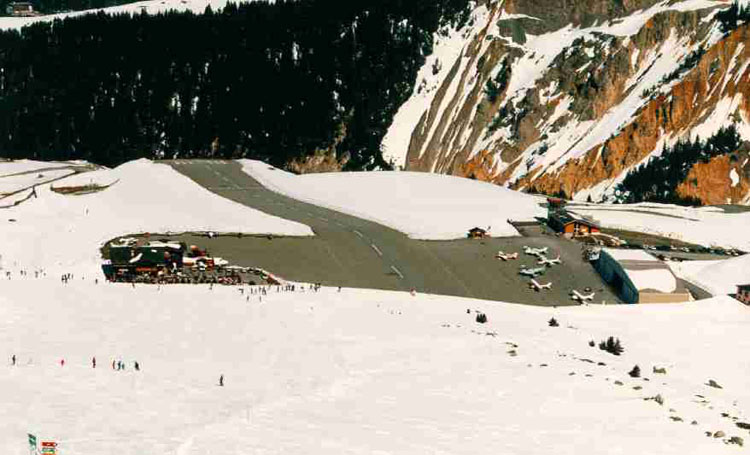
runway from hell ;p

Flight Simulation Screenshots displaying your Flight Simulation Experience. MSFS, FSX, Prepar3D, XPlane and other Flight Simulators. Focus is your Flight Simulator Experience. Please upload to Simviation (Button at top right)

runway from hell ;p

Postby Yurei » Sun Mar 20, 2005 9:46 pm

hey guys!

just did a short flight for some screenshots of my beautiful new Courchevel scenery. all credit goes to bj

Image
User avatar
Yurei
Captain
Captain
 
Posts: 684
Joined: Sun Feb 20, 2005 8:13 am
Location: hopefully far away soon

Re: runway from hell ;p

Postby Sock » Sun Mar 20, 2005 9:48 pm

Where is that scenery?
Last edited by Sock on Sun Mar 20, 2005 9:51 pm, edited 1 time in total.
User avatar
Sock
Major
Major
 
Posts: 1623
Joined: Fri Nov 08, 2002 10:50 pm
Location: Hudson, NY USA

Re: runway from hell ;p

Postby Yurei » Sun Mar 20, 2005 9:54 pm

oh ok, i was just gonna post the link ;)
yeah, is struggled all night to get it all installed properly, since i can't speak a word of french. ;D
oh and thanks  :)
Last edited by Yurei on Sun Mar 20, 2005 9:55 pm, edited 1 time in total.
Image
User avatar
Yurei
Captain
Captain
 
Posts: 684
Joined: Sun Feb 20, 2005 8:13 am
Location: hopefully far away soon

Re: runway from hell ;p

Postby xFLAMESx » Sun Mar 20, 2005 9:55 pm

LOL, is the runway surface actually uneven, or is it just to look good?
Honours :
Freeware Screenshot Competition Winner, June 2009
User avatar
xFLAMESx
Major
Major
 
Posts: 1595
Joined: Sat Jan 03, 2004 6:35 pm
Location: Torquay, England

Re: runway from hell ;p

Postby Yurei » Sun Mar 20, 2005 9:57 pm

no it's actually uneven ;D. it is in real life too as far as i know
Last edited by Yurei on Sun Mar 20, 2005 10:57 pm, edited 1 time in total.
Image
User avatar
Yurei
Captain
Captain
 
Posts: 684
Joined: Sun Feb 20, 2005 8:13 am
Location: hopefully far away soon

Re: runway from hell ;p

Postby xFLAMESx » Sun Mar 20, 2005 10:02 pm

OH MAN! I HAVE TO GET THAT!

Wonder if it would be possible to import the runway to other airports? ::)

Cheers,

GM
Honours :
Freeware Screenshot Competition Winner, June 2009
User avatar
xFLAMESx
Major
Major
 
Posts: 1595
Joined: Sat Jan 03, 2004 6:35 pm
Location: Torquay, England

Re: runway from hell ;p

Postby Yurei » Sun Mar 20, 2005 10:18 pm

yeah that would be brilliant but i doubt that's possible :(

anyway, here's a shot of the real thing for comparison (sorry you've probably seen it a million times but i don't care ;D)

Image
Last edited by Yurei on Sun Mar 20, 2005 10:20 pm, edited 1 time in total.
Image
User avatar
Yurei
Captain
Captain
 
Posts: 684
Joined: Sun Feb 20, 2005 8:13 am
Location: hopefully far away soon

Re: runway from hell ;p

Postby xFLAMESx » Sun Mar 20, 2005 10:21 pm

Yeah love that place 8)

I don't suppose you'd mind giving a quick description of roughly where the files should go?
My French is as good as my Latin ;). . . . . ;D

Cheers,
GM
Honours :
Freeware Screenshot Competition Winner, June 2009
User avatar
xFLAMESx
Major
Major
 
Posts: 1595
Joined: Sat Jan 03, 2004 6:35 pm
Location: Torquay, England

Re: runway from hell ;p

Postby Yurei » Sun Mar 20, 2005 10:23 pm

ok gnat hang in there, let me try to remember how i did it. i'll get back to you in a minute ;D

ok, here's how i did it. i'm not sure yet wether i messed up anything with that stuff so please back up your folders ;D!

- get all the texture zips from that french site. in the installation manual it says you need "textures1" and "textures2" but you actually need all the files so get "textures_alps1-4" aswell. the instructions confused me big time so i just chucked them all in the main fs9 texture folder (and it worked).

- now create a new folder (name it "courchevel") in your addon scenery folder and create a subfolder ( name it "scenery") in that "courchevel" folder. put all the .bgl files that came with the Courchevel zip into that folder.

-open your main scenery cfg and add

 
                [Area.***]
               Title=Courchevel
               Local=addon scenery\courchevel/scenery
               Active=TRUE
               Layer = **


(with a number instead of * in order of your sceneries)

i think you only need a good mesh of the area now and that should be it. none of the ones suggested on the french site worked for me so i got another one from avsim and it works like a dream :)

good luck
Last edited by Yurei on Sun Mar 20, 2005 10:40 pm, edited 1 time in total.
Image
User avatar
Yurei
Captain
Captain
 
Posts: 684
Joined: Sun Feb 20, 2005 8:13 am
Location: hopefully far away soon

Re: runway from hell ;p

Postby Stormtropper » Sun Mar 20, 2005 10:32 pm

Great shots! 8)

still need link tho ;)

Jeff
Arizona State University
Viva la party!


Image
Stormtropper
Major
Major
 
Posts: 1237
Joined: Mon Oct 18, 2004 7:49 pm
Location: Grosse Pointe, MI

Re: runway from hell ;p

Postby xFLAMESx » Sun Mar 20, 2005 10:38 pm

Last edited by xFLAMESx on Sun Mar 20, 2005 10:38 pm, edited 1 time in total.
Honours :
Freeware Screenshot Competition Winner, June 2009
User avatar
xFLAMESx
Major
Major
 
Posts: 1595
Joined: Sat Jan 03, 2004 6:35 pm
Location: Torquay, England

Re: runway from hell ;p

Postby Yurei » Sun Mar 20, 2005 10:43 pm

thanks jeff :)
yup it's the link gnat gave. i edited my earlier post to explain how i did it since my french isn't really the best either ;D
Last edited by Yurei on Sun Mar 20, 2005 10:45 pm, edited 1 time in total.
Image
User avatar
Yurei
Captain
Captain
 
Posts: 684
Joined: Sun Feb 20, 2005 8:13 am
Location: hopefully far away soon

Re: runway from hell ;p

Postby Stormtropper » Sun Mar 20, 2005 10:43 pm

The only words in French that I'll ever need is 'Pizza' 'Girls' and 'Download' ;D

...for everything else, theres MasterCard and personal translator ;D
Arizona State University
Viva la party!


Image
Stormtropper
Major
Major
 
Posts: 1237
Joined: Mon Oct 18, 2004 7:49 pm
Location: Grosse Pointe, MI

Re: runway from hell ;p

Postby Yurei » Sun Mar 20, 2005 10:47 pm

;D right on
Image
User avatar
Yurei
Captain
Captain
 
Posts: 684
Joined: Sun Feb 20, 2005 8:13 am
Location: hopefully far away soon

Re: runway from hell ;p

Postby xFLAMESx » Sun Mar 20, 2005 10:48 pm

[quote]ok gnat hang in there, let me try to remember how i did it. i'll get back to you in a minute ;D

ok, here's how i did it. i'm not sure yet wether i messed up anything with that stuff so please back up your folders ;D!

- get all the texture zips from that french site. in the installation manual it says you need "textures1" and "textures2" but you actually need all the files so get "textures_alps1-4" aswell. the instructions confused me big time so i just chucked them all in the main fs9 texture folder (and it worked).

- now create a new folder (name it "courchevel") in your addon scenery folder and create a subfolder ( name it "scenery") in that "courchevel" folder. put all the .bgl files that came with the Courchevel zip into that folder.

-open your main scenery cfg and add
Honours :
Freeware Screenshot Competition Winner, June 2009
User avatar
xFLAMESx
Major
Major
 
Posts: 1595
Joined: Sat Jan 03, 2004 6:35 pm
Location: Torquay, England

Next

Return to Simulation Screenshots Showcase

Who is online

Users browsing this forum: No registered users and 314 guests