Hey it's a compliment and thanks to you for that. I've kept a couple at high res because I use them myself as wallpaper. If I'd known I'd have kept that one as well.
Hey I dunno if other people do this. If you download the WEBSHOTS package you can use all your best screenies as wallpaper and the system changes the pic automatically every day. I used to delete all my old screenshots and I found myself with stoopid Webshots of hot air balloons, surfing and goodness knows what. I thought what the heck am I doing! I've deleted all those and now all my wallpapers are my own shots - it's a great way of making use of em and it's great when one of your good shots that you'd forgotten about suddenly turns up on your screen when you switch on.
The system also automatically uses them as screeensavers so if your PC is just sitting there for a while it begins cycling thru a slide show of your screen shots.
Highly recommended
Added this... for those who aren't familiar, here's a pic of the Webshots control panel
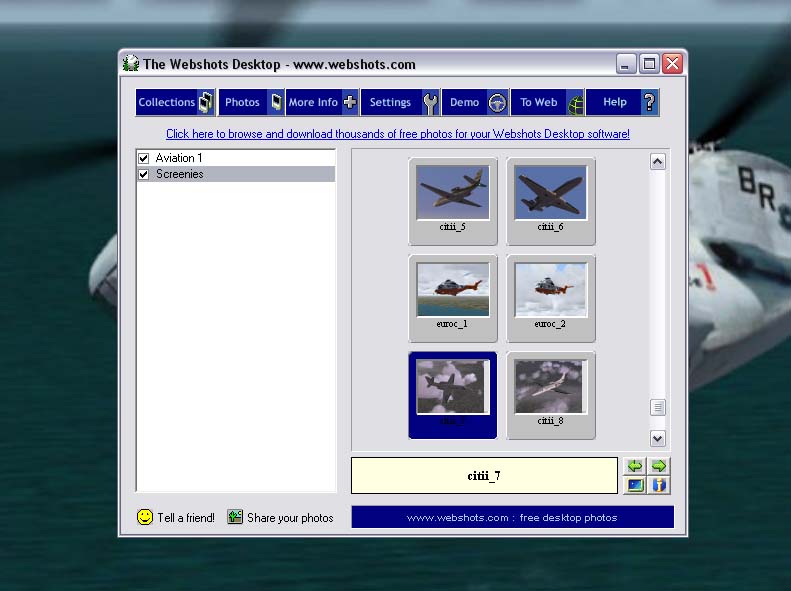
All you do is create a folder inside it (left hand panel), click on the folder name and drag your pics into it (right hand panel). Dead easy and very effective.
Last edited by RollerBall on Wed Sep 22, 2004 10:51 am, edited 1 time in total.


 by JW49 » Wed Sep 22, 2004 10:04 am





 ,love them all


