Cant Install Planes FSX Any Help???

FSX including FSX Steam version.

Cant Install Planes FSX Any Help???

Postby harleymhs » Wed Nov 25, 2009 1:23 pm

Hi all.. I have been trying so hard to install a few new planes in FSX.. So far the ONLY one I can get to work is the Sample plane on the help section. All I want to do is download a few comercial 737 textures ( delta, cont, or air canada ) textures. I download the zip files, make a new folder for them, unzip them into the new folder then copy the unzipped folder into FSZ sim objects/planes/737-800.. I cannot get them to show up! I tried to paste the config file into the 737-800 file still nothing. ANY HELP step by step would really be appreciated! Thanks in advance! I am running FSX standard version NO SP1 or SP2.. They screw all my textures up so I am running a fresh install of FSX and the only addon I have running is MyTraffic 2010.. Thanks in advance.. All I want is a Delta or cont 737 to fly..
harleymhs
Ground hog
Ground hog
 
Posts: 1
Joined: Wed Nov 25, 2009 12:49 pm
Location: New York USA

Re: Cant Install Planes FSX Any Help???

Postby DeepSpace » Wed Nov 25, 2009 2:19 pm

Ok, I'll try to make this as clear as possible.

1. Your texture folder HAS to be named "texture.****". So name the folder texture.delta

2. Put it in the aircraft's folder.

3. Open the Aircraft.CFG file using notepad or any text editor.

4. Scroll down until you fine the last [fltsim.XX] group of lines.

5. Select all of the lines in that group, and copy+paste them underneath the lines you copied.

6. In the group of lines you pasted, change the numbers in the [fltsim.XX] field to follow those in the group above. You should also make sure to change the "title" field to be unique, and DO NOT touch the "sim" field. Also you should change the "UI_Variation" to something else, and noticeable, perhaps "737 delta".
Last edited by DeepSpace on Wed Nov 25, 2009 3:03 pm, edited 1 time in total.
DeepSpace
1st Lieutenant
1st Lieutenant
 
Posts: 428
Joined: Sat Jun 08, 2002 11:55 am
Location: Israel

Re: Cant Install Planes FSX Any Help???

Postby Hagar » Wed Nov 25, 2009 2:44 pm

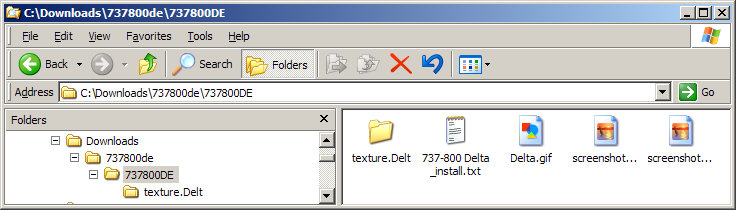
Let's see if I can walk you through this. First of all go to this page & download the Delta textures. http://www.simviation.com/fsxjets15.htm

The file name is 737800DE.zip. Extract it using your favourite method.
Open the extracted folder & look for a folder named Texture.Delt
This is the folder you paste into your B737_800 folder in FSX\SimObjects\airplanes.
Image

Now you have to edit the Aircraft.cfg file of the B737_800 to recognise the new variation.
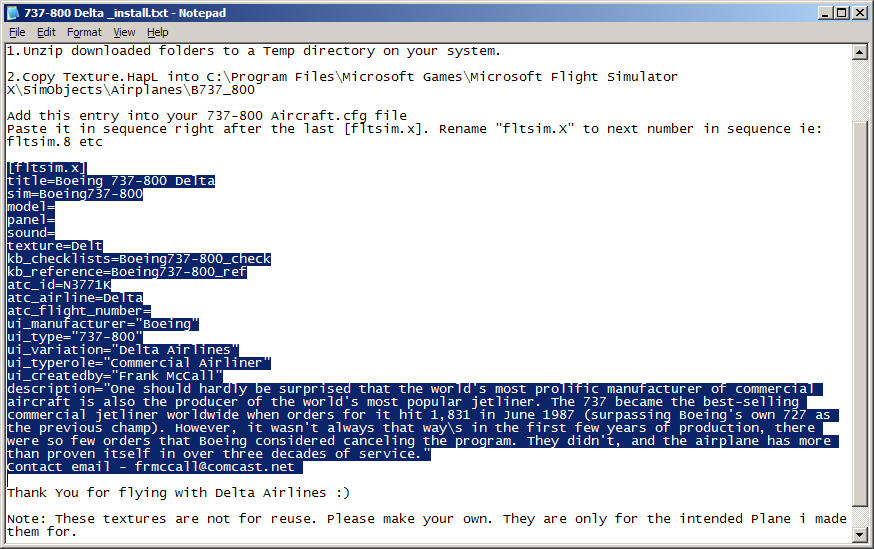
Open the file named 737-800 Delta _install.txt in the above shot in Notepad. This contains the installation instructions & the new CFG entry.
Highlight the text of the new entry by dragging the mouse across it. Then click Edit/Copy on the menu bar.
Image

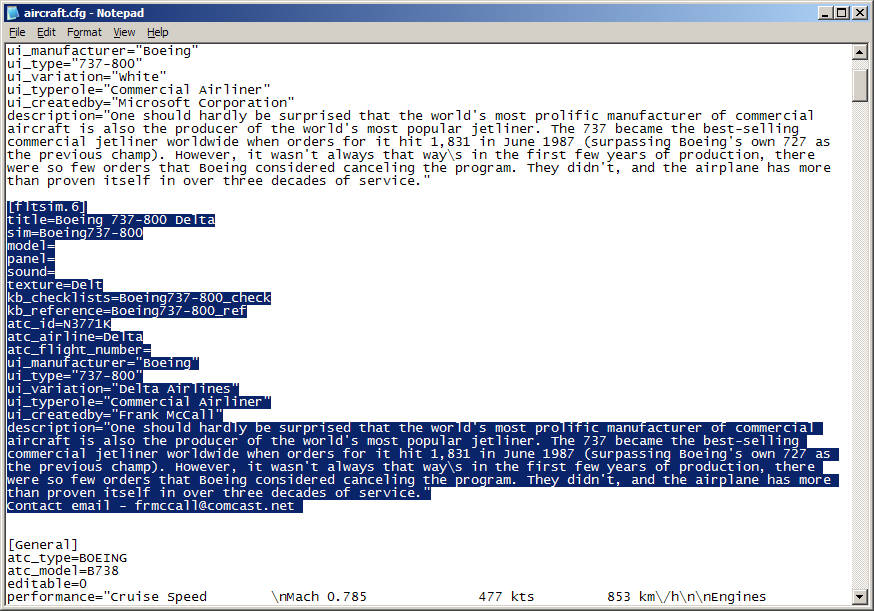
Open the B737_800 Aircraft.cfg in Notepad & scroll down to the end of the last variation, just above the General header. Make a space & click in it. Then click Edit/Paste.
Remember to change the X of the [flightsim.x] header to the next number in sequence. If this is your first new variation of the 737 it should be [fltsim.6]
Image
Finally, exit Notepad saving changes when prompted. The new variation should be listed on the selection menu as Boeing 737-800 Delta Airlines

Hope this explains it.

Edit: Oops, sorry DeepSpace. You must have replied while I was doing all this. I'll leave it in case it helps. Two heads are better than one. ;)
Last edited by Hagar on Wed Nov 25, 2009 2:51 pm, edited 1 time in total.
Image

Founder & Sole Member - Grumpy's Over the Hill Club for Veteran Virtual Aviators
Member of the Fox Four Group
My Google Photos albums
My Flickr albums
User avatar
Hagar
Colonel
Colonel
 
Posts: 30868
Joined: Wed Jun 19, 2002 7:15 am
Location: Costa Geriatrica


Return to Flight Simulator X (FSX) and Steam

Who is online

Users browsing this forum: No registered users and 516 guests

