FSX in Windows 8

FSX including FSX Steam version.

FSX in Windows 8

Postby Dennyyoung » Tue Feb 04, 2014 7:57 am

Hope this is in the right place...

Does anybody know how to fix this problem...

FSX Deluxe Edition......, Windows 8 ........While running the program I get this message

Microsoft Flight Simulator has stopped
Working.
A problem caused the program to stop working correctly.
Windows will close the program and notify you if a solution is
available.
yeah right notify my a--

So...HELP ....SOS
Dennyyoung
Ground hog
Ground hog
 
Posts: 27
Joined: Mon Dec 30, 2013 11:10 am

Re: FSX in Windows 8

Postby garymbuska » Tue Feb 04, 2014 8:50 am

Dennyyoung wrote:Hope this is in the right place...

Does anybody know how to fix this problem...

FSX Deluxe Edition......, Windows 8 ........While running the program I get this message

Microsoft Flight Simulator has stopped
Working.
A problem caused the program to stop working correctly.
Windows will close the program and notify you if a solution is
available.
yeah right notify my a--

So...HELP ....SOS


If you have installed FSX in the default location that could be your problem.
It is advised to not install FSX in the default location which is C/:Program files(86)/Microsoft Games
The reason has to do with permissions. Granted there are people that are not having any issues with it installed in the default location. From what I have read it becomes a issue with third party software such as REX; ACTIVE SKY; Moving Map; and so forth

As for what happened you need to check out your event viewer
In windows 8 put your mouse in the lower left hand corner of the screen and right click this should enable you to see the control panel.
another way is to go back to the tile screen and you will find the control panel there.
As you can see by my signature I am using Windows 8 64 bit and I have FSX installed on a separate hard drive


<<v
Gary M Buska
SYSTEM Specs ASUS P8Z68 V/GEN 3 mother board: INTELL I7 2600k 3.48 ghz Quad core CPU with Sandy bridge: 12 Gigs of 1800hz ram:
GTX 950 OVER CLOCKED: 2 Gigs Ram Windows 10 Home 64 bit Operating system. 750W Dedicated modular power supply. Two Internal 1TB hard drives 1 External 1TB 3.2 USB hard drive. SAITEK Cessna flight Yoke with throttles.
CH Rudder Peddles 27 inch Wide screen Monitor
User avatar
garymbuska
Major
Major
 
Posts: 4415
Joined: Tue Dec 30, 2003 11:10 am
Location: Jacksonville, Florida

Re: FSX in Windows 8

Postby Dennyyoung » Tue Feb 04, 2014 9:00 am

Ok I'll try to reinstalled .....should I also disable administration ?
Thanks for the response....... Also would like to redo the airport where I fly out of Memphis ....parking spot and add FedEx airplanes and the original air carriers and in and out of the airport been having trouble doing that..... Tried to follow the procedures and putting the disk one in and load sdk.....but no luck
Dennyyoung
Ground hog
Ground hog
 
Posts: 27
Joined: Mon Dec 30, 2013 11:10 am

Re: FSX in Windows 8

Postby Fozzer » Tue Feb 04, 2014 9:58 am

"Microsoft Flight Simulator has stopped
Working.
A problem caused the program to stop working correctly.
Windows will close the program and notify you if a solution is
available".

.... :lol: ... :lol: ... :lol: ...!

That always make me giggle when that pops up on my screen, 'cos I just know that nobody is going to tell me what the problem is!... :lol: ...!

I'm using Windows 8.1, 64bit, with my FSX installed directly on the C drive (NOT Program Files), and the message often pops up mostly when I change "something" whilst FSX is running, eg: Aircraft, weather, scenery effects, time/date, etc.
The program starts to install the change, stops just before the end of the process, and the error report pops up...it gets confused?

I now set everything up before the flight, leave it alone, and it mostly runs with no problems for the duration of the flight.
If I subsequently want to change "something"; after landing I EXIT the flight sim and set up everything again for the NEW flight, and start it up again afresh!

FSX doesn't seem to like being modified, or fiddled with, DURING my flights!

Also its is worth resetting the computer BEFORE running FSX, to clean up the Registry... :D ...!

Paul....Fiddling can be bad for your FSX...trust me!... ;) ....!
Win 8.1 64-bit. DX11. Advent Tower. Intel i7-3770 3.9 GHz 8-core. 8 GB System RAM. AMD Radeon HD 7700 1GB RAM. DVD ROM. 2 Terra Byte SATA Hard Drive. Philips 17" LCD Monitor. Saitek Cyborg X Fly-5 Joystick. ...and a Briggs and Stratton Petrol Lawn Mower.
User avatar
Fozzer
Colonel
Colonel
 
Posts: 27369
Joined: Thu Jan 31, 2002 3:11 pm
Location: Hereford. England. EGBS.

Re: FSX in Windows 8

Postby Bass » Tue Feb 04, 2014 10:14 am

I dont have win8.
But, Paul, THIS IS NOT RIGHT!!
You should be able to change aircraft, scenery ect, when in flight :shock:
If you cant do that, there's something terrible wrong with "wonderland"!
I have no clue as i have no wonder 8 :whistle:
"Just try to be YOU"!............ Kurt 

System. GA-X58A-UD3R, i7-950QC, Corsair XMS3 18GB 2000, GTX 780 tf 3GB, Corsair CMPSU-850, 24 BenQ 120, TM Hotas cougar, win7 pro.
User avatar
Bass
Major
Major
 
Posts: 3043
Joined: Wed Feb 15, 2012 9:32 am
Location: Scandinavia

Re: FSX in Windows 8

Postby Fozzer » Tue Feb 04, 2014 10:27 am

Bass wrote:I dont have win8.
But, Paul, THIS IS NOT RIGHT!!
You should be able to change aircraft, scenery ect, when in flight :shock:
If you cant do that, there's something terrible wrong with "wonderland"!
I have no clue as I have no wonder 8 :whistle:


I would dearly like to change "things" whilst in flight, but my experience with FSX tells me that the program doesn't like being "modified" whilst it is running.... :roll:....!

If I make a change to the program while it is running during the flight, there is a good chance that it will get confused, and shut down.

No problems with FS 2004....but FSX seems to be very "sensitive" to changes/modification during the flight!

As I sad...it doesn't like being fiddled with!

At other times, if I leave it alone, FSX runs wonderfully all day long!

Paul...Lead Violinist.... :D ...!
Win 8.1 64-bit. DX11. Advent Tower. Intel i7-3770 3.9 GHz 8-core. 8 GB System RAM. AMD Radeon HD 7700 1GB RAM. DVD ROM. 2 Terra Byte SATA Hard Drive. Philips 17" LCD Monitor. Saitek Cyborg X Fly-5 Joystick. ...and a Briggs and Stratton Petrol Lawn Mower.

User avatar
Fozzer
Colonel
Colonel
 
Posts: 27369
Joined: Thu Jan 31, 2002 3:11 pm
Location: Hereford. England. EGBS.

Re: FSX in Windows 8

Postby Bass » Tue Feb 04, 2014 10:38 am

Try to put this into your main FSX folder
http://www.search-dll.com/dll-files/dow ... e.dll.html

If it dont help, just delete it.

As i said, i dont have wonder 8 ;)
"Just try to be YOU"!............ Kurt 

System. GA-X58A-UD3R, i7-950QC, Corsair XMS3 18GB 2000, GTX 780 tf 3GB, Corsair CMPSU-850, 24 BenQ 120, TM Hotas cougar, win7 pro.
User avatar
Bass
Major
Major
 
Posts: 3043
Joined: Wed Feb 15, 2012 9:32 am
Location: Scandinavia

Re: FSX in Windows 8

Postby Fozzer » Tue Feb 04, 2014 10:59 am

Bass wrote:Try to put this into your main FSX folder
http://www.search-dll.com/dll-files/dow ... e.dll.html

If it don't help, just delete it.

As I said, I don't have wonder 8 ;)


The "MAGIC" xxx.dll universal cure.... :lol: ...!
..been there before....looked at them....turned the page over... ;) ...!

Most of those sort of programs look through your Registry and tell you that you have 10,000+ errors, and if you buy this wonderful program, we will fix your problems for you....including your Marital ones, etc..

...trust us!.... ;) ...!

...NAH!.... :lol: ...!

Glary Utilities 4 (my original free version) finds and fixes all my registry, etc, problems? many times a day!

Paul....always suspicious of MAGIC programs...especially when there is a $ sign attached to them.... :mrgreen: ...!
Win 8.1 64-bit. DX11. Advent Tower. Intel i7-3770 3.9 GHz 8-core. 8 GB System RAM. AMD Radeon HD 7700 1GB RAM. DVD ROM. 2 Terra Byte SATA Hard Drive. Philips 17" LCD Monitor. Saitek Cyborg X Fly-5 Joystick. ...and a Briggs and Stratton Petrol Lawn Mower.
User avatar
Fozzer
Colonel
Colonel
 
Posts: 27369
Joined: Thu Jan 31, 2002 3:11 pm
Location: Hereford. England. EGBS.

Re: FSX in Windows 8

Postby OldAirmail » Tue Feb 04, 2014 11:10 am

I don't have Windows 8.anything. I also don't have any problems changing any kind of settings while in flight.

On the other hand :evil: , I do have some of the Prepar3d V2 files suddenly being changed to "Read Only" at some point during the day, even when I haven't been using P3D.


When that happens, Prepar3d will very suddenly stop, with or without a warning. Usually without.

Let me restate that again: this problem occurs without even running Prepar3d.

On the other hand, when Prepar3d IS running, there's no problem making changes, back and forth, during a flight.


There is a solution. Or at least a practical solution for my particular problem, and maybe yours.

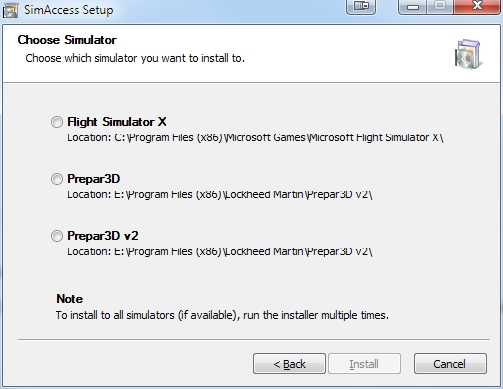
There's a very thorough program called SimAccess from Flightsim Estonia.


What does this have to do with FSX or Windows 8.anything?

SimAccess is a free program that will unlock FSX, and both versions of Prepar3d files.

Image


I haven't needed it for FSX, but for some reason I have to run it about once a week to fix Prepar3d V2.

But without SimAccess, I would hardly be able to use Prepar3d.


If anyone thinks that access rights is the cause of their problem, I'd suggest using it.
.. .
Get the most out of your controls - SPAD.neXt

Image
. . . . . .Any time, any plane, any weather.
. . . . . . . . . . . . . Prepar3d V4
User avatar
OldAirmail
Major
Major
 
Posts: 4814
Joined: Sun Feb 17, 2013 3:06 pm
Location: Concrete, WA ICAO - 3W5

Re: FSX in Windows 8

Postby Bass » Tue Feb 04, 2014 11:34 am

Fozzer wrote:
Bass wrote:Try to put this into your main FSX folder
http://www.search-dll.com/dll-files/dow ... e.dll.html

If it don't help, just delete it.

As I said, I don't have wonder 8 ;)


The "MAGIC" xxx.dll universal cure.... :lol: ...!
..been there before....looked at them....turned the page over... ;) ...!

Most of those sort of programs look through your Registry and tell you that you have 10,000+ errors, and if you buy this wonderful program, we will fix your problems for you....including your Marital ones, etc..

...trust us!.... ;) ...!

...NAH!.... :lol: ...!

Glary Utilities 4 (my original free version) finds and fixes all my registry, etc, problems? many times a day!

Paul....always suspicious of MAGIC programs...especially when there is a $ sign attached to them.... :mrgreen: ...!


I dont know what you mean, Paul :?
Its just a .dll file inside FSX! Not any program!!
But ok.
"Just try to be YOU"!............ Kurt 

System. GA-X58A-UD3R, i7-950QC, Corsair XMS3 18GB 2000, GTX 780 tf 3GB, Corsair CMPSU-850, 24 BenQ 120, TM Hotas cougar, win7 pro.
User avatar
Bass
Major
Major
 
Posts: 3043
Joined: Wed Feb 15, 2012 9:32 am
Location: Scandinavia

Re: FSX in Windows 8

Postby garymbuska » Tue Feb 04, 2014 4:29 pm

Dennyyoung wrote:Ok I'll try to reinstalled .....should I also disable administration ?
Thanks for the response....... Also would like to redo the airport where I fly out of Memphis ....parking spot and add FedEx airplanes and the original air carriers and in and out of the airport been having trouble doing that..... Tried to follow the procedures and putting the disk one in and load sdk.....but no luck

FSX has to run as administrator. Once you uninstall FSX make sure to run the reset tool and to clean up any left over folders before reinstalling FSX

<<s
Gary M Buska
SYSTEM Specs ASUS P8Z68 V/GEN 3 mother board: INTELL I7 2600k 3.48 ghz Quad core CPU with Sandy bridge: 12 Gigs of 1800hz ram:
GTX 950 OVER CLOCKED: 2 Gigs Ram Windows 10 Home 64 bit Operating system. 750W Dedicated modular power supply. Two Internal 1TB hard drives 1 External 1TB 3.2 USB hard drive. SAITEK Cessna flight Yoke with throttles.
CH Rudder Peddles 27 inch Wide screen Monitor
User avatar
garymbuska
Major
Major
 
Posts: 4415
Joined: Tue Dec 30, 2003 11:10 am
Location: Jacksonville, Florida

Re: FSX in Windows 8

Postby boromir125 » Tue Feb 04, 2014 6:24 pm

I too have had this problem. I ended up by removing the acceleration program and loading SP1...and, thanks to the goodness of fellow simmers, found and loaded the following: Simlauncher 9.1 and a utility called makerwys...you'll have to do a little Google search to get the proper address(es)

SimLauncher works reasonably well; I can adjust (for the most part) flight parameters, change aircraft on the fly. By the way, my FSX is loaded on my harddrive, program file (x86). I suspect that has something to do with the way it handles, but certainly, not everything. Also, know that win 8 (or 8.1) will load directx11 onto your drive...making directx 9 (which was the default version for FSX) unusable...and I've been unable to unload/reload 9, although I understand there are ways to do it. Anyway...good luck
boromir125
2nd Lieutenant
2nd Lieutenant
 
Posts: 108
Joined: Sun Jul 14, 2013 2:34 pm
Location: Vermont

Re: FSX in Windows 8

Postby compyelc4 » Tue Feb 04, 2014 8:37 pm

I had the same problem after loading Win 8.1! I tried everything to fix the "crash to desktop". Finally, I noticed that the culprit was Windows Auto Update. What it was doing was automatically updating to the latest video driver for my machine. Thing is the latest and greatest driver was causing my problem. I kept going back in the past driver-by-driver until I found a driver that eliminated my problem. It ended up being the very first video driver loaded to system. Then I changed my Auto update procedure to manual. Now I just leave the new video driver recommendation alone and all is well.

For the record I have am AMD A10-5700 APU with onboard Radeon HD Graphics 7660D. The driver that works best for this system and FSX Pro is AMD driver 12.102.1.1000. If I use a later driver I go back to the same problem of crashing to desktop anytime I try to change Anything once FSX boots up.

I sure hope this helps someone here.

Ted
compyelc4
Ground hog
Ground hog
 
Posts: 30
Joined: Fri Feb 07, 2003 10:15 pm

Re: FSX in Windows 8

Postby Pville211 » Wed Feb 05, 2014 8:29 am

I had similar issues with Windows 8.1 until I took ownership of the FSX files. What follows is a description of what that means and how to implement a fix that may resolve your issue.

Each new version of Windows introduced more complex networking and security features. Folder ownership became a bit of a challenge in Win 7, and that could usually be resolved by running program executables as the administrator (right-click, select Run as administrator). But after I upgraded to Win 8 even running as administrator sometimes hasn't been enough to prevent program crashes.

Win 8 introduced full integration with Microsoft SkyDrive (now being renamed to OneDrive after losing a trademark dispute). SkyDrive integration treats online folders like local folders, which requires a higher level of security for local folders. I suspect this led to stricter folder ownership requirements.

If the user does not own a folder then a program may see that a file exists but may not be able to do anything with it. Older programs like FSX may not comprehend this new situation. Thus, the program errors out, but the error message, if any, may be generic or may identify the issue as something different than what it actually is.

This is what fixed my issues with FSX:

1. Install FSX in a root folder (mine is installed in c:\fsx).
  • Most apps and installers have had no problem automatically finding it.

2. Create a shortcut to run FSX as the administrator.
  • Create a shortcut to ...\fsx\fsx.exe
  • Right-click on the shortcut > Properties tab > Advanced button > check the box Run as administrator > OK > OK

3. Take ownership of the FSX folders.
  • Easy instructions and a required file are at http://tinyurl.com/32hf32 (HowToGeek.com)
  • At the bottom of the instructions, below the "Uninstall" description, is a link to "Download TakeOwnership."
  • The download includes a small registry file that adds Take Ownership as a right-click option for your folders.
    • Open the zip file and copy InstallTakeOwnership.reg to any folder or to the desktop.
    • Double-click on the .reg file to install it.
  • Open Windows Explorer (now called File Explorer).
  • Right-click on your FSX folder and select Take Ownership.

4. Take ownership of FSX-related folders that are outside of the FSX program folders (ORBX, Flight1, etc.).
Pville211
Ground hog
Ground hog
 
Posts: 7
Joined: Sat Oct 13, 2012 11:04 pm

Re: FSX in Windows 8

Postby garymbuska » Wed Feb 05, 2014 8:50 am

Pville211 wrote:I had similar issues with Windows 8.1 until I took ownership of the FSX files. What follows is a description of what that means and how to implement a fix that may resolve your issue.

Each new version of Windows introduced more complex networking and security features. Folder ownership became a bit of a challenge in Win 7, and that could usually be resolved by running program executables as the administrator (right-click, select Run as administrator). But after I upgraded to Win 8 even running as administrator sometimes hasn't been enough to prevent program crashes.

Win 8 introduced full integration with Microsoft SkyDrive (now being renamed to OneDrive after losing a trademark dispute). SkyDrive integration treats online folders like local folders, which requires a higher level of security for local folders. I suspect this led to stricter folder ownership requirements.

If the user does not own a folder then a program may see that a file exists but may not be able to do anything with it. Older programs like FSX may not comprehend this new situation. Thus, the program errors out, but the error message, if any, may be generic or may identify the issue as something different than what it actually is.

This is what fixed my issues with FSX:

1. Install FSX in a root folder (mine is installed in c:\fsx).
  • Most apps and installers have had no problem automatically finding it.

2. Create a shortcut to run FSX as the administrator.
  • Create a shortcut to ...\fsx\fsx.exe
  • Right-click on the shortcut > Properties tab > Advanced button > check the box Run as administrator > OK > OK

3. Take ownership of the FSX folders.
  • Easy instructions and a required file are at http://tinyurl.com/32hf32 (HowToGeek.com)
  • At the bottom of the instructions, below the "Uninstall" description, is a link to "Download TakeOwnership."
  • The download includes a small registry file that adds Take Ownership as a right-click option for your folders.
    • Open the zip file and copy InstallTakeOwnership.reg to any folder or to the desktop.
    • Double-click on the .reg file to install it.
  • Open Windows Explorer (now called File Explorer).
  • Right-click on your FSX folder and select Take Ownership.

4. Take ownership of FSX-related folders that are outside of the FSX program folders (ORBX, Flight1, etc.).


I am still using Windows 8 I never updated to 8.1 but all I did was to install FSX on a separate hard drive and made a shortcut that allows me to run FSX as administrator. I did not have to go through what you describe here. But this could be because of Windows 8.1 who knows
But the bottom line here is what works best for you. I know that different versions of windows can effect how things work.
The only other thing I had to download was the .dll fix for multiple core CPU'S


<<u
Gary M Buska
SYSTEM Specs ASUS P8Z68 V/GEN 3 mother board: INTELL I7 2600k 3.48 ghz Quad core CPU with Sandy bridge: 12 Gigs of 1800hz ram:
GTX 950 OVER CLOCKED: 2 Gigs Ram Windows 10 Home 64 bit Operating system. 750W Dedicated modular power supply. Two Internal 1TB hard drives 1 External 1TB 3.2 USB hard drive. SAITEK Cessna flight Yoke with throttles.
CH Rudder Peddles 27 inch Wide screen Monitor
User avatar
garymbuska
Major
Major
 
Posts: 4415
Joined: Tue Dec 30, 2003 11:10 am
Location: Jacksonville, Florida

Next

Return to Flight Simulator X (FSX) and Steam

Who is online

Users browsing this forum: No registered users and 862 guests


