How to get your Posky 777 VC gauges working

FSX including FSX Steam version.

Re: How to get your Posky 777 VC working

Postby ryanman » Wed Aug 20, 2008 10:52 am

sound is here: http://www.avsim.com/

search library sub catagory fs2004 sound for:                              
'777-GE-90 "the real deal" version 2'
author:Christoffer Petersen
;)


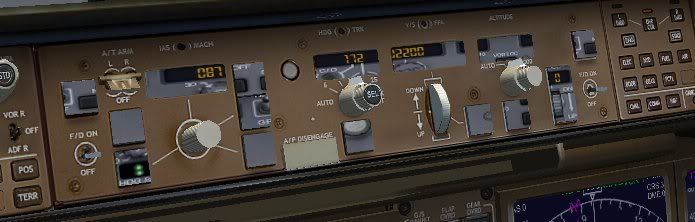
thanks, oh and one last thing, my autopilot is messed up, it seems as if there are 2 autopilot panels on top of each other :-? here is a screen shot:
Image
why is it messed up? how do i fix it?
ryanman
Ground hog
Ground hog
 
Posts: 8
Joined: Tue Aug 19, 2008 2:36 pm

Re: How to get your Posky 777 VC working

Postby chobot » Wed Aug 20, 2008 4:39 pm

yo i hav another idea but im not gud at dis stuff so maybe u can work wit dis. there is a 777 -300 at dis site maybe u can tak the vc work on it a bit nd put it up 4 download on the simviation website   :D

http://simviation.com/simviation/static ... 60&page=24
chobot
Ground hog
Ground hog
 
Posts: 8
Joined: Tue Aug 12, 2008 7:24 am
Location: east elmhurst,new york

Re: How to get your Posky 777 VC working

Postby gtirob01 » Wed Aug 20, 2008 6:43 pm

[quote]yo i hav another idea but im not gud at dis stuff so maybe u can work wit dis. there is a 777 -300 at dis site maybe u can tak the vc work on it a bit nd put it up 4 download on the simviation website
Last edited by gtirob01 on Wed Aug 20, 2008 6:57 pm, edited 1 time in total.
My specs... A hard drive, motherboard, graphics card, some memory, a keyboard, mouse, and monitor - in other words, nothing special.

Image

My Posky
User avatar
gtirob01
Major
Major
 
Posts: 3605
Joined: Fri Jul 20, 2007 11:10 pm
Location: Ft. Walton Beach, FL

Re: How to get your Posky 777 VC working

Postby marcelo02 » Thu Aug 21, 2008 8:26 am

I downloaded the 777 v2 and the vc....but the vc dont even show up.How do i make this work?
User avatar
marcelo02
Ground hog
Ground hog
 
Posts: 7
Joined: Wed Aug 20, 2008 6:42 pm

Re: How to get your Posky 777 VC working

Postby ShaneG_old » Thu Aug 21, 2008 10:07 am

:-?
ShaneG_old
Lieutenant Colonel
Lieutenant Colonel
 
Posts: 9700
Joined: Tue Mar 11, 2008 11:52 am

Re: How to get your Posky 777 VC working

Postby gtirob01 » Thu Aug 21, 2008 11:27 am

I downloaded the 777 v2 and the vc....but the vc dont even show up.How do i make this work?


You didnt install something correctly, or not even at all. Please follow the directions provided by posky regarding installation of the vc. Its all in the readme files. THe directions here on the 1st page are simply to get the gauges working.
My specs... A hard drive, motherboard, graphics card, some memory, a keyboard, mouse, and monitor - in other words, nothing special.

Image

My Posky
User avatar
gtirob01
Major
Major
 
Posts: 3605
Joined: Fri Jul 20, 2007 11:10 pm
Location: Ft. Walton Beach, FL

Re: How to get your Posky 777 VC gauges working

Postby xlunaticx » Sun Aug 24, 2008 12:52 pm

Hi
I instaled it, and i copied everything but it still doesn't work, only the secondary attitude indicator works, i don't get it  :-/
User avatar
xlunaticx
Ground hog
Ground hog
 
Posts: 8
Joined: Sat Jul 07, 2007 4:24 pm
Location: Sarajevo, BH

Re: How to get your Posky 777 VC gauges working

Postby N. Chapman » Sun Aug 24, 2008 2:36 pm

do we have any screenshots? we can't see your computer from here ;)
Image
Click for Computer info overload!
User avatar
N. Chapman
Captain
Captain
 
Posts: 971
Joined: Sat Oct 13, 2007 7:19 pm
Location: Fremont, CA

Re: How to get your Posky 777 VC gauges working

Postby Ferrari308guy » Sun Aug 24, 2008 3:11 pm

Just a suggestion..

If any of you guys still have FS9 installed (I do), you could just copy your 777 gauge file over to the FSX gauge folder ans use the original panel CFG. That's all I did and it worked fine, autopilot is normal as well. The gauges are also the correct size, you you can see everything.
Last edited by Ferrari308guy on Sun Aug 24, 2008 3:12 pm, edited 1 time in total.
Image
| Intel Q6600 2.9 Ghz | EVGA GTX260 896MB | 4GB 1066 Mhz DDR2 RAM | Nvidia 780i Mobo |
User avatar
Ferrari308guy
Captain
Captain
 
Posts: 574
Joined: Sat Aug 04, 2007 7:09 pm

Re: How to get your Posky 777 VC gauges working

Postby OVERLORD_CHRIS » Tue Aug 26, 2008 10:21 am

Downloaded the planes, Downloaded the 32bit pnl, followed the directions on page 1 and the read me, even copied every thing like it was on page one, and this is what I ended up with:

Image

Mine is not even close to what every one else is posting :-?
Image
User avatar
OVERLORD_CHRIS
Major
Major
 
Posts: 1136
Joined: Fri Aug 17, 2007 10:56 am
Location: Chalreston SC

Re: How to get your Posky 777 VC gauges working

Postby gtirob01 » Tue Aug 26, 2008 11:35 am

thats the 2d panel, not the vc
My specs... A hard drive, motherboard, graphics card, some memory, a keyboard, mouse, and monitor - in other words, nothing special.

Image

My Posky
User avatar
gtirob01
Major
Major
 
Posts: 3605
Joined: Fri Jul 20, 2007 11:10 pm
Location: Ft. Walton Beach, FL

Re: How to get your Posky 777 VC gauges working

Postby tas03 » Wed Aug 27, 2008 10:43 am

thats the 2d panel, not the vc


yeah,that is also what i could get after downloading the aircraft,and the 2 panel folder that in this thread (page 2) says..only the 2d panel,but it even doesnt work..how can i get the vc?..must i download something from the 'model packages' section? :-?
User avatar
tas03
2nd Lieutenant
2nd Lieutenant
 
Posts: 65
Joined: Fri Mar 21, 2008 3:06 pm
Location: Singapore

Re: How to get your Posky 777 VC gauges working

Postby gtirob01 » Wed Aug 27, 2008 11:20 am

thats the 2d panel, not the vc


yeah,that is also what i could get after downloading the aircraft,and the 2 panel folder that in this thread (page 2) says..only the 2d panel,but it even doesnt work..how can i get the vc?..must i download something from the 'model packages' section? :-?


yup. you need to download one of the model packages that say vc at the end in addition to the texture files and such.

First of all, decide which one you want. Wheather it be the british airways livery, or the continental livery for example. You decide which one you want.

Next, you will need to download one of the models. they are listed in sort of a confusing way so you will need to pay attention. I know you want the vc, so you will need to choose a model that has vc at the end of the title.

this is the one I used; OS772V2_GE90--L_VC model

Then, go to the panel section and download the vc panel sp1 (or newest version), and either of the texture files. You only need 1 of the texture files, not both. The 32 bit is if you have a pretty good computer with a good graphics card. The other is for any computer capable of running FS

One you have all those, start arranging them into one main folder just like the default planes. You should have one folder that says the plane, like "posky 777 continental" This will have all the basics in it. Start putting the other parts in that folder like the panel. It will ask you to overwrite the original, say yes. And just do that for the other things. If you need reference, just look in the folder of a default plane to get an idea where things go. Once you get that sorted, give it a try and see if it shows in the sim. If it does, cool. Go and follow my instructions on getting the vc gauges working, and you will be all set.
Last edited by gtirob01 on Wed Aug 27, 2008 11:26 am, edited 1 time in total.
My specs... A hard drive, motherboard, graphics card, some memory, a keyboard, mouse, and monitor - in other words, nothing special.

Image

My Posky
User avatar
gtirob01
Major
Major
 
Posts: 3605
Joined: Fri Jul 20, 2007 11:10 pm
Location: Ft. Walton Beach, FL

Re: How to get your Posky 777 VC gauges working

Postby tas03 » Wed Aug 27, 2008 11:42 am

yeah..i've done that but still couldnt work..im trying to download the B777-200 V2 Singapore Airlines livery,can u help me out on which files to download?
User avatar
tas03
2nd Lieutenant
2nd Lieutenant
 
Posts: 65
Joined: Fri Mar 21, 2008 3:06 pm
Location: Singapore

Re: How to get your Posky 777 VC working

Postby tas03 » Wed Aug 27, 2008 3:26 pm


thanks, oh and one last thing, my autopilot is messed up, it seems as if there are 2 autopilot panels on top of each other :-? here is a screen shot:

Image

why is it messed up? how do i fix it?


yes..guys,i do also have this prob..y is this so?

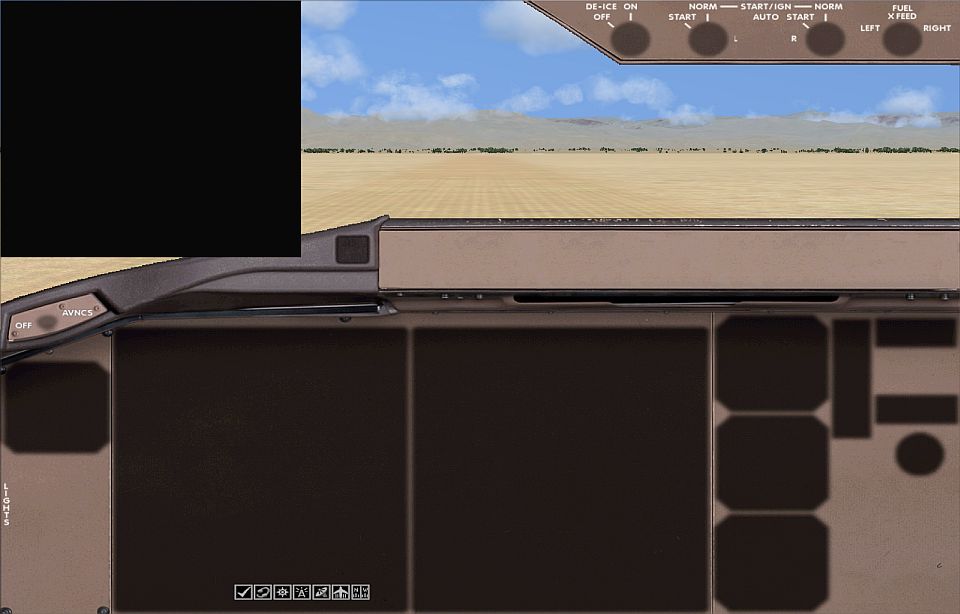
also,my vc doesnt have any colour,it turned out all silver or gold...??
Last edited by tas03 on Wed Aug 27, 2008 3:50 pm, edited 1 time in total.
User avatar
tas03
2nd Lieutenant
2nd Lieutenant
 
Posts: 65
Joined: Fri Mar 21, 2008 3:06 pm
Location: Singapore

PreviousNext

Return to Flight Simulator X (FSX) and Steam

Who is online

Users browsing this forum: No registered users and 292 guests