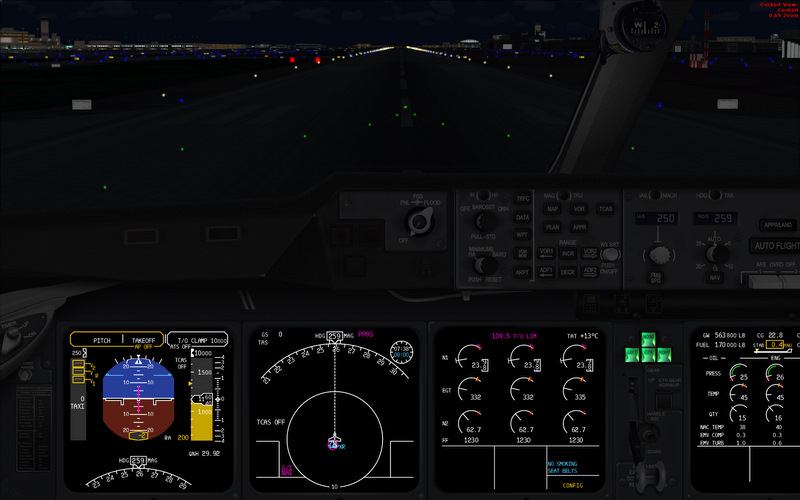
hello,
i have been searching for a solution in this forum but came up with nothing. i am not even sure where to post as this could be software related (windows or FSX settings - more likely) or hardware (video card, monitor...).
when i fly at night FSX is not as dark as i'd like and as it has been from what i remember. now i haven't flown at night in a while (was still on a different machine with win xp and a 7800GT) but i do remember how when the panel lights where off at night i could not find the switch to turn on the flood light in the cockpit, it was that dark! i had to press "L" to turn on the lights and find my way around.
i must say that i almost only fly PMDG or LD aircraft, not the default ones. when i get in the cockpit at night now i could even fly without any lights because i can read everything just like that. it is dark, but i can still see without problems.
to my knowledge i have tried everything i can - starting of course with the monitor (brightness is down and contrast is good, too), trying the nvidia control panel where i reduced color brightness (seemed to help but problem is the city lights become too dark, L.A. looked like a little town after that).
is there anything else i can do? does everybody have the same picture? can you guys read for example the dials on the PMDG MD-11 control panel with all the lights turned off?
i am curious if that's normal or not. btw when climbing out i could even make out green ground textures (fields) on my last flight.
are there settings in the fsx.cfg that i could change? or ist win7 with the new drivers just still not where it should be?
thanks!

Simviation Forums
Flight Simulator and other chat