
Simviation Forums
Flight Simulator and other chat
Flight Simulator and other chat
 by mo123pep » Sun Feb 23, 2014 7:35 am

 Re: HOW TO INSTALL A NEW GAUGE??
by Fozzer » Sun Feb 23, 2014 8:33 am
 ...!
...!

by mo123pep » Sun Feb 23, 2014 8:49 am
by Hagar » Sun Feb 23, 2014 9:20 am


by mo123pep » Sun Feb 23, 2014 9:42 am
 Re: HOW TO INSTALL A NEW GAUGE??
by Jetranger » Sun Feb 23, 2014 10:19 am
 and kinda clueless


 Re: HOW TO INSTALL A NEW GAUGE??
by Jetranger » Sun Feb 23, 2014 10:27 am

by mo123pep » Sun Feb 23, 2014 11:48 am
by OldAirmail » Sun Feb 23, 2014 11:52 am


by garymbuska » Sun Feb 23, 2014 11:56 am
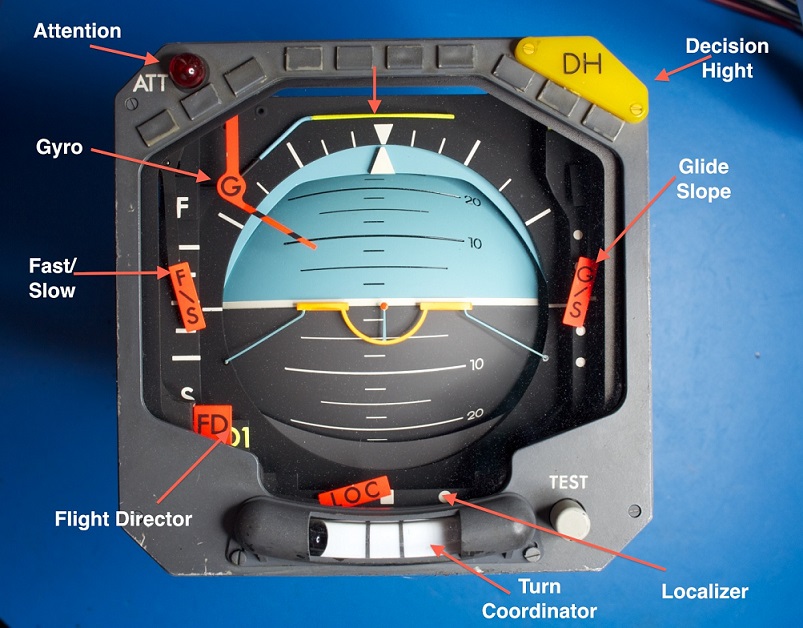
mo123pep wrote:I have am trying to modify one of the gauges on the Cessna 310 Q by Rob Richardson and I am trying to find out how to do this?? The AI (aircraft attitude indicator) on the virtual cockpit panel does not have a pointer at the top to indicate the amount of spin (turn) the aircraft is making and I use this to keep my self from turn to tight. I would like to change it to a different one that does have a pointer at the top like the one on the "standard cockpit" when you press the "W" key. Is there any way to do this?? Thanks for any tips or help on this one. Mike

 Re: HOW TO INSTALL A NEW GAUGE??
by Fozzer » Sun Feb 23, 2014 1:17 pm
...!by garymbuska » Mon Feb 24, 2014 2:17 pm
Fozzer wrote:Like you, Garry...
.....I am an enthusiast of "FS Panel Studio", but that is mainly because I mostly have fun with the "2D panels", where it is extremely easy to add, remove, and modify gauges....
..but, as Hagar points out, the VC (3D) panel is part of the original designers aircraft model, and therefore extremely difficult to modify.
Easy-peasy with 2D panels...not so easy with 3D panels!
Paul.....2D Panel Fiddler....
http://www.fspanelstudio.com/
Quote:
"Keep in Mind...
While FS Panel Studio can be used to perform some editing of gauge placement in Virtual Cockpits, VCs are primarily implemented in the model.cfg file, which defines 3D geometry which cannot be edited in FSPS".
End quote.

Return to Flight Simulator X (FSX) and Steam
Users browsing this forum: No registered users and 470 guests