Cd download not in aircraft list

Forum dedicated to Microsoft FS2004 - "A Century of Flight".

Cd download not in aircraft list

Postby timothy » Tue Oct 11, 2005 2:18 pm

Can anyone suggest why I cannot load up the Chinook helicopter Freeware from PcPilots magazine issue 32 ?

My XP set up puts the filesfrom the magazine CD into folders in My Documents.  . All well and good.  I thendrop and drag the folders as per the authors instructions  into Explorer.  When I then checkgo inExplorer  via My Programmes and Microsoft Games to FS 9 2004. there is the Chinook Folder happily sitting in the Aircraft folder along with my other original aircraft like the Beechcraft and Cessna  and a couple of other downloads. But when I load up the Flight Sim  CD  to fly the Chinook it isn't in the Aircraft option. For some reason FS9 isn't recognising Chinook.  I must be doing something wrong but it is very  strange  how something can be in Explorer and not the Flight Sim drop down.! Or is it ?  I have asked the authors but got no reply.
I notice that in My Documents there is an .cfg. file which  I cannot find in the Explorer aircraft folder although whether it should be there I do not know.

Thanks in advance for any replies.

timothy
2nd Lieutenant
2nd Lieutenant
 
Posts: 55
Joined: Sat Sep 14, 2002 4:01 pm

Re: Cd download not in aircraft list

Postby Hagar » Tue Oct 11, 2005 2:42 pm

Hi Timothy. This is by no means unusual & you either missed something or are simply not looking in the right place on the selection menu. It will probably be listed under Boeing but this is not necessarily the case. Try following this tute first.
http://www.simviation.com/acinstall.htm
Read the instructons carefully & make sure you have the correct folder in FS9\Aircraft. It could easily be hidden inside another one.
If you still have problems I'll suggest something else. This one is a tad more difficult than usual as I don't have the Chinook.
Image

Founder & Sole Member - Grumpy's Over the Hill Club for Veteran Virtual Aviators
Member of the Fox Four Group
My Google Photos albums
My Flickr albums
User avatar
Hagar
Colonel
Colonel
 
Posts: 30869
Joined: Wed Jun 19, 2002 7:15 am
Location: Costa Geriatrica

Re: Cd download not in aircraft list

Postby Fly2e » Tue Oct 11, 2005 4:12 pm

Hi Timothy and welcome.
Can you supply the link to the chinook?
Maybe if we can see what the file looks like and where it is going, we can help!

Dave
COMING SOON!
User avatar
Fly2e
Colonel
Colonel
 
Posts: 198020
Joined: Thu Jan 17, 2002 5:29 pm
Location: KFRG

Re: Cd download not in aircraft list

Postby Hagar » Tue Oct 11, 2005 4:29 pm

Dave. It comes on a free cover CD included with PC Pilot magazine. It therefore qualifies as freeware but there's probably no way for us to try it without purchasing the mag.

PS. From my past experience with these CDs I'm surprised it doesn't self-install.
Last edited by Hagar on Tue Oct 11, 2005 4:31 pm, edited 1 time in total.
Image

Founder & Sole Member - Grumpy's Over the Hill Club for Veteran Virtual Aviators
Member of the Fox Four Group
My Google Photos albums
My Flickr albums
User avatar
Hagar
Colonel
Colonel
 
Posts: 30869
Joined: Wed Jun 19, 2002 7:15 am
Location: Costa Geriatrica

Re: Cd download not in aircraft list

Postby Felix/FFDS » Tue Oct 11, 2005 4:32 pm

Usually the freeware aircraft on the PC Pilot Magazine CD is already available at one of the major sites, so I wouldn't be surprised if it's already here at SimV.

So, it still would be interesting to see who the author is, etc.
Felix/FFDS
User avatar
Felix/FFDS
Administrator
Administrator
 
Posts: 16776435
Joined: Wed Jan 31, 2001 9:42 am
Location: Orlando, FL

Re: Cd download not in aircraft list

Postby BFMF » Tue Oct 11, 2005 6:55 pm

Try following this tute first.
http://www.simviation.com/acinstall.htm
Read the instructons carefully & make sure you have the correct folder in FS9\Aircraft. It could easily be hidden inside another one.


I noticed you've updated your tutorial pictures since you had to go through the trouble of making it for me.

If I remember right, wasn't it originally the SimV 777 repaint?
BFMF
Colonel
Colonel
 
Posts: 16266
Joined: Mon Feb 25, 2002 6:06 pm
Location: Pacific Northwest

Re: Cd download not in aircraft list

Postby Hagar » Tue Oct 11, 2005 7:04 pm

I noticed you've updated your tutorial pictures since you had to go through the trouble of making it for me.

If I remember right, wasn't it originally the SimV 777 repaint?

Hmm, that must be a different one Andrew unless I've finally lost my marble. The one I did for you was the FS2002 737 & still is. AFAIK

PS. This is the only one I had anything to do with. http://www.simviation.com/lair/Repaint2002.htm
Image

Founder & Sole Member - Grumpy's Over the Hill Club for Veteran Virtual Aviators
Member of the Fox Four Group
My Google Photos albums
My Flickr albums
User avatar
Hagar
Colonel
Colonel
 
Posts: 30869
Joined: Wed Jun 19, 2002 7:15 am
Location: Costa Geriatrica

Re: Cd download not in aircraft list

Postby BFMF » Tue Oct 11, 2005 7:17 pm

Never mind, it just dawned on me that I was thinking of the tutorial you made for adding new texture for an aircraft

unless I've finally lost my marble


That's my marble rolling around on the floor somewhere ::) ;)
BFMF
Colonel
Colonel
 
Posts: 16266
Joined: Mon Feb 25, 2002 6:06 pm
Location: Pacific Northwest

Re: Cd download not in aircraft list

Postby Hagar » Tue Oct 11, 2005 7:26 pm

Never mind, it just dawned on me that I was thinking of the tutorial you made for adding new texture for an aircraft


That's my marble rolling around on the floor somewhere ::) ;)

That was the one I meant. You know what this could mean? We've both lost our marbles. :o :D

Maybe I changed it to the 737 for public consumption when you persuaded me to post it. It was a long time ago now & I've lost my marble you see. ;)
Image

Founder & Sole Member - Grumpy's Over the Hill Club for Veteran Virtual Aviators
Member of the Fox Four Group
My Google Photos albums
My Flickr albums
User avatar
Hagar
Colonel
Colonel
 
Posts: 30869
Joined: Wed Jun 19, 2002 7:15 am
Location: Costa Geriatrica

Re: Cd download not in aircraft list

Postby timothy » Wed Oct 12, 2005 2:03 pm

Hello folks, really feel as if I am among friends here. I will try and describe what I have on screen, hoping it makes sense.

'Next 'means next folder in the list.  '+ ' means it's a sub folder to the one previous.

1
Start.Programmes.Micro. Games. FS9 route :
In IE  Folder FS9 . Next, drop down,   folders- 1033.  next Add on Scenery.   next  Adv.   next Aircraft.
In Aircraft folder +several beginning alphabetically+Chinook.
In Chinook folder Folder Model. Next folder Panel. Next Folder Panel 1. Next Folder Sound. Next three Texture folders.
In folder Model from above there is file CH.47.air. (That is all.)

2
My Documents :
The download from the CD goes into My Documents like a rat up a drainpipe. (Old Wiltshire expression folks!)
In My Documents.  Flight Sim Folder + Folder named bbch 47.  (This is the CD download)
Click bbch47 and I have Folder Aircraft,  next folder Displays,  next Folder FS9
In folder Aircraft + folder Chinook  from above  I have all the folders as I have listed in 1     IE plus one named Aircraft .cfg.  CFG file 11KB.

This Aircraft CFG does not appear in the IE folders in list 1  for some reason. Perhaps I should just drop it in the aircraft folder in IE  and see what happens.
What do you think. ?

Thanks for your help and interest.

Oh and by the way I did wonder if it had gone into another aircraft folder, possibly the Boeing one for 737,747 and 777 but no such luck.
timothy
2nd Lieutenant
2nd Lieutenant
 
Posts: 55
Joined: Sat Sep 14, 2002 4:01 pm

Re: Cd download not in aircraft list

Postby Hagar » Wed Oct 12, 2005 2:14 pm

Hi Timothy. After thinking about this I'm sure the Chinook should auto-install to FS9. I've never come across one of these cover disks that requires you to manually extract the files from the CD itself.

In folder Model from above there is file CH.47.air.

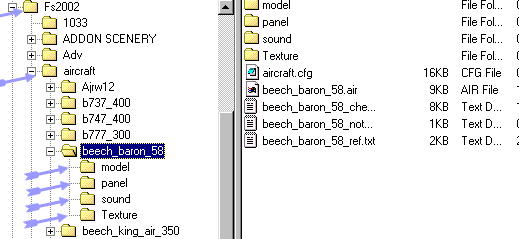
This doesn't sound right. The AIR file should be in the Chinook  folder along with the subfolders you mentioned & Aircraft.cfg, not in the Model subfolder. Check out the illustrations in the tute from my previous link or compare it with one of the default aircraft.

Image
Image

Founder & Sole Member - Grumpy's Over the Hill Club for Veteran Virtual Aviators
Member of the Fox Four Group
My Google Photos albums
My Flickr albums
User avatar
Hagar
Colonel
Colonel
 
Posts: 30869
Joined: Wed Jun 19, 2002 7:15 am
Location: Costa Geriatrica

Re: Cd download not in aircraft list

Postby timothy » Thu Oct 13, 2005 1:53 pm

Hello again Hagar,

Thanks for that, I am going to download your page and work on it. I am going away for a few days so it will have to wait now unfortunately.  Wish I knew how you got that explorer folder  snap shot extract showing like that then I could show you my set up !

If I dont have any luckI will come back next week. Meanwhile thanks again.

Regards  Timothy.
timothy
2nd Lieutenant
2nd Lieutenant
 
Posts: 55
Joined: Sat Sep 14, 2002 4:01 pm

Re: Cd download not in aircraft list

Postby Hagar » Thu Oct 13, 2005 2:07 pm

Although I've done many others I didn't write that installation tute. I can show you how to take a screenshot but let's get this sorted out first.

Without having that CD I can't be sure of my facts but I still say you should be able to install the Chinook straight from the CD without going to all this trouble. These cover disks are configured by pros who should know what they're doing & this is the reason many people use them rather than download the files here & install them manually. If you can find a text file with the author's name on it we could probably find the exact same Chinook posted right here at Simviation.
Last edited by Hagar on Thu Oct 13, 2005 2:09 pm, edited 1 time in total.
Image

Founder & Sole Member - Grumpy's Over the Hill Club for Veteran Virtual Aviators
Member of the Fox Four Group
My Google Photos albums
My Flickr albums
User avatar
Hagar
Colonel
Colonel
 
Posts: 30869
Joined: Wed Jun 19, 2002 7:15 am
Location: Costa Geriatrica

Re: Cd download not in aircraft list

Postby MattNW » Thu Oct 13, 2005 6:47 pm

This a pretty simple suggestion so you may have tried it already but have you opened the aircraft.cfg to see who is listed as the manufacturer?

Open the .cfg file with notepad and look for a line: ui_manufacturer=Extra

Look at the name in bold. That's what you want to look for in the aircraft selection dialog. I've found that nine times out of ten when I can't find an add on airplane in my drop down it's because I didn't know what to look for and was just missing it because it was listed under an unusual manufacturer in the config file.

This line is very sensitive to differences. If anything is different in spelling you will have a different manufacturer listed in the selection dialog. For example De Havilland and De_Havilland would show up as different in the selection dialog or Boeing and Boieng etc.
In Memory of John Consterdine (FS Tipster)1962-2003
User avatar
MattNW
Major
Major
 
Posts: 1705
Joined: Tue Mar 25, 2003 2:34 pm
Location: Indiana

Re: Cd download not in aircraft list

Postby cstrut » Thu Nov 24, 2005 2:15 am

I've had this same problem on many occasions. Once the folder "VIPER" was inside another folder called F-16, the folder contained the read me files docs and the aircraft folder while the folder it came in contained the gauges and effects folders, (I was confused that day). The next time I looked into the aircraft folder "F-22" and the AIR file was missing, it turned up in the texture folder from when I was repainting the craft (I was really confused that day, but the F-22 painted black with Jolly Rogers skull and cross bones on it is really cool looking). The most low percentage manuover on my part was the time I put the folder for some helo in the aircraft folder and the helo folder was just that a folder and nothing more. I have a great tip for those who are constantly loading and tweaking add ons, go to your Microsoft Games or FS9 folder right click on it and choose send to desk top create shortcut. once the short cut is on your desk top right click it and go to properties/change icon and then change the icon to one you will associate with FS9 but not the FS9 icon (yeah it's confusing if you use the same icon for both, trust me on this one) I like to put all my flight sim links (virtu dub, image viewer, shortcut to Flight Simulator 9, flight sim 9 start up, windows movie maker, etc...) on one part of the desk top especially reserved for FS9, this way I can get a quik fix anytime the urge hits. Hey sometimes I come home for lunch just to fly the Vancouver BC to Seattle run.  
cstrut
Ground hog
Ground hog
 
Posts: 22
Joined: Fri Apr 22, 2005 1:30 pm

Next

Return to FS 2004 - A Century of Flight

Who is online

Users browsing this forum: No registered users and 172 guests