

I saw this on another Forum, it really worked,
"Hey all
I felt my flightsim was running quiet bad. So i begain fiddling with drivers and fs9 cfg. Heres how I did it.
It may only work on ATI cards though
READ IT ALL FIRST
Open up fs9.cfg
Find the lines
[DISPLAY]
TEXTURE_BANDWIDTH_MULT=40 --- change the 40 to around 400
Open your fs9.cfg file, and modify the following lines to
TERRAIN_DEFAULT_RADIUS=9.500000
TERRAIN_EXTENDED_RADIUS=4.50000
Now, go into the ATI display Settings page by
Right on desktop, click properties.
on the tab click Settings
Then Click Advanced
A window like this should appear:
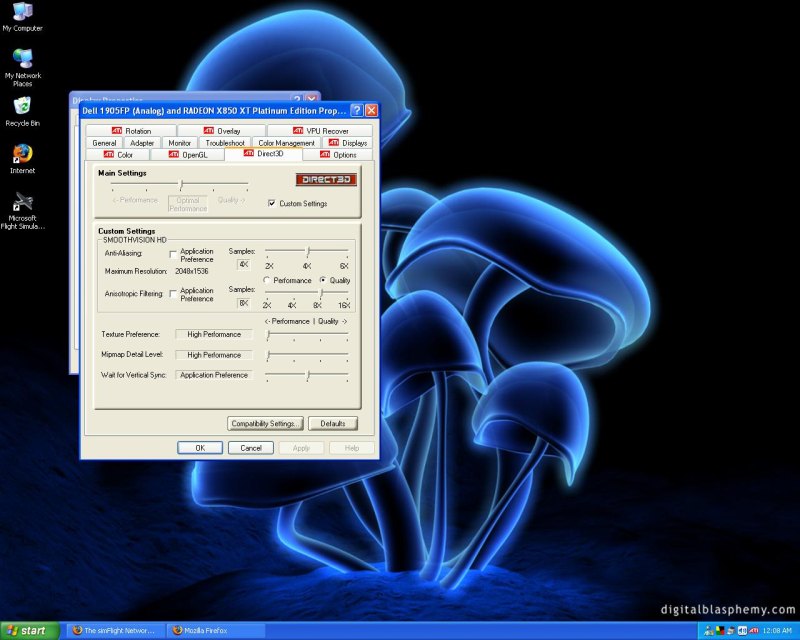
Work your display settings to rouphly match mine.
DONE, click apply and then fly!
The sim should run better while flying. However, when on the ground, some textures might look blurry.
Before I did this, I got around 13-15 fps. Now I get 23.6 average
I AM NOT RESPONSIBLE FOR ANY DAMAGE TO YOUR SYSTEM!!!!!!!111
More tricks here http://members.lycos.nl/vairkennis/FS9tips.txt
( i didnt write them though)
cya
P.S comments welcome"
Comments welcome
cya


 Thing's like clouds can be sacrificed to a certain degree, due to their extreme hit on frame rates, and the fact that they look blurry already! But ground textures really can make a sim come alive.


