Exhaust Smoke

Forum dedicated to Microsoft FS2004 - "A Century of Flight".

Exhaust Smoke

Postby romaruk » Sat Jul 09, 2005 2:07 pm

Hi all,

I have been trying out a couple of smoke guages and effects and found that they seem to be miles away from the engines.  You have to keep adjusting the aircraft conf.  This really becomes a chore if you have quite a few planes.  Has anyone used a smoke system with correct positioning.

Fed up with reading that "these numbers are correct" when they're not.  Installed the new A380 and found the smoke about 60 feet ahead.

Is there a payware program out there?  ???
User avatar
romaruk
2nd Lieutenant
2nd Lieutenant
 
Posts: 58
Joined: Sun Jun 05, 2005 10:58 am
Location: SW (UK)

Re: Exhaust Smoke

Postby SaVas » Sat Jul 09, 2005 8:36 pm

I dont know about smoke gauges and attaching them to lights etc, but here is a thread that will explain how to add smoke effects using the I key command

http://www.simviation.com/cgi-bin/yabb/YaBB.cgi?board=COF;action=display;num=1119793400

Scroll down to Greycats reply and pay CLOSE attention to how the X, Y, Z axis move and follow his instructions to the letter once you find a good smoke fx file you want to use
My life is like the movie Office Space
User avatar
SaVas
Major
Major
 
Posts: 2534
Joined: Thu Sep 04, 2003 11:58 am
Location: St. Louis, MO

Re: Exhaust Smoke

Postby microlight » Sun Jul 10, 2005 6:05 am

Hi romaruk.

You wrote "I have been trying out a couple of smoke guages and effects and found that they seem to be miles away from the engines.  You have to keep adjusting the aircraft conf.  This really becomes a chore if you have quite a few planes.  Has anyone used a smoke system with correct positioning."

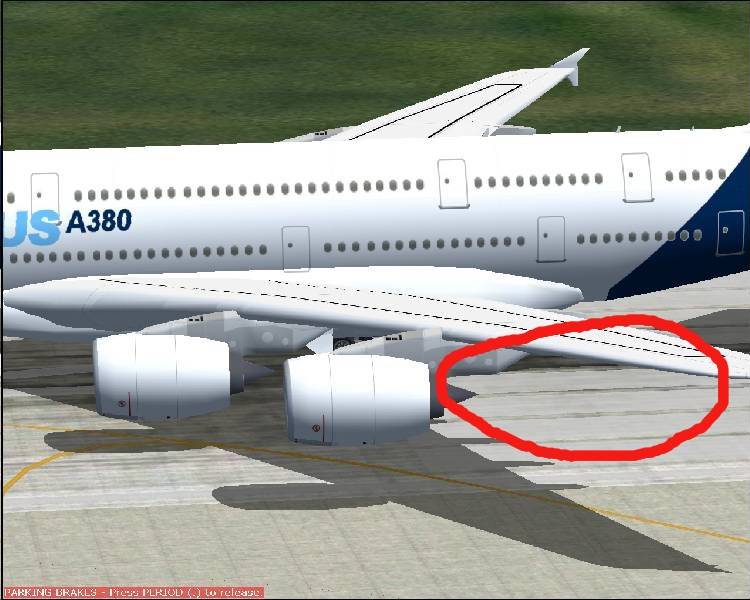
Are you referring to EES? Regarding the A380, the README specifically says that the system was tested on the Versluys model of the A380, and I have just retested this. For this model, the locations are accurate. Static screenshot pictures are not good at showing subtle effects, but here's where I just saw the effect emerge:

Image

Also: "Fed up with reading that "these numbers are correct" when they're not.  Installed the new A380 and found the smoke about 60 feet ahead."

If you are using any other model than those specifically mentioned, the effect may not appear in the right place. Some aircraft model manufacturers have altered where the centre of gravity and reference datum is in their aircraft.cfg files (e.g. the Posky 747-400) and since the effect locations are based on this, then if these values are out are out, the effects will move. Fact of life.

Also: "Is there a payware program out there?" - Not to my knowledge - that's why we amateurs produce this kind of thing. To echo model maker Mike Stone: the product is freeware so you have the ultimate sanction - if you don't like it, don't use it.

::)
User avatar
microlight
Major
Major
 
Posts: 2076
Joined: Mon Aug 19, 2002 6:24 pm
Location: Southern UK

Re: Exhaust Smoke

Postby romaruk » Sun Jul 10, 2005 9:14 am

I'm not knocking anyone for the software etc.
Last edited by romaruk on Sun Jul 10, 2005 9:17 am, edited 1 time in total.
User avatar
romaruk
2nd Lieutenant
2nd Lieutenant
 
Posts: 58
Joined: Sun Jun 05, 2005 10:58 am
Location: SW (UK)

Re: Exhaust Smoke

Postby wji » Sun Jul 10, 2005 11:30 am

My daughter says: "Dad, you ALWAYS repeated yourself." ah, 'tis true

"Has anyone used a smoke system with correct positioning."
Yes.
Nick's smoke
search this forum for 'smoke'  -- that will save me repeating myself -- again :D

Nick's smoke Nick's smoke Nick's smoke Nick's smoke Nick's smoke Nick's smoke Nick's smoke Nick's smoke Nick's smoke
Image PhotoShop 7 user
User avatar
wji
Major
Major
 
Posts: 1644
Joined: Tue May 04, 2004 11:27 am

Re: Exhaust Smoke

Postby Graycat » Sun Jul 10, 2005 2:27 pm

I completely agree with Bill that Nick's smoke is the most accurate of all the effects out there.

Here is another little trick that i've learned when using Nick's smoke:

1.)  Make a backup copy of your Aircraft.cfg before any modifications.

2.)  Go to the [Lights] section of the Aircraft.cfg and add a new light at the bottom of the section (example below is from the FFX 737-500 Aircraft.cfg)

[LIGHTS]
//Types: 1=beacon, 2=strobe, 3=navigation, 4=cockpit, 5=landing
//       6=taxi, 7=recognition, 8=wing, 9=logo, 10=cabin
//          Type    (X Axis)  (Y Axis)   (Z Axis)
light.0= 3,           -8.54,    -49.74,     1.90,      fx_navred ,
light.1= 3,           -8.54,     49.74,     1.90,      fx_navgre ,
light.2= 3,           -8.94,    -49.74,     1.90,      fx_navred ,
light.3= 3,           -8.94,     49.74,     1.90,      fx_navgre ,
light.4= 3,     -49.52,          0.00,     6.30,      fx_navwhih ,
light.5= 2,     -10.14,    -49.84,     1.90,      fx_strobe ,
light.6= 2,     -10.14,     49.84,     1.90,      fx_strobe ,
light.7= 1,           2.20,           0.00,    10.30,      fx_beaconh ,
light.8= 3,     -13.60,    -49.22,     1.90,      fx_navwhi ,
light.9= 3,     -13.60,     49.22,     1.90,      fx_navwhi ,

The next light in the sequence will be light.10.  As for position, just copy&paste the coordinates from the [GeneralEngineData] section since the X,Y,Z  coordinates are  in the same order:

light.10= 3,            -9.66,    -15.80,     -0.833,      fx_navred ,

Please note that the coordinates numbers in the [GeneralEngineData] section represent the (X Axis), (Y Axis), and (Z Axis) of the engine's moment of thrust vector and may not line up exactly with the visual model.  But it will give you a pretty good "ballpark" figure of where the light should be positioned initially.
In the light.10 example above I have also taken the liberty of moving the (X axis) coordinate 8 feet to the rear of the engine.  It would not do to have the new light appear in the center of the engine -- you wouldn't be able to see it then!

Another thing is the color of the light.  I always use the navred light because I see the red color better.

Save the Aircraft.cfg and leave it running in the background (minimize it).

3.  Now startup FS 2004 and select the aircraft that you want to add smoke to.  Turn on the lights.  You can now see another red navigation light "hovering" behind your engine.  Now you can minimize FS 2004 and go back to your Aircraft.cfg file and adjust the numbers for the (X Axis)  (Y Axis)   (Z Axis) coordinates in the light.10 line.  Bring up FS 2004 again and **very important** select a different aircraft (not a different paintscheme of the same aircraft, but a different aircraft altogether).  Now go back and select the aircraft that you're adding smoke to.  Now you will see that the position of the light has changed.

If you want you can press the Alt key and go to the FS 2004 menu Options>Controls>Assignments and scroll down the list until you get to the item listed as "Reload User Aircraft".  I have mine mapped to Ctrl + Shift + R.
Anytime you want to check on the corrected lights position you can then press the Ctrl + Shift + R keys and your aircraft will be reloaded and the light will change position.

Continue adjusting the light.10 (X,Y,Z) coordinates until you get the light centered behind the engine.

4.)  Once the light is centered open the Aircraft.cfg and replace the light.10 effect fx_navred to fx_nicksmokeAI_737.  You may want to adjust the (X Axis) coordinate of light.10 another 10 to 15 feet (in other words subtract another 10 to 15 feet) to the rear of the engine.  You don't want the smoke to be coming out of the front of the engine!

5.)  Now copy the entire light.10 line and paste it immediately below on the next line.  Change the light.10 to light.11 on the new line and then look at the (Y Axis) number and change it to the opposite (i.e. if it is a negative number change it to a positive number and vice-versa).

6.)  You're finished!  Save and close the Aircraft.cfg file.

This sounds like a long, roundabout method of placing smoke effects but (believe me) it saves a lot of time in the long run.

Also if you have any questions or issues IM me here at SimV and I'll be happy to help.
Happy Flying -- And may your main wheels always touch down first!

Dave F.

User avatar
Graycat
2nd Lieutenant
2nd Lieutenant
 
Posts: 114
Joined: Thu Jun 23, 2005 11:31 am
Location: Dallas, TX

Re: Exhaust Smoke

Postby romaruk » Mon Jul 11, 2005 7:00 am

Thanks for that GrayCat.

If I have any trouble, I will IM you.
Last edited by romaruk on Mon Jul 11, 2005 7:02 am, edited 1 time in total.
User avatar
romaruk
2nd Lieutenant
2nd Lieutenant
 
Posts: 58
Joined: Sun Jun 05, 2005 10:58 am
Location: SW (UK)

Re: Exhaust Smoke

Postby Graycat » Mon Jul 11, 2005 6:57 pm

No problem Steve -- I'm always happy to help.
Happy Flying -- And may your main wheels always touch down first!

Dave F.
User avatar
Graycat
2nd Lieutenant
2nd Lieutenant
 
Posts: 114
Joined: Thu Jun 23, 2005 11:31 am
Location: Dallas, TX


Return to FS 2004 - A Century of Flight

Who is online

Users browsing this forum: No registered users and 197 guests