Help downloading aircraft panels/liveries

Forum dedicated to Microsoft FS2004 - "A Century of Flight".

Help downloading aircraft panels/liveries

Postby Jayviator » Thu May 10, 2007 5:17 pm

Hi, I have enjoyed flying my fs2002 and fs2004 for quite sometime now but have only just figured how do download new planes to it, well it seems that some i can download with no problems at all, but some are prooving more difficuilt Im trying to recreate the Eastleigh airport (now Southampton intl, pffft!) of my childhood days this means Air UK f-27s and Heralds, Viscounts of British air ferries and Guernsey airlines, shorts 360's 330s (the only one thats came into our airport that i can find in the downloads is the aurigny one) and Aurigny trislanders (which are the only thing still operating from Eastleigh that was around when i was a kid.
Anyway, i managed to download a viscount and eventualy managed to get it in the guernsey airlines livery, so i was a bit gutted when i went to fly it that all the gauges were missing, after a bit of fiddling about i managed to get the main flying instruments but theres still a lot missing (mainly the engine instrument panel and throttle area) then i downlaoded a f-27 and when i tried to change the livery to air UK nothing happened, infact i just ended up with a grey f-27, i manged to get the original textures back, but i really want it to be air UK and when i looked in the texture thing for the air uk textures all i saw was blank, it seems there are no textures at all other than prop disc, and as for the trislander, absoloutley nothing at all, even though it appeared to be all in the correct place
i would really appreciate if someone can explain what to do, i am a complete novice to downloading planes so i need it to be explained in a very simple way, when i have sucsessfully downloaded planes this is what i did, i downloaded it to a folder i made called fs downloads then i used winzip to unzip it to c:\program files/microsoft games/flight simulator 9 then i drag it into the aircraft files, and that has worked fine with a tuccano and a jetstream so i am a bit annoyed its not so simple with other planes!

Jayviator
Ground hog
Ground hog
 
Posts: 21
Joined: Thu May 10, 2007 5:06 pm

Re: Help downloading aircraft panels/liveries

Postby Hagar » Fri May 11, 2007 2:01 am

Hi & welcome to Simviation. First of all may I suggest you read the aircraft installation tute posted here. http://www.simviation.com/acinstall.htm
You might also like to read my Windows Basics & Working with Windows articles here. http://www.simviation.com/lair/Windows%20Basics.htm

The main problem with installing 3rd party addons is that they are not all configured in the same way. If this were the case it would be so easy but everyone has their own favourite methods for installing them. This makes it extremely difficult to write a tutorial covering every possibility. I've found the best way is to take an example & show people how I would install it using the methods I find easiest. Tell me the page numbers the F27 & Air UK repaint you mention are posted on so I can check them out by installing them to my own FS9. Then if I walk you through the install you should have some idea of what we're doing & why. Once you understand the basic principles it should become much easier.

when i have sucsessfully downloaded planes this is what i did, i downloaded it to a folder i made called fs downloads then i used winzip to unzip it to c:\program files/microsoft games/flight simulator 9 then i drag it into the aircraft files, and that has worked fine with a tuccano and a jetstream so i am a bit annoyed its not so simple with other planes!

Two points here;
1. It's not a good idea to extract zipfiles direct to FS.
2. Most tutorials fail to mention that if you're using WinXP it has its own Compressed Folders utility. You shouldn't need separate unzipper utilities to open/extract zipfiles for installation into FS.

As you have WinZip you might find the Right-click WinZip/Extract to Folder ..... option useful. This will automatically extract the zipfile into a folder with the same name into the same folder you're working in, in this case your FS Downloads folder. This is the quickest, easiest method I know & you don't have to go hunting around for those extracted files.
Last edited by Hagar on Fri May 11, 2007 2:37 am, edited 1 time in total.
Image

Founder & Sole Member - Grumpy's Over the Hill Club for Veteran Virtual Aviators
Member of the Fox Four Group
My Google Photos albums
My Flickr albums
User avatar
Hagar
Colonel
Colonel
 
Posts: 30868
Joined: Wed Jun 19, 2002 7:15 am
Location: Costa Geriatrica

Re: Help downloading aircraft panels/liveries

Postby Jayviator » Sun May 13, 2007 8:37 am

Hi, and thanks for the reply, the air uk liveries are on page 81 and 82, i downloaded the mike stones f-27 200 and also the f27 200-500 package, i cannot get any of the liveries to work!
Jayviator
Ground hog
Ground hog
 
Posts: 21
Joined: Thu May 10, 2007 5:06 pm

Re: Help downloading aircraft panels/liveries

Postby Hagar » Sun May 13, 2007 9:47 am

I'd forgotten all about this. First you need to install the base aircraft. I suggest you download the Fokker F27-200/500 Package (sf27.zip) posted on this page. http://www.simviation.com/fs2004props18.htm
This contains both the mk 200 and mk 500 versions.

Installation is straightforward. Extract the zipfile using the Right-click WinZip/Extract to Folder .... option. Open the extracted sf27 folder & paste the f27200 & f27500 folders inside it into FS9\Aircraft. To install the gauges paste the contents of the folder named gauges into FS9\Gauges. That's it. Check both versions of the aircraft out in FS9 to make sure they're installed properly.

Now for the repaints. I'll use the Air UK F27-200 posted at the bottom of this page as a example. http://www.simviation.com/fs2004props81.htm
Download AirUKF27-200Late80s.zip & extract it as I described above. Open the AirUKF27-200Late80s folder you just extracted until you find a folder named texture.3. Paste the texture.3 folder into the f27200 folder you previously installed to FS9\Aircraft.
Now you need to edit Aircraft.cfg to recognise the new variation. Go back to the AirUKF27-200Late80s folder & open New Text Document.txt in Notepad. Select the sample CFG entry by dragging the mouse across the text & copy it. This is the entry.

[fltsim.XX]//insert next number
title=Fokker F27 Mk 200 Paint3
sim=f27200
model=
panel=
sound=
texture=3
panel_alias =
sound_alias =
kb_checklists=
kb_reference=
atc_id_color=0xffffffffff
atc_id=GBLGW
ui_manufacturer=Fokker
ui_type=F27 Mk 200
ui_variation=AirUK (Later livery)
description=Air UK F27 200 (Later livery).
atc_heavy=0
atc_airline=AirUk
atc_flight_number=

Now open Aircraft.cfg of the f27200 folder in Notepad. Paste the new entry below the last existing variation & just above the [General] header. Change the [fltsim.XX] entry to the next number in sequence. In this case it will be [fltsim.2]
It should now look like this. (The new entry is in red.)

[fltsim.0]
title=Fokker F27 Mk 200
sim=f27200
model=
panel=
sound=
texture=
panel_alias =
sound_alias =
kb_checklists=
kb_reference=
atc_id_color=0xffffffffff
atc_id=NTETP
ui_manufacturer=Fokker
ui_type=F27 Mk 200
ui_variation=Air Anglia
description=Enter your description here.
atc_heavy=0
atc_airline=Air Anglia
atc_flight_number=

[fltsim.1]
title=Fokker F27 Mk 200 Paint1
sim=f27200
model=
panel=
sound=
texture=1
panel_alias =
sound_alias =
kb_checklists=
kb_reference=
atc_id_color=0xffffffffff
atc_id=NTETP
ui_manufacturer=Fokker
ui_type=F27 Mk 200
ui_variation=NLM Cityhopper
description=Enter your description here.
atc_heavy=0
atc_airline=NLM Cityhopper
atc_flight_number=

[fltsim.2]///next number
title=Fokker F27 Mk 200 Paint3
sim=f27200
model=
panel=
sound=
texture=3
panel_alias =
sound_alias =
kb_checklists=
kb_reference=
atc_id_color=0xffffffffff
atc_id=GBLGW
ui_manufacturer=Fokker
ui_type=F27 Mk 200
ui_variation=AirUK (Later livery)
description=Air UK F27 200 (Later livery).
atc_heavy=0
atc_airline=AirUk
atc_flight_number=


[General]
etc. etc


Finally exit Notepad saving changes when prompted. Now go & fly your Air UK F27-200. It will be listed on the menu as AirUK (Later livery)

Hope that worked for you.
Last edited by Hagar on Sun May 13, 2007 10:05 am, edited 1 time in total.
Image

Founder & Sole Member - Grumpy's Over the Hill Club for Veteran Virtual Aviators
Member of the Fox Four Group
My Google Photos albums
My Flickr albums
User avatar
Hagar
Colonel
Colonel
 
Posts: 30868
Joined: Wed Jun 19, 2002 7:15 am
Location: Costa Geriatrica

Re: Help downloading aircraft panels/liveries

Postby Jayviator » Sun May 13, 2007 11:41 am

YES!!! it worked thank you very much! now i have almost recreated my local airport in my childhood days!  i just need to get an aurigny trislander and a bristol freighter!
Can i be cheeky and ask for your help again how to get gauges for viscount 800srs, i managed to get the main gauges but there are lots of gauges missing and no throttle panel
Jayviator
Ground hog
Ground hog
 
Posts: 21
Joined: Thu May 10, 2007 5:06 pm

Re: Help downloading aircraft panels/liveries

Postby Hagar » Sun May 13, 2007 11:51 am

That's good news. I'll be pleased to help but you will have to tell me which Viscount you're having problems with. I need the file name & page it's posted on.

I found an Aurigny Trislander but it might be better to fix your other problems first. It works well but the install is a tad complicated.
Image

Founder & Sole Member - Grumpy's Over the Hill Club for Veteran Virtual Aviators
Member of the Fox Four Group
My Google Photos albums
My Flickr albums
User avatar
Hagar
Colonel
Colonel
 
Posts: 30868
Joined: Wed Jun 19, 2002 7:15 am
Location: Costa Geriatrica

Re: Help downloading aircraft panels/liveries

Postby Jayviator » Sun May 13, 2007 1:22 pm

Hi, its on page 9 at the bottom, its a VASP livery but i changed it to a guersney, i cant figure out why i manged to get some instruments to show but not others, also im still havimnga  few probs with repaints, using your technique, which worked fine with the f-27 200, i tried to do the same with the f-27 500 (obviously i downloaded a air uk livery for the 500srs  (p82 middle one)but its just come out grey although it says on the description air uk, so it seems my sim has acknowledged that there is a air uk f-27 500 but its appaering as grey, and the same has happened when i tried to add another livery to the viscount, a British air ferries/guernsey livery, (p46 at the top) thats coming out grey as well
Jayviator
Ground hog
Ground hog
 
Posts: 21
Joined: Thu May 10, 2007 5:06 pm

Re: Help downloading aircraft panels/liveries

Postby Hagar » Sun May 13, 2007 1:37 pm

Let's take these one at a time. First this.
i tried to do the same with the f-27 500 (obviously i downloaded a air uk livery for the 500srs  (p82 middle one)but its just come out grey although it says on the description air uk, so it seems my sim has acknowledged that there is a air uk f-27 500 but its appaering as grey

Make sure you install the new texture folder to the correct version of the original aircraft under its correct name & that the new Aircraft.cfg entry is pointed to it. In this case paste the folder named Texture.uk into your f27500 folder.

Assuming this is the first repaint you've added to this aircraft the edited Aircraft.cfg will look like this;

[fltsim.0]
title=Fokker F27 Mk 500
sim=f27500
model=
panel=
sound=
texture=
panel_alias =
sound_alias =
kb_checklists=
kb_reference=
atc_id_color=0xffffffffff
atc_id=NTETP
ui_manufacturer=Fokker
ui_type=F27 Mk 500
ui_variation=United Express
description=Enter your description here.
atc_heavy=0
atc_airline=United Express
atc_flight_number=

[fltsim.1]///next number
title=Fokker F27 Mk 500 Air UK OLD
sim=f27500
model=
panel=
sound=
texture=uk
panel_alias =
sound_alias =
kb_checklists=
kb_reference=
atc_id_color=0xffffffffff
atc_id=G-BMXD
ui_manufacturer=Fokker
ui_type=F27 Mk 500
ui_variation=Air UK old livery
description=Country of orgin: Netherlands. Type: 44 - 52 seat turboprop regional airliner
atc_heavy=0
atc_airline=uk
atc_flight_number=422


Tell me if this helps.
Last edited by Hagar on Sun May 13, 2007 1:40 pm, edited 1 time in total.
Image

Founder & Sole Member - Grumpy's Over the Hill Club for Veteran Virtual Aviators
Member of the Fox Four Group
My Google Photos albums
My Flickr albums
User avatar
Hagar
Colonel
Colonel
 
Posts: 30868
Joined: Wed Jun 19, 2002 7:15 am
Location: Costa Geriatrica

Re: Help downloading aircraft panels/liveries

Postby Hagar » Sun May 13, 2007 2:23 pm

Hi, its on page 9 at the bottom, its a VASP livery but i changed it to a guersney, i cant figure out why i manged to get some instruments to show but not others,

For this one make sure you installed all the gauges. The included Gauges folder contains 9 x GAU files & 2 x CAB files*. Paste these 11 files into FS9\Gauges. The CAB files look like zipfiles but don't extract them.  (The gauges will work just as well in the Panel folder of the Viscount.)

To prevent error messages when selecting this aircraft you will probably need to download the Update posted on the same page. Paste the included FSSound.dll into FS9\Modules & add this entry to fs9.cfg:

[OldModules]
FSSound.dll=1

You shouldn't need the other DLL file included in the update but it won't do any harm to install it.

*PS. I don't know why fs9gps.cab is included in the download as it's a default FS9 gauge. When installing gauges it's best not to overwrite files/folders if prompted.
Last edited by Hagar on Sun May 13, 2007 2:23 pm, edited 1 time in total.
Image

Founder & Sole Member - Grumpy's Over the Hill Club for Veteran Virtual Aviators
Member of the Fox Four Group
My Google Photos albums
My Flickr albums
User avatar
Hagar
Colonel
Colonel
 
Posts: 30868
Joined: Wed Jun 19, 2002 7:15 am
Location: Costa Geriatrica

Re: Help downloading aircraft panels/liveries

Postby Jayviator » Sun May 13, 2007 11:37 pm

Well i have been battling with it and finnaly managed to get the air uk livery for the f-27 both 200 and 500 srs and i have almost a complete viscount panel now, i say almost as i am missing one gauge, and its a pretty important one, the air speed indicator!  strangly i managed to get the panel before i entered the FSSOUND and FSUIPC dlls to the fs9 cfg and didnt have any error messages i wish i hadnt done that because now i do get error messages, but i dont think this is causing my lack of ASI, i cannot find any ASI gauges in the viscount panel, even though the pic of the panel shows it, any ideas how to get the asi?
Thanks again you really have been most helpfull on this
Jayviator
Ground hog
Ground hog
 
Posts: 21
Joined: Thu May 10, 2007 5:06 pm

Re: Help downloading aircraft panels/liveries

Postby Hagar » Mon May 14, 2007 3:17 am

Well i have been battling with it and finnaly managed to get the air uk livery for the f-27 both 200 and 500 srs

This shouldn't be a struggle once you understand the basic principle. The fact that you're working with different versions of the same type of aircraft makes it more complicated. It's confusing me & I've been doing this sort of thing for years. You must approach it systematically & make sure the base aircraft is installed correctly before attempting to add new variations. The repaints will only work on the correct aircraft model. For example, it's quite likely that textures for the F27-200 series won't work with the 500 series by the same author. It's very easy to make mistakes when manually editing CFG files so make sure that you do this carefully. It's most
Last edited by Hagar on Mon May 14, 2007 3:46 am, edited 1 time in total.
Image

Founder & Sole Member - Grumpy's Over the Hill Club for Veteran Virtual Aviators
Member of the Fox Four Group
My Google Photos albums
My Flickr albums
User avatar
Hagar
Colonel
Colonel
 
Posts: 30868
Joined: Wed Jun 19, 2002 7:15 am
Location: Costa Geriatrica

Re: Help downloading aircraft panels/liveries

Postby Jayviator » Mon May 14, 2007 4:58 am

Hmmm, this is weird because i am using the 800 srs viscount that you mentioned, somehow i must have "lost" a gauge! i might try to uninstall it and try again, as for the error message, i have put the fssound.dll in the fs9 cfg but still get error message and also in the modules folder, do i need to get rid of it from the modules folder?
Jayviator
Ground hog
Ground hog
 
Posts: 21
Joined: Thu May 10, 2007 5:06 pm

Re: Help downloading aircraft panels/liveries

Postby Hagar » Mon May 14, 2007 5:16 am

Hmmm, this is weird because i am using the 800 srs viscount that you mentioned, somehow i must have "lost" a gauge! i might try to uninstall it and try again, as for the error message, i have put the fssound.dll in the fs9 cfg but still get error message and also in the modules folder, do i need to get rid of it from the modules folder?

Very weird. It might be best to delete the Viscount 800 & start again following my instructions from my earlier reply. You will need to paste FSSound.dll from the update into FS9\Modules & to add the corresponding [OLDMODULES] entry to fs9.cfg. Make sure you got it right. You can copy/paste it from this reply if you wish.

[OLDMODULES]
FSSound.dll=1

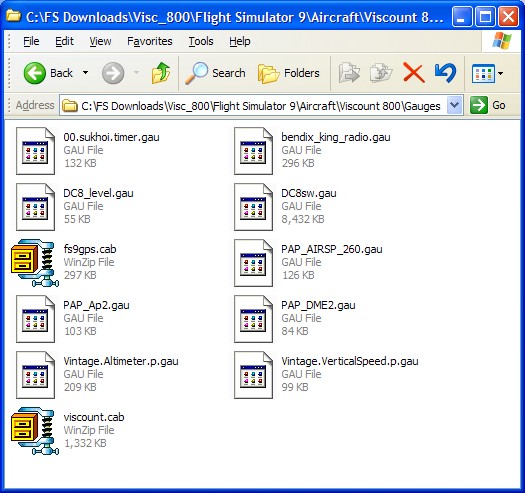
PS. These are the 11 gauges in Visc_800.zip.
Image

The easiest way to install them is to click Edit/Select All & cut/paste all 11 files into the Panel folder of the Viscount 800. If you prefer to put them in FS9\Gauges I suggest you don't overwrite fs9gps.cab when prompted.
Last edited by Hagar on Mon May 14, 2007 5:34 am, edited 1 time in total.
Image

Founder & Sole Member - Grumpy's Over the Hill Club for Veteran Virtual Aviators
Member of the Fox Four Group
My Google Photos albums
My Flickr albums
User avatar
Hagar
Colonel
Colonel
 
Posts: 30868
Joined: Wed Jun 19, 2002 7:15 am
Location: Costa Geriatrica

Re: Help downloading aircraft panels/liveries

Postby Jayviator » Mon May 14, 2007 12:25 pm

Thanks, i did manage to find the gauge after all, somehow i had made a shortcut to it on my desktop,  i just dragged it into the viscount panel folder and its there now!
just need to sort out this dll error thintg because i have done the [old modules] FSsound.dll=1 in the fs9cfg and added them to the modules folder to and im still getting that message, i can live with it though, i just have to click yes twice when FSSOUND DLL and FSUIPC DLL error message appears
Jayviator
Ground hog
Ground hog
 
Posts: 21
Joined: Thu May 10, 2007 5:06 pm

Re: Help downloading aircraft panels/liveries

Postby Hagar » Mon May 14, 2007 12:30 pm

[quote]Thanks, i did manage to find the gauge after all, somehow i had made a shortcut to it on my desktop,
Last edited by Hagar on Mon May 14, 2007 1:37 pm, edited 1 time in total.
Image

Founder & Sole Member - Grumpy's Over the Hill Club for Veteran Virtual Aviators
Member of the Fox Four Group
My Google Photos albums
My Flickr albums
User avatar
Hagar
Colonel
Colonel
 
Posts: 30868
Joined: Wed Jun 19, 2002 7:15 am
Location: Costa Geriatrica

Next

Return to FS 2004 - A Century of Flight

Who is online

Users browsing this forum: No registered users and 201 guests