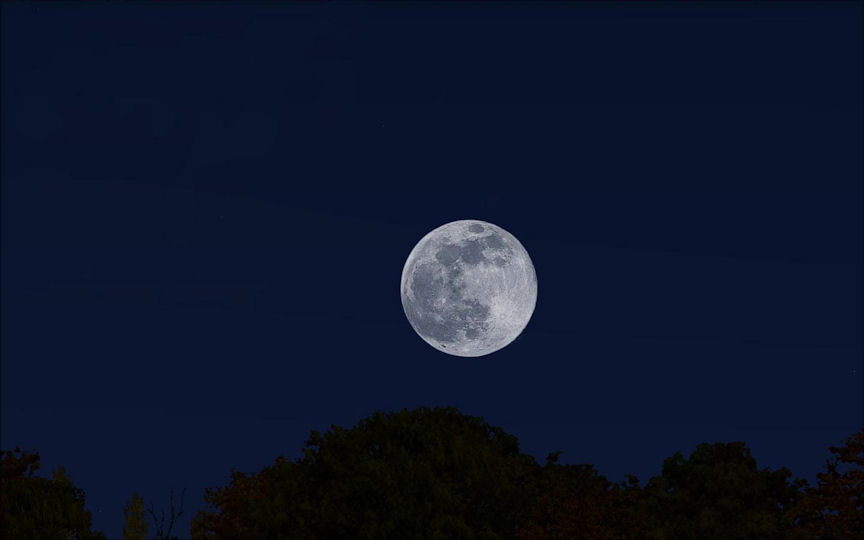
Hi Rez Moon

FSX including FSX Steam version.

Hi Rez Moon

Postby grizzard » Mon Jun 29, 2009 3:09 pm

I installed the "High Resolution Moon" but I'm not sure how to make it show up?  I checked my calendar, set to Oct 4th 2009 which is showing that it should be "full moon", but no moon?  Does the moon randomly appear .... or by calendar.  I picked a clear night ... flew at midnight, 2 am and 4 am.  Just curious because I don't know how to check if the install was good.
Intel i7 920 @ 4 Ghz- Thermalright Ultra-120 Extreme Fan - MSI X58 Platinum- MSI Geforce 285 GTX 1 GB - 6 GB OCZ 1600 DDR3 1600 - WD VelociRaptor 300 GB - OCZ 700 Watt GameXstream - Samsung SyncMaster 2493 HM - Vista Home Premium
User avatar
grizzard
2nd Lieutenant
2nd Lieutenant
 
Posts: 241
Joined: Sun Mar 09, 2008 7:17 pm
Location: Rio Tinto

Re: Hi Rez Moon

Postby Brando14100 » Mon Jun 29, 2009 3:13 pm

If you followed the install instructions it should work just fine. Remember though, just because it's a full moon, does not mean it is visible at night. It depends on where the moon is in it's orbit around Earth.

8-)
Brando14100
 

Re: Hi Rez Moon

Postby ShaneG_old » Mon Jun 29, 2009 3:32 pm

I'm not sure how astronomically correct FSX is.

There is an eclipse coming up on July 22, and FS9 shows it happen, so I thought it would look better in FSX, but nothing, the moon wasn't even where it was supposed to be.

Maybe an overlooked feature?
Last edited by ShaneG_old on Mon Jun 29, 2009 3:33 pm, edited 1 time in total.
ShaneG_old
Lieutenant Colonel
Lieutenant Colonel
 
Posts: 9700
Joined: Tue Mar 11, 2008 11:52 am

Re: Hi Rez Moon

Postby Boikat » Mon Jun 29, 2009 3:34 pm

The moon should appear where and when it does on the calender.  It's actually pretty accurate.

A full moon in the middle of the night is going to be more or less directly over head.  Depending on your longitude (and it should not be too far off) on October the 4th, 2009, should rise somewhere around 7 PM.  Add about 20 to 30 minutes, then look East.  The above times are for Shreveport Louisiana.

Boop!  There he is:

Image

A good place to find the moon rise and set times is the US Naval Observatory web site.  

If your moon is still missing, check to make sure they are in your main FSX "texture" folder, and not in a folder inside your texture folder (I've done that before!)
Image
"I reject your reality, and substitute my own" Adam Savage, Mythbusters
User avatar
Boikat
Major
Major
 
Posts: 2974
Joined: Thu Mar 20, 2008 8:23 pm
Location: NW Loueezianner

Re: Hi Rez Moon

Postby ShaneG_old » Mon Jun 29, 2009 3:37 pm

Hey Boikat, would you mind setting your sim to July 22 2009 and start up at Taipai Taiwan at Dawn and run the sim speed up and see if the eclipse appears for you.


 It happens in FS9, but not FSX, and I have your moon set in both sims.

Just curious. ;)
ShaneG_old
Lieutenant Colonel
Lieutenant Colonel
 
Posts: 9700
Joined: Tue Mar 11, 2008 11:52 am

Re: Hi Rez Moon

Postby Boikat » Mon Jun 29, 2009 3:37 pm

If you followed the install instructions it should work just fine. Remember though, just because it's a full moon, does not mean it is visible at night. It depends on where the moon is in it's orbit around Earth.

8-)


A ful moon should be visable pretty much all night.  FSX does span span at least two days per "moon", however.  Possibly a bit more since it does not present the New Moon, or the first slivers of the old moon and just past new moon.
Image
"I reject your reality, and substitute my own" Adam Savage, Mythbusters
User avatar
Boikat
Major
Major
 
Posts: 2974
Joined: Thu Mar 20, 2008 8:23 pm
Location: NW Loueezianner

Re: Hi Rez Moon

Postby grizzard » Mon Jun 29, 2009 4:49 pm

Ok .... got it, thanks.  Don't know why I couldn't see it before but now at KBOI at 8:00 PM it's showing up ... beautiful!  Thanks for the response ....

:) :)
Intel i7 920 @ 4 Ghz- Thermalright Ultra-120 Extreme Fan - MSI X58 Platinum- MSI Geforce 285 GTX 1 GB - 6 GB OCZ 1600 DDR3 1600 - WD VelociRaptor 300 GB - OCZ 700 Watt GameXstream - Samsung SyncMaster 2493 HM - Vista Home Premium
User avatar
grizzard
2nd Lieutenant
2nd Lieutenant
 
Posts: 241
Joined: Sun Mar 09, 2008 7:17 pm
Location: Rio Tinto

Re: Hi Rez Moon

Postby Boikat » Mon Jun 29, 2009 5:04 pm

[quote]Hey Boikat, would you mind setting your sim to July 22 2009 and start up at Taipai Taiwan at Dawn and run the sim speed up and see if the eclipse appears for you.
Image
"I reject your reality, and substitute my own" Adam Savage, Mythbusters
User avatar
Boikat
Major
Major
 
Posts: 2974
Joined: Thu Mar 20, 2008 8:23 pm
Location: NW Loueezianner

Re: Hi Rez Moon

Postby Boikat » Mon Jun 29, 2009 5:26 pm

I'm not sure how astronomically correct FSX is.

There is an eclipse coming up on July 22, and FS9 shows it happen, so I thought it would look better in FSX, but nothing, the moon wasn't even where it was supposed to be.
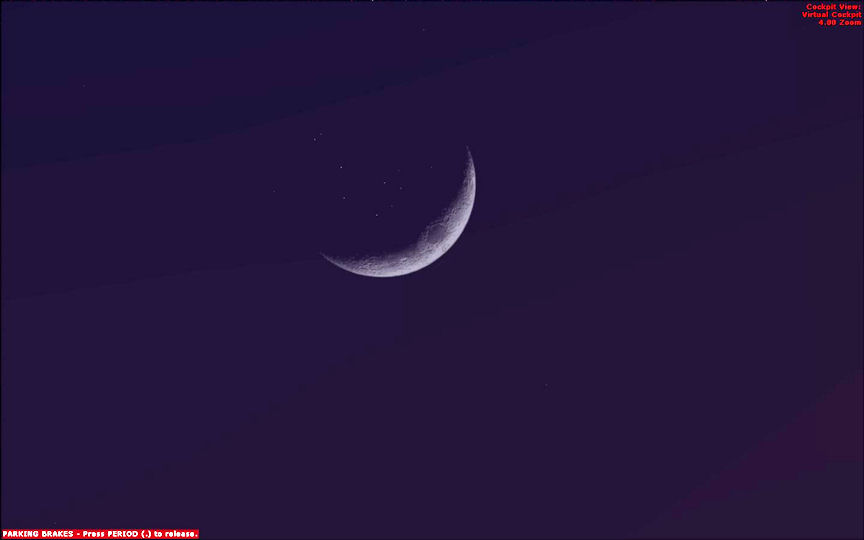

The moon is fairly correct.  I double checked a few moon/passing in front of" events, and except for the solar (and lunar, for that matter) eclipses, it seems dead on.  For example, 1 April, 2006, the moon passing in eclipsing the Pleiades star cluster.  It's dead on, but there is one little detail that makes my teeth grind:

Image

The stars are still visible, even though they are behind the moon.  I hate that.  Grrrrr!

I think the only way around that is a black disk in the "image" with the moon phase, then the Alpha mask to match the phase.  Sort of like the same way the "strange moons" were made.  I'll experiment over the weekend.

Hi Rez Moon V3.0?  :P

Maybe an overlooked feature?


Like masking out the stars.  Aaaaargh!
Image
"I reject your reality, and substitute my own" Adam Savage, Mythbusters
User avatar
Boikat
Major
Major
 
Posts: 2974
Joined: Thu Mar 20, 2008 8:23 pm
Location: NW Loueezianner


Return to Flight Simulator X (FSX) and Steam

Who is online

Users browsing this forum: No registered users and 439 guests