wing views

Forum dedicated to Microsoft FS2004 - "A Century of Flight".

wing views

Postby upintheair28 » Tue Jan 09, 2007 8:36 pm

I downloaded a horizon airlines q202 turboprop for fs2004, and it said it had moving cargo door and stairway, and wing view. How do I get the door and stairway to move, and how do I get the wing view? ( I'm new to this stuff)
upintheair28
Ground hog
Ground hog
 
Posts: 9
Joined: Tue Jan 09, 2007 9:28 pm

Re: wing views

Postby klaaz » Wed Jan 10, 2007 11:54 am

Welcome to "this stuff" upintheair!

Well, normaly is shift-E for opening en closing the door. For the cargo door ther must be a handle or lever in the cockpit i think.
Wing-view, you mean that you can look out over the wing? See also the view-options in the keyboard-joystick setup.

succes.
klaaz
Ground hog
Ground hog
 
Posts: 25
Joined: Sun Jan 07, 2007 5:55 am

Re: wing views

Postby upintheair28 » Thu Jan 11, 2007 12:02 am

Thank you very much. I still can't get the wing view though. Where does it show the key combination for that in the "views" options?
Thanks again
upintheair28
Ground hog
Ground hog
 
Posts: 9
Joined: Tue Jan 09, 2007 9:28 pm

Re: wing views

Postby Si_Combat » Thu Jan 11, 2007 6:26 am

If Wing views come with the download then you should be able to select wing views by simply pulling back or down on the hat switch of your joystick while in the 2D cockpit view...  ;)
Simon (Si_Combat)
User avatar
Si_Combat
2nd Lieutenant
2nd Lieutenant
 
Posts: 209
Joined: Tue Apr 06, 2004 3:47 am
Location: Belfast - N.Ireland

Re: wing views

Postby klaaz » Thu Jan 11, 2007 5:18 pm

Yes, it always works with the hat switch, no matter what plane you have.
You can choose under settings, assigment-menu, view options, a key for wingview, default key is shift + NUMPAD6 for look right, shift + NUMPAD4 for left.
I hope this is what you are looking for.
klaaz
Ground hog
Ground hog
 
Posts: 25
Joined: Sun Jan 07, 2007 5:55 am

Re: wing views

Postby upintheair28 » Thu Jan 11, 2007 7:43 pm

When pulling the hat switch back, won't that just make the camera look backwards? Also, on the "views menu" where does it let you make a key combination for looking out the wing? Finally, when I did the Shift+Num4 or Shift+Num6, all it did was look to the sides, am I doing something wrong?
Thanks for taking your time to help me with this
upintheair28
Ground hog
Ground hog
 
Posts: 9
Joined: Tue Jan 09, 2007 9:28 pm

Re: wing views

Postby Si_Combat » Fri Jan 12, 2007 1:58 pm

What you are actually telling the hat switch to do is to look for a BITMAP image... provided the correct configuration file has the proper data on it and the BITMAP image is in the Aircraft texture folder then your hat switch will find it by default... I can only assume that the aircraft file you downloaded was sullpied with all the correct data and files... All YOU simply have to do is load up the aircraft and try BACK on the hat switch...

If the proper BITMAP images are not in the Texture folder of the Aircraft folder then all you'll see is scenery when you operate your hat switch...
Simon (Si_Combat)
User avatar
Si_Combat
2nd Lieutenant
2nd Lieutenant
 
Posts: 209
Joined: Tue Apr 06, 2004 3:47 am
Location: Belfast - N.Ireland

Re: wing views

Postby Hagar » Fri Jan 12, 2007 2:16 pm

What you are actually telling the hat switch to do is to look for a BITMAP image... provided the correct configuration file has the proper data on it and the BITMAP image is in the Aircraft texture folder then your hat switch will find it by default... I can only assume that the aircraft file you downloaded was sullpied with all the correct data and files... All YOU simply have to do is load up the aircraft and try BACK on the hat switch...

If the proper BITMAP images are not in the Texture folder of the Aircraft folder then all you'll see is scenery when you operate your hat switch...

I think you're confusing the old-fashioned 2D panel views with a DVC. If this aircraft has a DVC with cabin views I suspect it involves "moving around" in the DVC. This can be done with Shift + Backspace/Enter & Ctrl + Backspace/Enter. Use the HAT for panning round the VC in the usual way. There are also various utilities that make it easier.

This is only a guess & there should be instructions of some sort in the documentation with the file. It would help if I knew where this this aircraft is posted so I can check it out for myself.

PS. Think I found it. If so I was wrong about those panel views. Try pressing Num Pad 5 + 1 (look Back/Up/Left), 5 + 2 (look Back/Up) & 5 + 3 (look Back/Up/Right).
Last edited by Hagar on Fri Jan 12, 2007 3:36 pm, edited 1 time in total.
Image

Founder & Sole Member - Grumpy's Over the Hill Club for Veteran Virtual Aviators
Member of the Fox Four Group
My Google Photos albums
My Flickr albums
User avatar
Hagar
Colonel
Colonel
 
Posts: 30868
Joined: Wed Jun 19, 2002 7:15 am
Location: Costa Geriatrica

Re: wing views

Postby upintheair28 » Fri Jan 12, 2007 7:53 pm

Thanks, but since I'm new to this, I'm not sure where all the files are and what all of the files are, so I'm not quite sure what I'm supposed to do.
upintheair28
Ground hog
Ground hog
 
Posts: 9
Joined: Tue Jan 09, 2007 9:28 pm

Re: wing views

Postby Hagar » Fri Jan 12, 2007 8:00 pm

The easiest way would be for you to tell me the file name of the aircraft you have & exactly where I can download it so I can check it out for you.
Image

Founder & Sole Member - Grumpy's Over the Hill Club for Veteran Virtual Aviators
Member of the Fox Four Group
My Google Photos albums
My Flickr albums
User avatar
Hagar
Colonel
Colonel
 
Posts: 30868
Joined: Wed Jun 19, 2002 7:15 am
Location: Costa Geriatrica

Re: wing views

Postby upintheair28 » Fri Jan 12, 2007 9:32 pm

Its the FS2004 DeHavilland Dash8-Q202 Horizon Air Package by Premier Aircraft Design. Its on the fs2004 section of simviation.com and it's under "props" on page 69.
upintheair28
Ground hog
Ground hog
 
Posts: 9
Joined: Tue Jan 09, 2007 9:28 pm

Re: wing views

Postby upintheair28 » Fri Jan 12, 2007 9:37 pm

I was also wondering if there are any pre-installed airplanes on fs2004 that have wing view?
upintheair28
Ground hog
Ground hog
 
Posts: 9
Joined: Tue Jan 09, 2007 9:28 pm

Re: wing views

Postby Hagar » Sat Jan 13, 2007 6:31 am

Its the FS2004 DeHavilland Dash8-Q202 Horizon Air Package by Premier Aircraft Design. Its on the fs2004 section of simviation.com and it's under "props" on page 69.

Right. Now the dog can see the rabbit. :)

Before going any further here's a few tips to make all this so much easier. A few minutes spent on this now will save so much time & aggravation in future. First I created a special folder on my C: drive for this job named FS Downloads. I also created a shortcut to the FS Downloads folder & pasted it to my desktop. This makes it easy to locate downloaded zipfiles. While you're about it, locate & create a shortcut to your FS9 root directory folder {C:\Program Files\Microsoft Games\Flight Simulator 9) & paste that to your desktop.

Now we're ready to download & install our first aircraft to FS9. Everyone has their own favourite methods & there's no right or wrong way. I'll show you the way I do it. This one is a good example of how downloads should be configured. If they were all like this there would be no need for tutorials or instructions. I downloaded the file dhc8_qxe.zip to my FS Downloads folder & clicked the desktop shortcut to locate it in Windows Explorer. After extracting the zipfile to the FS Downloads folder this is what you should see.
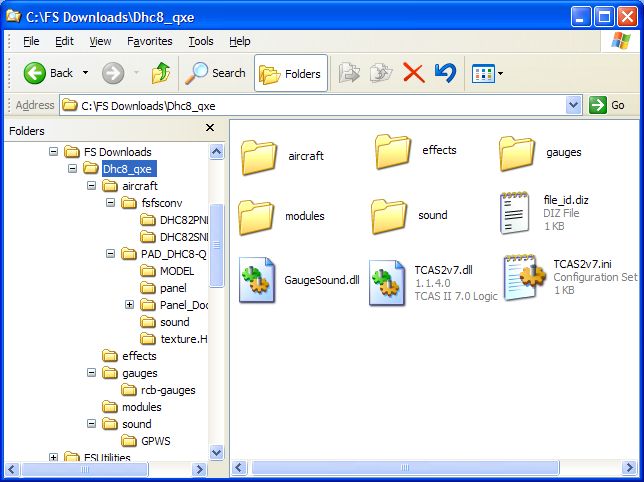
Image

Note that this download is configured in subfolders with the same names as those in the FS9 directory itself - aircraft, effects, gauges, modules & sound. This should make installing it so easy as all it involves is transferring the contents of those folders into their corresponding folders in FS9.

First the aircraft. Open the folder named aircraft in the download & you will see 2 folders named fsfsconv & PAD_DHC8-Q 200_Horizon. You need to move these into the FS9\Aircraft folder. Click Edit/Select All on the Windows Explorer menu bar. This will select the 2 folders. Right-click (right-hand mouse button) on one of the selected folders & select Cut from the drop-down menu. Now go to the FS9 root directory by double-clicking on the desktop shortcut to it you created earlier. Open the Aircraft folder, right-click in an empty space in the window & select Paste. Click Yes when prompted to overwrite the fsfsconv folder. Both selected folders should appear in the FS9\Aircraft folder alongside all your other aircraft. The aircraft is now installed.

Now go back to the download & open the effects folder. Repeat the above procedure, this time pasting the contents into FS9\effects. Repeat this with the contents of the 4 remaining folders. (As a general rule Do NOT overwrite gauges if prompted.)

Finally the 2 DLL files named GaugeSound.dll & TCAS2v7.dll plus TCAS2v7.ini should be pasted into the FS9 root directory folder. That's it. The aircraft is now fully installed.

For your other questions I copied this from ReadMe_First.txt in the PAD_DHC8-Q 200_Horizon folder.

* Shift E operates the Airstair, Shift E +2 will operate the Cargo door

* This aircraft has wing views...
* Use CTRL+ Num Pad 1 for the Left Wing View
* Use CTRL+ Num Pad 3 for the Right Wing View
* Use CTRL+ Num Pad 2 for a Cabin View

* The RED Button on the left grip of the VC Yoke will open the ATC dialog box.


I was also wondering if there are any pre-installed airplanes on fs2004 that have wing view?

The short answer is no. Panels with extra view windows are not usually used on aircraft with a DVC. There might be modified panels for them posted at Simviation & other FS sites. Do a search for < wing views >

Hope this helps.

PS. If your zipfiles look like this the WinXP "Compressed Folders" utility is set as your default unzipper.
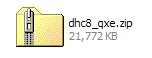
Image

The Compressed (zipped) Folders utility included with WinXP treats zipfiles as ordinary folders. You can open zipfiles in Windows Explorer by double-clicking on the icon which means you can install most FS addons without extracting them.

Last edited by Hagar on Sat Jan 13, 2007 8:57 am, edited 1 time in total.
Image

Founder & Sole Member - Grumpy's Over the Hill Club for Veteran Virtual Aviators
Member of the Fox Four Group
My Google Photos albums
My Flickr albums
User avatar
Hagar
Colonel
Colonel
 
Posts: 30868
Joined: Wed Jun 19, 2002 7:15 am
Location: Costa Geriatrica

Re: wing views

Postby upintheair28 » Sat Jan 13, 2007 10:51 am

When I got onto fs2004, when I clicked "ok" for selecting my aircraft, it (dash8 q-202) said it was unable to load some aircraft or software, and then below, it showed that it was one of the "gauges" files.
upintheair28
Ground hog
Ground hog
 
Posts: 9
Joined: Tue Jan 09, 2007 9:28 pm

Re: wing views

Postby Hagar » Sat Jan 13, 2007 11:37 am

Mine installed with no problem. If you follow my instructions carefully it should be fine.

and then below, it showed that it was one of the "gauges" files

Try it again & make a note of the name of the gauge.
Image

Founder & Sole Member - Grumpy's Over the Hill Club for Veteran Virtual Aviators
Member of the Fox Four Group
My Google Photos albums
My Flickr albums
User avatar
Hagar
Colonel
Colonel
 
Posts: 30868
Joined: Wed Jun 19, 2002 7:15 am
Location: Costa Geriatrica

Next

Return to FS 2004 - A Century of Flight

Who is online

Users browsing this forum: No registered users and 193 guests
