Hot Key for the FS9/FSX Map...?

Forum dedicated to Microsoft FS2004 - "A Century of Flight".

Hot Key for the FS9/FSX Map...?

Postby Fozzer » Thu Oct 26, 2006 5:47 am

Hello Lads....!

I was going to post this question on the FSX Forum, but as there are such a lot of seriously argumentative, annoying Newbies on there, it's probably safer, to post it here (FS9) amongst a much nicer selection of Sim V established folks....;)...!

I may be missing something, but is there a "Hot Key" to toggle the "Map" on and off in all the Flight Sims (FSX, FS9, etc) rather than constantly fumbling for the mouse to click on the Map Icon, wait for the Map to load, then click on the Map "OK", wait again for the Map to close and for the flight to continue...(or having to do the same thing via the drop-down Menu).... :'(....?

(FS Navigator toggles the GPS Map on and off with successive F9 key presses....;D...)!

I've looked through all the default key commands and I'm blowed if I can find anything there which will do the job... :'(...!

Many thanks to all the nice, friendly, relaxed, laid-back, non-argumentative Chaps on the FS9 Forum.....;)... :D...!
....Long may we continue...;)...
LOL...!

Paul....G-BPLF... 8)...!

P.S. Any lucky users of "Microflight" will appreciate the nice, variable, transparent GPS Map window which covers the forward view whilst in flight.....super... ;D...!

http://www.hangsim.com/mf/
Win 8.1 64-bit. DX11. Advent Tower. Intel i7-3770 3.9 GHz 8-core. 8 GB System RAM. AMD Radeon HD 7700 1GB RAM. DVD ROM. 2 Terra Byte SATA Hard Drive. Philips 17" LCD Monitor. Saitek Cyborg X Fly-5 Joystick. ...and a Briggs and Stratton Petrol Lawn Mower.
User avatar
Fozzer
Colonel
Colonel
 
Posts: 27369
Joined: Thu Jan 31, 2002 3:11 pm
Location: Hereford. England. EGBS.

Re: Hot Key for the FS9/FSX Map...?

Postby Hagar » Thu Oct 26, 2006 6:05 am

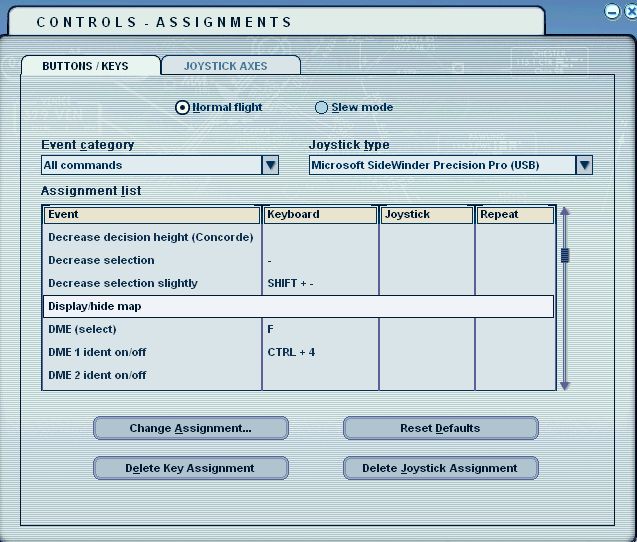
Well, I don't have FSX so I looked in FS9. There is no default key command but you should be able to assign your own.

Image

PS. Hope I'm not one of these annoying people you're on about. :P :D
Image

Founder & Sole Member - Grumpy's Over the Hill Club for Veteran Virtual Aviators
Member of the Fox Four Group
My Google Photos albums
My Flickr albums
User avatar
Hagar
Colonel
Colonel
 
Posts: 30868
Joined: Wed Jun 19, 2002 7:15 am
Location: Costa Geriatrica

Re: Hot Key for the FS9/FSX Map...?

Postby Sir_Crashalot » Thu Oct 26, 2006 6:20 am

Paul, I assigned Shift-M to do that a long time ago.

Now according to the new style in the FSX world we have to start an argument over this assignment. You start....

Crash ;D
Sir_Crashalot
 

Re: Hot Key for the FS9/FSX Map...?

Postby Fozzer » Thu Oct 26, 2006 6:29 am

Ta, Doug....!

That got me half way there.... ;D...!

Assigning a "Hot Key" via the "Controls Menu" brings up the Map...;D...., but unfortunately I still have to fumble with the mouse to click "OK" to close the Map down again....
..and I hate having to "Fumble".... :-[....!
LOL...;D...!

The Hot Key doesn't seem to Toggle the Map on and off... :o...!


PS. Hope I'm not one of these annoying people you're on about. :P :D


.....perish the thought, Doug...:o... ;)... ;D...!
LOL...!

Paul...Champion Fumbler... :-*...!
Win 8.1 64-bit. DX11. Advent Tower. Intel i7-3770 3.9 GHz 8-core. 8 GB System RAM. AMD Radeon HD 7700 1GB RAM. DVD ROM. 2 Terra Byte SATA Hard Drive. Philips 17" LCD Monitor. Saitek Cyborg X Fly-5 Joystick. ...and a Briggs and Stratton Petrol Lawn Mower.
User avatar
Fozzer
Colonel
Colonel
 
Posts: 27369
Joined: Thu Jan 31, 2002 3:11 pm
Location: Hereford. England. EGBS.

Re: Hot Key for the FS9/FSX Map...?

Postby Fozzer » Thu Oct 26, 2006 6:56 am


Now according to the new style in the FSX world we have to start an argument over this assignment. You start....

Crash ;D


I think that assigning a Hot Key in FS9 is very much quicker than it is in FSX.
And the key which you have assigned in FS9 is much more scenically attractive than the similar key in FSX.
The assigned FS9 Map key is shaped nicely to fit the finger, whereas the FSX Map key is rough, and causes abrasions to the finger.

Microsoft has not designed a suitably assignable key for FSX, therefore I have assigned a person to return FSX to the shop from whence I purchased it, for an assignable refund...>:(...!
...so there...!

Paul...Assignable Fumble Finger.... 8)...!
Win 8.1 64-bit. DX11. Advent Tower. Intel i7-3770 3.9 GHz 8-core. 8 GB System RAM. AMD Radeon HD 7700 1GB RAM. DVD ROM. 2 Terra Byte SATA Hard Drive. Philips 17" LCD Monitor. Saitek Cyborg X Fly-5 Joystick. ...and a Briggs and Stratton Petrol Lawn Mower.
User avatar
Fozzer
Colonel
Colonel
 
Posts: 27369
Joined: Thu Jan 31, 2002 3:11 pm
Location: Hereford. England. EGBS.

Re: Hot Key for the FS9/FSX Map...?

Postby eno » Thu Oct 26, 2006 7:02 am

We all know you just like fumbling  Paul ....... but I would have thought you could have found something more interesting to fumble with  ;) ;) ;) ;D ;D ;D
[align=center][img]http://www.simviation.com/yabbuploads/imaginsigeno.jpg[/img][/align]
User avatar
eno
Lieutenant Colonel
Lieutenant Colonel
 
Posts: 6708
Joined: Sun Jan 18, 2004 12:30 pm
Location: Derbyshire UK

Re: Hot Key for the FS9/FSX Map...?

Postby Fozzer » Thu Oct 26, 2006 8:32 am

We all know you just like fumbling  Paul ....... but I would have thought you could have found something more interesting to fumble with  ;) ;) ;) ;D ;D ;D


...eno...;)...

When you are very young, you consider yourself to be an expert at "things"... :-*...!

...but as you get older it's easy to forget how you did "it" in the past... :'(...!

..and then you have no choice but to to "fumble"...:-[...!

....;D...!

Paul...I need another Memory stick.... ;)...!
(..or a book of instructions)... ::)...!
Win 8.1 64-bit. DX11. Advent Tower. Intel i7-3770 3.9 GHz 8-core. 8 GB System RAM. AMD Radeon HD 7700 1GB RAM. DVD ROM. 2 Terra Byte SATA Hard Drive. Philips 17" LCD Monitor. Saitek Cyborg X Fly-5 Joystick. ...and a Briggs and Stratton Petrol Lawn Mower.
User avatar
Fozzer
Colonel
Colonel
 
Posts: 27369
Joined: Thu Jan 31, 2002 3:11 pm
Location: Hereford. England. EGBS.

Re: Hot Key for the FS9/FSX Map...?

Postby microlight » Thu Oct 26, 2006 3:14 pm

Paul,

You might need another memory stick, but have you got any sockets left to poke one into?

Ouch...

Ah, it's good to be back in a forum that's as comfortable and friendly as a warm bath with soap suds in it...

;)
User avatar
microlight
Major
Major
 
Posts: 2076
Joined: Mon Aug 19, 2002 6:24 pm
Location: Southern UK

Re: Hot Key for the FS9/FSX Map...?

Postby Hagar » Thu Oct 26, 2006 3:23 pm

Ta, Doug....!

That got me half way there.... ;D...!

Assigning a "Hot Key" via the "Controls Menu" brings up the Map...;D...., but unfortunately I still have to fumble with the mouse to click "OK" to close the Map down again....

Just tried it. Press Enter. ;)
Image

Founder & Sole Member - Grumpy's Over the Hill Club for Veteran Virtual Aviators
Member of the Fox Four Group
My Google Photos albums
My Flickr albums
User avatar
Hagar
Colonel
Colonel
 
Posts: 30868
Joined: Wed Jun 19, 2002 7:15 am
Location: Costa Geriatrica

Re: Hot Key for the FS9/FSX Map...?

Postby Fozzer » Thu Oct 26, 2006 3:44 pm

Just tried it. Press Enter. ;)


Well, would you know...:o...!

Now if the Missus had told me that years ago I wouldn't have had to go through all this "fumbling" malarkey, and maybe she wouldn't have buggered off with the Milkman...
...you live and learn... :'(...!

Too late now....Tee-Hee...;D...!

Paul.... ;)... 8)...!

You are prob' right, Doug. The OK key is highlighted waiting for the little pinkie to press it..easy-peasy...;)...!


Paul,

You might need another memory stick, but have you got any sockets left to poke one into?

Ouch...;)


Hi Micro...!

I bought a new memory stick today...;D...

...but I can't remember where I put it... :-[...!
Last edited by Fozzer on Thu Oct 26, 2006 3:52 pm, edited 1 time in total.
Win 8.1 64-bit. DX11. Advent Tower. Intel i7-3770 3.9 GHz 8-core. 8 GB System RAM. AMD Radeon HD 7700 1GB RAM. DVD ROM. 2 Terra Byte SATA Hard Drive. Philips 17" LCD Monitor. Saitek Cyborg X Fly-5 Joystick. ...and a Briggs and Stratton Petrol Lawn Mower.
User avatar
Fozzer
Colonel
Colonel
 
Posts: 27369
Joined: Thu Jan 31, 2002 3:11 pm
Location: Hereford. England. EGBS.

Re: Hot Key for the FS9/FSX Map...?

Postby Ravang » Thu Oct 26, 2006 7:45 pm

You probably left it with some guy wearing a pink shirt with a rainbow on it and then it broke and you went to the pub and drank away your troubles :o, lol just kidding ;D
User avatar
Ravang
Ground hog
Ground hog
 
Posts: 0
Joined: Sat Nov 07, 2009 11:40 pm
Location: South Carolina, USA

Re: Hot Key for the FS9/FSX Map...?

Postby beaky » Thu Oct 26, 2006 8:45 pm


Well, would you know...:o...!

Now if the Missus had told me that years ago I wouldn't have had to go through all this "fumbling" malarkey, and maybe she wouldn't have buggered off with the Milkman...
...you live and learn... :'(...!

Too late now....Tee-Hee...;D...!

Paul.... ;)... 8)...!

You are prob' right, Doug. The OK key is highlighted waiting for the little pinkie to press it..easy-peasy...;)...!


Hi Micro...!

I bought a new memory stick today...;D...

...but I can't remember where I put it... :-[...!


:D  :D  :D
This is just the kind of rambling I stumbled (fumbled?) onto a coupla years ago as I searched the Web for help with FS9... no wonder I stuck around!!

:D

PS- thanks for the tip, Doug- I've been wondering how to do that, myself!!
Image
User avatar
beaky
Global Moderator
Global Moderator
 
Posts: 12877
Joined: Thu Dec 16, 2004 8:00 am
Location: Shenandoah, PA USA


Return to FS 2004 - A Century of Flight

Who is online

Users browsing this forum: No registered users and 265 guests