I've started work on a VFR flight tute; and it suddenly hit me that it ain't gonna work too well because I use a little mod I came up with 'way back - the VFR map.
Now; many know by now I'm not a real big fan of IFR flight; I prefer to hunt my way using landmarks as I find them. In order to help I have a full range of sectionals, maps and a handy-dandy road atlas; but I started using the inflight map (during my pole-pole flight) to make things easier - I'm lazy.

FS9 has an inflight map; but it has 2 major problems: 1) it pauses the sim while you look at it and 2) it shows your position. Nothing destroys a VFR flight by being able to lok at the map and saying "oooh - just a bit more right."
So since I don't use the GPS in the DC-3 anyway; I butchered that panel and put in the map instead. If you want to try it (in any plane); here's how you do it. (Adjusted so you can keep the GPS in the plane.)
1) On the aircraft of your choice; open up the Panel.cfg
2) Directly under the last Window heading (before the Virtual Cockpit section, if it has one) add the following lines:
[WindowXX]
file=Map_background.bmp
size_mm=545,377
position=2
VISIBLE=0
ident=VFR
Change the 'XX' to the next available window number.
Now; once you decide where you're gonna fly; go looking for a good map. I use Google; or I'll scan in a pice of sectional or atlas. I prefer to Google (I use Mapquest a lot for coastal areas) since you tend to wind up with sharper images.
Once you have a good map of your flight area; use Pixresizer to size it to 545mm wide. Save it as a bitmap - NOT a JPEG; and rename it 'VFR_background'.
Place this new pic into your aircraft's Panel folder.
Now; when you start up that aircraft; you'll have something that looks like this:
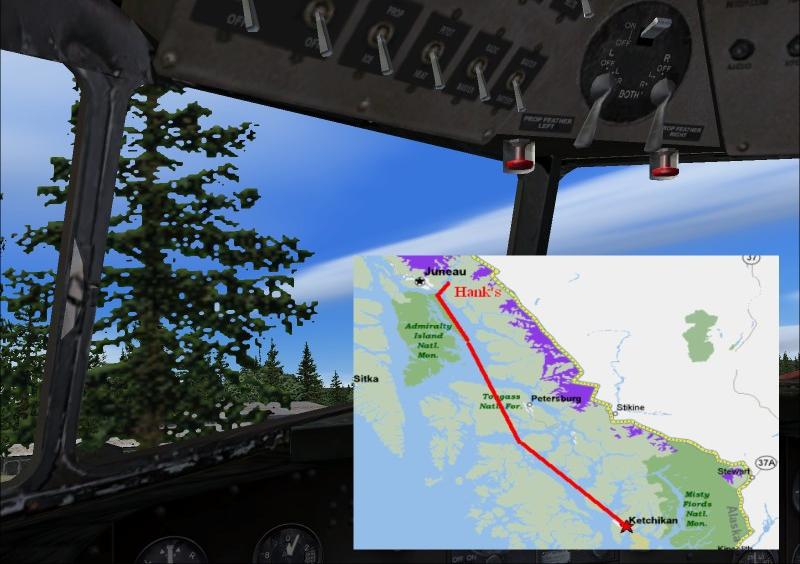
Like any panel; the map can be turned on and off depending on need.
Cheers!





 ...!
...! ...!
...!

 ... uhh, thats what I would give you if I was female :)







 ...!
...!