Cockpit Main Support Construction (Part 1 -repost)

Only for Genuine FS fanatics! Taking this hobby from Real to Surreal? Or maybe just combining 4 hobbies into 1 ;)

Cockpit Main Support Construction (Part 1 -repost)

Postby JBaymore » Thu Oct 30, 2003 3:42 pm

First Piece of Cockpit Structure Constructed

I wasn't up to doing any "fussy" wiring type stuff....... and I am waiting for some 10K ohm slide potentiometers to arrive anyway.... so I thought I'd take a couple of hours and tackle the first item for the construction of the cockpit structure itself.

The first section I decided to build for this project is the "shelf" unit that will sit directly behind the center console structure.
Last edited by JBaymore on Wed Mar 17, 2004 11:06 pm, edited 1 time in total.
Image ImageIntel i7 960 quad 3.2G LGA 1366, Asus P6X58D Premium, 750W Corsair, 6 gig 1600 DDR3, Spinpoint 1TB 720
User avatar
JBaymore
Global Moderator
Global Moderator
 
Posts: 10020
Joined: Sat May 24, 2003 9:15 am
Location: New Hampshire

Re: Cockpit Main Support Construction (repost)

Postby JBaymore » Thu Oct 30, 2003 3:45 pm

Starting to look interesting there John.

Will
Image ImageIntel i7 960 quad 3.2G LGA 1366, Asus P6X58D Premium, 750W Corsair, 6 gig 1600 DDR3, Spinpoint 1TB 720
User avatar
JBaymore
Global Moderator
Global Moderator
 
Posts: 10020
Joined: Sat May 24, 2003 9:15 am
Location: New Hampshire

Re: Cockpit Main Support Construction (repost)

Postby JBaymore » Thu Oct 30, 2003 3:47 pm

Thanks Will.  :)

I may get another couple of hours tonight to tackle starting the next cockpit section.  Next part of the cockpit itself to make is the center console.  That will be a litle more complex... but not much.

The problem is that I am trying to cram in one more VDT down there (  ;) ) in the center console for a FMC or a radar display.  The logical place it should go puts it on the slanted part right next to where the center console butts up against the main panel facing.  But I can't put my hands on something like a 7" or 9" dirt cheap monitor right now.  I've got a small monochrome one that has a 7 3/4" x 10 1/4" screen... in a 11 1/2" x 13" "box".  But that size puts the font edge of the throttle quadrant back about 13" from the panel face.  I am thinking that is a little too far back for comfort for the right arm to conveniently reach it.

The real time consuming stuff with all of this will come when I have to do the wiring for all the switches and stuff.  ;)

You off your night shift thing yet?

best,

....................john
Image ImageIntel i7 960 quad 3.2G LGA 1366, Asus P6X58D Premium, 750W Corsair, 6 gig 1600 DDR3, Spinpoint 1TB 720
User avatar
JBaymore
Global Moderator
Global Moderator
 
Posts: 10020
Joined: Sat May 24, 2003 9:15 am
Location: New Hampshire

Re: Cockpit Main Support Construction (repost)

Postby JBaymore » Thu Oct 30, 2003 3:49 pm

You need some cheap flat screen monitors really, but where you get them from I've no idea.  I was sent home sick from my fourth night and have been feeling rank for a few days so at the moment design work has been suspended.  I have made a list of all of the possible key commands and listed them in excel.  I have removed from the list all of those that I want to use an axis for and that don't apply for a cessna (afterburner etc).

Currently the list is 80 functions but this would include a "working Radio" in addition to a console.  I just need an old keyboard now.

Will
Image ImageIntel i7 960 quad 3.2G LGA 1366, Asus P6X58D Premium, 750W Corsair, 6 gig 1600 DDR3, Spinpoint 1TB 720
User avatar
JBaymore
Global Moderator
Global Moderator
 
Posts: 10020
Joined: Sat May 24, 2003 9:15 am
Location: New Hampshire

Re: Cockpit Main Support Construction (repost)

Postby JBaymore » Thu Oct 30, 2003 3:51 pm

Construction Started On Cockpit Center Console

I managed to steal about 3 hours last night from 10 PM to 1 AM to get started on constructing the center console portion of my simulated cockpit.  The basic construction techniques here are the same as what was done for the part that I documented in a post prior to this one in this thread.

All of the design work was done in my CAD program and I again just transfered the dimensions onto the wood.  The center console is constructed mainly out of 1/2" medium density fiberboard, with 1/8" fiberboard "whiteboard" material for the panel facings.  All of the main wood for the console came out of 1/2 of a 4' x 8' sheet.  It is screwed and glued using scrap pine furring strips.  Total cost for this part was again about $12 USD.


Photo #1
Image

As You can see in Photo #1 above...... I spent some time playing with the monitor that I want to add in here as a FMC / TCAS radar display.  Here I am checking to make sure that the dimensions are going to match the CAD design....... because I did not leave a lot of room here for this!  The paper CAD plans are in the foreground.  The already partially built throttle quadrant was also used to help visualize if this is going to all work out OK  ;).

I really want to have that extra monitor in this console.  There are just too many things that you need to display in a large jet cockpit  ;).  This will bring the number of monitors for the "glass cockpit" part of this cockpit project to four.  It will be driven by my old Tcera laptop...... which is small and can be tucked into a nook somewhere.

The monitor I am utilizing here is one I picked up at the dump a week and a half ago.  People just throw this kind of thing out.  It is a 7 3/4" x 10 1/4" display, monochrome white, 604 x 480 vga display in perfect working condition.  The monochrome is perfect for a TCAS type display...... although I would have prefered green, not white.  "One man's junk is another man's........ "

To save space in the console I decided to strip the housing off most of the monitor.  I just left the facing portion on the monitor to serve as a "flange" to mount it in the wood construction.  If you are following this project and decide to do this also....... be vary careful with opening monitors!  They can have pretty lethal charges still in them even when unplugged.  Watch how you handle them.  And the picture tube can implode badly if you bang it on anything.


Photo #2
Image

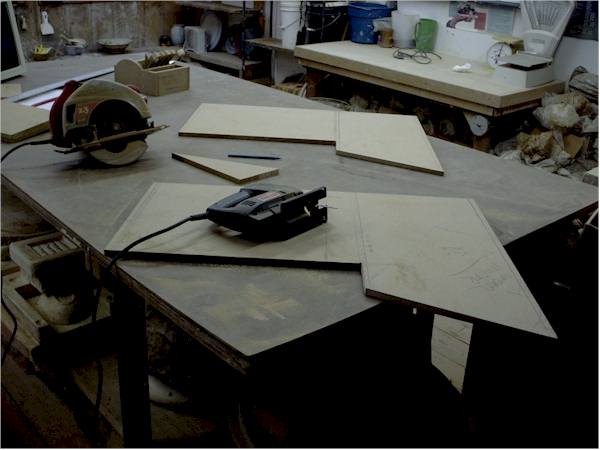
Photo #2 shows the two main side panels cut out.  Note the sloping upper console section.  This area takes the most planning.  The edges of the boards you use must have the same slope so that the facing fits against it correctly.  Using a skillsaw at an angle is sufficient for these cuts..... you don't NEED a tablesaw.

The two side pieces were cut out and then set "back to back" to compare the cuts.  Slight adjustment was done with a saber saw so that the two matched as well as possible.

With careful planning the "scrap" from the two side panels will make all the other pieces.


Photo #3
Image

In photo #3 you can see the trickiest cut in the project.  This large flat sheet with the bevel cut edge is the top rear console wall.  This angled cut has to match the slope of the upper portion ofthe console.  I used the skillsaw set at an angle.  The corner braces also have to be cut at an angle to match.  You can see the "screw and glue" construction here too.


Photo #4
Image

In photo #4 you see the rear console wall where it butts up against the main panel support structures.  This section is cut out to allow good air circulation for the FMC/TCAS monitor that will be located there.  I will also likely install some boxer fans near each monitor in the setup (with "real" cooling controls located on the overhead panel) to help keep them all cool.  The holes in the bottom serve for more wiring passthroughs.  The corner construction of the "box" is also evident here.


Photo #5
Image


Photo #5 shows the internal structure of the console a bit.  The wall that separates the lower console from the upper part does not go all the way to the bottom.  This will allow the lower area to be utilized to store all manner of electronic stuff.  It also facilitates wiring passthrough.  The "dividing wall" will get a strip of furring along it at the level of the lower panel facing to help support that material.

This lower section will eventually get some internal dividing and supporting walls.  These will be spaced to match the electronics that will get installed there.  I already know that on the lower left... next to the pilot seat...... there will be a section set up to take a couple of Goflight radio units.  So there will be a wall set up to support them on their panel mounting width of 7 1/4".


Photo #6
Image


In photo #6 you can see the "stripped" monitor set in place in the upper center console.  The mount is simply two furring strips screwed into the console walls at the appropriate height so that the monitor face is flush with the console face.  The console panel facing will go over this...and have a cutout for the display screen.  The monitor is "friction fit" here.... no mounting screws or anything..... it just sits on the flange created by the wood.  It's quite stable 'cause the fit is so tight all around  ;).  But it is easily lifted in and out for doing any work.  The two screws on the left side of the "mount" are evident on the dividing wall.  They will be covered by the throttle quadrant.


Photo #7
Image

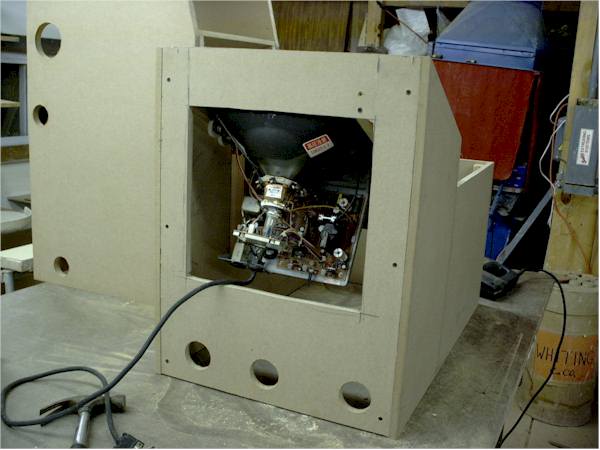
In photo #7 you see the center console from the rear, showing the monitor in place.  The ease of access to the monitor workings is self evident.  Also the wiring passthrough holes.  The monitor does NOT project beyond the outside of the rear wall..... so that the console will butt up flush with the other support structures for the main panel.


Photo #8
Image

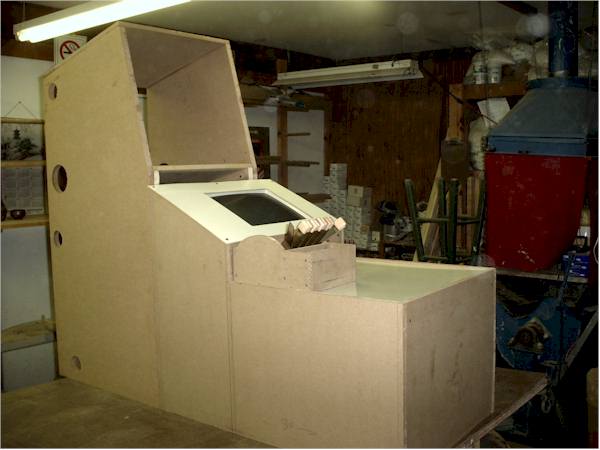
Photo # 8 shows the state of the project at this time.  The center console has had the sheets of 1/8" fiberboard "whiteboard" cut and put in place.  The hole for the monitor display in the upper panels section was cut out by drilling holes at the corners and then cutting with a sabre saw.  The throttle quadrant is just sitting on top of the lower console section at the moment.  The center console in this picture is butted up into its desired position next to the shelf unit that will hold the engine management display monitor and glaresheild (see prior posting in this thread).


So..... there you have the details about the status of my crazy "homebrew simulated cockpit" efforts so far.  There are 5 hours of labor so far into the cockpit "framing" part of this project.  Hope this documentation is inspiring someone else to "take the plunge" with this kind of thing ;D.  Undertaking this project is an incredible amount of fun!  And I haven't even FLOWN in it yet!

More as it all develops.


best,

.....................john
Image ImageIntel i7 960 quad 3.2G LGA 1366, Asus P6X58D Premium, 750W Corsair, 6 gig 1600 DDR3, Spinpoint 1TB 720

User avatar
JBaymore
Global Moderator
Global Moderator
 
Posts: 10020
Joined: Sat May 24, 2003 9:15 am
Location: New Hampshire

Re: Cockpit Main Support Construction (repost)

Postby JBaymore » Mon Nov 03, 2003 12:56 pm

Next Piece of Cockpit Structure Constructed

Got a little time and built the next piece of the shelf support structures that will act as the "bones" in the simulated cockpit.

This shelf unit will sit directly in front of the pilot and butted up to the left side of the structure shown above before this message.  The pedals will be under it in the center of the lower opening.  Two VGA monitors will be sitting on it on the middle shelf.  The top will get the display monitor...... and help support the glare shield assembly.

Again as all the others before it in this thread...... screw and glue out of MDFiberboard with scraps of pine for structural attachment points.  Holes are for wiring passthroughs and for ventilation.  The holes line up from unit to unit.

The lower opening where the pilot's legs will go will likely get a center structure to "divide" the pedal access area.  This won't be done until the pedals themselves are dimensioned.  There will likely also be some "facing" on the lower opening edges to finish it off visually and also for mounting some controls lower down.

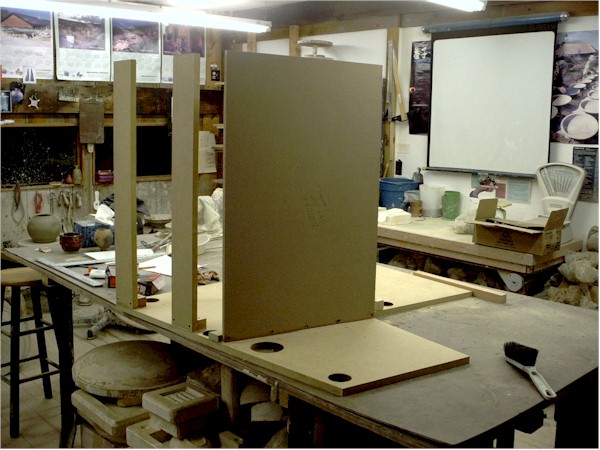
Photo #1
Image

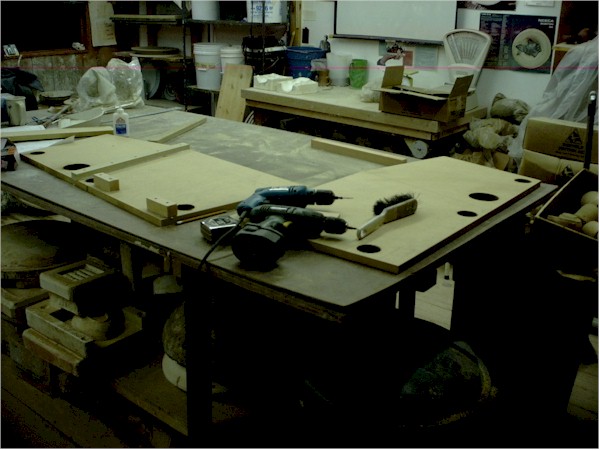
Photo #1 shows pieces cut out with skillsaw and jigsaw, drilled, and the start of the "screwing and gluing" process.


Photo #2
Image

Photo #2 shows the middle shelf member and the leg supports in place on one end.  Now just to add the other side.


Photo #3
Image

Photo 3# is from the rear.  The two narrow strips are for stabilizing the "legs" of the shelf.  When the cockpit is finished, there will be a "false wall" on the inside of the leg well that covers these from view.


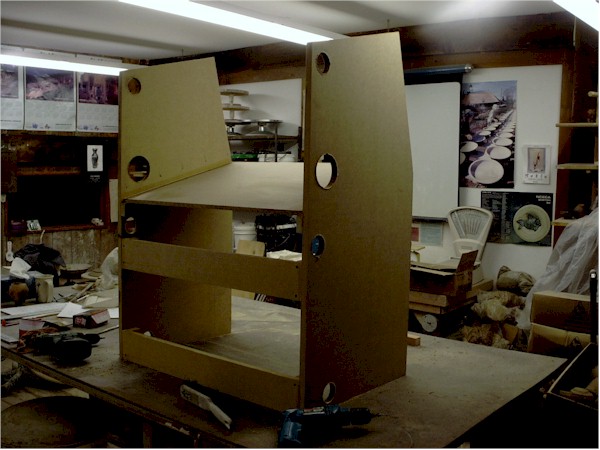
Photo #4
Image

Photo #4 shows the completed structure.  


The next thing to do will be to construct the coverings for the main face of the panel, then build the left sidestick area, and then the glareshield assembly.  After that....  tackle the overhead panel.

So...... ever onward.

best,

...................john
Image ImageIntel i7 960 quad 3.2G LGA 1366, Asus P6X58D Premium, 750W Corsair, 6 gig 1600 DDR3, Spinpoint 1TB 720
User avatar
JBaymore
Global Moderator
Global Moderator
 
Posts: 10020
Joined: Sat May 24, 2003 9:15 am
Location: New Hampshire

Re: Cockpit Main Support Construction (repost)

Postby Vchat20 » Mon Nov 03, 2003 1:28 pm

quick question: exactly what cockpit are you trying to build? is it supposed to be a fighter cockpit, cessna, etc..?
User avatar
Vchat20
2nd Lieutenant
2nd Lieutenant
 
Posts: 57
Joined: Sun Sep 21, 2003 8:55 pm

Re: Cockpit Main Support Construction (repost)

Postby JBaymore » Mon Nov 03, 2003 2:49 pm

Vchat,

Sorry...... when I tried to "break up" the big massive "one topic fits all" forum creation survey thread ......... some of the messages just got left there cause people didn't move them.  So some continuity in the topics that are starting off with the (repost) appended to them are missing some info that got discussed there.

What I am building is a "generic" heavy jet cockpit.  It is based loosely on the BAe 146-200 plus the Airbus 3XX.  It will be a four engine capable setup.  By not trying to create and "exact" copy of any aircraft..... I save myself thousands and thousands of dollars to start with   ;D.

I am modeling only the left seat position up to the copilots side of the center pedestal.  I don't have the space to add the right seat..... and no one to sit there anyway   ;).  Because it is modular...... I could always add the right seat in the future....by just duplicating the stuff on the left of the center console over on the right.  That just about doubles the cost.  Plus then to be realistic.....you have to mechanically (or electronically) link the yokes.  Expensive!

Hope that answers your questions.

best,

.................john
Image ImageIntel i7 960 quad 3.2G LGA 1366, Asus P6X58D Premium, 750W Corsair, 6 gig 1600 DDR3, Spinpoint 1TB 720
User avatar
JBaymore
Global Moderator
Global Moderator
 
Posts: 10020
Joined: Sat May 24, 2003 9:15 am
Location: New Hampshire

Re: Cockpit Main Support Construction (repost)

Postby JBaymore » Sun Nov 16, 2003 4:09 pm

This part of the construction project is now continued in the thread labeled "Cockpit Main Support Construction Part Two"..


best,

.............john
Image ImageIntel i7 960 quad 3.2G LGA 1366, Asus P6X58D Premium, 750W Corsair, 6 gig 1600 DDR3, Spinpoint 1TB 720
User avatar
JBaymore
Global Moderator
Global Moderator
 
Posts: 10020
Joined: Sat May 24, 2003 9:15 am
Location: New Hampshire

Re: Cockpit Main Support Construction (repost)

Postby JBaymore » Tue Mar 16, 2004 10:10 am

Putting a message here so that this thread pops back toward the top.... to complement the new posting I just did on the further status of the construction.  Just noticed that some of the pictures that I used have somehow gotten garbled with other pictures in these older threads.... I'll try to fix that soon.

best,

....................john
Image ImageIntel i7 960 quad 3.2G LGA 1366, Asus P6X58D Premium, 750W Corsair, 6 gig 1600 DDR3, Spinpoint 1TB 720
User avatar
JBaymore
Global Moderator
Global Moderator
 
Posts: 10020
Joined: Sat May 24, 2003 9:15 am
Location: New Hampshire

Re: Cockpit Main Support Construction (Part 1 -rep

Postby Imzzaudae » Mon Jun 20, 2005 10:36 pm

Wow J
Nice pit man. Love it.

What more can I say.

Thanks for sharing some great Ideas
Imz
Imzzaudae
2nd Lieutenant
2nd Lieutenant
 
Posts: 52
Joined: Mon Jun 10, 2002 1:19 pm


Return to Home Cockpits and Setups

Who is online

Users browsing this forum: No registered users and 328 guests

