Page 1 of 1

Trouble posting

PostPosted: Thu Apr 16, 2009 10:06 am
by Flt4ever
I have tried several times to post a screen shot.  I have followed the guide but I must be missing something a I can not get anything to post. All help is very welcomed.

Re: Trouble posting

PostPosted: Thu Apr 16, 2009 10:21 am
by Hagar
Hi there. Posting images should be quite straightforward.

1. First make sure your image is saved in JPEG (.jpg) format & within the forum limits (max width 1024 pixels & below 150 Kb). Save the image with a file name unique to you so it doesn't conflict with previously uploaded images. (I use a da- prefix on all images I upload here.)

2. Then upload the image to the Simviation server from the Upload Images link on the forum Menu Bar. http://www.simviation.com/yabbupload.html

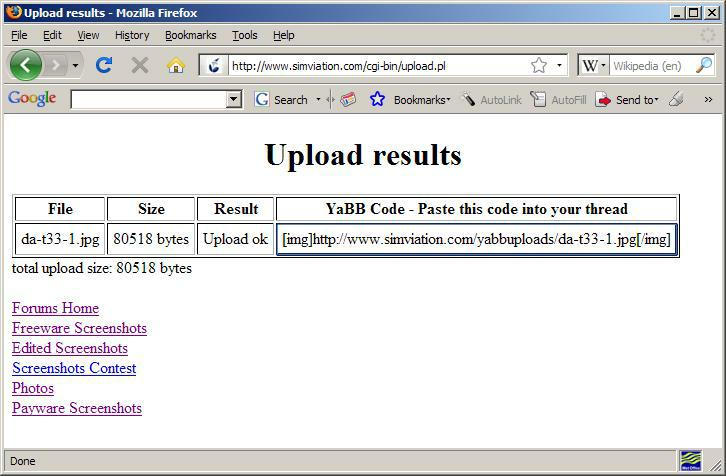
3. When the image has been successfully uploaded you will be given a link to it including the code to paste into your post. (There is no need to click the

Re: Trouble posting

PostPosted: Thu Apr 16, 2009 3:32 pm
by Flt4ever
Thanks!  I will give it a try again.  My problem may have been the insert function.  I could upload the pictures but then coyuld not get them to post.  Thanks again

Re: Trouble posting

PostPosted: Thu Apr 16, 2009 3:58 pm
by Hagar
The URL you paste into your topic should look like this complete with the [img ] brackets. (This example is a shot I just posted in another topic.)

Code: Select all
[img]http://www.simviation.com/yabbuploads/da-t33-1.jpg[/img]

Image