Flight Simulation Screenshots displaying your Flight Simulation Experience. MSFS, FSX, Prepar3D, XPlane and other Flight Simulators. Focus is your Flight Simulator Experience. Please upload to Simviation (Button at top right)
 by gtirob01 » Tue Apr 14, 2009 9:10 pm
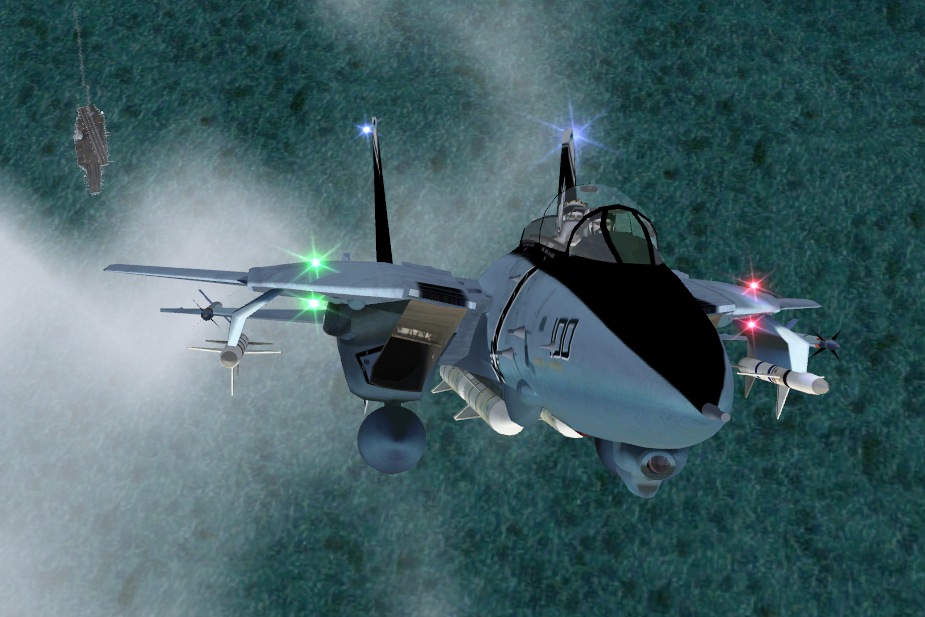
Thats my kind of shot! Me likey very much!
My specs... A hard drive, motherboard, graphics card, some memory, a keyboard, mouse, and monitor - in other words, nothing special.
My Posky
-

gtirob01
- Major

-
- Posts: 3605
- Joined: Fri Jul 20, 2007 11:10 pm
- Location: Ft. Walton Beach, FL
by Brando14100 » Tue Apr 14, 2009 9:15 pm
Awesome shot. Cool angle.
8-)
-
Brando14100
-
by U4EA » Tue Apr 14, 2009 9:50 pm
Methinks I have the same Tomcat, so I have to ask.......is there a tweak that will place the navs and beacons a tad more realistically?
I always turn them off. It's a little wierd lookin' with them appearring to 'float' just a bit out of position.
-
U4EA
-
by lunitic_8 » Wed Apr 15, 2009 7:54 am
Great shot you get a real sense of power 8-) i can hear that cat prowl
Last edited by
lunitic_8 on Wed Apr 15, 2009 7:54 am, edited 1 time in total.
 I7-7700HQ | GTX 1060 | 16GB DDR4-2400MHz | 1TB HDD + 256GB SSD
-

lunitic_8
- Major
-
- Posts: 3163
- Joined: Sun Sep 28, 2008 8:05 pm
- Location: Houston, Texas (KHOU)
by aussiewannabe » Wed Apr 15, 2009 10:52 am
[quote]Methinks I have the same Tomcat, so I have to ask.......is there a tweak that will place the navs and beacons a tad more realistically?
I always turn them off.
Last edited by
aussiewannabe on Wed Apr 15, 2009 10:54 am, edited 1 time in total.
-

aussiewannabe
- Major
-
- Posts: 2531
- Joined: Thu May 17, 2007 11:33 am
by haroldkip » Wed Apr 15, 2009 2:35 pm
is there a tweak that will place the navs and beacons a tad more realistically?
Juggle the numbers in the [LIGHTS] section of the aircraft.cfg a bit ...
-

haroldkip
- Lieutenant Colonel

-
- Posts: 5906
- Joined: Wed Apr 12, 2006 5:13 am
- Location: Amsterdam, The Netherlands
by aussiewannabe » Wed Apr 15, 2009 3:14 pm
is there a tweak that will place the navs and beacons a tad more realistically?
Juggle the numbers in the [LIGHTS] section of the aircraft.cfg a bit ...
Sure thing, Harold. I love tinkering with the aircraft.cfg file

-
aussiewannabe
- Major
-
- Posts: 2531
- Joined: Thu May 17, 2007 11:33 am
by gtirob01 » Wed Apr 15, 2009 8:43 pm
Just looking at it again, I like the way the lights look. Kinda look like LED's.
My specs... A hard drive, motherboard, graphics card, some memory, a keyboard, mouse, and monitor - in other words, nothing special.
My Posky
-
gtirob01
- Major
-
- Posts: 3605
- Joined: Fri Jul 20, 2007 11:10 pm
- Location: Ft. Walton Beach, FL
by U4EA » Wed Apr 15, 2009 10:14 pm
is there a tweak that will place the navs and beacons a tad more realistically?
Juggle the numbers in the [LIGHTS] section of the aircraft.cfg a bit ...
Sure thing, Harold. I love tinkering with the aircraft.cfg file
Hey!
Last edited by U4EA on Wed Apr 15, 2009 10:15 pm, edited 1 time in total.
-
U4EA
-
by patchz » Wed Apr 15, 2009 11:54 pm
is there a tweak that will place the navs and beacons a tad more realistically?
Juggle the numbers in the [LIGHTS] section of the aircraft.cfg a bit ...
Sure thing, Harold. I love tinkering with the aircraft.cfg file
Hey!

If God intended aircraft engines to have horizontally opposed engines, Pratt and Whitney would have made them that way.
-

patchz
- Colonel

-
- Posts: 10424
- Joined: Wed Mar 11, 2009 7:33 pm
- Location: IN THE FUNNY PAPERS
Return to Simulation Screenshots Showcase
Who is online
Users browsing this forum: No registered users and 260 guests