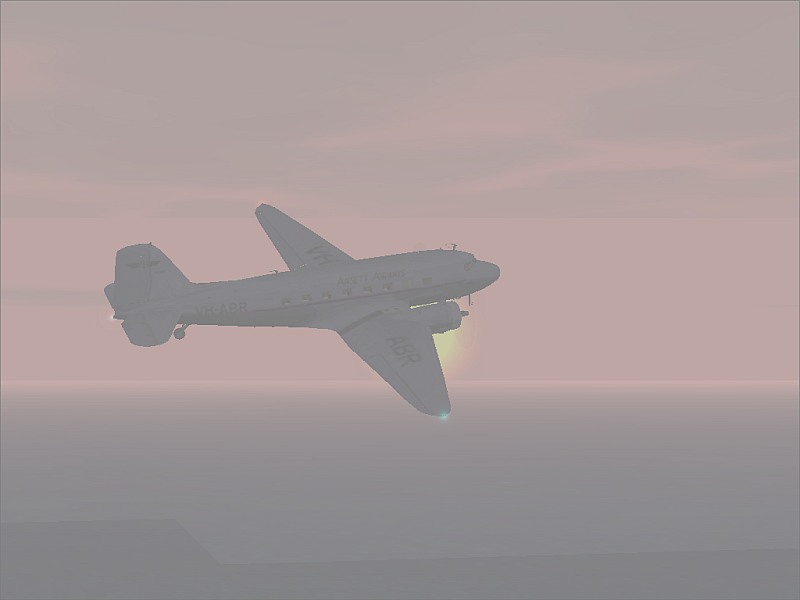
ansett in the sunset
 Posted: Sat Oct 20, 2007 10:21 pm
hope you like 
Flight Simulator and other chat
https://forums.simviation.com/phpBB3/
https://forums.simviation.com/phpBB3/viewtopic.php?f=42&t=142708
Posted: Sat Oct 20, 2007 10:21 pmPosted: Sun Oct 21, 2007 7:01 pmPosted: Mon Oct 22, 2007 2:25 amPosted: Mon Oct 22, 2007 2:46 amit was on
Posted: Mon Oct 22, 2007 3:53 amit was on
If that's the case maybe you should have left it a little while in order for the textures to load a bit.
Plus you really need to get rid of the jaggies. There are two ways of doing this in my experience, one of which requires a decent graphics card.
If you are using Irfanview to resize your shots, I'd recommend using the 'resample' feature to smooth out the edges of your aircraft. I can provide an example of what this accomplishes if you would like it.
If you have a decent graphics card, simply go into your graphics card interface and find the option to turn anti-aliasing on. In case you didn't know, anti-aliasing is a feature that smooths out the edges of your aircraft in-sim, rather than post-screenshot-capture.
Sorry I can't be more specific about where to go in your graphics card interface - the reason for this is that my computer is rubbish, and doesn't have a graphics card that can support anti-aliasing, therefore I've always had to use Irfanview to get rid of jaggies. It isn't always reliable.
Hope this helps.
Posted: Mon Oct 22, 2007 4:20 amit was on
If that's the case maybe you should have left it a little while in order for the textures to load a bit.
Plus you really need to get rid of the jaggies. There are two ways of doing this in my experience, one of which requires a decent graphics card.
If you are using Irfanview to resize your shots, I'd recommend using the 'resample' feature to smooth out the edges of your aircraft. I can provide an example of what this accomplishes if you would like it.
If you have a decent graphics card, simply go into your graphics card interface and find the option to turn anti-aliasing on. In case you didn't know, anti-aliasing is a feature that smooths out the edges of your aircraft in-sim, rather than post-screenshot-capture.
Sorry I can't be more specific about where to go in your graphics card interface - the reason for this is that my computer is rubbish, and doesn't have a graphics card that can support anti-aliasing, therefore I've always had to use Irfanview to get rid of jaggies. It isn't always reliable.
Hope this helps.
spit the anti aliasing was un full that's with fs2002 and i did wait but n more loading happened and i have a densent graphics card it was 126mb but its ati or ait i forget but my water isn't the best and i use resample to resize
Posted: Mon Oct 22, 2007 4:22 amit was on
If that's the case maybe you should have left it a little while in order for the textures to load a bit.
Plus you really need to get rid of the jaggies. There are two ways of doing this in my experience, one of which requires a decent graphics card.
If you are using Irfanview to resize your shots, I'd recommend using the 'resample' feature to smooth out the edges of your aircraft. I can provide an example of what this accomplishes if you would like it.
If you have a decent graphics card, simply go into your graphics card interface and find the option to turn anti-aliasing on. In case you didn't know, anti-aliasing is a feature that smooths out the edges of your aircraft in-sim, rather than post-screenshot-capture.
Sorry I can't be more specific about where to go in your graphics card interface - the reason for this is that my computer is rubbish, and doesn't have a graphics card that can support anti-aliasing, therefore I've always had to use Irfanview to get rid of jaggies. It isn't always reliable.
Hope this helps.
spit the anti aliasing was un full that's with fs2002 and i did wait but n more loading happened and i have a densent graphics card it was 126mb but its ati or ait i forget but my water isn't the best and i use resample to resize
Ah... right... I guess fs2002 must be the problem then... and correct me if I'm wrong, but isn't that to be solved very soon? I remember you mentioning something about an upgrade...?
 and joystick Posted: Mon Oct 22, 2007 8:41 am
spit the anti aliasing was un full that's with fs2002 and i did wait but n more loading happened and i have a densent graphics card it was 126mb but its ati or ait i forget but my water isn't the best and i use resample to resize