First screenshot

Flight Simulation Screenshots displaying your Flight Simulation Experience. MSFS, FSX, Prepar3D, XPlane and other Flight Simulators. Focus is your Flight Simulator Experience. Please upload to Simviation (Button at top right)

First screenshot

Postby Aerophile » Wed Jun 13, 2007 11:22 pm

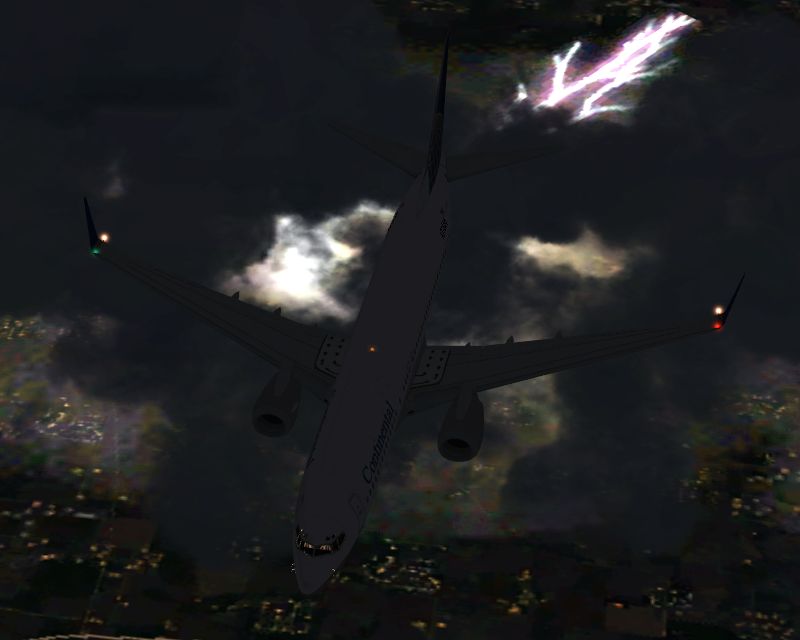
Okay, so I'm sitting at home with no real airplanes to take pictures of so I figure why not try this screenshot thing and see how it works out.  Well, here's one of my first ones so don't be afraid to let me know what you think.  I figure the monthly screenshot contest might be a fun forum to enter if I can get a worthy shot.  

So here we have a "Klunckinental" (as my boss calls them) Airlines B738 flying at FL330 above a thunderstorm.  The shot would have probably been better had the logo lights worked.
Image  

Constructive criticism is welcome.
User avatar
Aerophile
Captain
Captain
 
Posts: 725
Joined: Mon Mar 05, 2007 4:48 pm
Location: Earth

Re: First screenshot

Postby an-225 » Thu Jun 14, 2007 1:52 am

VERY good for a first screenshot. And I mean VERY, absolutely positively GOOD. One of the best screens I have seen in a while. Nice lightning capture there aswell. ;) Only complaint is, its a little too dark, but that doesn't bother me too much. :)
an-225
 

Re: First screenshot

Postby Isak922 » Thu Jun 14, 2007 2:24 am

It's quite nice, although the clouds look a bit... flat to me. Could just be me though.

Otherwise a very nice shot!
4GB DDR2 PC5300; 3.2GHz Pentium D 940, Nvidia 9800GT 1024MB DDR3, Windows XP Pro SP3
User avatar
Isak922
Major
Major
 
Posts: 1484
Joined: Tue Jun 27, 2006 9:09 pm
Location: Connecticut

Re: First screenshot

Postby Double_Farvel » Thu Jun 14, 2007 5:38 am

It's great shot for a first one. Way better than my first. Also, be sure to take full advantage of the 100KB. :)
Image
User avatar
Double_Farvel
Major
Major
 
Posts: 1073
Joined: Fri Aug 11, 2006 5:06 am
Location: New Jersey, USA

Re: First screenshot

Postby Aerophile » Thu Jun 14, 2007 6:30 am

Thanks!  In order to get better aircraft detail I set the levels pretty low on everything else, including clouds, so that performance wouldn't suffer too terribly much.  Perhaps I should increase everything else just to see what happens.
User avatar
Aerophile
Captain
Captain
 
Posts: 725
Joined: Mon Mar 05, 2007 4:48 pm
Location: Earth

Re: First screenshot

Postby Isak922 » Thu Jun 14, 2007 11:03 am

Thanks!  In order to get better aircraft detail I set the levels pretty low on everything else, including clouds, so that performance wouldn't suffer too terribly much.  Perhaps I should increase everything else just to see what happens.


So you decreased everything except the aircraft before taking the shot?  ;D

You should have done the exact opposite! Increasing all the settings momentarily makes the shot look much better, and it doesn't take too long to reset them.
4GB DDR2 PC5300; 3.2GHz Pentium D 940, Nvidia 9800GT 1024MB DDR3, Windows XP Pro SP3
User avatar
Isak922
Major
Major
 
Posts: 1484
Joined: Tue Jun 27, 2006 9:09 pm
Location: Connecticut

Re: First screenshot

Postby DaveT » Thu Jun 14, 2007 12:15 pm

very good for a first,just a tad dark for me.and turn them settings up 8-)

Cheers
;)dave
User avatar
DaveT
Major
Major
 
Posts: 2260
Joined: Thu Jan 31, 2002 7:46 pm
Location: KGSO


Return to Simulation Screenshots Showcase

Who is online

Users browsing this forum: No registered users and 295 guests